
redsvienas
New member
- Local time
- 8:35 AM
- Messages
- 2
Hello, thanks for your time in advance.
I have been using win7 pro 64 with my new system for nearly 6 months. I had no problems until now, but since the beginning of new year i have this no sound issue.
Appriciate your help.
i have gigabyte x58a-ud3r mobo and i used to have the sound coming from my monitor with hdmi output of my gpu (nvidia gefore gtx 460), i sometimes also use the audio jacks in front or the back of the case to get audio to headphones.
now i tried several options but what i get is this.
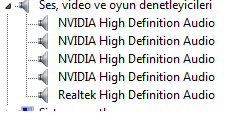
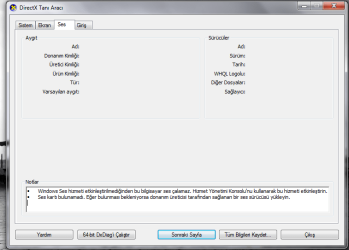
in device manager, i see no problems and sound cards look fine, i already updated it to latest realtek drivers after having the problem but no luck. when i go to dxdiag in sound section i see no cards listed and below its something written like "windows audio service disabled, go to services to enable it". but when i go to services.msc i have nothing related with sound in the list like "windows audio" or whatever. i tried deleting all the sound drivers and reinstalling, disabling the nvidia ones and just leaving the realtek or reverse. but nothing helped. when i go to control panel and click on "sound" nothing shows up either. when i click on realtek hd audio manager i just get a blank screen. it says "you are seeing a blank page because there is no sound device working on your system. to activate GUI, please plug a sound device"
I checked to see if there is anything in bios to be enabled. the only thing i see in bios about audio is "azalia audio" and its set to automatic. the only other way to change it is to disable it.
any suggestions please?
I have been using win7 pro 64 with my new system for nearly 6 months. I had no problems until now, but since the beginning of new year i have this no sound issue.
Appriciate your help.
i have gigabyte x58a-ud3r mobo and i used to have the sound coming from my monitor with hdmi output of my gpu (nvidia gefore gtx 460), i sometimes also use the audio jacks in front or the back of the case to get audio to headphones.
now i tried several options but what i get is this.
in device manager, i see no problems and sound cards look fine, i already updated it to latest realtek drivers after having the problem but no luck. when i go to dxdiag in sound section i see no cards listed and below its something written like "windows audio service disabled, go to services to enable it". but when i go to services.msc i have nothing related with sound in the list like "windows audio" or whatever. i tried deleting all the sound drivers and reinstalling, disabling the nvidia ones and just leaving the realtek or reverse. but nothing helped. when i go to control panel and click on "sound" nothing shows up either. when i click on realtek hd audio manager i just get a blank screen. it says "you are seeing a blank page because there is no sound device working on your system. to activate GUI, please plug a sound device"
I checked to see if there is anything in bios to be enabled. the only thing i see in bios about audio is "azalia audio" and its set to automatic. the only other way to change it is to disable it.
any suggestions please?
Attachments
My Computer
At a glance
windows 7 professional 64bit
- OS
- windows 7 professional 64bit


