Windows 7 not showing all Thumbnails + green bar

ToeKneee

New member
Local time
4:56 PM
Messages
37
Hi,
It's going on 3 weeks now, 4 by this weekend, that I lost all my thumbnails.
I have searched this group and followed every step I can think of and I still am unable to fix it.
It all started when I had to compress a video with VLC. I have gone back, uninstalled it.
Rebooted, restored, scanned for virus, malware, etc and nothing.
I also have that never ending green bar at the top of the address that keeps going till almost the end but doesn't stop. I have even left it running overnight, right through the next day, a full 24 hours.
I do not want to reinstall.
I have run out of ideas, tricks, tweaks.
I would really need any help possible

Thank you!!!
 

My Computer My Computer

At a glance

Windows 7 Home Premium 64 bitIntel Core i5 760DD3 8MGNvidia GeForce GTX 460 1MB
Computer type
PC/Desktop
Computer Manufacturer/Model Number
Custom build
OS
Windows 7 Home Premium 64 bit
CPU
Intel Core i5 760
Motherboard
Asus P7H55M Pro
Memory
DD3 8MG
Graphics Card(s)
Nvidia GeForce GTX 460 1MB
Hard Drives
2 X 4TB
Antivirus
Avast
Browser
Chrome
Welcome to the Forum.

The green bar is on top of file explorer or desktop?
Can you please take a snapshot to show us what are you seeing?
Go to the page you see the green barand expand it. Launch the snipping tool and take a snapshot of the whole window and save the image.
Here, on the answer box you find a paper clip. On the window, browse to the file - upload. It will put the image below the text you have written.
 

My Computers My Computers

  • At a glance

    Windows 7 HP 64i5 6600K - 800MHz to 4200MHz4+4G GSkill DDR4 3000IG - Intel 530
    Computer type
    PC/Desktop
    Computer Manufacturer/Model Number
    custom build
    OS
    Windows 7 HP 64
    CPU
    i5 6600K - 800MHz to 4200MHz
    Motherboard
    GA-Z170-HD3P
    Memory
    4+4G GSkill DDR4 3000
    Graphics Card(s)
    IG - Intel 530
    Monitor(s) Displays
    Samsung 226BW
    Screen Resolution
    1680x1050
    Hard Drives
    (1) -1 SM951 – 128GB M.2 AHCI PCIe SSD drive for Windows 7 and Lubuntu
    (2) -1 WD SATA 3 - 1T for Data
    (3) -1 WD SATA 3 - 1T for backup
    PSU
    Thermaltake 450W TR2 gold
    Keyboard
    Old and good Chicony mechanical keyboard
    Mouse
    Logitech mX performance - 9 buttons (had to disable some)
    Internet Speed
    500Mb/s
    Browser
    Firefox 64
    Other Info
    TinyWall firewall
  • At a glance

    Windows 7 Proi7-4500U 800MHz to 3.0GHz(4+4)G DDR3 1600IG intel 4400 + NVIDIA GeForce GT 745M
    Computer type
    Laptop
    System Manufacturer/Model Number
    Asus Q550LF
    OS
    Windows 7 Pro
    CPU
    i7-4500U 800MHz to 3.0GHz
    Motherboard
    Asus Q550LF
    Memory
    (4+4)G DDR3 1600
    Graphics Card(s)
    IG intel 4400 + NVIDIA GeForce GT 745M
    Sound Card
    Realtek
    Monitor(s) Displays
    LG Display LP156WF4-SPH1
    Screen Resolution
    1920 x 1080
    Hard Drives
    BX500 120G SSD for Windows and programs +
    1T HDD for data
    Internet Speed
    500 Mb/s
    Browser
    Firefox
    Other Info
    TinyWall firewall
Have you checked your HDD(s) for errors?

Tutorial
Disk Check


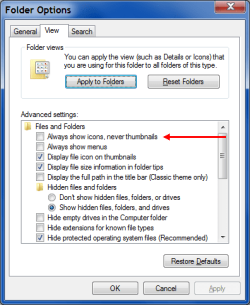
This sort of thing can also be caused when you use Thumbnails instead of Icons for images & videos.

You could try changing your "Folder Options" to see if this is causing the issue:

  • Type "Folder" into the Start Menu Search Box
  • Select "Folder Options" from the results list

Change the "Always show icon, never thumbnails" option.
WE - Folder Options - Icons.png

Note:
"Always show icon, never thumbnails" is not selected in the screenshot.


My Computer My Computer

At a glance

W7 Ultimate SP1, LM19.2 MATE, W10 Home 1703, ...AMD Phenom II x6 1100T, 3.3 GHz12GB DDR3 1333 G-Skill (4GB x 2), G-Skill (2G...NVIDIA GeForce GTX 660
Computer type
PC/Desktop
Computer Manufacturer/Model Number
n/a
OS
W7 Ultimate SP1, LM19.2 MATE, W10 Home 1703, W10 Pro 1703 VM, #All 64 bit
CPU
AMD Phenom II x6 1100T, 3.3 GHz
Motherboard
ASUS M4A88T-M/USB3 (AM3)
Memory
12GB DDR3 1333 G-Skill (4GB x 2), G-Skill (2GB x 2)
Graphics Card(s)
NVIDIA GeForce GTX 660
Sound Card
Realtek?
Monitor(s) Displays
Samsung S23B350
Screen Resolution
1920x1080
Hard Drives
WD Green 2TB (SATA), WD Green 3TB (SATA), WD Blue 4TB (SATA), WD Blue 6TB (SATA)
PSU
Cooler Master
Case
Antec GX300 Tower
Cooling
3x Antec TRICOOL 120mm Fans
Mouse
Wired Optical
Internet Speed
DSL
Antivirus
Avast
Browser
Pale Moon (64 bit)
Other Info
2018-12-27 Upgraded HDDs
2015-12-10 Upgraded case, graphics card, storage
2015-08-15 Upgraded motherboard & RAM
2015-07-15 Upgraded LM17.1 to LM17.2
I hope this works, it's my first time in a forum.
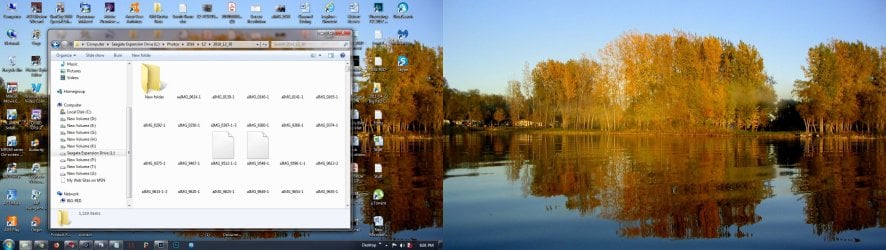
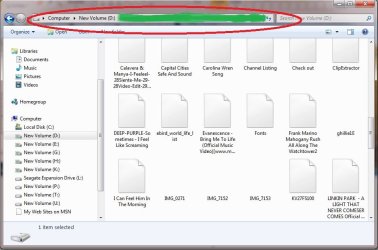
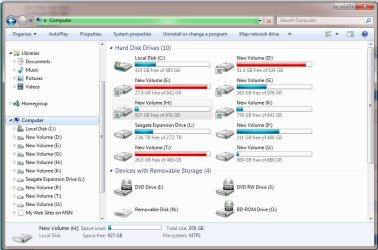
I have attached 2 screen shots taken just now.
One is what I see when I open explorer.
The other, I had to do the green bar with a marker to simulate, but that is what I get, it goes to the "refresh" symbol and jams there. It's as if its searching and searching for I don't know what.
I have left it run for 24 hours and the green bar never turns off.
 

Attachments

  • Windows Screen 1.jpg
    Windows Screen 1.jpg
    297.5 KB · Views: 2
  • Windows Screen 2.jpg
    Windows Screen 2.jpg
    65.2 KB · Views: 0

My Computer My Computer

At a glance

Windows 7 Home Premium 64 bitIntel Core i5 760DD3 8MGNvidia GeForce GTX 460 1MB
Computer type
PC/Desktop
Computer Manufacturer/Model Number
Custom build
OS
Windows 7 Home Premium 64 bit
CPU
Intel Core i5 760
Motherboard
Asus P7H55M Pro
Memory
DD3 8MG
Graphics Card(s)
Nvidia GeForce GTX 460 1MB
Hard Drives
2 X 4TB
Antivirus
Avast
Browser
Chrome
Did you try turning off windows search?
 

My Computers My Computers

  • At a glance

    7 X64i5 84002x8gb 3200mhz
    Computer type
    PC/Desktop
    OS
    7 X64
    CPU
    i5 8400
    Motherboard
    gigabyte b365m ds3h
    Memory
    2x8gb 3200mhz
    Hard Drives
    various
    PSU
    pure power 11 400w cm
    Case
    Coolermaster
    Cooling
    cryorig m9i
  • At a glance

    7x64g54008gb ddr4 2400
    Computer type
    PC/Desktop
    OS
    7x64
    CPU
    g5400
    Motherboard
    ga b365m ds3h
    Memory
    8gb ddr4 2400
    PSU
    xfx pro 450w
I do not know how to turn off windows search?
 

My Computer My Computer

At a glance

Windows 7 Home Premium 64 bitIntel Core i5 760DD3 8MGNvidia GeForce GTX 460 1MB
Computer type
PC/Desktop
Computer Manufacturer/Model Number
Custom build
OS
Windows 7 Home Premium 64 bit
CPU
Intel Core i5 760
Motherboard
Asus P7H55M Pro
Memory
DD3 8MG
Graphics Card(s)
Nvidia GeForce GTX 460 1MB
Hard Drives
2 X 4TB
Antivirus
Avast
Browser
Chrome
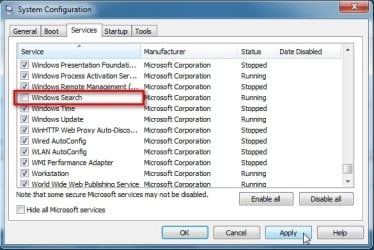
EITHER:

Type msconfig in start box, click it when it pops up. Select Services Tab, scroll down to windows search, untick, APPLY,OK

msconfig-services.jpg


Or you can access the services via computer management
 

My Computers My Computers

  • At a glance

    7 X64i5 84002x8gb 3200mhz
    Computer type
    PC/Desktop
    OS
    7 X64
    CPU
    i5 8400
    Motherboard
    gigabyte b365m ds3h
    Memory
    2x8gb 3200mhz
    Hard Drives
    various
    PSU
    pure power 11 400w cm
    Case
    Coolermaster
    Cooling
    cryorig m9i
  • At a glance

    7x64g54008gb ddr4 2400
    Computer type
    PC/Desktop
    OS
    7x64
    CPU
    g5400
    Motherboard
    ga b365m ds3h
    Memory
    8gb ddr4 2400
    PSU
    xfx pro 450w
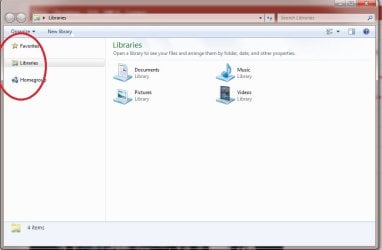
Thanks for the tip, I turned it off but now I have something else, besides the no thumbnails.
On the left side, where I circled, its continuous magnifying glasses looping in circles over those folders.
 

Attachments

  • win.jpg
    win.jpg
    33.8 KB · Views: 2

My Computer My Computer

At a glance

Windows 7 Home Premium 64 bitIntel Core i5 760DD3 8MGNvidia GeForce GTX 460 1MB
Computer type
PC/Desktop
Computer Manufacturer/Model Number
Custom build
OS
Windows 7 Home Premium 64 bit
CPU
Intel Core i5 760
Motherboard
Asus P7H55M Pro
Memory
DD3 8MG
Graphics Card(s)
Nvidia GeForce GTX 460 1MB
Hard Drives
2 X 4TB
Antivirus
Avast
Browser
Chrome
Update on the green bar, it's back as it was, trying to load non stop, 2 days now.
Still no thumbnails
even folder icons are gone.
 

My Computer My Computer

At a glance

Windows 7 Home Premium 64 bitIntel Core i5 760DD3 8MGNvidia GeForce GTX 460 1MB
Computer type
PC/Desktop
Computer Manufacturer/Model Number
Custom build
OS
Windows 7 Home Premium 64 bit
CPU
Intel Core i5 760
Motherboard
Asus P7H55M Pro
Memory
DD3 8MG
Graphics Card(s)
Nvidia GeForce GTX 460 1MB
Hard Drives
2 X 4TB
Antivirus
Avast
Browser
Chrome
In regards to the thumbnail problem, I suggest going to Accessories, System Tools, Disk Cleanup. Select the C: drive. When it first runs and tells you how much disk space it can recover, check the box for Thumbnails. Let it run and select Ok to delete files. After it's finished, reboot. It should repopulate the thumbnails.
 

My Computer My Computer

At a glance

Windows 7 Pro SP1 64 bit8 GB
Computer type
Laptop
Computer Manufacturer/Model Number
Dell M6500 Precision Work Station
OS
Windows 7 Pro SP1 64 bit
Memory
8 GB
Screen Resolution
1920x
Internet Speed
30 Mbps
Antivirus
Norton Security
Browser
IE 11
I have done that.
It doesn't work :(
 

My Computer My Computer

At a glance

Windows 7 Home Premium 64 bitIntel Core i5 760DD3 8MGNvidia GeForce GTX 460 1MB
Computer type
PC/Desktop
Computer Manufacturer/Model Number
Custom build
OS
Windows 7 Home Premium 64 bit
CPU
Intel Core i5 760
Motherboard
Asus P7H55M Pro
Memory
DD3 8MG
Graphics Card(s)
Nvidia GeForce GTX 460 1MB
Hard Drives
2 X 4TB
Antivirus
Avast
Browser
Chrome
And this is a screen shot I took now, even after I have removed the check mark on search and rebooted..
It did nothing
 

Attachments

  • Win2.jpg
    Win2.jpg
    75.2 KB · Views: 2

My Computer My Computer

At a glance

Windows 7 Home Premium 64 bitIntel Core i5 760DD3 8MGNvidia GeForce GTX 460 1MB
Computer type
PC/Desktop
Computer Manufacturer/Model Number
Custom build
OS
Windows 7 Home Premium 64 bit
CPU
Intel Core i5 760
Motherboard
Asus P7H55M Pro
Memory
DD3 8MG
Graphics Card(s)
Nvidia GeForce GTX 460 1MB
Hard Drives
2 X 4TB
Antivirus
Avast
Browser
Chrome
Open Windows Explorer and select the problem drive.

Open the Task Manager.

Right click on Windows Explorer and select End Task.

Click on New Task.

Enter explorer.exe and run it.

Does that help?
 

My Computer My Computer

At a glance

Windows 7 Pro SP1 64 bit8 GB
Computer type
Laptop
Computer Manufacturer/Model Number
Dell M6500 Precision Work Station
OS
Windows 7 Pro SP1 64 bit
Memory
8 GB
Screen Resolution
1920x
Internet Speed
30 Mbps
Antivirus
Norton Security
Browser
IE 11
Error: The remote procedure call failed and did not execute.
 

My Computer My Computer

At a glance

Windows 7 Home Premium 64 bitIntel Core i5 760DD3 8MGNvidia GeForce GTX 460 1MB
Computer type
PC/Desktop
Computer Manufacturer/Model Number
Custom build
OS
Windows 7 Home Premium 64 bit
CPU
Intel Core i5 760
Motherboard
Asus P7H55M Pro
Memory
DD3 8MG
Graphics Card(s)
Nvidia GeForce GTX 460 1MB
Hard Drives
2 X 4TB
Antivirus
Avast
Browser
Chrome

My Computers My Computers

  • At a glance

    Windows 7 HP 64i5 6600K - 800MHz to 4200MHz4+4G GSkill DDR4 3000IG - Intel 530
    Computer type
    PC/Desktop
    Computer Manufacturer/Model Number
    custom build
    OS
    Windows 7 HP 64
    CPU
    i5 6600K - 800MHz to 4200MHz
    Motherboard
    GA-Z170-HD3P
    Memory
    4+4G GSkill DDR4 3000
    Graphics Card(s)
    IG - Intel 530
    Monitor(s) Displays
    Samsung 226BW
    Screen Resolution
    1680x1050
    Hard Drives
    (1) -1 SM951 – 128GB M.2 AHCI PCIe SSD drive for Windows 7 and Lubuntu
    (2) -1 WD SATA 3 - 1T for Data
    (3) -1 WD SATA 3 - 1T for backup
    PSU
    Thermaltake 450W TR2 gold
    Keyboard
    Old and good Chicony mechanical keyboard
    Mouse
    Logitech mX performance - 9 buttons (had to disable some)
    Internet Speed
    500Mb/s
    Browser
    Firefox 64
    Other Info
    TinyWall firewall
  • At a glance

    Windows 7 Proi7-4500U 800MHz to 3.0GHz(4+4)G DDR3 1600IG intel 4400 + NVIDIA GeForce GT 745M
    Computer type
    Laptop
    System Manufacturer/Model Number
    Asus Q550LF
    OS
    Windows 7 Pro
    CPU
    i7-4500U 800MHz to 3.0GHz
    Motherboard
    Asus Q550LF
    Memory
    (4+4)G DDR3 1600
    Graphics Card(s)
    IG intel 4400 + NVIDIA GeForce GT 745M
    Sound Card
    Realtek
    Monitor(s) Displays
    LG Display LP156WF4-SPH1
    Screen Resolution
    1920 x 1080
    Hard Drives
    BX500 120G SSD for Windows and programs +
    1T HDD for data
    Internet Speed
    500 Mb/s
    Browser
    Firefox
    Other Info
    TinyWall firewall
I have turned it on and off and nothing has changed.
And I still have no thumbnails..
 

My Computer My Computer

At a glance

Windows 7 Home Premium 64 bitIntel Core i5 760DD3 8MGNvidia GeForce GTX 460 1MB
Computer type
PC/Desktop
Computer Manufacturer/Model Number
Custom build
OS
Windows 7 Home Premium 64 bit
CPU
Intel Core i5 760
Motherboard
Asus P7H55M Pro
Memory
DD3 8MG
Graphics Card(s)
Nvidia GeForce GTX 460 1MB
Hard Drives
2 X 4TB
Antivirus
Avast
Browser
Chrome
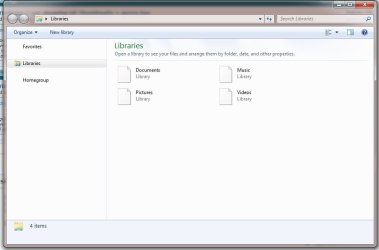
Tonights screen capture.
I'm giving up.
Seems to be getting worse.
 

Attachments

  • Win 3.jpg
    Win 3.jpg
    32.8 KB · Views: 0

My Computer My Computer

At a glance

Windows 7 Home Premium 64 bitIntel Core i5 760DD3 8MGNvidia GeForce GTX 460 1MB
Computer type
PC/Desktop
Computer Manufacturer/Model Number
Custom build
OS
Windows 7 Home Premium 64 bit
CPU
Intel Core i5 760
Motherboard
Asus P7H55M Pro
Memory
DD3 8MG
Graphics Card(s)
Nvidia GeForce GTX 460 1MB
Hard Drives
2 X 4TB
Antivirus
Avast
Browser
Chrome
Since you got the RPC error, I wonder if your profile is corrupted.

If you create a new user account and log into it, do you have the same problem?
 

My Computer My Computer

At a glance

Windows 7 Pro SP1 64 bit8 GB
Computer type
Laptop
Computer Manufacturer/Model Number
Dell M6500 Precision Work Station
OS
Windows 7 Pro SP1 64 bit
Memory
8 GB
Screen Resolution
1920x
Internet Speed
30 Mbps
Antivirus
Norton Security
Browser
IE 11
The error goes away after rebooting.
I would like to try the new user account but I don't know how too. :(
 

My Computer My Computer

At a glance

Windows 7 Home Premium 64 bitIntel Core i5 760DD3 8MGNvidia GeForce GTX 460 1MB
Computer type
PC/Desktop
Computer Manufacturer/Model Number
Custom build
OS
Windows 7 Home Premium 64 bit
CPU
Intel Core i5 760
Motherboard
Asus P7H55M Pro
Memory
DD3 8MG
Graphics Card(s)
Nvidia GeForce GTX 460 1MB
Hard Drives
2 X 4TB
Antivirus
Avast
Browser
Chrome
In Control Panel, select User Accounts..........................

Select Create a new account.

Give it a name.

Select a standard account.

Create Account.

Reboot. You should be able to select the new account during the boot process.
 

My Computer My Computer

At a glance

Windows 7 Pro SP1 64 bit8 GB
Computer type
Laptop
Computer Manufacturer/Model Number
Dell M6500 Precision Work Station
OS
Windows 7 Pro SP1 64 bit
Memory
8 GB
Screen Resolution
1920x
Internet Speed
30 Mbps
Antivirus
Norton Security
Browser
IE 11
Back
Top