Windows 7 not showing all Thumbnails + green bar

You mentioned cleaning icons. However, those are stored in .dll and .ico files. That's different than thumbnails.
 

My Computer My Computer

At a glance

Windows 7 Pro SP1 64 bit8 GB
Computer type
Laptop
Computer Manufacturer/Model Number
Dell M6500 Precision Work Station
OS
Windows 7 Pro SP1 64 bit
Memory
8 GB
Screen Resolution
1920x
Internet Speed
30 Mbps
Antivirus
Norton Security
Browser
IE 11
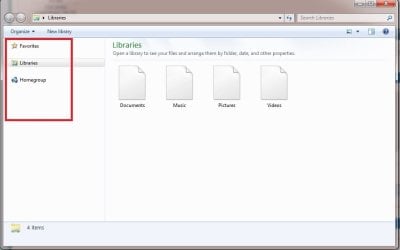
This is a screen shot right now when I open explorer. The left pane in red, there are magnifying glasses going around in circles.
I have no options to look at anything. The only way I can go is if I open lightroom, edit a photo, save it, then it opens the saved folder, I see everything. But not for long.
 

Attachments

  • WIn 5.jpg
    WIn 5.jpg
    30.3 KB · Views: 0

My Computer My Computer

At a glance

Windows 7 Home Premium 64 bitIntel Core i5 760DD3 8MGNvidia GeForce GTX 460 1MB
Computer type
PC/Desktop
Computer Manufacturer/Model Number
Custom build
OS
Windows 7 Home Premium 64 bit
CPU
Intel Core i5 760
Motherboard
Asus P7H55M Pro
Memory
DD3 8MG
Graphics Card(s)
Nvidia GeForce GTX 460 1MB
Hard Drives
2 X 4TB
Antivirus
Avast
Browser
Chrome
Here you go
Is this it?
 

My Computer My Computer

At a glance

Windows 7 Home Premium 64 bitIntel Core i5 760DD3 8MGNvidia GeForce GTX 460 1MB
Computer type
PC/Desktop
Computer Manufacturer/Model Number
Custom build
OS
Windows 7 Home Premium 64 bit
CPU
Intel Core i5 760
Motherboard
Asus P7H55M Pro
Memory
DD3 8MG
Graphics Card(s)
Nvidia GeForce GTX 460 1MB
Hard Drives
2 X 4TB
Antivirus
Avast
Browser
Chrome
It didnt post the pic
 

Attachments

  • Win 6.jpg
    Win 6.jpg
    54.3 KB · Views: 1

My Computer My Computer

At a glance

Windows 7 Home Premium 64 bitIntel Core i5 760DD3 8MGNvidia GeForce GTX 460 1MB
Computer type
PC/Desktop
Computer Manufacturer/Model Number
Custom build
OS
Windows 7 Home Premium 64 bit
CPU
Intel Core i5 760
Motherboard
Asus P7H55M Pro
Memory
DD3 8MG
Graphics Card(s)
Nvidia GeForce GTX 460 1MB
Hard Drives
2 X 4TB
Antivirus
Avast
Browser
Chrome
I notice you don't have the green bar. How did you manage that? You didn't specifically say if you tried disconnecting the 3 extra drives and what the result was. Please answer that.

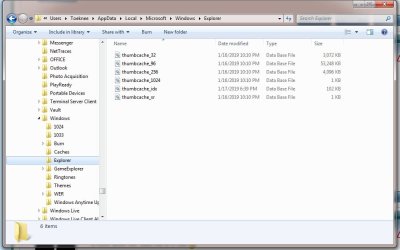
Also, it looks like all the files were regenerated a couple of days ago and indexed yesterday. I assume they're okay even though the file sizes are much larger than the ones I have.
 

My Computer My Computer

At a glance

Windows 7 Pro SP1 64 bit8 GB
Computer type
Laptop
Computer Manufacturer/Model Number
Dell M6500 Precision Work Station
OS
Windows 7 Pro SP1 64 bit
Memory
8 GB
Screen Resolution
1920x
Internet Speed
30 Mbps
Antivirus
Norton Security
Browser
IE 11
Do you have Paint installed? Also, when you go to Accessories, is the Snipping Tool available?
 

My Computer My Computer

At a glance

Windows 7 Pro SP1 64 bit8 GB
Computer type
Laptop
Computer Manufacturer/Model Number
Dell M6500 Precision Work Station
OS
Windows 7 Pro SP1 64 bit
Memory
8 GB
Screen Resolution
1920x
Internet Speed
30 Mbps
Antivirus
Norton Security
Browser
IE 11
Sorry, Yes I have disconnected to 2 externals and nothing changed.
The green bar does come on at first loading. Once I can not see thumbnails anymore there is no green bar. It goes to like the previous picture, with the magnifying glass looking for something.

When I save a picture, its back to normal for a few minutes, 2 or 3. I can search 3 or 4 folders before everything disappears again.
If I do upload, I can see some thumbnails also, just for a brief moment and everything goes to shit again.
 

My Computer My Computer

At a glance

Windows 7 Home Premium 64 bitIntel Core i5 760DD3 8MGNvidia GeForce GTX 460 1MB
Computer type
PC/Desktop
Computer Manufacturer/Model Number
Custom build
OS
Windows 7 Home Premium 64 bit
CPU
Intel Core i5 760
Motherboard
Asus P7H55M Pro
Memory
DD3 8MG
Graphics Card(s)
Nvidia GeForce GTX 460 1MB
Hard Drives
2 X 4TB
Antivirus
Avast
Browser
Chrome
I dont have paint or a snipping tool installed.
 

My Computer My Computer

At a glance

Windows 7 Home Premium 64 bitIntel Core i5 760DD3 8MGNvidia GeForce GTX 460 1MB
Computer type
PC/Desktop
Computer Manufacturer/Model Number
Custom build
OS
Windows 7 Home Premium 64 bit
CPU
Intel Core i5 760
Motherboard
Asus P7H55M Pro
Memory
DD3 8MG
Graphics Card(s)
Nvidia GeForce GTX 460 1MB
Hard Drives
2 X 4TB
Antivirus
Avast
Browser
Chrome
If you don't see either of those two things, there's something wrong with your installation since they were still default in Win 7. If you go to C:\Windows\System32, is there a mspaint.exe?

I wanted you to disconnect all three drives.

I'm done for the evening. Talk to you tomorrow.
 

My Computer My Computer

At a glance

Windows 7 Pro SP1 64 bit8 GB
Computer type
Laptop
Computer Manufacturer/Model Number
Dell M6500 Precision Work Station
OS
Windows 7 Pro SP1 64 bit
Memory
8 GB
Screen Resolution
1920x
Internet Speed
30 Mbps
Antivirus
Norton Security
Browser
IE 11
My bad, I get paint confused with another program. Yes I have paint, it is what I use for print screens. But I dont know about snip it.
Thanks for your help
 

My Computer My Computer

At a glance

Windows 7 Home Premium 64 bitIntel Core i5 760DD3 8MGNvidia GeForce GTX 460 1MB
Computer type
PC/Desktop
Computer Manufacturer/Model Number
Custom build
OS
Windows 7 Home Premium 64 bit
CPU
Intel Core i5 760
Motherboard
Asus P7H55M Pro
Memory
DD3 8MG
Graphics Card(s)
Nvidia GeForce GTX 460 1MB
Hard Drives
2 X 4TB
Antivirus
Avast
Browser
Chrome
And here is a screen capture now that I have saved a picture to access the folder. The green bar is / has been going for 45 min now.
 

Attachments

  • Win 7.jpg
    Win 7.jpg
    94.7 KB · Views: 0

My Computer My Computer

At a glance

Windows 7 Home Premium 64 bitIntel Core i5 760DD3 8MGNvidia GeForce GTX 460 1MB
Computer type
PC/Desktop
Computer Manufacturer/Model Number
Custom build
OS
Windows 7 Home Premium 64 bit
CPU
Intel Core i5 760
Motherboard
Asus P7H55M Pro
Memory
DD3 8MG
Graphics Card(s)
Nvidia GeForce GTX 460 1MB
Hard Drives
2 X 4TB
Antivirus
Avast
Browser
Chrome
The Snipping Tool should in Accessories, as shown in the screen shot-

snipping tool in accessories.jpg
 

My Computer My Computer

At a glance

Windows 7 Pro SP1 64 bit8 GB
Computer type
Laptop
Computer Manufacturer/Model Number
Dell M6500 Precision Work Station
OS
Windows 7 Pro SP1 64 bit
Memory
8 GB
Screen Resolution
1920x
Internet Speed
30 Mbps
Antivirus
Norton Security
Browser
IE 11
The SSD is one of the drives I wanted you to disconnect. I was hoping you would disconnect them all except for the one that is your C: drive to see where the exact problem is and to work on Windows.
 

My Computer My Computer

At a glance

Windows 7 Pro SP1 64 bit8 GB
Computer type
Laptop
Computer Manufacturer/Model Number
Dell M6500 Precision Work Station
OS
Windows 7 Pro SP1 64 bit
Memory
8 GB
Screen Resolution
1920x
Internet Speed
30 Mbps
Antivirus
Norton Security
Browser
IE 11
I do not have an SSD drive.
Well at least I learned I have a snipping tool.
I have 2 external and that's it.
 

My Computer My Computer

At a glance

Windows 7 Home Premium 64 bitIntel Core i5 760DD3 8MGNvidia GeForce GTX 460 1MB
Computer type
PC/Desktop
Computer Manufacturer/Model Number
Custom build
OS
Windows 7 Home Premium 64 bit
CPU
Intel Core i5 760
Motherboard
Asus P7H55M Pro
Memory
DD3 8MG
Graphics Card(s)
Nvidia GeForce GTX 460 1MB
Hard Drives
2 X 4TB
Antivirus
Avast
Browser
Chrome
Is there anything else I can do or do I just re install windows, I don't even know what I need after. Unless theres a thirdparty thumbnail viewer
 

My Computer My Computer

At a glance

Windows 7 Home Premium 64 bitIntel Core i5 760DD3 8MGNvidia GeForce GTX 460 1MB
Computer type
PC/Desktop
Computer Manufacturer/Model Number
Custom build
OS
Windows 7 Home Premium 64 bit
CPU
Intel Core i5 760
Motherboard
Asus P7H55M Pro
Memory
DD3 8MG
Graphics Card(s)
Nvidia GeForce GTX 460 1MB
Hard Drives
2 X 4TB
Antivirus
Avast
Browser
Chrome
My apologies. For some reason, I was thinking the L: drive was an SSD. However, I thought that we had established you have two internal drives and two external drives. Is that correct?

The L: drive uses USB 3 but, I think all your USB ports are USB 2. That will slow down reading the drive considerably. I also notice that thumbnails are shown while it's reading the disc. As I mentioned, I wanted you to disconnect all the drives except the one that has Windows installed (I assume it's the C: drive) to see if it does the same thing.
 

My Computer My Computer

At a glance

Windows 7 Pro SP1 64 bit8 GB
Computer type
Laptop
Computer Manufacturer/Model Number
Dell M6500 Precision Work Station
OS
Windows 7 Pro SP1 64 bit
Memory
8 GB
Screen Resolution
1920x
Internet Speed
30 Mbps
Antivirus
Norton Security
Browser
IE 11
It's fine. All my drives are disconnected. I do not have USB 3. If I have to reinstall win, I might as well get an SSD drive and 16G more memory. But financially, I would rather not. So I am stuck with what I have for now.
Is there anything else I can do to fix this? Or do I install a 3rd party software, XnViewer? no clue what that is, I just did a fast google search.
 

My Computer My Computer

At a glance

Windows 7 Home Premium 64 bitIntel Core i5 760DD3 8MGNvidia GeForce GTX 460 1MB
Computer type
PC/Desktop
Computer Manufacturer/Model Number
Custom build
OS
Windows 7 Home Premium 64 bit
CPU
Intel Core i5 760
Motherboard
Asus P7H55M Pro
Memory
DD3 8MG
Graphics Card(s)
Nvidia GeForce GTX 460 1MB
Hard Drives
2 X 4TB
Antivirus
Avast
Browser
Chrome
You didn't directly answer my question about the number of drives?

When you disconnect all but the one with Windows on it, do you still get the green bar? If so, what is the model number for the drive?

I don't think reinstalling Windows is going to fix the green bar issue. Since it's showing thumbnails, I don't think there's a problem with Windows, in that regard.
 

My Computer My Computer

At a glance

Windows 7 Pro SP1 64 bit8 GB
Computer type
Laptop
Computer Manufacturer/Model Number
Dell M6500 Precision Work Station
OS
Windows 7 Pro SP1 64 bit
Memory
8 GB
Screen Resolution
1920x
Internet Speed
30 Mbps
Antivirus
Norton Security
Browser
IE 11
That's the thing, I am not seeing thumbnails! I see empty white squares, or no squares at all. 2T WD20EARS SATA 64MB Cache
Only my C is connected, which is partitioned.
 

My Computer My Computer

At a glance

Windows 7 Home Premium 64 bitIntel Core i5 760DD3 8MGNvidia GeForce GTX 460 1MB
Computer type
PC/Desktop
Computer Manufacturer/Model Number
Custom build
OS
Windows 7 Home Premium 64 bit
CPU
Intel Core i5 760
Motherboard
Asus P7H55M Pro
Memory
DD3 8MG
Graphics Card(s)
Nvidia GeForce GTX 460 1MB
Hard Drives
2 X 4TB
Antivirus
Avast
Browser
Chrome
I just took this with the snip tool
I can't even load control panel :(
 

Attachments

  • Capture.PNG
    Capture.PNG
    29.9 KB · Views: 0

My Computer My Computer

At a glance

Windows 7 Home Premium 64 bitIntel Core i5 760DD3 8MGNvidia GeForce GTX 460 1MB
Computer type
PC/Desktop
Computer Manufacturer/Model Number
Custom build
OS
Windows 7 Home Premium 64 bit
CPU
Intel Core i5 760
Motherboard
Asus P7H55M Pro
Memory
DD3 8MG
Graphics Card(s)
Nvidia GeForce GTX 460 1MB
Hard Drives
2 X 4TB
Antivirus
Avast
Browser
Chrome
Back
Top