Solved Windows 7 only boots from cd

Butchhardwell

New member
Local time
4:41 PM
Messages
10
Hello all. I'm new to this forum and to Win 7. Recently I loaded Win 7 on to this machine as a new install. I built the computer from ground up and everything is new. I have built other machines in the past but this is the first with Win 7. I installed from DVD R/W with no problems. On reboot I received a blank screen with blnking curser in upper left hand corner. On the next reboot I sellected F8 which gave me selections of which drive to boot from (BIOS is set to SATA 1). I chose the DVD R/W and the machine booted with no problems. Everything works fine except I have to boot from the install disk in the DVD R/W. I have searched through the postings here and other places on the net and havn't found anything that quite discribes this problem. The HDD was new and unused (no prervious OS). Any help would be appreciated. Thanks in advance,

Butch H
 

My Computer

OS
Microsoft Windows 7 Ultimate 64-bit 7601 Multiprocessor Free Service Pack 1
CPU
AMD Athlon(tm) II X2 270 Processor
Motherboard
ASUSTeK Computer INC. M5A88-V EVO
Memory
16.00 GB
Graphics Card(s)
ATI Radeon HD 4250
Sound Card
(1) ATI High Definition Audio Device (2) Realtek High Defi
Monitor(s) Displays
HP W2071d
Screen Resolution
1600 x 900 x 32 bits (4294967296 colors) @ 60 Hz
Hard Drives
ST1000DM003-9YN162 ATA Device
Thanks Theog for the reply. I ran the startup repair and no issues were detected. When I looked at the log I noticed these listings: System Disk= \Device\Hard disk0, Windows directory= D:\Windows. In System Information Boot Device is listed as \Device\Harddiskvolume1. Don't know if this is important or not.

Thanks,
Butch H.
 

My Computer

OS
Microsoft Windows 7 Ultimate 64-bit 7601 Multiprocessor Free Service Pack 1
CPU
AMD Athlon(tm) II X2 270 Processor
Motherboard
ASUSTeK Computer INC. M5A88-V EVO
Memory
16.00 GB
Graphics Card(s)
ATI Radeon HD 4250
Sound Card
(1) ATI High Definition Audio Device (2) Realtek High Defi
Monitor(s) Displays
HP W2071d
Screen Resolution
1600 x 900 x 32 bits (4294967296 colors) @ 60 Hz
Hard Drives
ST1000DM003-9YN162 ATA Device
On the next reboot I sellected F8 which gave me selections of which drive to boot from (BIOS is set to SATA 1). I chose the DVD R/W and the machine booted with no problems.
Why did you choose to boot from the DVD instead of BIOS/ Hard Drive?
 

My Computer

Computer type
PC/Desktop
Computer Manufacturer/Model Number
Bruce ... somewhere in his 40's
OS
Windows 7 Ultimate 32bit SP1
CPU
Intel(R) Core(TM)2 Quad CPU @ 2.40GHz, 2400 MHz
Motherboard
INTEL/D975XBX2
Memory
4 GB
Graphics Card(s)
ATI Radeon HD 2600 Pro
Monitor(s) Displays
Samsung SyncMaster 914v
Screen Resolution
1280 x 1024
Hard Drives
2/500GB each ... ST3500630AS ATA Device.
One is not connected
PSU
Rocketfish 700 W
Case
G.Skill Gigabyte Chassis
Keyboard
Standard PS/2 Keyboard
Mouse
Microsoft PS/2 Mouse
Internet Speed
DSL
Antivirus
Avira Internet Security
Browser
IE 11
Other Info
ATI HDMI Audio
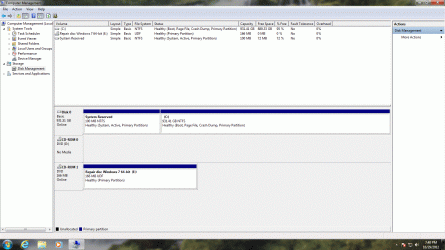
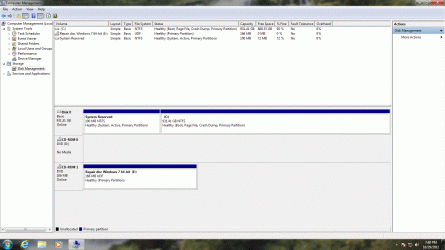
If you can boot into windows from the dvd post us a shot of disk management.
 

My Computer

Computer type
PC/Desktop
Computer Manufacturer/Model Number
Skylake Special #666
OS
Windows 10 Pro x64
CPU
Intel Core i7 6700K
Motherboard
Asus Sabertooth Z170 Mark 1
Memory
GSkill TridentZ RGB 16GB 3600 16-16-16-36
Graphics Card(s)
EVGA GTX 980 Ti SC x2
Sound Card
Realtek High Definition
Monitor(s) Displays
AOC G2460PG
Screen Resolution
1920 x 1080 144Hz
Hard Drives
Samsung 860 Pro 256GB, Seagate Barracuda 4TB x2
PSU
EVGA 1000 P2, EVGA White Custom Braided Cables
Case
Corsair Vengeance C70 Gunmetal Black
Cooling
Corsair H100i v2, Corsair ML120 x2, Thermal Grizzly Kryonaut
Keyboard
Logitech G910 Orion Spectrum
Mouse
Logitech G700s
Internet Speed
Verizon Fios Quantum Gateway 75/75
Antivirus
Windows Defender, Malwarebytes Free 3.8.3
Browser
Chrome
Other Info
Corsair SP120 x4, LG Blu-ray Drive, Durabrand HT-395 100 Watt Dolby Digital Amp, Corsair H2100 Wireless 7.1 Headset
Jacee, The BIOS was set to default to the SATA HDD on reboot. On the first reboot the SATA HDD was selected and I received the blank screen with the blinking curser. I tried rebooting several times to the HDD with the same result. That is when I decided to try the DVD drive and it worked.
Thanks,
Butch H.
 

My Computer

OS
Microsoft Windows 7 Ultimate 64-bit 7601 Multiprocessor Free Service Pack 1
CPU
AMD Athlon(tm) II X2 270 Processor
Motherboard
ASUSTeK Computer INC. M5A88-V EVO
Memory
16.00 GB
Graphics Card(s)
ATI Radeon HD 4250
Sound Card
(1) ATI High Definition Audio Device (2) Realtek High Defi
Monitor(s) Displays
HP W2071d
Screen Resolution
1600 x 900 x 32 bits (4294967296 colors) @ 60 Hz
Hard Drives
ST1000DM003-9YN162 ATA Device
I'll try again
 

Attachments

  • Disk Mgt.gif
    Disk Mgt.gif
    250.4 KB · Views: 16
Last edited:

My Computer

OS
Microsoft Windows 7 Ultimate 64-bit 7601 Multiprocessor Free Service Pack 1
CPU
AMD Athlon(tm) II X2 270 Processor
Motherboard
ASUSTeK Computer INC. M5A88-V EVO
Memory
16.00 GB
Graphics Card(s)
ATI Radeon HD 4250
Sound Card
(1) ATI High Definition Audio Device (2) Realtek High Defi
Monitor(s) Displays
HP W2071d
Screen Resolution
1600 x 900 x 32 bits (4294967296 colors) @ 60 Hz
Hard Drives
ST1000DM003-9YN162 ATA Device
Disk Mgt.gifOk I have tried again to upload a screen shot of disk management. If you need more let me know.
Thanks,
Butch H.
 

My Computer

OS
Microsoft Windows 7 Ultimate 64-bit 7601 Multiprocessor Free Service Pack 1
CPU
AMD Athlon(tm) II X2 270 Processor
Motherboard
ASUSTeK Computer INC. M5A88-V EVO
Memory
16.00 GB
Graphics Card(s)
ATI Radeon HD 4250
Sound Card
(1) ATI High Definition Audio Device (2) Realtek High Defi
Monitor(s) Displays
HP W2071d
Screen Resolution
1600 x 900 x 32 bits (4294967296 colors) @ 60 Hz
Hard Drives
ST1000DM003-9YN162 ATA Device
Sorry for the double post. Now I understand how this works.

Thanks,
Butch H.
 

My Computer

OS
Microsoft Windows 7 Ultimate 64-bit 7601 Multiprocessor Free Service Pack 1
CPU
AMD Athlon(tm) II X2 270 Processor
Motherboard
ASUSTeK Computer INC. M5A88-V EVO
Memory
16.00 GB
Graphics Card(s)
ATI Radeon HD 4250
Sound Card
(1) ATI High Definition Audio Device (2) Realtek High Defi
Monitor(s) Displays
HP W2071d
Screen Resolution
1600 x 900 x 32 bits (4294967296 colors) @ 60 Hz
Hard Drives
ST1000DM003-9YN162 ATA Device
The configuration is correct. However I would boot into BIOS setup and set the HD first to boot.

Does it still require having the DVD in the drive for Win7 to start? If so run Startup Repair - Run 3 Separate Times no matter what it reports.

If that fails, back up your files and wipe the HD with Diskpart Clean Command to clear the boot sector, then follow the same steps in Clean Reinstall to make sure drivers are being handled correctly.
 
Thanks Gregrocker. HD is set first to start. Ran startup repair five times with same results. Still needs instal or repair disk to boot. I will look at the Diskpart clean command tomorrow.

Thanks again,
Butch H.
 

My Computer

OS
Microsoft Windows 7 Ultimate 64-bit 7601 Multiprocessor Free Service Pack 1
CPU
AMD Athlon(tm) II X2 270 Processor
Motherboard
ASUSTeK Computer INC. M5A88-V EVO
Memory
16.00 GB
Graphics Card(s)
ATI Radeon HD 4250
Sound Card
(1) ATI High Definition Audio Device (2) Realtek High Defi
Monitor(s) Displays
HP W2071d
Screen Resolution
1600 x 900 x 32 bits (4294967296 colors) @ 60 Hz
Hard Drives
ST1000DM003-9YN162 ATA Device
I had another look at the BIOS. I didn't notice the choices for IDE, ACHI and RAID eairlier. Default was set to IDE. Sooo I selected ACHI mode for SATA 1-4. Of course this messed things up real good. After several restarts and attemped repairs I just went ahead and reinstalled WIN 7. Everything seems to work correctly now. Before all this I tried Easy BCD. Nothing helped. Thanks again for all the replies.

Butch H
 

My Computer

OS
Microsoft Windows 7 Ultimate 64-bit 7601 Multiprocessor Free Service Pack 1
CPU
AMD Athlon(tm) II X2 270 Processor
Motherboard
ASUSTeK Computer INC. M5A88-V EVO
Memory
16.00 GB
Graphics Card(s)
ATI Radeon HD 4250
Sound Card
(1) ATI High Definition Audio Device (2) Realtek High Defi
Monitor(s) Displays
HP W2071d
Screen Resolution
1600 x 900 x 32 bits (4294967296 colors) @ 60 Hz
Hard Drives
ST1000DM003-9YN162 ATA Device
abc
 
Last edited:

My Computer

OS
Microsoft Windows 7 Ultimate 64-bit 7601 Multiprocessor Free Service Pack 1
CPU
AMD Athlon(tm) II X2 270 Processor
Motherboard
ASUSTeK Computer INC. M5A88-V EVO
Memory
16.00 GB
Graphics Card(s)
ATI Radeon HD 4250
Sound Card
(1) ATI High Definition Audio Device (2) Realtek High Defi
Monitor(s) Displays
HP W2071d
Screen Resolution
1600 x 900 x 32 bits (4294967296 colors) @ 60 Hz
Hard Drives
ST1000DM003-9YN162 ATA Device
So your system DID boot when booting form DVD and didn't press anything from "press any key key to boot from CD/DVD"?

This bypasses the boot device order on harddisk.
 
Last edited:

My Computer

Computer type
Laptop
Computer Manufacturer/Model Number
ACER ASPIRE 5742G
OS
Microsoft Windows 7 Home Premium 64-bits 7601 Multiprocessor Free Service Pack 1
CPU
Intel(R) Core(TM) i3 CPU M 370 @ 2.40GHz
Motherboard
Acer Aspire 5742G
Memory
4,00 GB
Graphics Card(s)
ATI Mobility Radeon HD 5400 Series
Sound Card
(1) AMD High Definition Audio Device (2) Realtek High Defi
Screen Resolution
1366 x 768 x 32 bits (4294967296 colors) @ 60 Hz
Hard Drives
WDC WD5000BEVT-22ZAT0
Kaktussoft, yes when I reloaded Win 7 after trying to repair. In the process of updating now.

Butch H
 

My Computer

OS
Microsoft Windows 7 Ultimate 64-bit 7601 Multiprocessor Free Service Pack 1
CPU
AMD Athlon(tm) II X2 270 Processor
Motherboard
ASUSTeK Computer INC. M5A88-V EVO
Memory
16.00 GB
Graphics Card(s)
ATI Radeon HD 4250
Sound Card
(1) ATI High Definition Audio Device (2) Realtek High Defi
Monitor(s) Displays
HP W2071d
Screen Resolution
1600 x 900 x 32 bits (4294967296 colors) @ 60 Hz
Hard Drives
ST1000DM003-9YN162 ATA Device
Back
Top