
fluxify
New member
Hey Peeps,
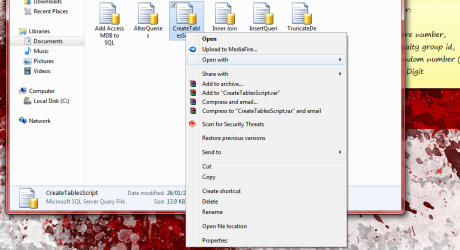
I have Windows 7 Ultimate x64 installed on my system. Had to do some Windows Updates recently and since Tuesday I have noticed that the Open With context menu does not expand.
I have not installed anything funny or weird, had no virusses or malware, and it just does not make sense at all.
As can be seen in the screenshot attached, I do a normal right-click (tried Shift+Right Click - does the same) hover over the 'Open With' item and then....nothing. This is a major pain in the neck as I open several files using Notepad.
I prefer not to perform a repair install of Windows 7 as the repair install usually overwrites installed updates. Any advice or tricks I can try will be greatly appreciated!!
Thanks.
I have Windows 7 Ultimate x64 installed on my system. Had to do some Windows Updates recently and since Tuesday I have noticed that the Open With context menu does not expand.
I have not installed anything funny or weird, had no virusses or malware, and it just does not make sense at all.
As can be seen in the screenshot attached, I do a normal right-click (tried Shift+Right Click - does the same) hover over the 'Open With' item and then....nothing. This is a major pain in the neck as I open several files using Notepad.
I prefer not to perform a repair install of Windows 7 as the repair install usually overwrites installed updates. Any advice or tricks I can try will be greatly appreciated!!
Thanks.
Attachments
My Computer
- Computer Manufacturer/Model Number
- Lenovo Ideapad
- OS
- Windows 7 Ultimate 64-bit
- CPU
- Mobile Intel Core i7 (Sandy Bridge)
- Memory
- 8GB DDR3 RAM
- Graphics Card(s)
- NVIDIA GeForce 540M
- Sound Card
- Realtek HD Audio
- Monitor(s) Displays
- 15.6" HD Display
- Screen Resolution
- 1366x768
- Hard Drives
- Seagate 500GB


