JavaScript is disabled. For a better experience, please enable JavaScript in your browser before proceeding.
You are using an out of date browser. It may not display this or other websites correctly.
You should upgrade or use an
alternative browser .
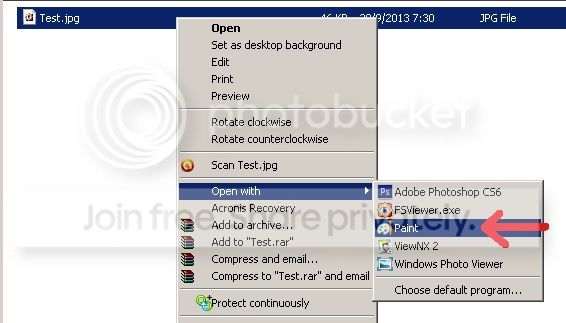
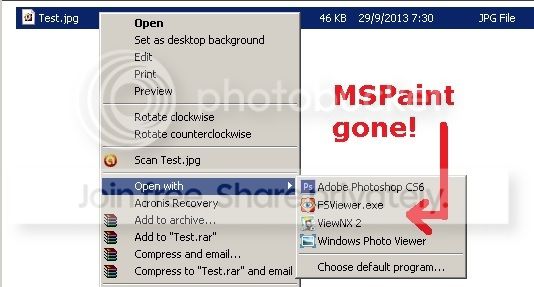
Solved Windows 7 Open With: How to remove MSPaint option?
I do not want MSPaint to be an OpenWith option when right-clicking a .jpg file. I have tried the following (and many other) approaches without success -
1. HKCU\Software\Microsoft\Windows\CurrentVersion\Explorer\FileExts\.jpg\OpenWithList - deleted MSPaint.exe
2. HKCR\Application\mspaint.exe\SupportedTypes - deleted .jpg
3. Ran command prompt: assoc .jpg=
4. Also tried both OpenWithView and Unassoc freeware
The MSPaint option just refuses to go away. This is supposedly only a simple task, but is frustratingly difficult for me to find a solution. Could anyone help me please? Thank you.
Righteous Dude
Guru
VIP
SF Team
Windows 10 Home x64 INTEL Core i5-750 Quad-Core 3.37GHz HyperX Fury Black Series 8GB (2 x 4GB) 1866Mhz EVGA GeForce GTX 750 Superclocked 1GB 128-Bit... PC/Desktop Windows 10 Home x64 INTEL Core i5-750 Quad-Core 3.37GHz ASUS P7P55D HyperX Fury Black Series 8GB (2 x 4GB) 1866Mhz EVGA GeForce GTX 750 Superclocked 1GB 128-Bit GDDR5 LG 32MA68HY 32" IPS 1920 x 1080 Samsung 840 Evo 120GB, SEAGATE 500GB Barracuda® 7200.12, SATA 3 Gb/s, 7200 RPM, 16MB cache ANTEC TruePower New TP-550, 80 PLUS, 550W ANTEC Three Hundred Illusion COOLER MASTER Hyper 212 Plus, 4 x 120mm 1 x 140mm Noctua's 85 + Mbps Avast Vivaldi
3 Brain Cells
Guru
Gold Member
VIP
Windows 10 Pro. 64/ version 1709 Windows 7 Pr... Intel i7-6800K @ 4.3 Corsair Platinum 16 gig @2400 EVGA GTX 1070 OC PC/Desktop Home made Desktop Windows 10 Pro. 64/ version 1709 Windows 7 Pro/64 Intel i7-6800K @ 4.3 ASUS X-99 Deluxe II Corsair Platinum 16 gig @2400 EVGA GTX 1070 OC Asus 27" LED LCD/VE278Q 1920-1080 or 1280-720 HDMI INTEL SSD 730-240 Gb Sata 3.0/ EVGA Platium 1200W Phanteks Luxe Tempered Glass 8 fans/ one radiator XSPC/ Water Cooled CPU Das 4 Professional Logitech M705/MX Anywhere 2-S 100 mbits Microsoft Security Essentials/ Malwarebytes Premium 3.0/ SAS I.E. 11 default/Firefox/ ISP Time Warner Cable/Spectrum LG BluRay Burner/
New member
Thread Starter
Thank you so much A Guy and Layback Bear for the pointers!
I tried the 7 locations in the link posted by A Guy. Unfortunately, they did not work. As A Guy suggested, I also looked at Boo's reply. Yes, that's it - it solved my problem! The relevant key is:
HKEY_LOCAL_MACHINE\SOFTWARE\Microsoft\Windows\CurrentVersion\Applets\Paint\Capabilities\FileAssociations
Thank you once again for your help!
Righteous Dude
Guru
VIP
SF Team
Excellent, glad you got it sorted, and we could help
A Guy
Windows 10 Home x64 INTEL Core i5-750 Quad-Core 3.37GHz HyperX Fury Black Series 8GB (2 x 4GB) 1866Mhz EVGA GeForce GTX 750 Superclocked 1GB 128-Bit... PC/Desktop Windows 10 Home x64 INTEL Core i5-750 Quad-Core 3.37GHz ASUS P7P55D HyperX Fury Black Series 8GB (2 x 4GB) 1866Mhz EVGA GeForce GTX 750 Superclocked 1GB 128-Bit GDDR5 LG 32MA68HY 32" IPS 1920 x 1080 Samsung 840 Evo 120GB, SEAGATE 500GB Barracuda® 7200.12, SATA 3 Gb/s, 7200 RPM, 16MB cache ANTEC TruePower New TP-550, 80 PLUS, 550W ANTEC Three Hundred Illusion COOLER MASTER Hyper 212 Plus, 4 x 120mm 1 x 140mm Noctua's 85 + Mbps Avast Vivaldi
I know i know, this thread is 1852 days old, but I took a deep dive into the "remove-all-unwanted-programs-in-open-with-context-menu" and now I'm only stuck with MS Paint
What exactyly did you delete from this key?
HKEY_LOCAL_MACHINE\SOFTWARE\Microsoft\Windows\CurrentVersion\Applets\Paint\Capabilities\FileAssociations
I have deleted several entries (.png / .jpg / .jpeg) but I'm still seeing Paint in the Open With menu.
Windows 10 ver 1803
(OS Build 17134.345)
PC/Desktop Windows 10 64-bit