Solved Windows 7 orb

spottydog10

New member
Windows xp used to remember the last things you typed in start/run.
It doesnt appear that the Win 7 orb does, is there a way to make it act like that?

Ta,

Mike
 

My Computer

Computer Manufacturer/Model Number
home built
OS
windows 7 enterprise 64-bit
CPU
intel i7 [email protected]
Motherboard
asus px68-v-lx
Memory
G-Skill 8GB (2x4GB) DDR3 1600Mhz RipjawsX Memory Kit CL9 (9-
Graphics Card(s)
ati radeon hd 4800
Sound Card
emu 0404
Monitor(s) Displays
dgm 23 inch
Hard Drives
ocz vertex 3 160gb ssd
hitachi 1T sata
wd raptor 1500
PSU
genereic 650wt
Case
vento
Cooling
Arctic Cooling Freezer 7 Pro rev 2
It remembers things here. When I bring down the Start and open up the Run command line a dropdown list of previous entries like regedit, msconfig, sfc /scannow, etc. being recently entered are still found.

But this is on a desktop edtiion(Ultimate x64) not the Enterprise edition if that is what you are referring to. Server orientated editions will tend to have their own form of memory or non remembered functions. I've never heard of any customization to see Windows remember things regardless of which version or edition you are running.

Typically the Windows search options as well as IE have their own histories. You may have something running that clears out caches such as some part of the system protections you have inplace that would explain this or use a program like CCleaner that will see clearing out histories for IE and other checked off by default.
 

My Computers

System One System Two

  • Computer type
    PC/Desktop
    Computer Manufacturer/Model Number
    Custom builds = 2
    OS
    W7 Ultimate x64/W10 Pro x64/W11 Pro Triple Boot - Main PC W7 Remote PC Micro ATX W7 Pro x64/W11 Pro
    CPU
    AMD Phenom II X4 975 Deneb 3.6ghz - 965 2nd remote pc
    Motherboard
    Gigabyte GA-790XTA-UD4-Gigabyte GA-880GM-D2H remote pc
    Memory
    Kingston Hyper X DDR3 1600 1.5v 16gb - Hyper X Fury 8gb 2nd
    Graphics Card(s)
    MSI HD Radeon 5750 1gb - MSI HD Radeon 6450 on mini tower
    Sound Card
    Creative Labs X-Fi Xtreme Audio P - Realtek onooard 2nd case
    Monitor(s) Displays
    ASUS VW199T-P 19" HP 2082a Main-HP 2082a 20" remote pc
    Screen Resolution
    Asus 1440x900 - HP 1600x900
    Hard Drives
    WD Black 1TB HD per OS W7, W10, and pending W11 presently on 500gb OS Drive - Pending Triple 1TB HDs for Spanned Storage/backup volume
    Single 2TB external USB enclosure, single 1TB System 7 Host/Boot drive, Pending 8TB external HD for system image b
    PSU
    Corsair 750TX - primary / Corsair CX600 - second
    Case
    Antec 900-2 - SSD compatible / NZXT Vulcan mini tower
    Cooling
    Zalman CNPS9900A
    Keyboard
    AZIO L70 Backlit Letters Gaming - ONN Cordless/USB
    Mouse
    MSI DS200 Programmable, Logitech Cordless
    Internet Speed
    30mbps upgrade - primary hard wired - mini tower usb WiFi
    Antivirus
    GFI VIPRE Internet Security 2014 on W7 2016 beta on W10,
    Browser
    Cyberfox, WaterFox 64bit FF variants, FireFox x64, Pale Moon
    Other Info
    Accomdata fan cooled usb 2.0 PIDE/Sata II, III external enclosure.
    Sambient usb/eSata PATA/Sata II, III external enclosure.
  • Computer type
    PC/Desktop
    System Manufacturer/Model Number
    CUSTOM ASSEMBLY
    OS
    W7 Pro x64/W11 Pro
    CPU
    AMD Deneb 3.6ghz - 965
    Motherboard
    Gigabyte GA-880GM-D2H remote pc
    Memory
    Kingston Hyper X Fury 8gb
    Graphics Card(s)
    MSI HD Radeon 6450 DVI Output
    Sound Card
    Realtek onooard Creative or Other separate PENDING
    Monitor(s) Displays
    VIZIO 32" LCD TV Separate LCD Pending
    Screen Resolution
    1600x1080
    Hard Drives
    WD 500GB OS Host/Boot WD Green 1TB Storage/Backup
    PSU
    Corsair 600W - THERMALTAKE 600W spare case
    Case
    NZXT Vulcan mini tower
    Cooling
    Twin 120mm Top Fans - 240mm Side Cover
    Keyboard
    ONN Cordless/USB Logitech Cordless
    Mouse
    ONN USB/Cordless - Logitech Cordless
    Internet Speed
    DSL 5G
    Browser
    MS Edge, FireFox, WaterFox x64, FireFox Nightly
    Other Info
    OS Testing-Remote Access to Main TeamViewer
Hi NH, thanks for the reply.

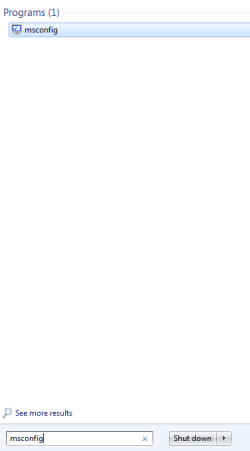
If I say, type in msconfig, I of course get msconfig.
If I then type the start of the command, say ms, It doesnt appear to guess
the rest of it (see pics)
I dont have (to my knowlege anyway) anything configured that would clear
the search.
It's bugged me since Win 7 came out,so any help would be appreciated.
Thanks

Mike
 

Attachments

  • orb1.PNG
    orb1.PNG
    12.7 KB · Views: 3
  • orb2.PNG
    orb2.PNG
    18.9 KB · Views: 4

My Computer

Computer Manufacturer/Model Number
home built
OS
windows 7 enterprise 64-bit
CPU
intel i7 [email protected]
Motherboard
asus px68-v-lx
Memory
G-Skill 8GB (2x4GB) DDR3 1600Mhz RipjawsX Memory Kit CL9 (9-
Graphics Card(s)
ati radeon hd 4800
Sound Card
emu 0404
Monitor(s) Displays
dgm 23 inch
Hard Drives
ocz vertex 3 160gb ssd
hitachi 1T sata
wd raptor 1500
PSU
genereic 650wt
Case
vento
Cooling
Arctic Cooling Freezer 7 Pro rev 2
For commands like the msconfig, regedit, sfc /scannow, cmd I never have any problem and seem to still see them in the dropdown months after use. I know that since I performed a clean install of 7 back in June and now still see the sfc /scannow used initially after the clean install following removed dual boot with the W8 RP.

The search line if visible at the bottom of the Start menu however will forget on the spot once you have run a command there to bring up something like the Policy Editor or other. That requires a fresh entry each time regardless of which version you have on.

As a rule the Run command line wouldn't even have a history while Windows Explorer would to some extent being part of the main shell. The Run is an extension of explorer.exe to some degree explaining why the dropdown list is even seen here.

The likely reason why it remembers despite the recent clean install would be from repetative use when opening up the msconfig and regedit in particular multiple times Windows then seems to remember the entries better. When going to open up the Run the last command entered always seem to be on display despite seeing it after a full restart or when powering up the next day showing explorer has a cache of it's own.
 

My Computers

System One System Two

  • Computer type
    PC/Desktop
    Computer Manufacturer/Model Number
    Custom builds = 2
    OS
    W7 Ultimate x64/W10 Pro x64/W11 Pro Triple Boot - Main PC W7 Remote PC Micro ATX W7 Pro x64/W11 Pro
    CPU
    AMD Phenom II X4 975 Deneb 3.6ghz - 965 2nd remote pc
    Motherboard
    Gigabyte GA-790XTA-UD4-Gigabyte GA-880GM-D2H remote pc
    Memory
    Kingston Hyper X DDR3 1600 1.5v 16gb - Hyper X Fury 8gb 2nd
    Graphics Card(s)
    MSI HD Radeon 5750 1gb - MSI HD Radeon 6450 on mini tower
    Sound Card
    Creative Labs X-Fi Xtreme Audio P - Realtek onooard 2nd case
    Monitor(s) Displays
    ASUS VW199T-P 19" HP 2082a Main-HP 2082a 20" remote pc
    Screen Resolution
    Asus 1440x900 - HP 1600x900
    Hard Drives
    WD Black 1TB HD per OS W7, W10, and pending W11 presently on 500gb OS Drive - Pending Triple 1TB HDs for Spanned Storage/backup volume
    Single 2TB external USB enclosure, single 1TB System 7 Host/Boot drive, Pending 8TB external HD for system image b
    PSU
    Corsair 750TX - primary / Corsair CX600 - second
    Case
    Antec 900-2 - SSD compatible / NZXT Vulcan mini tower
    Cooling
    Zalman CNPS9900A
    Keyboard
    AZIO L70 Backlit Letters Gaming - ONN Cordless/USB
    Mouse
    MSI DS200 Programmable, Logitech Cordless
    Internet Speed
    30mbps upgrade - primary hard wired - mini tower usb WiFi
    Antivirus
    GFI VIPRE Internet Security 2014 on W7 2016 beta on W10,
    Browser
    Cyberfox, WaterFox 64bit FF variants, FireFox x64, Pale Moon
    Other Info
    Accomdata fan cooled usb 2.0 PIDE/Sata II, III external enclosure.
    Sambient usb/eSata PATA/Sata II, III external enclosure.
  • Computer type
    PC/Desktop
    System Manufacturer/Model Number
    CUSTOM ASSEMBLY
    OS
    W7 Pro x64/W11 Pro
    CPU
    AMD Deneb 3.6ghz - 965
    Motherboard
    Gigabyte GA-880GM-D2H remote pc
    Memory
    Kingston Hyper X Fury 8gb
    Graphics Card(s)
    MSI HD Radeon 6450 DVI Output
    Sound Card
    Realtek onooard Creative or Other separate PENDING
    Monitor(s) Displays
    VIZIO 32" LCD TV Separate LCD Pending
    Screen Resolution
    1600x1080
    Hard Drives
    WD 500GB OS Host/Boot WD Green 1TB Storage/Backup
    PSU
    Corsair 600W - THERMALTAKE 600W spare case
    Case
    NZXT Vulcan mini tower
    Cooling
    Twin 120mm Top Fans - 240mm Side Cover
    Keyboard
    ONN Cordless/USB Logitech Cordless
    Mouse
    ONN USB/Cordless - Logitech Cordless
    Internet Speed
    DSL 5G
    Browser
    MS Edge, FireFox, WaterFox x64, FireFox Nightly
    Other Info
    OS Testing-Remote Access to Main TeamViewer
Well here's a funny thing.
The last screen captures were from my laptop.
This desktop gives this (see pic)
Same OS and near enough same progs.
Waddya think?

Mike
 

Attachments

  • orb3.PNG
    orb3.PNG
    25.4 KB · Views: 8

My Computer

Computer Manufacturer/Model Number
home built
OS
windows 7 enterprise 64-bit
CPU
intel i7 [email protected]
Motherboard
asus px68-v-lx
Memory
G-Skill 8GB (2x4GB) DDR3 1600Mhz RipjawsX Memory Kit CL9 (9-
Graphics Card(s)
ati radeon hd 4800
Sound Card
emu 0404
Monitor(s) Displays
dgm 23 inch
Hard Drives
ocz vertex 3 160gb ssd
hitachi 1T sata
wd raptor 1500
PSU
genereic 650wt
Case
vento
Cooling
Arctic Cooling Freezer 7 Pro rev 2
ahh i see what the problem is.. do this.
right click on the stat button
click properties
click the customize button and scroll down till you see the run command. check the box and you'll be able to use that instead of the search box. it will also remember every command you type so you'll have the access you want.
 

My Computer

Computer Manufacturer/Model Number
asus k53e bbr23 laptop
OS
windows 7 x64 pro sp1
CPU
intel i5 2540m
Motherboard
asus
Memory
8 gig ddr3 12800
Graphics Card(s)
intel hd 3000
Sound Card
realtek hd audio
Screen Resolution
1366*768 hd
Hard Drives
(1) ST3250312AS ATA Device (2) TOSHIBA External USB 3.0 USB Device
Mouse
lenovo usb mouse
Internet Speed
20Mbps/1Mbps
Hi Mate,
Yes that will work.
Thanks,
Mike
 

My Computer

Computer Manufacturer/Model Number
home built
OS
windows 7 enterprise 64-bit
CPU
intel i7 [email protected]
Motherboard
asus px68-v-lx
Memory
G-Skill 8GB (2x4GB) DDR3 1600Mhz RipjawsX Memory Kit CL9 (9-
Graphics Card(s)
ati radeon hd 4800
Sound Card
emu 0404
Monitor(s) Displays
dgm 23 inch
Hard Drives
ocz vertex 3 160gb ssd
hitachi 1T sata
wd raptor 1500
PSU
genereic 650wt
Case
vento
Cooling
Arctic Cooling Freezer 7 Pro rev 2
Back
Top