Windows 7 Perceived Bugs & Glitches List

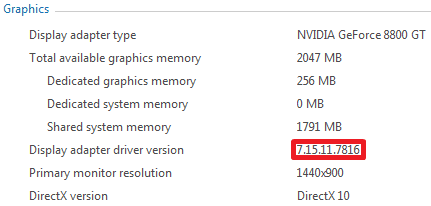
There appears to be a bug in the WEI tool.
This shows how the WEI tool reports the graphics driver version:
Capture.PNG
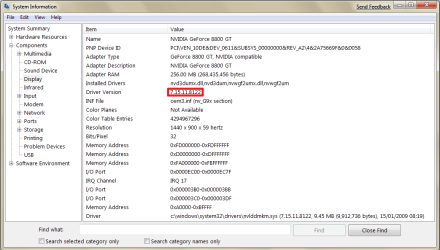
And here is how System Information reports it:
Capture1.PNG
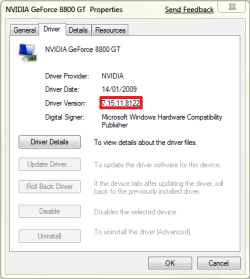
It is also being reported correctly in Device Manager:
Capture2.PNG
 

My Computer My Computer

Computer type
PC/Desktop
Computer Manufacturer/Model Number
Dwarf Dwf/11/2012 r09/2013
OS
Windows 8.1 Pro RTM x64
CPU
Intel Core-i5-3570K 4-core @ 3.4GHz (Ivy Bridge) (OC 4.4GHz)
Motherboard
ASRock Z77 Extreme4-M
Memory
4 x 4GB DDR3-1600 Corsair Vengeance CMZ8GX3M2A1600C9B (16GB)
Graphics Card(s)
MSI GeForce GTX770 Gaming OC 2GB
Sound Card
Realtek High Definition on board solution (ALC 898)
Monitor(s) Displays
ViewSonic VA1912w Widescreen (VGA)
Screen Resolution
1440x900
Hard Drives
OCZ Agility 3 SSD 120GB SATA III x2 (RAID 0)
Samsung HD501LJ 500GB SATA II x2
Hitachi HDS721010CLA332 1TB SATA II
Iomega 1.5TB Ext USB 2.0
WD 2.0TB Ext USB 3.0
PSU
XFX Pro Series 850W Semi-Modular
Case
Gigabyte IF233
Cooling
1 x 120mm Front Inlet 1 x 120mm Rear Exhaust
Keyboard
Microsoft Comfort Curve Keyboard 3000 (USB)
Mouse
Microsoft Comfort Mouse 3000 for Business (USB)
Internet Speed
NetGear DG834Gv3 ADSL Modem/Router (Ethernet) ~4.0 Mb/s (O2)
Antivirus
Avast! 8.0.1497
Browser
IE 11
Other Info
Optical Drive: HL-DT-ST BD-RE BH10LS30 SATA Bluray
Lexmark S305 Printer/Scanner/Copier (USB)
WEI Score: 8.1/8.1/8.5/8.5/8.25
Asus Eee PC 1011PX Netbook (Windows 7 x86 Starter)
I also get snipping tools problems. The other is that the monitor doesn't always go into power saving mode.
 

My Computer My Computer

Computer type
PC/Desktop
Computer Manufacturer/Model Number
Systems by SmartEyeball
OS
8 Pro x64
CPU
i7 3770K 4.6GHz
Motherboard
ASUS P8Z77 WS
Memory
16GB G.Skill Trident X 2666mhz
Graphics Card(s)
x2 EVGA 780 Ti Superclocked SLI
Sound Card
SB X-FI Surround 5.1 PRO USB / ATH-AD900 Headphones
Monitor(s) Displays
x3 Dell U2410 / 58" Samsung
Screen Resolution
5760*1200/ 1920*1200
Hard Drives
2x Intel 520 240GB (RAID 0) * 2x WD Caviar Blacks 2TB (RAID 0) * 2TB WD Caviar Black * Sony Optirac DVD
PSU
Silverstone Strider Evolution 1200W
Case
Thermaltake Level 10 GT Snow Edition
Cooling
Noctua NH-D14
Keyboard
Topre Realforce // Ducky Shine MX Black // Filco Ninja TKL
Mouse
Thermaltake Theron (Highly Recommended) + Razer Imperator
Antivirus
MSE
Browser
IE, FF, WaterFox
Other Info
GT Extreme V2 Sim Racing Cockpit + 40" LCD and K/B Mouse stand ▼
Fanatec CSR Elite Wheel + Clubsport V1 Pedals + CSR shifter/7G-H ▼Saitek X52 Pro ▼ TrackIR 5 Pro
Buttkicker v2 Seat Rumbler with Dedicated 5.1 and Sub Woofer attached to frame ▼
=
Bloody Big Grin
Right click on a taskbar window tab, select close. The selection box hangs around until you click elsewhere (the window does close though).
This is in uncombined mode, all fancy features off (max performance option)
 

My Computer My Computer

OS
Windows 7
To me the new sidebar is a joke. Network meters simply do not work. My sushi drive gadget keeps getting messed up and once I delated it now it will not come back no matter what I do. The Imp's drive meters never work at all period. I mean there are like 6 useful gadgets and half of them do not even work? There is no way on earth anyone could have missed this.

Something gets stuck in gadgets and it will not let go of it, it's like it's stuck forever and going into the sidebar files you can't do anything because it says the file's is in use even when all the Gadgets are turned off. I liked the Vista one so much better because it actually worked. This one is a disaster it's so bad man O man it's bad.

Yes I know we can replace it with the Vista one but that is besides the point because WE SHOULDN'T HAVE TOO!!!! I won't get into the fact that if you attempt an sfc/scannow than all your file changes will be reverted back to original thus making the Vista sidebar hack pretty much useless.

This is the worst program in Windows 7 without a doubt. I won't get into the fact that it will not work with UAC turned off. This is just sheer BS on microsoft's part. Even for a beta this sidebar is a complete joke.

Does anyone know of a way to clean out the garbage in the sidebar because it's just not right. I may have to do a system restore just to get my drive meter to work again. This is rediculous. And no system restore does nothing to actually fix this problem. Sorry for the rant but something had to be said about the new sidebar which is by far the most poorly implimented and obviously nontested program in Windows 7.
 

My Computer My Computer

Computer type
PC/Desktop
Computer Manufacturer/Model Number
Home built
OS
Windows 7 Ult, Windows 8.1 Pro,
CPU
Q9650-4.275GHz, E8600 4.5GHz, E6750-3.8GHz
Motherboard
Evga 780i FTW
Memory
G.Skill PC2 9600 1200Mhz 5 5 5 15 2T
Graphics Card(s)
GTX480
Sound Card
Asus Xonar D2
Monitor(s) Displays
HannsG
Screen Resolution
1680X1050
Hard Drives
GSkill Phoenix Pro 120GB SSD
PSU
ThermalTake Toughpower 1000Watt modular
Case
ThermalTake XaserV
Cooling
Xigmatek S1283
Keyboard
Logitech G15
Mouse
Logitech G9
Internet Speed
T1
I won't get into the fact that it will not work with UAC


There is a workaround for that on these forums.

You must edit your registry so the sidebar can run in an elevated state (UAC Disabled)

Navigate to HKEY_LOCAL_MACHINE\SOFTWARE\Microsoft\Windows\CurrentVersion\Sidebar\Settings

Create a new DWORD value, change it to Decimal and set it to 1.

You may have to log off/back on for the changes to take place, I don't remember for sure. I can't find the thread, you just got lucky that was the last thing I changed in my registry so the last used directory was still open :)
 

My Computer My Computer

Computer Manufacturer/Model Number
Gateway P7801
OS
7 x64 + XP Pro x86
CPU
Undervolted T9900 3.06 GHz Core2Duo
Memory
4GB DDR3 1066MHz
Graphics Card(s)
NVIDIA 9800M GTS 1GB DDR3 1066 MHz
Monitor(s) Displays
17" WUXGA
Screen Resolution
1920x1200
Hard Drives
32GB Patriot V2 SSD w/ Hyperfast
PSU
9-cell Lithium Ion
Keyboard
Logitech Classic
Mouse
Logitech MX310
Internet Speed
slow AT&T
Other Info
Nlited XP x86 (540MB C:) locked with EWF
There is a workaround for that on these forums.

You must edit your registry so the sidebar can run in an elevated state (UAC Disabled)

Navigate to HKEY_LOCAL_MACHINE\SOFTWARE\Microsoft\Windows\CurrentVersion\Sidebar\Settings

Create a new DWORD value, change it to Decimal and set it to 1.

You may have to log off/back on for the changes to take place, I don't remember for sure. I can't find the thread, you just got lucky that was the last thing I changed in my registry so the last used directory was still open :)

Yup I know all about it and that is just one of the many problems associated with the new sidebar. I have the fix for that but it simply does not address the 10 other problems that I'am having with it. Thanks for the help :)
 

My Computer My Computer

Computer type
PC/Desktop
Computer Manufacturer/Model Number
Home built
OS
Windows 7 Ult, Windows 8.1 Pro,
CPU
Q9650-4.275GHz, E8600 4.5GHz, E6750-3.8GHz
Motherboard
Evga 780i FTW
Memory
G.Skill PC2 9600 1200Mhz 5 5 5 15 2T
Graphics Card(s)
GTX480
Sound Card
Asus Xonar D2
Monitor(s) Displays
HannsG
Screen Resolution
1680X1050
Hard Drives
GSkill Phoenix Pro 120GB SSD
PSU
ThermalTake Toughpower 1000Watt modular
Case
ThermalTake XaserV
Cooling
Xigmatek S1283
Keyboard
Logitech G15
Mouse
Logitech G9
Internet Speed
T1
Another big problem for me and I'am sure many others is that the favicons keep vanishing from my favorites list in Explorer. Every 12 hours or so they just vanish for no reason at all.

No it is not because I was delating temp files or using CCleaner. None of that happend and yet the favicons keep vanishing into thin air. This never happend once in Vista.

I have to go back to the sites to get them back. this has gone on with a new install with no other programs installed so it's not a compatiblity problem.

There are so many program errors and bugs I can't even count them all anymore.
 

My Computer My Computer

Computer type
PC/Desktop
Computer Manufacturer/Model Number
Home built
OS
Windows 7 Ult, Windows 8.1 Pro,
CPU
Q9650-4.275GHz, E8600 4.5GHz, E6750-3.8GHz
Motherboard
Evga 780i FTW
Memory
G.Skill PC2 9600 1200Mhz 5 5 5 15 2T
Graphics Card(s)
GTX480
Sound Card
Asus Xonar D2
Monitor(s) Displays
HannsG
Screen Resolution
1680X1050
Hard Drives
GSkill Phoenix Pro 120GB SSD
PSU
ThermalTake Toughpower 1000Watt modular
Case
ThermalTake XaserV
Cooling
Xigmatek S1283
Keyboard
Logitech G15
Mouse
Logitech G9
Internet Speed
T1
This is not so much a bug, but more of an annoyance. There doesn't seem to be any way of making the network icon in the system tray animate.
 

My Computer My Computer

Computer type
PC/Desktop
Computer Manufacturer/Model Number
Dwarf Dwf/11/2012 r09/2013
OS
Windows 8.1 Pro RTM x64
CPU
Intel Core-i5-3570K 4-core @ 3.4GHz (Ivy Bridge) (OC 4.4GHz)
Motherboard
ASRock Z77 Extreme4-M
Memory
4 x 4GB DDR3-1600 Corsair Vengeance CMZ8GX3M2A1600C9B (16GB)
Graphics Card(s)
MSI GeForce GTX770 Gaming OC 2GB
Sound Card
Realtek High Definition on board solution (ALC 898)
Monitor(s) Displays
ViewSonic VA1912w Widescreen (VGA)
Screen Resolution
1440x900
Hard Drives
OCZ Agility 3 SSD 120GB SATA III x2 (RAID 0)
Samsung HD501LJ 500GB SATA II x2
Hitachi HDS721010CLA332 1TB SATA II
Iomega 1.5TB Ext USB 2.0
WD 2.0TB Ext USB 3.0
PSU
XFX Pro Series 850W Semi-Modular
Case
Gigabyte IF233
Cooling
1 x 120mm Front Inlet 1 x 120mm Rear Exhaust
Keyboard
Microsoft Comfort Curve Keyboard 3000 (USB)
Mouse
Microsoft Comfort Mouse 3000 for Business (USB)
Internet Speed
NetGear DG834Gv3 ADSL Modem/Router (Ethernet) ~4.0 Mb/s (O2)
Antivirus
Avast! 8.0.1497
Browser
IE 11
Other Info
Optical Drive: HL-DT-ST BD-RE BH10LS30 SATA Bluray
Lexmark S305 Printer/Scanner/Copier (USB)
WEI Score: 8.1/8.1/8.5/8.5/8.25
Asus Eee PC 1011PX Netbook (Windows 7 x86 Starter)
Nope, only when it's connecting does it have some animation.
 

My Computer My Computer

Computer type
PC/Desktop
Computer Manufacturer/Model Number
Airbot 2.0
OS
Windows 7 Ultimate x64 SP1
CPU
Core i7 920 (D0) @ 4Ghz, *26c idle *65c full load on air
Motherboard
Asus P6X58D Premium - Sata 6Gb/s - USB 3.0
Memory
12GB DDR3 Corsair Dominator -CMD12GX3M6A1600C8 at 1600MHz
Graphics Card(s)
Zotac Geforce GTX 770
Sound Card
ASUS Xonar D2X
Monitor(s) Displays
1 LG 24" Flatron W2453V-PF 1 Samsung 24" P2450H both 2ms RT
Screen Resolution
1920x1080@60hz
Hard Drives
1 Samsung 250GB 840 Evo SSD
1 OCZ Vertex2 180GB SSD
1 TB Samsung Spinpoint F1 7200RPM 32MB cache
2 500GB WD Caviar Blacks 7200RPM 32MB cache (WD5001AALS)

Pioneer DVD Burner DVR-S18M
PSU
Corsair HX1000W
Case
Cooler Master HAF 932
Cooling
Case Fans *3 230mm, *1 140mm/CPU - *Tuniq Tower 120 Extreme
Keyboard
Logitech Wireless MK700
Mouse
Logitech Wireless MK700
Internet Speed
DL 15 Mbps UL 0.98 Mbps
Antivirus
None
Browser
Firefox Nightly
Other Info
Processor-7.7 *RAM- 7.9 *Graphics-7.9 *Gaming Graphics- 7.9 *SSD- 7.8 W.E.I final score= 7.7
*Phone- LG Nexus 5
There seems to be a bug in the font rendering routine in IE8. These images give an idea of some of the distortion that is apparent. This is puzzling, because it does not happen all the time but sporadically and randomly, and is still happening despite IE8 being set to run in Compatibility View settings for all websites.
Capture.PNG Capture1.PNG
 

My Computer My Computer

Computer type
PC/Desktop
Computer Manufacturer/Model Number
Dwarf Dwf/11/2012 r09/2013
OS
Windows 8.1 Pro RTM x64
CPU
Intel Core-i5-3570K 4-core @ 3.4GHz (Ivy Bridge) (OC 4.4GHz)
Motherboard
ASRock Z77 Extreme4-M
Memory
4 x 4GB DDR3-1600 Corsair Vengeance CMZ8GX3M2A1600C9B (16GB)
Graphics Card(s)
MSI GeForce GTX770 Gaming OC 2GB
Sound Card
Realtek High Definition on board solution (ALC 898)
Monitor(s) Displays
ViewSonic VA1912w Widescreen (VGA)
Screen Resolution
1440x900
Hard Drives
OCZ Agility 3 SSD 120GB SATA III x2 (RAID 0)
Samsung HD501LJ 500GB SATA II x2
Hitachi HDS721010CLA332 1TB SATA II
Iomega 1.5TB Ext USB 2.0
WD 2.0TB Ext USB 3.0
PSU
XFX Pro Series 850W Semi-Modular
Case
Gigabyte IF233
Cooling
1 x 120mm Front Inlet 1 x 120mm Rear Exhaust
Keyboard
Microsoft Comfort Curve Keyboard 3000 (USB)
Mouse
Microsoft Comfort Mouse 3000 for Business (USB)
Internet Speed
NetGear DG834Gv3 ADSL Modem/Router (Ethernet) ~4.0 Mb/s (O2)
Antivirus
Avast! 8.0.1497
Browser
IE 11
Other Info
Optical Drive: HL-DT-ST BD-RE BH10LS30 SATA Bluray
Lexmark S305 Printer/Scanner/Copier (USB)
WEI Score: 8.1/8.1/8.5/8.5/8.25
Asus Eee PC 1011PX Netbook (Windows 7 x86 Starter)
Another big problem for me and I'am sure many others is that the favicons keep vanishing from my favorites list in Explorer. Every 12 hours or so they just vanish for no reason at all.

No it is not because I was delating temp files or using CCleaner. None of that happend and yet the favicons keep vanishing into thin air. This never happend once in Vista.

I have to go back to the sites to get them back. this has gone on with a new install with no other programs installed so it's not a compatiblity problem.

There are so many program errors and bugs I can't even count them all anymore.

To clear all your custom gadgets out go to task manager, close sidebar.exe and go to this folder C:/Users/User name/AppData/Local/Microsoft/Windows Sidebar/Gadgets/ and delete all the folders in there.

You may also want to delete the the settings in the folder up one level.
 

My Computer My Computer

Computer Manufacturer/Model Number
Home Brew
OS
Windows 7 Ultimate Vista Ultimate x64
CPU
Core 2 Duo E8500 3.16Ghz @ 3.8Ghz
Motherboard
eVGA 750i FTW
Memory
2x2Gigs Patriot PC2-6400 LL
Graphics Card(s)
Inno3D GeForce GTX260 216 SP
Monitor(s) Displays
ASUS VW222U 22" 2ms Response time
Screen Resolution
1680x1050
Hard Drives
SATA 150GB
SATA II 250GB
USB IDE 750GB Ext.
PSU
HYTEC 600W & Thermaltake 650W Toughpower Power Exp
Case
Thermaltake Armor LCS (Liquid Cooling System)
Cooling
Liquid Cooling System
Keyboard
Logitech G15 Gaming Keyboard
Mouse
Logitech G9 Gaming Mouse
To clear all your custom gadgets out go to task manager, close sidebar.exe and go to this folder C:/Users/User name/AppData/Local/Microsoft/Windows Sidebar/Gadgets/ and delete all the folders in there.

You may also want to delete the the settings in the folder up one level.

Thanks Grim. :D

Of course it helps when I set to "allow hidden files view" otherwise the appdata one doesn't show up LOL. Now at least I can get rid of the sidebar gadgets when they bug out on me.

Any idea on what my favicon vanishing problem might be? They routinely vanish into thin air from my favorites list yet they remain in the temp folder. I also have noticed the sign in cookies vanishing for no reason at all. I never have delated the temp files once and this is on a fresh installation. :sarc:

The only way to get them back is to revisit the site then close and open Explorer again. I know there is a way to save them all to another folder but that doesn't really correct the actual problem is just puts a band-aid on it. :rolleyes:

I'am convinced it's either a bug or a security setting but I can't figure out which one. :huh:
 

My Computer My Computer

Computer type
PC/Desktop
Computer Manufacturer/Model Number
Home built
OS
Windows 7 Ult, Windows 8.1 Pro,
CPU
Q9650-4.275GHz, E8600 4.5GHz, E6750-3.8GHz
Motherboard
Evga 780i FTW
Memory
G.Skill PC2 9600 1200Mhz 5 5 5 15 2T
Graphics Card(s)
GTX480
Sound Card
Asus Xonar D2
Monitor(s) Displays
HannsG
Screen Resolution
1680X1050
Hard Drives
GSkill Phoenix Pro 120GB SSD
PSU
ThermalTake Toughpower 1000Watt modular
Case
ThermalTake XaserV
Cooling
Xigmatek S1283
Keyboard
Logitech G15
Mouse
Logitech G9
Internet Speed
T1
Your welcome chev65, can't help with IE8 I don't use it, I have always used Firefox and never had any problems with it, hopefully they will release an update for IE8 soon that will fix the problem for you.
 

My Computer My Computer

Computer Manufacturer/Model Number
Home Brew
OS
Windows 7 Ultimate Vista Ultimate x64
CPU
Core 2 Duo E8500 3.16Ghz @ 3.8Ghz
Motherboard
eVGA 750i FTW
Memory
2x2Gigs Patriot PC2-6400 LL
Graphics Card(s)
Inno3D GeForce GTX260 216 SP
Monitor(s) Displays
ASUS VW222U 22" 2ms Response time
Screen Resolution
1680x1050
Hard Drives
SATA 150GB
SATA II 250GB
USB IDE 750GB Ext.
PSU
HYTEC 600W & Thermaltake 650W Toughpower Power Exp
Case
Thermaltake Armor LCS (Liquid Cooling System)
Cooling
Liquid Cooling System
Keyboard
Logitech G15 Gaming Keyboard
Mouse
Logitech G9 Gaming Mouse
Maybe I should try firefox because this new Explorer is pretty bad. I was hoping for an update also,hopefully others are having this problem and not just me. I have no such problems with Vista on the same partition. Little things like this just drive me nuts but I do like the Op system!
 

My Computer My Computer

Computer type
PC/Desktop
Computer Manufacturer/Model Number
Home built
OS
Windows 7 Ult, Windows 8.1 Pro,
CPU
Q9650-4.275GHz, E8600 4.5GHz, E6750-3.8GHz
Motherboard
Evga 780i FTW
Memory
G.Skill PC2 9600 1200Mhz 5 5 5 15 2T
Graphics Card(s)
GTX480
Sound Card
Asus Xonar D2
Monitor(s) Displays
HannsG
Screen Resolution
1680X1050
Hard Drives
GSkill Phoenix Pro 120GB SSD
PSU
ThermalTake Toughpower 1000Watt modular
Case
ThermalTake XaserV
Cooling
Xigmatek S1283
Keyboard
Logitech G15
Mouse
Logitech G9
Internet Speed
T1
When IE 8 becomes unstable there is a way to reset it. go to tools, internet options, advanced, and click on reset. I had a similar issue and it worked great.
 

My Computer My Computer

Computer Manufacturer/Model Number
E Machine
OS
Windows 7 Beta
Desktop icons disappear when you rename them (f5 brings them back)

If DWM can't start the system basically locks you out, not even Task Manager starts :D

Windows Media Player does what looks like some kind of pixellated dissolve transition from an old version of PowerPoint when you open a video and consecutive videos (vista didn't on my same gpu, geforce 7600, and no I've never had to download new gpu drivers for vista at all :rolleyes:)

And I've mainly been on YouTube so far ;)

Edit: Search in Explorer is still really bad.. seriously..

I did a search for a line of code I knew was in at least 1 file in that dir, I got no results so I trimmed it down to everything but normal characters and () ->, but it gives me only 6 (other) results. I thought maybe the search feature in Vista was bad because I hadn't been getting updates :rolleyes:
 
Last edited:

My Computer My Computer

OS
Windows 7
?

I got this bug where i delete some files out of a game folder to generate the old files and remove all of the mods but after i delete the files and restart the game, it loads all the files like i didn't delete them. Any ideas why this is happening?
 

My Computer My Computer

OS
windows 7
I got this bug where i delete some files out of a game folder to generate the old files and remove all of the mods but after i delete the files and restart the game, it loads all the files like i didn't delete them. Any ideas why this is happening?

It depends really on which game you are talking about.

I'm going out on a limb here by guessing that the game is installed to the "C:\Program Files" (or "C:\Program Files (x86)" on 64 Bit) folder? The thing is, "Program Files" is considered a protected folder, and most operations are restricted. Usually only system tools and installer programs have the ability to modify the contents of "Program Files" and any sub-folders.

One solution that you can try when installing games would be to follow the installer program carefully, and then when you get to the screen that asks where you want to install to, change "Program Files" to something else. For example, when I install Diablo 2 to Windows 7 64 Bit, I change "C:\Program Files (x86)\Blizzard\Diablo 2" to "C:\Games\Diablo 2". That way, my games install into a non-protected folder. This also has the advantage of resolving alot of compatibility issues that some older games may have with Vista or Windows 7.

How do you think I got the original Diablo 1 to work? ;)
 

My Computer My Computer

Computer type
PC/Desktop
Computer Manufacturer/Model Number
Virtual Machine
OS
Windows 7 Professional 32-bit SP1
CPU
AMD A4/A6
Motherboard
Intel Corporation 440BX Desktop Reference Platform
Memory
3.00GB EDO
Graphics Card(s)
VMware SVGA 3D
Sound Card
High Definition Audio Device
Monitor(s) Displays
Generic Non-PnP Monitor on VMware SVGA 3D
Screen Resolution
1440x900
Hard Drives
1 x 60GB VMware Virtual SATA Hard Drive ATA Device
Antivirus
Kaspersky Total Security
Problems iv encountered so far :-

Computer, context menu error
http://www.sevenforums.com/general-...ntext-menu-manage-not-working.html#post242940

Windows behind task bar
http://www.sevenforums.com/general-...ndows-maximize-behind-taskbar.html#post233005

Windows audio service not running, but it is running
http://www.sevenforums.com/sound-audio/23587-windows-audio-service-not-running-but.html#post254504

My latest problem that seems not to be just me is that when i try to print from an XP machine to win 7 via LAN to my HP6520 it prints in mirror, iv checked all the settings on both comps. Iv also read up a little and it is not only me having this problem. I have not found a solution as yet.
http://www.sevenforums.com/general-discussion/25060-mirror-printing-lan.html#post271142
 

My Computer My Computer

Computer Manufacturer/Model Number
Me
OS
Windows 7 Ultimate Media Center Edition
CPU
AMD x64 duel core 5200+ 2.69GHz
Motherboard
Nvidia ALiveNF7G-FullHD.
Memory
3G DDR2-SDRAM PC2-6400 (399 MHz) - [DDR2-800]
Graphics Card(s)
NVIDIA GeForce 9500 GT & onboard NVIDIA GeForce 7
Sound Card
On Board MCP67 High Definition Audio
Monitor(s) Displays
DELL E771p & COMPAQ MV540
Screen Resolution
1280 x 1024 @ 60 Hz
Hard Drives
MAXTOR STM3500320AS ATA Device 500GB
Maxtor 6Y080L0 ATA Device 80GB
PSU
500w
Internet Speed
8Mb/s 500Kb/s
pci simple communications controller & MEI Drivers

Hello Everyone.

I installed Windows 7 build 7227 yesterday and have encountered 2 problems.

My Specs are:
Intel DP35DP MB
Quad core Q8200 2.33GHZ CPU
2x1Gb HyperX Kingston RAM
EZCool 1200w PSU
XFX GTX 295 Graphics card

1st problem:
My MB Management Engine Interface Drivers are incompatible and even when I try to run them in compatibility mode they still do not work.

2nd Problem:
The new OS is not picking up one of my WD 1Tb HDD. It shows in the bios, and it shows in the device manager but nowhere else. I think that this may have something to do with the fact that there is no PCI simple communications controller installed, and I cannot find that anywhere.

I would really appreciate it if someone could help me with these issues.

Neptunian
 

My Computer My Computer

Computer Manufacturer/Model Number
Custom Build
OS
Windows 7 x64
CPU
Core2 Quad Q8200 2.33GHz
Motherboard
EP43-UD3L
Memory
2x2Gb Corsair Dominator @ 1066MHz
Graphics Card(s)
XFX GTX 295 1792Mb
Sound Card
Onboard : Realtek
Monitor(s) Displays
Samsung T260
Screen Resolution
1920x1200
Hard Drives
1x Seagate 320Gb (Operating System); 2x WD 1Tb; 1x Seagate 500Gb; 2x Seagate 1.5Tb - all are sata drives
PSU
EZCool 1200w
Case
Antec 1200
Cooling
3x120mm intake 3spd;2x120mm exhaust 3spd;1x200mm exhaust
Keyboard
Razer Lycosa
Mouse
Razer Deathadder
Internet Speed
DSL 4Mb connection
Other Info
Thermaltake Blue Orb CPU cooling system
Back
Top