Windows 7 Performance

whateverx2019

New member
Local time
7:20 AM
Messages
10
I have a Q6600 (quad core...I know it's old), 8 GB of RAM, 64-bit Windows 7, Office 2013, 7200 rpm hard drive and Geforce 710 1 GB)..when I run a certain Word document with lots of text and formatting....it's not that snappy

e.g., when I press enter multiple times, it's not fast and it's choppy

so i ran the same doc on my work PC (i7 3.40 ghz, 4 gb of RAM, 32-bit Windows 8, Office 2010, integrated graphics intel 4000, 7200 rpm hard drive), it's so fast and snappy

actually, windows 7 in general runs a bit smoother and snappier than my machine

Why is that? the i7 alone makes that much of a difference? I mean, it's just Windows and Office????
 

My Computer

Computer type
PC/Desktop
Computer Manufacturer/Model Number
Custom
OS
windows 7 64-bit
CPU
intel q6000
Motherboard
dg33tl intel
Memory
8 gb of corsair
Graphics Card(s)
GeForce GT 710 1GB DirectX 12 PCIe x16 2.0 Low
Hard Drives
Western Digital 500 GB 7200 RPM
Hello, and welcome to the Forums

What SATA connection do you have to your HDD? There can be a difference between SATA II and SATA III even for same 7200rpm HDD.

Also something else to look for is Hybrid SSHD are faster than ordinary HDD.
 
Last edited:

My Computer

Computer type
PC/Desktop
OS
Windows 7 x64, Vista x64, 8.1 smartphone
CPU
Intel E8400 65W 64-bit
Motherboard
Gigabyte EP45-UD3LR
Memory
DDR2 2 x 2GB, 1GB x 2
Graphics Card(s)
XFX Radeon HD5750
Sound Card
AMD High Definition Audio; Realtek High Definition Audio
Monitor(s) Displays
iiyama prolite X2377HDS
Screen Resolution
1920 x 1080
Hard Drives
500GB 7200 rpm Seagate ST3500413AS 16MB, 500GB 5400 rpm Toshiba MQ02ABF050H 32MB, 200GB 7200 rpm Seagate ST3200820AS 8MB, 2TB 7200 rpm Western Digital WD20EZRX 64MB
PSU
Enermax Liberty Modular
Case
Antec P193 Midi Tower
Keyboard
Mionix ZIBAL 60
Mouse
Razer USB 2.0 Diamondback Mouse or Huion Graphics Tablet
Browser
Internet Explorer, Lunascape, Firefox, Opera, Avast Safezone
Hello, and welcome to the Forums

What SATA connection do you have to your HDD? There can be a difference between SATA II and SATA III even for same 7200rpm HDD.

Also something else to look for is Hybrid SSHD are faster than ordinary HDD.

i really dont remember...Intel-Desktop-Board-DG33TL...pretty sure it's just SATA II

my work PC is also just HDD , not hybrid (it'sthis one: WD Blue 500GB Desktop Hard Disk Drive - 7200 RPM SATA 6 Gb/s 16MB Cache 3.5 Inch - WD5000AAKX - Newegg.com)

well, my work PC looks to be a fresh install....maybe that's it

or maybe my anti-virus is causing it to bog down (AVAST)....cpu usage does jump around to like 20-30% ish for a bit when running the heavy Word doc
 

My Computer

Computer type
PC/Desktop
Computer Manufacturer/Model Number
Custom
OS
windows 7 64-bit
CPU
intel q6000
Motherboard
dg33tl intel
Memory
8 gb of corsair
Graphics Card(s)
GeForce GT 710 1GB DirectX 12 PCIe x16 2.0 Low
Hard Drives
Western Digital 500 GB 7200 RPM
Well SATA II is 300 GB/s and SATAIII is 600 GB/s. So, if your home motherboard has SATA II and your work computer has SATA III then that would explain why you notice a difference.

Also disk fragmentation could be another cause. When did you last run a disk defrag?

Hope that helps.
 

My Computer

Computer type
PC/Desktop
OS
Windows 7 x64, Vista x64, 8.1 smartphone
CPU
Intel E8400 65W 64-bit
Motherboard
Gigabyte EP45-UD3LR
Memory
DDR2 2 x 2GB, 1GB x 2
Graphics Card(s)
XFX Radeon HD5750
Sound Card
AMD High Definition Audio; Realtek High Definition Audio
Monitor(s) Displays
iiyama prolite X2377HDS
Screen Resolution
1920 x 1080
Hard Drives
500GB 7200 rpm Seagate ST3500413AS 16MB, 500GB 5400 rpm Toshiba MQ02ABF050H 32MB, 200GB 7200 rpm Seagate ST3200820AS 8MB, 2TB 7200 rpm Western Digital WD20EZRX 64MB
PSU
Enermax Liberty Modular
Case
Antec P193 Midi Tower
Keyboard
Mionix ZIBAL 60
Mouse
Razer USB 2.0 Diamondback Mouse or Huion Graphics Tablet
Browser
Internet Explorer, Lunascape, Firefox, Opera, Avast Safezone
Well SATA II is 300 GB/s and SATAIII is 600 GB/s. So, if your home motherboard has SATA II and your work computer has SATA III then that would explain why you notice a difference.

Also disk fragmentation could be another cause. When did you last run a disk defrag?

Hope that helps.

weekly...there's no fragmentation

i know there's a big speed difference between SATA II and III, but wouldn't that impact more the transfer of large files? i mean, the word doc is 80kb

I initially thought it was GPU related so I bought that low-end geforce card, and it did help a little big (before I was typing and the text wouldn't even show up till like a couple fo seconds later). so i thought it was fixed, but then now I see my work PC, which in a lot of respects, is slower than my PC so I was surprised.

i mean, i7 and sata 3 is really the difference here? i can seee that making a difference for like photoshop or games.....but anyway...perhaps cause my work PC is a fresh install (I havent done so in 10 yrs fortunately).
 

My Computer

Computer type
PC/Desktop
Computer Manufacturer/Model Number
Custom
OS
windows 7 64-bit
CPU
intel q6000
Motherboard
dg33tl intel
Memory
8 gb of corsair
Graphics Card(s)
GeForce GT 710 1GB DirectX 12 PCIe x16 2.0 Low
Hard Drives
Western Digital 500 GB 7200 RPM
1) We can discount disk fragmentation then.

2) I noticed a difference when I went from a SATA II disk to a SATA III disk, both used on a SATA III motherboard. Affects Computer Startup times, Windows Explorer search times, etc.

3) Aero Glass that is on Windows Vista and Windows 7 demands a higher performance graphics card for the Windows effects to work properly.

4) Have a look at the benchmark results Intel Core2 Quad Q6600 vs Intel Core i7 3770K. The Q6600 was a breakthrough in getting four cores onto one die, but today on performance and power consumption, it is easily beaten. Even a Core i5 would be faster in single task execution.
 

My Computer

Computer type
PC/Desktop
OS
Windows 7 x64, Vista x64, 8.1 smartphone
CPU
Intel E8400 65W 64-bit
Motherboard
Gigabyte EP45-UD3LR
Memory
DDR2 2 x 2GB, 1GB x 2
Graphics Card(s)
XFX Radeon HD5750
Sound Card
AMD High Definition Audio; Realtek High Definition Audio
Monitor(s) Displays
iiyama prolite X2377HDS
Screen Resolution
1920 x 1080
Hard Drives
500GB 7200 rpm Seagate ST3500413AS 16MB, 500GB 5400 rpm Toshiba MQ02ABF050H 32MB, 200GB 7200 rpm Seagate ST3200820AS 8MB, 2TB 7200 rpm Western Digital WD20EZRX 64MB
PSU
Enermax Liberty Modular
Case
Antec P193 Midi Tower
Keyboard
Mionix ZIBAL 60
Mouse
Razer USB 2.0 Diamondback Mouse or Huion Graphics Tablet
Browser
Internet Explorer, Lunascape, Firefox, Opera, Avast Safezone
1) We can discount disk fragmentation then.

2) I noticed a difference when I went from a SATA II disk to a SATA III disk, both used on a SATA III motherboard. Affects Computer Startup times, Windows Explorer search times, etc.

3) Aero Glass that is on Windows Vista and Windows 7 demands a higher performance graphics card for the Windows effects to work properly.

4) Have a look at the benchmark results Intel Core2 Quad Q6600 vs Intel Core i7 3770K. The Q6600 was a breakthrough in getting four cores onto one die, but today on performance and power consumption, it is easily beaten. Even a Core i5 would be faster in single task execution.

to add confusion, sometimes I feel, in general, my work PC performs a bit smoother better than my i5 Surface Book (the original generation).

anyway....i guess its sata and cpu
 

My Computer

Computer type
PC/Desktop
Computer Manufacturer/Model Number
Custom
OS
windows 7 64-bit
CPU
intel q6000
Motherboard
dg33tl intel
Memory
8 gb of corsair
Graphics Card(s)
GeForce GT 710 1GB DirectX 12 PCIe x16 2.0 Low
Hard Drives
Western Digital 500 GB 7200 RPM
Your computer has enough RAM for a quad core machine. But there are perceivable bottlenecks, and these can be down to SATA, CPU and RAM or GPU. When considering CPU, it is not just the number of cores (although that does help) it is also core clock speed, memory clock speed, and technologies integrated on CPU. For instance the i5/i7 also have SSE 4.1 and SSE 4.2 integrated on chip. These integrated instruction sets can also explain perceived speed differences.
 

My Computer

Computer type
PC/Desktop
OS
Windows 7 x64, Vista x64, 8.1 smartphone
CPU
Intel E8400 65W 64-bit
Motherboard
Gigabyte EP45-UD3LR
Memory
DDR2 2 x 2GB, 1GB x 2
Graphics Card(s)
XFX Radeon HD5750
Sound Card
AMD High Definition Audio; Realtek High Definition Audio
Monitor(s) Displays
iiyama prolite X2377HDS
Screen Resolution
1920 x 1080
Hard Drives
500GB 7200 rpm Seagate ST3500413AS 16MB, 500GB 5400 rpm Toshiba MQ02ABF050H 32MB, 200GB 7200 rpm Seagate ST3200820AS 8MB, 2TB 7200 rpm Western Digital WD20EZRX 64MB
PSU
Enermax Liberty Modular
Case
Antec P193 Midi Tower
Keyboard
Mionix ZIBAL 60
Mouse
Razer USB 2.0 Diamondback Mouse or Huion Graphics Tablet
Browser
Internet Explorer, Lunascape, Firefox, Opera, Avast Safezone
Your computer has enough RAM for a quad core machine. But there are perceivable bottlenecks, and these can be down to SATA, CPU and RAM or GPU. When considering CPU, it is not just the number of cores (although that does help) it is also core clock speed, memory clock speed, and technologies integrated on CPU. For instance the i5/i7 also have SSE 4.1 and SSE 4.2 integrated on chip. These integrated instruction sets can also explain perceived speed differences.

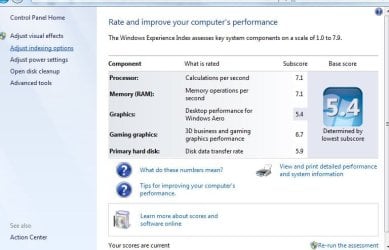
does windows experience index have any weight?

cpu 7.1
ram 7.1
graphics 5.9
disk 6.6 or something (dont remember this number exactly)

...i mean, my PC could play some 3d games (with low fps etc)...cant imagine it cant run word and windows 100% smoothly.
 

My Computer

Computer type
PC/Desktop
Computer Manufacturer/Model Number
Custom
OS
windows 7 64-bit
CPU
intel q6000
Motherboard
dg33tl intel
Memory
8 gb of corsair
Graphics Card(s)
GeForce GT 710 1GB DirectX 12 PCIe x16 2.0 Low
Hard Drives
Western Digital 500 GB 7200 RPM
windows experience index was intended to allow users see where bottlenecks appear in their system by use of this benchmark. Trouble is, the wei benchmark does not discriminiate between single task and multitasking. I suspect your higher score is due to the high multitasking capability of the Q6600.

If it helps my windows 7 dual core computer has a wei of 5.2 (primary disk drive, 7200 rpm).
 

My Computer

Computer type
PC/Desktop
OS
Windows 7 x64, Vista x64, 8.1 smartphone
CPU
Intel E8400 65W 64-bit
Motherboard
Gigabyte EP45-UD3LR
Memory
DDR2 2 x 2GB, 1GB x 2
Graphics Card(s)
XFX Radeon HD5750
Sound Card
AMD High Definition Audio; Realtek High Definition Audio
Monitor(s) Displays
iiyama prolite X2377HDS
Screen Resolution
1920 x 1080
Hard Drives
500GB 7200 rpm Seagate ST3500413AS 16MB, 500GB 5400 rpm Toshiba MQ02ABF050H 32MB, 200GB 7200 rpm Seagate ST3200820AS 8MB, 2TB 7200 rpm Western Digital WD20EZRX 64MB
PSU
Enermax Liberty Modular
Case
Antec P193 Midi Tower
Keyboard
Mionix ZIBAL 60
Mouse
Razer USB 2.0 Diamondback Mouse or Huion Graphics Tablet
Browser
Internet Explorer, Lunascape, Firefox, Opera, Avast Safezone
I have a Z170 MB, a i5, a M.2 SSD and a SATA 6 HDD.
I have bench marked the same HDD under SATA 3 and SATA 6.
Small files transfer much faster on a SATA 6 as they go fist to the memory cache on the disk.
With large files and I can say there is no difference. The transfer rate: Sequential Read (Q= 32,T= 1) : 135.585 MB/s
The same results on SATA 3 or SATA 6.
The bottle neck is the disk.

There are many reasons to not be fast and and to be choppy when saving a Word doc.
- How big is the file?
- Antivirus scans the file before allow it to be written. What anti virus and / or anti malware you have?
- Did you checked the disk (chkdsk c: /f) to see if it is healthy?

Over the years, you collect a lot of trash all over the OS. My experience says that is nothing like a clean install to speed up a computer. I do it every two years. When was the last time you did a clean install?

Finally, If you want to give your computer a huge upgrade in overall performance, buy a small SSD (128G - ~US$25) for windows and programs and use the HDD for data only.
 

My Computers

System One System Two

  • Computer type
    PC/Desktop
    Computer Manufacturer/Model Number
    custom build
    OS
    Windows 7 HP 64
    CPU
    i5 6600K - 800MHz to 4200MHz
    Motherboard
    GA-Z170-HD3P
    Memory
    4+4G GSkill DDR4 3000
    Graphics Card(s)
    IG - Intel 530
    Monitor(s) Displays
    Samsung 226BW
    Screen Resolution
    1680x1050
    Hard Drives
    (1) -1 SM951 – 128GB M.2 AHCI PCIe SSD drive for Windows 7 and Lubuntu
    (2) -1 WD SATA 3 - 1T for Data
    (3) -1 WD SATA 3 - 1T for backup
    PSU
    Thermaltake 450W TR2 gold
    Keyboard
    Old and good Chicony mechanical keyboard
    Mouse
    Logitech mX performance - 9 buttons (had to disable some)
    Internet Speed
    500Mb/s
    Browser
    Firefox 64
    Other Info
    TinyWall firewall
  • Computer type
    Laptop
    System Manufacturer/Model Number
    Asus Q550LF
    OS
    Windows 7 Pro
    CPU
    i7-4500U 800MHz to 3.0GHz
    Motherboard
    Asus Q550LF
    Memory
    (4+4)G DDR3 1600
    Graphics Card(s)
    IG intel 4400 + NVIDIA GeForce GT 745M
    Sound Card
    Realtek
    Monitor(s) Displays
    LG Display LP156WF4-SPH1
    Screen Resolution
    1920 x 1080
    Hard Drives
    BX500 120G SSD for Windows and programs +
    1T HDD for data
    Internet Speed
    500 Mb/s
    Browser
    Firefox
    Other Info
    TinyWall firewall
64-bit Windows 7

actually, windows 7 in general runs a bit smoother and snappier than my machine

Confused, I thought your machine was Windows 7?

Megahertz07 has some good points. I always check the HDD on any machine that is not running well, especially one that old with what appears to be the original install on it, wow 10yrs!

CPU is old architecture, slow, but meets all requirements of Office 2013.
 

My Computer

Computer type
Laptop
Computer Manufacturer/Model Number
HP Pavilion dv7-6c23cl
OS
Windows 7 Home Premium 64bit
CPU
AMD A8-3520M
Motherboard
Hewlett-Packard 180B (Socket FS1)
Memory
6.00GB DDR3 @ 674MHz (9-9-9-24)
Graphics Card(s)
512MB ATI AMD Radeon HD 6620G
Sound Card
IDT High Definition Audio CODEC
Monitor(s) Displays
Generic PnP Monitor
Screen Resolution
(1600x900@60Hz)
Hard Drives
Samsung 850 EVO 250GB SSD
Mouse
Logitec M525
Internet Speed
30-75Mbps
Antivirus
Avast Free, Unfortunately
Browser
Google Chrome, Firefox, IE
windows experience index was intended to allow users see where bottlenecks appear in their system by use of this benchmark. Trouble is, the wei benchmark does not discriminiate between single task and multitasking. I suspect your higher score is due to the high multitasking capability of the Q6600.

If it helps my windows 7 dual core computer has a wei of 5.2 (primary disk drive, 7200 rpm).

actually, it's my video card, 5.4 rating, and my hard drive is 5.9 (attached).

perhaps it's a shitty driver, but I do have the latest driver installed....can't believe this video card can't handle Aero well according to Windows....Aero doesn't rely on ray tracing here.....
 

Attachments

  • windows experience index.JPG
    windows experience index.JPG
    51.4 KB · Views: 0

My Computer

Computer type
PC/Desktop
Computer Manufacturer/Model Number
Custom
OS
windows 7 64-bit
CPU
intel q6000
Motherboard
dg33tl intel
Memory
8 gb of corsair
Graphics Card(s)
GeForce GT 710 1GB DirectX 12 PCIe x16 2.0 Low
Hard Drives
Western Digital 500 GB 7200 RPM
Confused, I thought your machine was Windows 7?

Megahertz07 has some good points. I always check the HDD on any machine that is not running well, especially one that old with what appears to be the original install on it, wow 10yrs!

CPU is old architecture, slow, but meets all requirements of Office 2013.

yes it is windows 7, both machiens, so it's a fair comparison.

my surface book is running windows 10 (obviously) and is of course faster than my PC.

yah, I just need my PC for browsing, some streaming, and office productivity.

just bought the surface book (on sale) for mobility and flexiblity (stylus, detachable screen, etc.)...I digress.
 

My Computer

Computer type
PC/Desktop
Computer Manufacturer/Model Number
Custom
OS
windows 7 64-bit
CPU
intel q6000
Motherboard
dg33tl intel
Memory
8 gb of corsair
Graphics Card(s)
GeForce GT 710 1GB DirectX 12 PCIe x16 2.0 Low
Hard Drives
Western Digital 500 GB 7200 RPM
FYI...what do you know? i have the same HDD as my work PC according to Windows' system info app.

and yes I confirmed it's 0% fragmented.

honestly, maybe cause it's a fresh install it's a faster and my shitty drivers is making my work PC's intel 4000 perform better than my dedicated geforce 710 .
 

My Computer

Computer type
PC/Desktop
Computer Manufacturer/Model Number
Custom
OS
windows 7 64-bit
CPU
intel q6000
Motherboard
dg33tl intel
Memory
8 gb of corsair
Graphics Card(s)
GeForce GT 710 1GB DirectX 12 PCIe x16 2.0 Low
Hard Drives
Western Digital 500 GB 7200 RPM
5.9 is a good performance for a HDD. As I wrote, the bottle neck is the disk, not the SATA.

Did you checked the disk (chkdsk c: /f) to see if it is healthy?
What anti virus and / or anti malware you have?
When was the last time you did a clean install?
 

My Computers

System One System Two

  • Computer type
    PC/Desktop
    Computer Manufacturer/Model Number
    custom build
    OS
    Windows 7 HP 64
    CPU
    i5 6600K - 800MHz to 4200MHz
    Motherboard
    GA-Z170-HD3P
    Memory
    4+4G GSkill DDR4 3000
    Graphics Card(s)
    IG - Intel 530
    Monitor(s) Displays
    Samsung 226BW
    Screen Resolution
    1680x1050
    Hard Drives
    (1) -1 SM951 – 128GB M.2 AHCI PCIe SSD drive for Windows 7 and Lubuntu
    (2) -1 WD SATA 3 - 1T for Data
    (3) -1 WD SATA 3 - 1T for backup
    PSU
    Thermaltake 450W TR2 gold
    Keyboard
    Old and good Chicony mechanical keyboard
    Mouse
    Logitech mX performance - 9 buttons (had to disable some)
    Internet Speed
    500Mb/s
    Browser
    Firefox 64
    Other Info
    TinyWall firewall
  • Computer type
    Laptop
    System Manufacturer/Model Number
    Asus Q550LF
    OS
    Windows 7 Pro
    CPU
    i7-4500U 800MHz to 3.0GHz
    Motherboard
    Asus Q550LF
    Memory
    (4+4)G DDR3 1600
    Graphics Card(s)
    IG intel 4400 + NVIDIA GeForce GT 745M
    Sound Card
    Realtek
    Monitor(s) Displays
    LG Display LP156WF4-SPH1
    Screen Resolution
    1920 x 1080
    Hard Drives
    BX500 120G SSD for Windows and programs +
    1T HDD for data
    Internet Speed
    500 Mb/s
    Browser
    Firefox
    Other Info
    TinyWall firewall
Is the word doc snappy when you boot in safe mode?
 

My Computer

Computer type
PC/Desktop
Computer Manufacturer/Model Number
diy
OS
Win7 pro x64
CPU
stock i7 7700k
Motherboard
Gigabyte Z270N-WIFI mini-ITX
Memory
Corsair Vengeance LPX 16GB (2x8GB) DDR4 @ 3200MHz
Graphics Card(s)
integrated Intel HD 630
Sound Card
onboard Realtek ALC1220
Monitor(s) Displays
two vertically mounted samsung 55" 4k un55mu8000
Screen Resolution
1920x1280
Hard Drives
256GB Samsung EVO 960 M.2 pci-e NVMe SSD
PSU
SilverStone Nightjar ST45NF 450Watt Fanless
Case
No case. Motherboard is mounted directly onto power supply
Cooling
Evercool low profile 815EP with Panaflow 12L fan at 7v
Keyboard
Ortek MCK-86 mini
Mouse
Belkin 5-button USB
Internet Speed
spectrum 400mbps
Is the word doc snappy when you boot in safe mode?

no malware, viruses

i even disabled anti-virus

clean install? don't recall

don't get me wrong, my PC isn't sluggish, but it's odd how my work PC and my girl's laptop (i3, onboard graphics) seems to run the Word doc a bit better

that said, work PC is using 2010, laptop is using 2016. ...it could be a software issue with 2013...the CPU usage is high when I'm using the Word document
 

My Computer

Computer type
PC/Desktop
Computer Manufacturer/Model Number
Custom
OS
windows 7 64-bit
CPU
intel q6000
Motherboard
dg33tl intel
Memory
8 gb of corsair
Graphics Card(s)
GeForce GT 710 1GB DirectX 12 PCIe x16 2.0 Low
Hard Drives
Western Digital 500 GB 7200 RPM
Is the word doc snappy when you boot in safe mode?
no malware, viruses
I am still curious how the performance of your machine in safe mode compares to normal mode. Is it as snappy as it should be in safe mode.


If safe mode is not slow like normal mode, you may be running out of free memory in normal mode or you have some program that is eating up the cpu.
 

My Computer

Computer type
PC/Desktop
Computer Manufacturer/Model Number
diy
OS
Win7 pro x64
CPU
stock i7 7700k
Motherboard
Gigabyte Z270N-WIFI mini-ITX
Memory
Corsair Vengeance LPX 16GB (2x8GB) DDR4 @ 3200MHz
Graphics Card(s)
integrated Intel HD 630
Sound Card
onboard Realtek ALC1220
Monitor(s) Displays
two vertically mounted samsung 55" 4k un55mu8000
Screen Resolution
1920x1280
Hard Drives
256GB Samsung EVO 960 M.2 pci-e NVMe SSD
PSU
SilverStone Nightjar ST45NF 450Watt Fanless
Case
No case. Motherboard is mounted directly onto power supply
Cooling
Evercool low profile 815EP with Panaflow 12L fan at 7v
Keyboard
Ortek MCK-86 mini
Mouse
Belkin 5-button USB
Internet Speed
spectrum 400mbps
I am still curious how the performance of your machine in safe mode compares to normal mode. Is it as snappy as it should be in safe mode.


If safe mode is not slow like normal mode, you may be running out of free memory in normal mode or you have some program that is eating up the cpu.

good point...it runs smooth in safe mode

when i load windows and word....and press enter in that word document..CPU usage is around 30% and it's relatively choppy when I keep pressing enter to make new lines in the word document

when i do the same thing on my surface book (first gen, i5) ....CPU usage is high as well, but it's smooth when I press enter


anyway....im thinking it's either cause the CPU is old (but I mean, it's just a Word doc...), or perhaps a software issue with 2013 (I'm using 2016 on my surface)


it's not THAT big of a deal, so I'm not gonna go through the pain of installing 2016 on my desktop ...
 

My Computer

Computer type
PC/Desktop
Computer Manufacturer/Model Number
Custom
OS
windows 7 64-bit
CPU
intel q6000
Motherboard
dg33tl intel
Memory
8 gb of corsair
Graphics Card(s)
GeForce GT 710 1GB DirectX 12 PCIe x16 2.0 Low
Hard Drives
Western Digital 500 GB 7200 RPM
Back
Top