
Solved Windows 7 periodically Freezes.

Tweakit

New member
Power User
Local time
10:52 AM
Messages
75
My windows 7 64-bit Pro computer has a nasty, annoying problem. I’m pretty sure it’s been present since I built it 2+ years ago. The computer sort of “freezes” periodically and randomly. It can happen two or three times a day or not be seen for 2 days in a row. When it “freezes,” here’s what happens. The mouse moves freely but applications can neither be opened nor closed. Clicking on anything has no effect for the duration of the “freeze.” The length of time a freeze lasts is typically about 30 seconds but can be shorter or longer. Often freezes will occur twice in a row with 10 seconds between freezes. When a freeze occurs, the hard drive lite is ON-SOLID with no flickering for the duration of the freeze. Curiously, audio and video players continue playing during a freeze. I also get application hangs on this computer but I can’t tell if these are related to the “freezes.” Here’s what I’ve done to debug:
· I’ve run process explorer to see what is keeping the hard drive lite on solid but it says the hard drive is free during a freeze. I think process explorer is tell the truth because I can’t hear any drive activity during a freeze. I suspect the hard drive lite is not really reflecting HD activity during a freeze.
· I’ve updated my video drivers a few times with no effect on the freezes.
· I suspected the Sata Drivers which I understand are part of the Intel chipset INF drivers. I ran the Intel Driver Update Utility which indicated I have version 9.1.2.1007 and that “This version is valid.”
· I ran SFC /verifyonly but no problems were found.
Also, no errors are logged in the event viewer as a result of a freeze. At the bottom of the post I listed informational events that occur with a freeze.
All help will be appreciated!

Code:
Windows 7 professional 64 bit 
CPU: i7-870
Mobo: Gigabyte GA-P55-USB3 (rev 2) 
Memory: G.Skill F3-10666CL8D-4GBHK; (4GB)
Graphics Card: Radeon HD4670 
Hard Drives:
· VelociRaptor WD1500HLFS 150GB (system+applications)
· 2TB Samsung spinpoint (data) 
· WD caviar blue (data)
PSU: Antec EA-500D Earthwatts 
Other: Hauppauge TV Card HVR-1600
 
Informational events logged with a "freeze:"
Log Name:      System
Source:        Service Control Manager
Date:          9/15/2012 12:29:52 PM
Event ID:      7036
Task Category: None
Level:         Information
Keywords:      Classic
User:          N/A
Computer:      FASTEDDIE
Description: The Windows Error Reporting Service service entered the stopped state.
-
Log Name:      System
Source:        Service Control Manager
Date:          9/15/2012 12:28:45 PM
Event ID:      7036
Task Category: None
Level:         Information
Keywords:      Classic
User:          N/A
Computer:      FASTEDDIE
Description: The Application Experience service entered the running state.
-
Log Name:      System
Source:        Service Control Manager
Date:          9/15/2012 12:27:52 PM
Event ID:      7036
Task Category: None
Level:         Information
Keywords:      Classic
User:          N/A
Computer:      FASTEDDIE
Description:  The Windows Error Reporting Service service entered the running state.
-
Log Name:      Security
Source:        Microsoft-Windows-Security-Auditing
Date:          9/15/2012 12:27:47 PM
Event ID:      4672
Task Category: Special Logon
Level:         Information
Keywords:      Audit Success
User:          N/A
Computer:      FASTEDDIE
Description:
Special privileges assigned to new logon.

Subject:
                Security ID:                             SYSTEM
                Account Name:                      SYSTEM
                Account Domain:                   NT AUTHORITY
                Logon ID:                               0x3e7

Privileges:                              SeAssignPrimaryTokenPrivilege
                                                SeTcbPrivilege
                                                SeSecurityPrivilege
                                                SeTakeOwnershipPrivilege
                                                SeLoadDriverPrivilege
                                                SeBackupPrivilege
                                                SeRestorePrivilege
                                                SeDebugPrivilege
                                                SeAuditPrivilege
                                                SeSystemEnvironmentPrivilege
                                                SeImpersonatePrivilege 
-
Log Name:      Security
Source:        Microsoft-Windows-Security-Auditing
Date:          9/15/2012 12:27:47 PM
Event ID:      4624
Task Category: Logon
Level:         Information
Keywords:      Audit Success
User:          N/A
Computer:      FASTEDDIE
Description:
An account was successfully logged on.

Subject:
                Security ID:                             SYSTEM
                Account Name:                      FASTEDDIE$
                Account Domain:                   WORKGROUP
                Logon ID:                               0x3e7

Logon Type:                                          5

New Logon:
                Security ID:                             SYSTEM
                Account Name:                      SYSTEM
                Account Domain:                   NT AUTHORITY
                Logon ID:                               0x3e7
                Logon GUID:                         {00000000-0000-0000-0000-000000000000}

Process Information:
                Process ID:                            0x260
                Process Name:                      C:\Windows\System32\services.exe

Network Information:
                Workstation Name:               
                Source Network Address:     -
                Source Port:                           -

Detailed Authentication Information:
                Logon Process:                     Advapi  
                Authentication Package:       Negotiate
                Transited Services:               -
                Package Name (NTLM only):               -
                Key Length:                            0
 
Last edited:

My Computer

Computer type
PC/Desktop
Computer Manufacturer/Model Number
Custom Build
OS
Windows 7 professional 64 bit
CPU
i7-870
Motherboard
Gigabyte GA-P55-USB3 (rev 2)
Memory
G.Skill F3-10666CL9D-8GBRL; (8GB)
Graphics Card(s)
Radeon HD4670
Sound Card
on board
Monitor(s) Displays
Dell U2311H plus ASUS PB238
Screen Resolution
1080P (dual monitors)
Hard Drives
VelociRaptor WD1500HLHX 150GB (system)
2TB Samsung spinpoint (data)
596GB WD caviar blue (data)
PSU
FSP AS400 400W ATX2.31/EPS2.92
Case
Antec Sonata III 500
Cooling
CPU cooled by Rosewill HSF RCX-Z90-CP
Keyboard
Microsoft ergonomic PS-2
Mouse
Logitech M510
Internet Speed
very fast via cable
Antivirus
Microsoft Security Essentials
Browser
Chrome and IE10
Other Info
Also have hauppauge TV Card HVR-1600
CPU, case and GPU Fans are controlled by SpeedFan.
I would love some guidance on this problem. Can somebody help? :cry:
 

My Computer

Computer type
PC/Desktop
Computer Manufacturer/Model Number
Custom Build
OS
Windows 7 professional 64 bit
CPU
i7-870
Motherboard
Gigabyte GA-P55-USB3 (rev 2)
Memory
G.Skill F3-10666CL9D-8GBRL; (8GB)
Graphics Card(s)
Radeon HD4670
Sound Card
on board
Monitor(s) Displays
Dell U2311H plus ASUS PB238
Screen Resolution
1080P (dual monitors)
Hard Drives
VelociRaptor WD1500HLHX 150GB (system)
2TB Samsung spinpoint (data)
596GB WD caviar blue (data)
PSU
FSP AS400 400W ATX2.31/EPS2.92
Case
Antec Sonata III 500
Cooling
CPU cooled by Rosewill HSF RCX-Z90-CP
Keyboard
Microsoft ergonomic PS-2
Mouse
Logitech M510
Internet Speed
very fast via cable
Antivirus
Microsoft Security Essentials
Browser
Chrome and IE10
Other Info
Also have hauppauge TV Card HVR-1600
CPU, case and GPU Fans are controlled by SpeedFan.
Have you ran a full virus scan, I would install and update Malwarebytes, and run it while in safe mode. Then you can try doing a minimal boot using MSConfig, just make sure you don't disable Microsoft processes. Also do a hard drive test to make sure your drive is working fully. Depending on the brand of your Hard Drive, I would get the diagnostics program from the manufacturer's website.
 

My Computer

Computer Manufacturer/Model Number
HP C2N70UA#ABA Laptop
OS
Windows 8 64-bit (6.2, Build 9200) (9200.win8_rtm.120725-1247)
CPU
AMD Quad-Core A10-4600M APU 2.3Ghz Turbo to 3.4
Memory
8GB DDR3
Graphics Card(s)
AMD Radeon HD 7660G
Sound Card
Altec Lansing with SRS Premium Sound
Monitor(s) Displays
17" Laptop HD Display (720p)
Screen Resolution
1600*900
Hard Drives
750GB (5400 RPM), with smart protect
Western Digital 1TB Passport
Cooling
HP Cool Sense
Keyboard
Island Style
Mouse
Logitech 625 Wireless
Internet Speed
30MBps
I've run full virus scans using Microsoft Security Essentials. My system drive is Western Digital Velociraptor which I've not yet run diagnostics on. I will do the suggested scans and drive diagnostics and post the results. Thanks for the suggestions!
 

My Computer

Computer type
PC/Desktop
Computer Manufacturer/Model Number
Custom Build
OS
Windows 7 professional 64 bit
CPU
i7-870
Motherboard
Gigabyte GA-P55-USB3 (rev 2)
Memory
G.Skill F3-10666CL9D-8GBRL; (8GB)
Graphics Card(s)
Radeon HD4670
Sound Card
on board
Monitor(s) Displays
Dell U2311H plus ASUS PB238
Screen Resolution
1080P (dual monitors)
Hard Drives
VelociRaptor WD1500HLHX 150GB (system)
2TB Samsung spinpoint (data)
596GB WD caviar blue (data)
PSU
FSP AS400 400W ATX2.31/EPS2.92
Case
Antec Sonata III 500
Cooling
CPU cooled by Rosewill HSF RCX-Z90-CP
Keyboard
Microsoft ergonomic PS-2
Mouse
Logitech M510
Internet Speed
very fast via cable
Antivirus
Microsoft Security Essentials
Browser
Chrome and IE10
Other Info
Also have hauppauge TV Card HVR-1600
CPU, case and GPU Fans are controlled by SpeedFan.
Ok, I've done everything suggested. Ran all non-destructive Western Digital hard drive tests, ran Malwarebytes in both safe mode and from a clean boot and ran TDSKiller. Also ran another full virus scan using MSE. All was clean and no errors!
Any other suggestions??
 

My Computer

Computer type
PC/Desktop
Computer Manufacturer/Model Number
Custom Build
OS
Windows 7 professional 64 bit
CPU
i7-870
Motherboard
Gigabyte GA-P55-USB3 (rev 2)
Memory
G.Skill F3-10666CL9D-8GBRL; (8GB)
Graphics Card(s)
Radeon HD4670
Sound Card
on board
Monitor(s) Displays
Dell U2311H plus ASUS PB238
Screen Resolution
1080P (dual monitors)
Hard Drives
VelociRaptor WD1500HLHX 150GB (system)
2TB Samsung spinpoint (data)
596GB WD caviar blue (data)
PSU
FSP AS400 400W ATX2.31/EPS2.92
Case
Antec Sonata III 500
Cooling
CPU cooled by Rosewill HSF RCX-Z90-CP
Keyboard
Microsoft ergonomic PS-2
Mouse
Logitech M510
Internet Speed
very fast via cable
Antivirus
Microsoft Security Essentials
Browser
Chrome and IE10
Other Info
Also have hauppauge TV Card HVR-1600
CPU, case and GPU Fans are controlled by SpeedFan.
http://www.sevenforums.com/tutorials/105647-ram-test-memtest86.html

Test each RAM stick individually, if an error found, then test the same RAM module again (least 6-7 passes) in a different motherboard slot (repeat for all slots). If an error is found in every motherboard slot, then you have a faulty RAM module, if there are no errors found in a different motherboard slot, then you have a bad motherboard slot.
 

My Computer

Computer type
Laptop
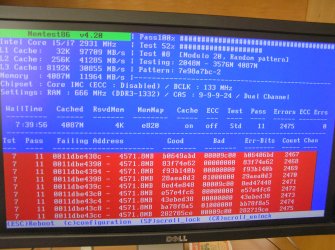
I ran memtest86+ latest version although i didn't take the computer apart so both memory modules remained in place. Within 1-2 minutes errors were logged on pass 0! I ran it overnight and logged 2475 errors in 11 passes. I attached 5 screen shots during various times in the test (I'm not sure how to figure out what addresses are bad but that info might be in the screen shots). Then I slowed down the basic memory speeds from 7 to 9 and from 24 to 27 and ran a single pass again. No errors BUT: I then put the speeds back to the SPD values and ran it for a single pass with no errors! Humm.. Seems like we're in intermittent land! In any case there does seem to be a memory problem so I'll plan to replace it. In the meantime I'm running the slowed rates. I'm not sure if the memory is my problem or not as I don't think it was bad from the beginning (cant be sure though) and my freeze problem has been there from the beginning. If slowing the memory down has really fixed it, I should know something in a week or less. I'll post whatever I learn on this. Also please let me know if you can identify what addresses are bad or have any ideas besides what I menitoned. Do you really think I need to pursue the possibility of the mobo memory slot being bad? Thanks MUCH for the help!
 

Attachments

  • P1010001.JPG
    P1010001.JPG
    531.7 KB · Views: 19
  • P1010003.JPG
    P1010003.JPG
    517.8 KB · Views: 16
  • P1010006.JPG
    P1010006.JPG
    529.6 KB · Views: 15
  • P1010011.JPG
    P1010011.JPG
    647.6 KB · Views: 16
  • P1010012.JPG
    P1010012.JPG
    615.9 KB · Views: 18

My Computer

Computer type
PC/Desktop
Computer Manufacturer/Model Number
Custom Build
OS
Windows 7 professional 64 bit
CPU
i7-870
Motherboard
Gigabyte GA-P55-USB3 (rev 2)
Memory
G.Skill F3-10666CL9D-8GBRL; (8GB)
Graphics Card(s)
Radeon HD4670
Sound Card
on board
Monitor(s) Displays
Dell U2311H plus ASUS PB238
Screen Resolution
1080P (dual monitors)
Hard Drives
VelociRaptor WD1500HLHX 150GB (system)
2TB Samsung spinpoint (data)
596GB WD caviar blue (data)
PSU
FSP AS400 400W ATX2.31/EPS2.92
Case
Antec Sonata III 500
Cooling
CPU cooled by Rosewill HSF RCX-Z90-CP
Keyboard
Microsoft ergonomic PS-2
Mouse
Logitech M510
Internet Speed
very fast via cable
Antivirus
Microsoft Security Essentials
Browser
Chrome and IE10
Other Info
Also have hauppauge TV Card HVR-1600
CPU, case and GPU Fans are controlled by SpeedFan.
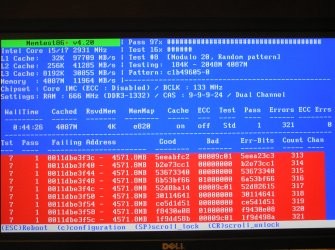
they told you to test each ram bank alone to find easily who of the two was faulty. Figuring out those addresses is something not a lot of techs can (or feel the need to) do.

So, test ONE RAM bank at a time, once in a ram slot, once in the other.

Check the ram voltage in the bios with the ram voltage needed (should be stated on the manufacturer's site or on the RAM's documentation), and adjust it if necessary.
 

My Computer

Computer type
PC/Desktop
Computer Manufacturer/Model Number
custom built
OS
Win 7 Pro 64-bit 7601
CPU
AMD Phenom 9650 QuadCore, revision DR-B3
Motherboard
ASUS M4A78
Memory
5 GB yes I run 2x 2GB and 1x 1GB, different brand, spank me.
Graphics Card(s)
NVIDIA GeForce 9800 GT 512 Mb, unknown manufacturer.
Sound Card
Crappy Realtek Integrated Audio
Monitor(s) Displays
Fujitsu Siemens P19-3P
Screen Resolution
1280 x 1024 x 32 bits @ 60 Hz Oh yeah, 4:3 rocks!
Hard Drives
(1) MAXTOR S TM3320613AS SATA Disk Device (2) STM35004 18AS SATA Disk Device (3) TOSHIBA USB 2.5"-HDD
PSU
whatever, around 450w
Case
Scavenged from old company PC, 10+ years old
Cooling
CPU fan, GPU fan, case fan, nothing fancy
Keyboard
Microsoft, PS/2, white.
Mouse
Optical, logitec.
Internet Speed
effective max speeds: 70-ish kB/s down 30-ish kB/s up
Antivirus
Avira, free edition.
Browser
Firefox with FXChrome to make it look like Google Chrome :P
Other Info
Was discarded by previous owner due to "horrible performance".
Was running Win Xp from a IDE drive. Yeah. Was a pain.
SATA II drive and Win7 and it zips away! Yay!
OK this is getting complicated. I bought two new sticks 2x4GB of very highly rated G. Skill memory. I kept the bios memory setting on auto and ran memtest86+. With a few minutes I got errors. Rebooted to start the test again and ran for a few hours with no errors. Rebooted to start the test again and got errors within a few minutes. Rebooted and ran the test overnight and got no errors! A similar thing happened with the old memory where I would get no errors, reboot the test and then got errors. I’m starting to wonder:
1. Am I seeing another memory problem with the newly purchased memory or:
2. Am I seeing some other problem maybe with the way things initialize during a boot that causes problems or:
3. Some other mobo problem rather than memory related?

I could take one stick out as previously suggested and try it in both slots but it’s starting to look like what I see may not be stick or slot related but something that happens on a particular boot up that determines how things are read and written to the ram. In other words it’s starting to look like this problem may not be memory or mobo slot related but something deeper in the mobo circuitry. I’m pretty baffled and I’d love to get some suggestions.
 

My Computer

Computer type
PC/Desktop
Computer Manufacturer/Model Number
Custom Build
OS
Windows 7 professional 64 bit
CPU
i7-870
Motherboard
Gigabyte GA-P55-USB3 (rev 2)
Memory
G.Skill F3-10666CL9D-8GBRL; (8GB)
Graphics Card(s)
Radeon HD4670
Sound Card
on board
Monitor(s) Displays
Dell U2311H plus ASUS PB238
Screen Resolution
1080P (dual monitors)
Hard Drives
VelociRaptor WD1500HLHX 150GB (system)
2TB Samsung spinpoint (data)
596GB WD caviar blue (data)
PSU
FSP AS400 400W ATX2.31/EPS2.92
Case
Antec Sonata III 500
Cooling
CPU cooled by Rosewill HSF RCX-Z90-CP
Keyboard
Microsoft ergonomic PS-2
Mouse
Logitech M510
Internet Speed
very fast via cable
Antivirus
Microsoft Security Essentials
Browser
Chrome and IE10
Other Info
Also have hauppauge TV Card HVR-1600
CPU, case and GPU Fans are controlled by SpeedFan.
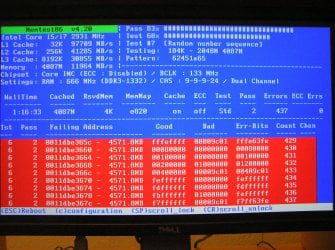
AS bobafetthotmail states You MUST CHECK the ram voltage in the bios with the ram voltage needed (should be stated on the manufacturer's site or on the RAM's documentation), and adjust it if necessary. :D
 

My Computer

Computer type
PC/Desktop
Computer Manufacturer/Model Number
Bluethunder II
OS
Windows 7 x64 Ultimate and numerous virtual machines
CPU
AMD FX-8350 Vishera 32nm Technology @ 4.2 GHz default
Motherboard
ASUSTeK COMPUTER INC. SABERTOOTH 990FX R2.0 (Socket 942)
Memory
G Skill 32.0GB Dual-Channel DDR3 @ 1204MHz (11-13-13-31)
Graphics Card(s)
EVGA GeForce GTX 960 4GB Super SC ACX 2.0+ with Back Plate
Sound Card
Creative X-Fi Titanium HD Audiophile PCIe
Monitor(s) Displays
LG L227WTG x 3
Screen Resolution
1680 x 1050 16:10
Hard Drives
238GB Samsung850 PRO SATA Disk Device (SSD)
1863GB Seagate ST2000DM 001-1CH164 (SATA)
1397GB Seagate ST1500DL 003-9VT16L(SATA)
466GB Western Digital WDC WD50 03AZEX-00K1GA0 (SATA) x 2
932GB Seagate ST310005 28AS SATA Disk Device (SATA)
PSU
Enermax Revolution87+ 1000 Watts Gold Certified Power Supply
Case
Rocketfish Full Tower
Cooling
Cooler Master Hyper 212 EVO Push Pull 120mm Fans
Keyboard
Logitech K740
Mouse
Logitech G100S Laser LED + Logitech Gamepad F310
Internet Speed
500 mbs down and 30mbs up
Antivirus
Malwarebytes Pro & Avast and MSE on certain Virtual Machines
Browser
Firefox (Main) Chrome, Internet Explorer (Back Up)
Other Info
Logitech X 230 2.1 Stereo System and 5.1 Yamaha RX V2090
B&W DM6 Monitor Speakers + Center and Surround Speakers
Using Mouse Without Borders (Google it)
Oh that's been checked. It's set at 1.5 which is what the RAM spec is. Thanks.
 

My Computer

Computer type
PC/Desktop
Computer Manufacturer/Model Number
Custom Build
OS
Windows 7 professional 64 bit
CPU
i7-870
Motherboard
Gigabyte GA-P55-USB3 (rev 2)
Memory
G.Skill F3-10666CL9D-8GBRL; (8GB)
Graphics Card(s)
Radeon HD4670
Sound Card
on board
Monitor(s) Displays
Dell U2311H plus ASUS PB238
Screen Resolution
1080P (dual monitors)
Hard Drives
VelociRaptor WD1500HLHX 150GB (system)
2TB Samsung spinpoint (data)
596GB WD caviar blue (data)
PSU
FSP AS400 400W ATX2.31/EPS2.92
Case
Antec Sonata III 500
Cooling
CPU cooled by Rosewill HSF RCX-Z90-CP
Keyboard
Microsoft ergonomic PS-2
Mouse
Logitech M510
Internet Speed
very fast via cable
Antivirus
Microsoft Security Essentials
Browser
Chrome and IE10
Other Info
Also have hauppauge TV Card HVR-1600
CPU, case and GPU Fans are controlled by SpeedFan.
Oh that's been checked. It's set at 1.5 which is what the RAM spec is. Thanks.
If possible try bumping up the RAM voltage to the next value, say 1.6 or 1.65 and see if it becomes stable. :geek:
 

My Computer

Computer type
PC/Desktop
Computer Manufacturer/Model Number
Bluethunder II
OS
Windows 7 x64 Ultimate and numerous virtual machines
CPU
AMD FX-8350 Vishera 32nm Technology @ 4.2 GHz default
Motherboard
ASUSTeK COMPUTER INC. SABERTOOTH 990FX R2.0 (Socket 942)
Memory
G Skill 32.0GB Dual-Channel DDR3 @ 1204MHz (11-13-13-31)
Graphics Card(s)
EVGA GeForce GTX 960 4GB Super SC ACX 2.0+ with Back Plate
Sound Card
Creative X-Fi Titanium HD Audiophile PCIe
Monitor(s) Displays
LG L227WTG x 3
Screen Resolution
1680 x 1050 16:10
Hard Drives
238GB Samsung850 PRO SATA Disk Device (SSD)
1863GB Seagate ST2000DM 001-1CH164 (SATA)
1397GB Seagate ST1500DL 003-9VT16L(SATA)
466GB Western Digital WDC WD50 03AZEX-00K1GA0 (SATA) x 2
932GB Seagate ST310005 28AS SATA Disk Device (SATA)
PSU
Enermax Revolution87+ 1000 Watts Gold Certified Power Supply
Case
Rocketfish Full Tower
Cooling
Cooler Master Hyper 212 EVO Push Pull 120mm Fans
Keyboard
Logitech K740
Mouse
Logitech G100S Laser LED + Logitech Gamepad F310
Internet Speed
500 mbs down and 30mbs up
Antivirus
Malwarebytes Pro & Avast and MSE on certain Virtual Machines
Browser
Firefox (Main) Chrome, Internet Explorer (Back Up)
Other Info
Logitech X 230 2.1 Stereo System and 5.1 Yamaha RX V2090
B&W DM6 Monitor Speakers + Center and Surround Speakers
Using Mouse Without Borders (Google it)
I did that. Bumped the RAM volts to 1.6 from 1.5. No change. Made errors within 10 minutes of testing.
Other ideas??
 

My Computer

Computer type
PC/Desktop
Computer Manufacturer/Model Number
Custom Build
OS
Windows 7 professional 64 bit
CPU
i7-870
Motherboard
Gigabyte GA-P55-USB3 (rev 2)
Memory
G.Skill F3-10666CL9D-8GBRL; (8GB)
Graphics Card(s)
Radeon HD4670
Sound Card
on board
Monitor(s) Displays
Dell U2311H plus ASUS PB238
Screen Resolution
1080P (dual monitors)
Hard Drives
VelociRaptor WD1500HLHX 150GB (system)
2TB Samsung spinpoint (data)
596GB WD caviar blue (data)
PSU
FSP AS400 400W ATX2.31/EPS2.92
Case
Antec Sonata III 500
Cooling
CPU cooled by Rosewill HSF RCX-Z90-CP
Keyboard
Microsoft ergonomic PS-2
Mouse
Logitech M510
Internet Speed
very fast via cable
Antivirus
Microsoft Security Essentials
Browser
Chrome and IE10
Other Info
Also have hauppauge TV Card HVR-1600
CPU, case and GPU Fans are controlled by SpeedFan.
I did that. Bumped the RAM volts to 1.6 from 1.5. No change. Made errors within 10 minutes of testing.
Other ideas??
Is there a BIOS update for your motherboard?
About the only thing I can think of after all you have checked and tested is a suspect motherboard. If there is an update to the bios this may fix it, if not I would be seeking advice from Giga Byte to RMA if under warranty.
Before you do that try this.
A power supply can cause issues like this if some of the capacitors are getting weak causing voltage fluctuations on the high current low voltage supplies, see if you can borrow one for troubleshooting purposes. Never attempt repairs of any kind on the PSU. :geek:
 

My Computer

Computer type
PC/Desktop
Computer Manufacturer/Model Number
Bluethunder II
OS
Windows 7 x64 Ultimate and numerous virtual machines
CPU
AMD FX-8350 Vishera 32nm Technology @ 4.2 GHz default
Motherboard
ASUSTeK COMPUTER INC. SABERTOOTH 990FX R2.0 (Socket 942)
Memory
G Skill 32.0GB Dual-Channel DDR3 @ 1204MHz (11-13-13-31)
Graphics Card(s)
EVGA GeForce GTX 960 4GB Super SC ACX 2.0+ with Back Plate
Sound Card
Creative X-Fi Titanium HD Audiophile PCIe
Monitor(s) Displays
LG L227WTG x 3
Screen Resolution
1680 x 1050 16:10
Hard Drives
238GB Samsung850 PRO SATA Disk Device (SSD)
1863GB Seagate ST2000DM 001-1CH164 (SATA)
1397GB Seagate ST1500DL 003-9VT16L(SATA)
466GB Western Digital WDC WD50 03AZEX-00K1GA0 (SATA) x 2
932GB Seagate ST310005 28AS SATA Disk Device (SATA)
PSU
Enermax Revolution87+ 1000 Watts Gold Certified Power Supply
Case
Rocketfish Full Tower
Cooling
Cooler Master Hyper 212 EVO Push Pull 120mm Fans
Keyboard
Logitech K740
Mouse
Logitech G100S Laser LED + Logitech Gamepad F310
Internet Speed
500 mbs down and 30mbs up
Antivirus
Malwarebytes Pro & Avast and MSE on certain Virtual Machines
Browser
Firefox (Main) Chrome, Internet Explorer (Back Up)
Other Info
Logitech X 230 2.1 Stereo System and 5.1 Yamaha RX V2090
B&W DM6 Monitor Speakers + Center and Surround Speakers
Using Mouse Without Borders (Google it)
I could take one stick out as previously suggested and try it in both slots but it’s starting to look like what I see may not be stick or slot related but something that happens on a particular boot up that determines how things are read and written to the ram. In other words it’s starting to look like this problem may not be memory or mobo slot related but something deeper in the mobo circuitry. I’m pretty baffled and I’d love to get some suggestions.
No offence, but we already said how to troubleshoot your machine. If you follow our advice you may actually find the culprit, otherwise you are just wasting your and our time. I understand that it's extremely annoying to properly test hardware, but impatience isn't going to help.

Once again I repeat:
-take away all ram, reset voltages to 1.5
-pick a single ram bank
-place it in the first slot (look at the motheboard manual to determine what is the first slot for it)
-run memtest for at least 6-7 passes. It's long, but if you do less it's not catching errors.

If it goes well, that ram bank is fine, now we can start testing the motherboard.
Test the same ram bank in another slot (again check the manual to make sure the motherboard accepts a single ram in that particular slot slot) following the same procedure as above.

If no errors after you tested it in all the slots, then the motherboard is fine.

Last you can test other ram banks following same procedure.

After you did this, report back your findings.
 

My Computer

Computer type
PC/Desktop
Computer Manufacturer/Model Number
custom built
OS
Win 7 Pro 64-bit 7601
CPU
AMD Phenom 9650 QuadCore, revision DR-B3
Motherboard
ASUS M4A78
Memory
5 GB yes I run 2x 2GB and 1x 1GB, different brand, spank me.
Graphics Card(s)
NVIDIA GeForce 9800 GT 512 Mb, unknown manufacturer.
Sound Card
Crappy Realtek Integrated Audio
Monitor(s) Displays
Fujitsu Siemens P19-3P
Screen Resolution
1280 x 1024 x 32 bits @ 60 Hz Oh yeah, 4:3 rocks!
Hard Drives
(1) MAXTOR S TM3320613AS SATA Disk Device (2) STM35004 18AS SATA Disk Device (3) TOSHIBA USB 2.5"-HDD
PSU
whatever, around 450w
Case
Scavenged from old company PC, 10+ years old
Cooling
CPU fan, GPU fan, case fan, nothing fancy
Keyboard
Microsoft, PS/2, white.
Mouse
Optical, logitec.
Internet Speed
effective max speeds: 70-ish kB/s down 30-ish kB/s up
Antivirus
Avira, free edition.
Browser
Firefox with FXChrome to make it look like Google Chrome :P
Other Info
Was discarded by previous owner due to "horrible performance".
Was running Win Xp from a IDE drive. Yeah. Was a pain.
SATA II drive and Win7 and it zips away! Yay!
BINGO! I did the bios update and ran Memtest86+ overnight and then rebooting and rerunning many times (more than enough to have seen the problem if it were still there). I never got a single error! Curiously the bios update did not list any fixes for memory issues so I guess they don’t itemize all the fixed included. I’ll have to run the computer for about a week before I can be sure this has solved the Freeze problem I reported with my initial post. Since I’ll be away, it’ll be a few weeks till I can be sure. Once I figure that part out, I’ll reply and mark this as ‘solved’ if appropriate.
In the meantime my thanks to those who helped with this and particularly to ‘Indianatone’ for suggesting the bios update. :)
 

My Computer

Computer type
PC/Desktop
Computer Manufacturer/Model Number
Custom Build
OS
Windows 7 professional 64 bit
CPU
i7-870
Motherboard
Gigabyte GA-P55-USB3 (rev 2)
Memory
G.Skill F3-10666CL9D-8GBRL; (8GB)
Graphics Card(s)
Radeon HD4670
Sound Card
on board
Monitor(s) Displays
Dell U2311H plus ASUS PB238
Screen Resolution
1080P (dual monitors)
Hard Drives
VelociRaptor WD1500HLHX 150GB (system)
2TB Samsung spinpoint (data)
596GB WD caviar blue (data)
PSU
FSP AS400 400W ATX2.31/EPS2.92
Case
Antec Sonata III 500
Cooling
CPU cooled by Rosewill HSF RCX-Z90-CP
Keyboard
Microsoft ergonomic PS-2
Mouse
Logitech M510
Internet Speed
very fast via cable
Antivirus
Microsoft Security Essentials
Browser
Chrome and IE10
Other Info
Also have hauppauge TV Card HVR-1600
CPU, case and GPU Fans are controlled by SpeedFan.
OK, I’m following up with a status on this. While the bios update solved the memory issue, it apparently has not solved the Freeze issue. I’m still getting the Freezes I described in my 1st post to this thread. I think the biggest clues on this are the entries from the Event Viewer that are also seen in my first post. I suspect this has something to do with the “Windows Error Reporting Service.” From the events I listed in the 1st post it appears this service starts up at the beginning of a freeze and stops at or near the end of a Freeze. I’m not sure what this service does or if I can disable it or why it seems to Freeze up my computer. If it caused every computer to Freeze up I would expect a lot of folks to be irritated or for uSoft to have fixed it. From all the tests that have been run, I think we’ve ruled out hardware problems and corrupted OS files, viruses etc. It may be more software or conflict type stuff but I’m not that much of an expert.
Any suggestions or other clues on this?
 

My Computer

Computer type
PC/Desktop
Computer Manufacturer/Model Number
Custom Build
OS
Windows 7 professional 64 bit
CPU
i7-870
Motherboard
Gigabyte GA-P55-USB3 (rev 2)
Memory
G.Skill F3-10666CL9D-8GBRL; (8GB)
Graphics Card(s)
Radeon HD4670
Sound Card
on board
Monitor(s) Displays
Dell U2311H plus ASUS PB238
Screen Resolution
1080P (dual monitors)
Hard Drives
VelociRaptor WD1500HLHX 150GB (system)
2TB Samsung spinpoint (data)
596GB WD caviar blue (data)
PSU
FSP AS400 400W ATX2.31/EPS2.92
Case
Antec Sonata III 500
Cooling
CPU cooled by Rosewill HSF RCX-Z90-CP
Keyboard
Microsoft ergonomic PS-2
Mouse
Logitech M510
Internet Speed
very fast via cable
Antivirus
Microsoft Security Essentials
Browser
Chrome and IE10
Other Info
Also have hauppauge TV Card HVR-1600
CPU, case and GPU Fans are controlled by SpeedFan.
OK so the computer is freezing. The hard drive light is on which means it is writing something to the hard drive. What are you doing at this point? Playing games, saving a document or working on pictures or any other large files? Have you tinkered in any way with the virtual memory settings (from default)?
 

My Computer

Computer type
PC/Desktop
Computer Manufacturer/Model Number
Bluethunder II
OS
Windows 7 x64 Ultimate and numerous virtual machines
CPU
AMD FX-8350 Vishera 32nm Technology @ 4.2 GHz default
Motherboard
ASUSTeK COMPUTER INC. SABERTOOTH 990FX R2.0 (Socket 942)
Memory
G Skill 32.0GB Dual-Channel DDR3 @ 1204MHz (11-13-13-31)
Graphics Card(s)
EVGA GeForce GTX 960 4GB Super SC ACX 2.0+ with Back Plate
Sound Card
Creative X-Fi Titanium HD Audiophile PCIe
Monitor(s) Displays
LG L227WTG x 3
Screen Resolution
1680 x 1050 16:10
Hard Drives
238GB Samsung850 PRO SATA Disk Device (SSD)
1863GB Seagate ST2000DM 001-1CH164 (SATA)
1397GB Seagate ST1500DL 003-9VT16L(SATA)
466GB Western Digital WDC WD50 03AZEX-00K1GA0 (SATA) x 2
932GB Seagate ST310005 28AS SATA Disk Device (SATA)
PSU
Enermax Revolution87+ 1000 Watts Gold Certified Power Supply
Case
Rocketfish Full Tower
Cooling
Cooler Master Hyper 212 EVO Push Pull 120mm Fans
Keyboard
Logitech K740
Mouse
Logitech G100S Laser LED + Logitech Gamepad F310
Internet Speed
500 mbs down and 30mbs up
Antivirus
Malwarebytes Pro & Avast and MSE on certain Virtual Machines
Browser
Firefox (Main) Chrome, Internet Explorer (Back Up)
Other Info
Logitech X 230 2.1 Stereo System and 5.1 Yamaha RX V2090
B&W DM6 Monitor Speakers + Center and Surround Speakers
Using Mouse Without Borders (Google it)
Actually the hard drive lite is on solid during a Freeze, but Process Explorer does not detect any HD activity! Weird, I know. Any other times the drive lite is on you can see what is using the drive in process explorer. It doesn't matter what I'm doing with the computer. Often i'm just surfing the web when the freeze occurs. I've not touched the virtual memory settings. I assume they are at default.
The biggest clue I have is that the Freeze starts when the "Windows Error Reporting Service" enters the running state and the computer returns to normal when WER service enters the Stopped state! It seems pretty clear that when WER runs it Freezes up the computer. I guess I could try disabling this service but it seems like it really shouldn't be causing Freezes unless there is a problem with it or something related to it.
 

My Computer

Computer type
PC/Desktop
Computer Manufacturer/Model Number
Custom Build
OS
Windows 7 professional 64 bit
CPU
i7-870
Motherboard
Gigabyte GA-P55-USB3 (rev 2)
Memory
G.Skill F3-10666CL9D-8GBRL; (8GB)
Graphics Card(s)
Radeon HD4670
Sound Card
on board
Monitor(s) Displays
Dell U2311H plus ASUS PB238
Screen Resolution
1080P (dual monitors)
Hard Drives
VelociRaptor WD1500HLHX 150GB (system)
2TB Samsung spinpoint (data)
596GB WD caviar blue (data)
PSU
FSP AS400 400W ATX2.31/EPS2.92
Case
Antec Sonata III 500
Cooling
CPU cooled by Rosewill HSF RCX-Z90-CP
Keyboard
Microsoft ergonomic PS-2
Mouse
Logitech M510
Internet Speed
very fast via cable
Antivirus
Microsoft Security Essentials
Browser
Chrome and IE10
Other Info
Also have hauppauge TV Card HVR-1600
CPU, case and GPU Fans are controlled by SpeedFan.
Back
Top