Solved Windows 7 premium service pack 1- Need help Please!

woodrb

New member
Member
Local time
10:27 AM
Messages
10
I would like to start off by saying the past couple weeks I have tried desperately to figure out why my computer has turned to junk. Laugh at the expense of my illiteracy but I can assure you I am trying. I have only used my computer to browse and type papers, recently I have really been interested in what technology has to offer.

I recently updated to Windows 7 Home Premium Service Pack 1. My computer takes forever to load, media players are ridiculous, and my computers overall performance is embarrassing. My windows experience index can not be computed, and it currently shows a base score of 2.5. My processors calculations per second is a 2.5. As far as graphics, they are not detected and have 0 MB next to them...

I realize I am asking a lot of this forum and obviously my ignorance led to this rats nest. I have researched threads but to be honest I get nervous deleting or messing with stuff because I don't want to make things even worse. I wish I had the money to just purchase an awesome setup but I would really like to learn my own computer system from honest tech die hard's. Therefore, I made an account with this forum and put my case out there. Please help me out! I ATTACHED MY PERFORMANCE INFORMATION AND TOOLS. Thanks alot
View attachment 268078
 

Attachments

My Computer My Computer

At a glance

windows 7 home premium service pack 1AMD E-240 processor4.0 GB (3.6 GB usable)AMD Radeon HD 6310
Computer type
Laptop
Computer Manufacturer/Model Number
Toshiba satellite C655D
OS
windows 7 home premium service pack 1
CPU
AMD E-240 processor
Memory
4.0 GB (3.6 GB usable)
Graphics Card(s)
AMD Radeon HD 6310
Hard Drives
Disk partition 211 GB free (286 GB total)
Antivirus
Norton
Browser
Google Chrome
What exactly do you mean by "updated to windows 7" who installed it ?

Where did you get the install dvd from ?

I would re install windows, can you read your activation key ?

Also consider buying a solid state hard drive.

And............Welcome to Seven Forums :D

Get rid of Norton, garbage In my opinion.

Microsoft Security Essentials and Malwarebytes Anti-Malware is all you need.

2.5 for a cpu is very low, and it looks like you haven`t installed any graphics drivers yet.
 

My Computer My Computer

At a glance

Windows 10 Pro x64Intel Core i7 6700KGSkill TridentZ RGB 16GB 3600 16-16-16-36EVGA GTX 980 Ti SC x2
Computer type
PC/Desktop
Computer Manufacturer/Model Number
Skylake Special #666
OS
Windows 10 Pro x64
CPU
Intel Core i7 6700K
Motherboard
Asus Sabertooth Z170 Mark 1
Memory
GSkill TridentZ RGB 16GB 3600 16-16-16-36
Graphics Card(s)
EVGA GTX 980 Ti SC x2
Sound Card
Realtek High Definition
Monitor(s) Displays
AOC G2460PG
Screen Resolution
1920 x 1080 144Hz
Hard Drives
Samsung 860 Pro 256GB, Seagate Barracuda 4TB x2
PSU
EVGA 1000 P2, EVGA White Custom Braided Cables
Case
Corsair Vengeance C70 Gunmetal Black
Cooling
Corsair H100i v2, Corsair ML120 x2, Thermal Grizzly Kryonaut
Keyboard
Logitech G910 Orion Spectrum
Mouse
Logitech G700s
Internet Speed
Verizon Fios Quantum Gateway 75/75
Antivirus
Windows Defender, Malwarebytes Free 3.8.3
Browser
Chrome
Other Info
Corsair SP120 x4, LG Blu-ray Drive, Durabrand HT-395 100 Watt Dolby Digital Amp, Corsair H2100 Wireless 7.1 Headset
In addition if you're still running the Toshiba factory preinstall that is a corrupt version of Win7 larded with bloatware and useless duplicate utilties that have better versions built into Win7. These smother Win7's native perfect performance and cause endless issues as you're experiencing.

This is why most tech enthusiasts instead will Clean Reinstall - Factory OEM Windows 7 following the steps in the blue link to get a perfect install.

Removing Norton may help quite a bit since it's grossly bloated. At the minimum I'd try to Clean Up Factory Bloatware bloatware is so intrusive that even removing it cam damage System files. So let us help you get a perfect reinstall so you can enjoy Win7's native performance.
 
Thanks a lot!

Ok as I mentioned bare with me... As I recall my computer just asked me if I wanted to update to 7. So, no activation key a dvd (off to a shaky start i take it).

As for Norton, thanks for the heads up and I will take your advice on the other 2 programs. Would you mind giving me direction in regards to buying "a solid state hard drive" and graphics drivers? I just graduated from college last week so I'm kinda strapped for cash... I'm not into gaming or anything else that demands a top of the line system but I'm stoked about this and want to set myself up nice.

I know It's over the top but I took screen shots of my programs and down loads with the hope that you can get a better idea of what the heck I got myself into over the years. one last thing, what can I get to clean up my computer bc I have so many pointless documents and old versions of programs. I was planning on getting an external hard drive to back everything up so if you have one in mind...

I know thats a lot to ask but I cant begin to explain how new at this I am. All I've ever done is write papers and browse the internet. Just relieved and excited I have such an awesome forum for advice. Curious to hear what kind of shape I'm in after you look at the attachments....
 

Attachments

Last edited:

My Computer My Computer

At a glance

windows 7 home premium service pack 1AMD E-240 processor4.0 GB (3.6 GB usable)AMD Radeon HD 6310
Computer type
Laptop
Computer Manufacturer/Model Number
Toshiba satellite C655D
OS
windows 7 home premium service pack 1
CPU
AMD E-240 processor
Memory
4.0 GB (3.6 GB usable)
Graphics Card(s)
AMD Radeon HD 6310
Hard Drives
Disk partition 211 GB free (286 GB total)
Antivirus
Norton
Browser
Google Chrome
Your PC wouldn't just ask you out of the blue if you wanna update to Win7. It is a big software program which you either buy in a package or download or it comes preinstalled on your PC? Which was it?

What was the original OS which came installed on your PC? If you didn't buy WIn7 and don't plan to buy it now then we may need to help you reinstall the licensed OS which came with the PC.

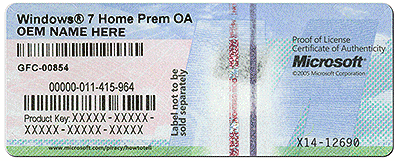
Is there a COA sticker on the PC which looks like this?

coa-stickers.gif

If so what is the WIn7 version shown on it?
 
Sorry I know I have been clueless as to what my computer consists of. The COA sticker shows Windows 7 premium. I will begin working on your instruction from yesterday right now! I really want to learn how to make my PC as good as I can.
 

My Computer My Computer

At a glance

windows 7 home premium service pack 1AMD E-240 processor4.0 GB (3.6 GB usable)AMD Radeon HD 6310
Computer type
Laptop
Computer Manufacturer/Model Number
Toshiba satellite C655D
OS
windows 7 home premium service pack 1
CPU
AMD E-240 processor
Memory
4.0 GB (3.6 GB usable)
Graphics Card(s)
AMD Radeon HD 6310
Hard Drives
Disk partition 211 GB free (286 GB total)
Antivirus
Norton
Browser
Google Chrome
what type of external hard drive do u recommend?
 

My Computer My Computer

At a glance

windows 7 home premium service pack 1AMD E-240 processor4.0 GB (3.6 GB usable)AMD Radeon HD 6310
Computer type
Laptop
Computer Manufacturer/Model Number
Toshiba satellite C655D
OS
windows 7 home premium service pack 1
CPU
AMD E-240 processor
Memory
4.0 GB (3.6 GB usable)
Graphics Card(s)
AMD Radeon HD 6310
Hard Drives
Disk partition 211 GB free (286 GB total)
Antivirus
Norton
Browser
Google Chrome
A usb external hard drive.

I see you have marked the thread solved, if that is so then disregard this, but if you`re still working on it.........

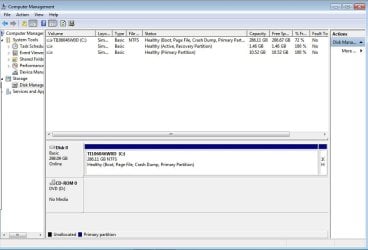
Can you post a shot of disk management from the problem pc so we can see what`s what ?

http://www.sevenforums.com/tutorials/9733-screenshots-files-upload-post-seven-forums.html

http://www.sevenforums.com/tutorials/274797-disk-management-post-screen-capture-image.html

If you have decided to reinstall Windows Home Premium 64 Bit and you can read the key on the COA sticker, then the 1st thing you need to do is download the iso file from this link

http://www.heidoc.net/joomla/technology-science/microsoft/14-windows-7-direct-download-links

Greg will know which iso file to download for sure, but I think it is X17-58997.iso and it should be 3.09 GBs, download that to your desktop.

Let us know when you are done that.
 

My Computer My Computer

At a glance

Windows 10 Pro x64Intel Core i7 6700KGSkill TridentZ RGB 16GB 3600 16-16-16-36EVGA GTX 980 Ti SC x2
Computer type
PC/Desktop
Computer Manufacturer/Model Number
Skylake Special #666
OS
Windows 10 Pro x64
CPU
Intel Core i7 6700K
Motherboard
Asus Sabertooth Z170 Mark 1
Memory
GSkill TridentZ RGB 16GB 3600 16-16-16-36
Graphics Card(s)
EVGA GTX 980 Ti SC x2
Sound Card
Realtek High Definition
Monitor(s) Displays
AOC G2460PG
Screen Resolution
1920 x 1080 144Hz
Hard Drives
Samsung 860 Pro 256GB, Seagate Barracuda 4TB x2
PSU
EVGA 1000 P2, EVGA White Custom Braided Cables
Case
Corsair Vengeance C70 Gunmetal Black
Cooling
Corsair H100i v2, Corsair ML120 x2, Thermal Grizzly Kryonaut
Keyboard
Logitech G910 Orion Spectrum
Mouse
Logitech G700s
Internet Speed
Verizon Fios Quantum Gateway 75/75
Antivirus
Windows Defender, Malwarebytes Free 3.8.3
Browser
Chrome
Other Info
Corsair SP120 x4, LG Blu-ray Drive, Durabrand HT-395 100 Watt Dolby Digital Amp, Corsair H2100 Wireless 7.1 Headset
Sorry Addram I fell asleep. Here you go and let me know if you you guys need me to make any changes. Was wondering if either one of you guys think I should change my antivirus and clean up my computer before I do the clean and install of windows? Thanks you guys, no idea how much I appreciate this.
Capture.JPG
 

My Computer My Computer

At a glance

windows 7 home premium service pack 1AMD E-240 processor4.0 GB (3.6 GB usable)AMD Radeon HD 6310
Computer type
Laptop
Computer Manufacturer/Model Number
Toshiba satellite C655D
OS
windows 7 home premium service pack 1
CPU
AMD E-240 processor
Memory
4.0 GB (3.6 GB usable)
Graphics Card(s)
AMD Radeon HD 6310
Hard Drives
Disk partition 211 GB free (286 GB total)
Antivirus
Norton
Browser
Google Chrome
I don't know why there is no System flag on C, which signifies the System boot files are there. This is not correct. I'd boot the Win7 DVD as soon as you burn it to run a few Startup Repairs to see if it appears.

You can try uninstalling Norton bloatware using the special Norton Removal Tool to uninstall your Norton product.

This may help, along with the Troubleshooting Steps for Windows 7.

You can also benefit from using only the tools and methods given in Clean Reinstall - Factory OEM Windows 7 for your current install, but if it's varied too much from the way it's recommended to perform it in the tutorial then I'd do it over, deleting C during install to create a new Partition there.
 
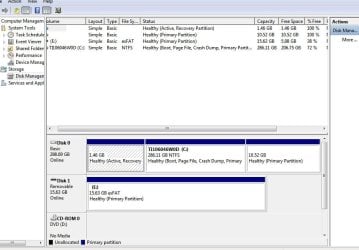
Well I was all over the place last night ... I'm praying i didnt dig a deeper hole. I went to the site and downloaded X17-58997.iso. I also deleted norton and installed microsoft essentials. I backed up my computer on my USB and now I dont know where to go from here.

After I backed up my computer to my usb I tried using USB to DVD down load tool and it wanted to delete everything on it to proceed.

Can either of you guys tell where I'm and I what was and/or needs to be accomplished?

This is my most up to date picCapture.JPG
 

My Computer My Computer

At a glance

windows 7 home premium service pack 1AMD E-240 processor4.0 GB (3.6 GB usable)AMD Radeon HD 6310
Computer type
Laptop
Computer Manufacturer/Model Number
Toshiba satellite C655D
OS
windows 7 home premium service pack 1
CPU
AMD E-240 processor
Memory
4.0 GB (3.6 GB usable)
Graphics Card(s)
AMD Radeon HD 6310
Hard Drives
Disk partition 211 GB free (286 GB total)
Antivirus
Norton
Browser
Google Chrome
I was also wondering how do I know if the new "reinstalled clean version" is running or the old crappy preinstalled version is still there? I'm picking up a new USB just in case you guys still want me to run that USB to DVD download. That confused the hell out of me last nt.

Thanks
 

My Computer My Computer

At a glance

windows 7 home premium service pack 1AMD E-240 processor4.0 GB (3.6 GB usable)AMD Radeon HD 6310
Computer type
Laptop
Computer Manufacturer/Model Number
Toshiba satellite C655D
OS
windows 7 home premium service pack 1
CPU
AMD E-240 processor
Memory
4.0 GB (3.6 GB usable)
Graphics Card(s)
AMD Radeon HD 6310
Hard Drives
Disk partition 211 GB free (286 GB total)
Antivirus
Norton
Browser
Google Chrome
When you reinstall windows you format the partition you install windows on, in this case C: when you do that the old windows is gone, so no issues with the past operating system.

Have you downloaded the iso file yet and checked it to make sure it`s size is 3.09 GBs ?

You now have to burn it to a dvd.

We used to use Imgburn to burn the iso to the dvd.

http://download.cnet.com/ImgBurn/3000-2646_4-10847481.html

http://www.filehippo.com/download_imgburn/

If you are having trouble with the download tool, use it instead. And do not burn it any faster then 4x speed.

Once you`ve installed ImgBurn, open the program and choose "Burn iso file to disc" then browse to your desktop where you have the iso image saved. Then just burn it to the dvd.

Watch the video from the 1st link above.

And read this tutorial if you haven`t yet.

http://www.sevenforums.com/tutorials/1649-clean-install-windows-7-a.html
 

My Computer My Computer

At a glance

Windows 10 Pro x64Intel Core i7 6700KGSkill TridentZ RGB 16GB 3600 16-16-16-36EVGA GTX 980 Ti SC x2
Computer type
PC/Desktop
Computer Manufacturer/Model Number
Skylake Special #666
OS
Windows 10 Pro x64
CPU
Intel Core i7 6700K
Motherboard
Asus Sabertooth Z170 Mark 1
Memory
GSkill TridentZ RGB 16GB 3600 16-16-16-36
Graphics Card(s)
EVGA GTX 980 Ti SC x2
Sound Card
Realtek High Definition
Monitor(s) Displays
AOC G2460PG
Screen Resolution
1920 x 1080 144Hz
Hard Drives
Samsung 860 Pro 256GB, Seagate Barracuda 4TB x2
PSU
EVGA 1000 P2, EVGA White Custom Braided Cables
Case
Corsair Vengeance C70 Gunmetal Black
Cooling
Corsair H100i v2, Corsair ML120 x2, Thermal Grizzly Kryonaut
Keyboard
Logitech G910 Orion Spectrum
Mouse
Logitech G700s
Internet Speed
Verizon Fios Quantum Gateway 75/75
Antivirus
Windows Defender, Malwarebytes Free 3.8.3
Browser
Chrome
Other Info
Corsair SP120 x4, LG Blu-ray Drive, Durabrand HT-395 100 Watt Dolby Digital Amp, Corsair H2100 Wireless 7.1 Headset
Why are the screenshots in two successive posts completely different?

Have you reinstalled since you bought the Toshiba (this is the Toshiba in your specs, correct)?

If not then you have the Toshiba preinstalled Win7 which is a corrupt install to begin with, smothering WIn7's native performance with bloatware and useless duplicate utilities which have better versions built into Win7.

You can try to Clean Up Factory Bloatware to see if you get better performance, but most tech enthusiasts won't bother with the factory preinstall but prefer to Clean Reinstall - Factory OEM Windows 7 .

Read over both tutorials to see what's involved and decide which you want to start with, then ask back any questions you have so that you understand fully. Focus on the steps and how to do them, not distractions. We will be here to help you as you go. Don't waste the resource.
 
He didn`t expand it in the 1st shot, you can see part of the adjoining partition to the right, he has 3 partitions.

He`s offline now so.....
 

My Computer My Computer

At a glance

Windows 10 Pro x64Intel Core i7 6700KGSkill TridentZ RGB 16GB 3600 16-16-16-36EVGA GTX 980 Ti SC x2
Computer type
PC/Desktop
Computer Manufacturer/Model Number
Skylake Special #666
OS
Windows 10 Pro x64
CPU
Intel Core i7 6700K
Motherboard
Asus Sabertooth Z170 Mark 1
Memory
GSkill TridentZ RGB 16GB 3600 16-16-16-36
Graphics Card(s)
EVGA GTX 980 Ti SC x2
Sound Card
Realtek High Definition
Monitor(s) Displays
AOC G2460PG
Screen Resolution
1920 x 1080 144Hz
Hard Drives
Samsung 860 Pro 256GB, Seagate Barracuda 4TB x2
PSU
EVGA 1000 P2, EVGA White Custom Braided Cables
Case
Corsair Vengeance C70 Gunmetal Black
Cooling
Corsair H100i v2, Corsair ML120 x2, Thermal Grizzly Kryonaut
Keyboard
Logitech G910 Orion Spectrum
Mouse
Logitech G700s
Internet Speed
Verizon Fios Quantum Gateway 75/75
Antivirus
Windows Defender, Malwarebytes Free 3.8.3
Browser
Chrome
Other Info
Corsair SP120 x4, LG Blu-ray Drive, Durabrand HT-395 100 Watt Dolby Digital Amp, Corsair H2100 Wireless 7.1 Headset
I'm here guys.

I finally am at 95% in the windows usb download...

Just completed X17-58997.iso on my usb!!!

What do i do next plez?
 

My Computer My Computer

At a glance

windows 7 home premium service pack 1AMD E-240 processor4.0 GB (3.6 GB usable)AMD Radeon HD 6310
Computer type
Laptop
Computer Manufacturer/Model Number
Toshiba satellite C655D
OS
windows 7 home premium service pack 1
CPU
AMD E-240 processor
Memory
4.0 GB (3.6 GB usable)
Graphics Card(s)
AMD Radeon HD 6310
Hard Drives
Disk partition 211 GB free (286 GB total)
Antivirus
Norton
Browser
Google Chrome
1st things 1st. Do you see your shot of disk management, you see the partition C that`s 286 GBs ?

That`s where you are going to install windows, unless you want to delete the other partitions next to it and use the whole drive for windows. You have to make that decision and let us know, so we can proceed.

Have you gotten all the files and data, music pictures etc. you want to keep off the hard drive yet ?
 

My Computer My Computer

At a glance

Windows 10 Pro x64Intel Core i7 6700KGSkill TridentZ RGB 16GB 3600 16-16-16-36EVGA GTX 980 Ti SC x2
Computer type
PC/Desktop
Computer Manufacturer/Model Number
Skylake Special #666
OS
Windows 10 Pro x64
CPU
Intel Core i7 6700K
Motherboard
Asus Sabertooth Z170 Mark 1
Memory
GSkill TridentZ RGB 16GB 3600 16-16-16-36
Graphics Card(s)
EVGA GTX 980 Ti SC x2
Sound Card
Realtek High Definition
Monitor(s) Displays
AOC G2460PG
Screen Resolution
1920 x 1080 144Hz
Hard Drives
Samsung 860 Pro 256GB, Seagate Barracuda 4TB x2
PSU
EVGA 1000 P2, EVGA White Custom Braided Cables
Case
Corsair Vengeance C70 Gunmetal Black
Cooling
Corsair H100i v2, Corsair ML120 x2, Thermal Grizzly Kryonaut
Keyboard
Logitech G910 Orion Spectrum
Mouse
Logitech G700s
Internet Speed
Verizon Fios Quantum Gateway 75/75
Antivirus
Windows Defender, Malwarebytes Free 3.8.3
Browser
Chrome
Other Info
Corsair SP120 x4, LG Blu-ray Drive, Durabrand HT-395 100 Watt Dolby Digital Amp, Corsair H2100 Wireless 7.1 Headset
If you're going ahead with the Clean Reinstall - Factory OEM Windows 7 then read it over carefully as it included everything that must be considered and backed up before reinstalling, how to do the best install, and how to set up the new install perfectly.

Ask back any questions. I'll be waiting here to answer them.
 
You scared me Greg, I thought you were gone for the nite.

I`m not finding a tut for a usb stick install.

Installing from a usb drive can be real tricky. I don`t want him to get in the constant rebooting from the usb drive when the pc restarts, that tripped me up the 1st time I did it from the flash drive.
 

My Computer My Computer

At a glance

Windows 10 Pro x64Intel Core i7 6700KGSkill TridentZ RGB 16GB 3600 16-16-16-36EVGA GTX 980 Ti SC x2
Computer type
PC/Desktop
Computer Manufacturer/Model Number
Skylake Special #666
OS
Windows 10 Pro x64
CPU
Intel Core i7 6700K
Motherboard
Asus Sabertooth Z170 Mark 1
Memory
GSkill TridentZ RGB 16GB 3600 16-16-16-36
Graphics Card(s)
EVGA GTX 980 Ti SC x2
Sound Card
Realtek High Definition
Monitor(s) Displays
AOC G2460PG
Screen Resolution
1920 x 1080 144Hz
Hard Drives
Samsung 860 Pro 256GB, Seagate Barracuda 4TB x2
PSU
EVGA 1000 P2, EVGA White Custom Braided Cables
Case
Corsair Vengeance C70 Gunmetal Black
Cooling
Corsair H100i v2, Corsair ML120 x2, Thermal Grizzly Kryonaut
Keyboard
Logitech G910 Orion Spectrum
Mouse
Logitech G700s
Internet Speed
Verizon Fios Quantum Gateway 75/75
Antivirus
Windows Defender, Malwarebytes Free 3.8.3
Browser
Chrome
Other Info
Corsair SP120 x4, LG Blu-ray Drive, Durabrand HT-395 100 Watt Dolby Digital Amp, Corsair H2100 Wireless 7.1 Headset
Back
Top