- Local time
- 2:58 PM
- Messages
- 96
I hope I get my question out so it is understood.
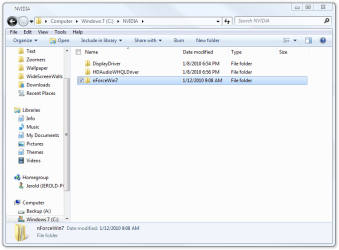
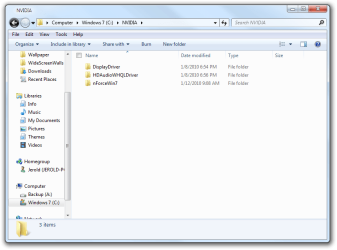
Open computer, locate the c drive, select it. On the right side you will see a list of the folders and in the pro version, click either one of the either program files you will see a list of folders on left side of the right pain then if the divider is wide enough in the right pain you will see the modified date and the word "file fikder".
Now my question: the modified date and file folder characters are VERY dim, the folder names are bright and very readable.
Another are of lightness is in windows live mail. If i want to save an email I click file save as locate a place I want to save it other that within windows live mail I look for the date it was received in the upper right site of the message. IT IS VERY DIM.
Does anyone know how these areas described can be increased in brightness? At 81 my eyes are not as sharp as they used to be. If I am on a web site and have this problem I can hold the crtl key down and use the wheel on the mouse to make the screen and text bigger this solves the problem there but not anywhere else.
Open computer, locate the c drive, select it. On the right side you will see a list of the folders and in the pro version, click either one of the either program files you will see a list of folders on left side of the right pain then if the divider is wide enough in the right pain you will see the modified date and the word "file fikder".
Now my question: the modified date and file folder characters are VERY dim, the folder names are bright and very readable.
Another are of lightness is in windows live mail. If i want to save an email I click file save as locate a place I want to save it other that within windows live mail I look for the date it was received in the upper right site of the message. IT IS VERY DIM.
Does anyone know how these areas described can be increased in brightness? At 81 my eyes are not as sharp as they used to be. If I am on a web site and have this problem I can hold the crtl key down and use the wheel on the mouse to make the screen and text bigger this solves the problem there but not anywhere else.
My Computer
At a glance
Windows 7 Pro 64 bitAMD6GBON BOARD
- Computer Manufacturer/Model Number
- assemble my own
- OS
- Windows 7 Pro 64 bit
- CPU
- AMD
- Motherboard
- ASUS
- Memory
- 6GB
- Graphics Card(s)
- ON BOARD
- Sound Card
- ON BOARD
- Monitor(s) Displays
- HP FALT SCREEN 21"
- Hard Drives
- ONE 1.5TB, ONE .5TB
- PSU
- 500w
- Case
- NEW TO FIT
- Cooling
- WGAT CANE WUTG CASE