Windows 7 problem not working of audio sound,no scf sca

atedisons

New member
Local time
7:39 AM
Messages
3
I'v buyed Dell studio 1555 with Windows 7 Home Premium(64 bit).I had uninstalled power dvd(pre installed by Dell) using Revo uninstaller ,inadvertently I deleted some of the registry files.
Now facing various problems...
First there is no audio sound(no mp3,no login sound, no keypad sound..)..

then on changing monitor settings through keyboard buttons there is no graphical display of the monitotr status ...

when i tried to run sfc \scannow (in cmd prompt as Administrator) it shows "Windows resource protection could not start the repair"

when I tried to open Disk Management utility an error dialogue box stating "Disk management could not start Virtual Disk Space..This happen if remote computer does get supported or if connection cannot be established..."

My system details:dell studio 1555,windows 7 Home Premium(64 bit),core 2 duoT6600,320 GB HD SATA,3 Gb RAM

Its annoying Pls Help me...
 

My Computer My Computer

At a glance

Windows 7 Home premiumCore 2 DUo T66003 GB RAM512 MB ATI Mobility Radeon HD 4570
OS
Windows 7 Home premium
CPU
Core 2 DUo T6600
Memory
3 GB RAM
Graphics Card(s)
512 MB ATI Mobility Radeon HD 4570
Sound Card
ATI Integrated stereo sound
Hard Drives
320 Gb HD SATA
Did you try System Restore?
 

My Computer My Computer

At a glance

Windows 10, Home Clean InstallIntel Core2 processsor Q8200(2.33Ghz 1333FSB)...6 gbATI Radeon 256MB HD3650
Computer type
PC/Desktop
Computer Manufacturer/Model Number
Dell XPS 420
OS
Windows 10, Home Clean Install
CPU
Intel Core2 processsor Q8200(2.33Ghz 1333FSB) Quad Core Tech
Motherboard
Dell
Memory
6 gb
Graphics Card(s)
ATI Radeon 256MB HD3650
Sound Card
Intergrated 7.1 Channel Audio
Monitor(s) Displays
Dell SP2009W 20"
Hard Drives
640 GB Serial ATA Hard drive
Cooling
Fan
Keyboard
Dell USB Keyboard
Mouse
Dell Premium Optical USB
Internet Speed
DSL 2.85
Hi atedisons and welcome to Windows 7 Forums :party:

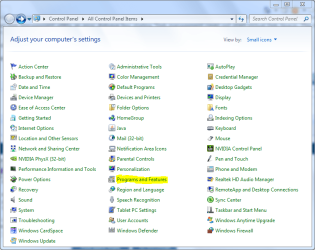
Reinstall Windows 7 using the disks supplied or by installing from the recovery partition (see manual). If you want to remove Power DVD (or any other programs that Dell have installed), then you should be able to do so from here:
Capture.PNG
Programs such as Revo Uninstaller can only work if they were installed before hand and can monitor the installation of a program.
 

My Computer My Computer

At a glance

Windows 8.1 Pro RTM x64Intel Core-i5-3570K 4-core @ 3.4GHz (Ivy Brid...4 x 4GB DDR3-1600 Corsair Vengeance CMZ8GX3M2...MSI GeForce GTX770 Gaming OC 2GB
Computer type
PC/Desktop
Computer Manufacturer/Model Number
Dwarf Dwf/11/2012 r09/2013
OS
Windows 8.1 Pro RTM x64
CPU
Intel Core-i5-3570K 4-core @ 3.4GHz (Ivy Bridge) (OC 4.4GHz)
Motherboard
ASRock Z77 Extreme4-M
Memory
4 x 4GB DDR3-1600 Corsair Vengeance CMZ8GX3M2A1600C9B (16GB)
Graphics Card(s)
MSI GeForce GTX770 Gaming OC 2GB
Sound Card
Realtek High Definition on board solution (ALC 898)
Monitor(s) Displays
ViewSonic VA1912w Widescreen (VGA)
Screen Resolution
1440x900
Hard Drives
OCZ Agility 3 SSD 120GB SATA III x2 (RAID 0)
Samsung HD501LJ 500GB SATA II x2
Hitachi HDS721010CLA332 1TB SATA II
Iomega 1.5TB Ext USB 2.0
WD 2.0TB Ext USB 3.0
PSU
XFX Pro Series 850W Semi-Modular
Case
Gigabyte IF233
Cooling
1 x 120mm Front Inlet 1 x 120mm Rear Exhaust
Keyboard
Microsoft Comfort Curve Keyboard 3000 (USB)
Mouse
Microsoft Comfort Mouse 3000 for Business (USB)
Internet Speed
NetGear DG834Gv3 ADSL Modem/Router (Ethernet) ~4.0 Mb/s (O2)
Antivirus
Avast! 8.0.1497
Browser
IE 11
Other Info
Optical Drive: HL-DT-ST BD-RE BH10LS30 SATA Bluray
Lexmark S305 Printer/Scanner/Copier (USB)
WEI Score: 8.1/8.1/8.5/8.5/8.25
Asus Eee PC 1011PX Netbook (Windows 7 x86 Starter)
Thank you very much for your concern brother,
I have reinstall win 7 Home Premium through PC restore.

I have got the problem in creating new Volume.

Before PC restore process I have already made 142 GB as "Free Space" and 146 GB in C:/ Drive of 320GB SATA HD.

Now the OS is in 146 GB partition.I made a shrink, to have 80 GB in C:/ Drive .

As a result an unallocated partition 66GB is formed between Drive(C) and Free space.

I tried to create a new simple volume out of 66GB, but after clicking Finish button at the end it shows
"You cannot create a new volume in this unallocated space because the disk already contains the maximum number of partitions".

After this surprisingly I have created two Logical partitions(50 GB & 52 GB) from the Free space leaving 40 GB.

Please help me how to create a primary partition out of unallocated 66.42 GB partition.

My disk Management show (as in order)
Healthy(OEM)-198 MB,
Recovery-9.12 GB,
OS(C)-80 GB,
unallocated-66.42 GB,
Drive(G)-50 GB,
Drive(H)-52GB,
Free space-40GB.

My system details:Dell studio 1555,windows 7 Home Premium 64 bit,core 2 duo T6600,320 GB SATA HD,3GB RAM.
 

My Computer My Computer

At a glance

Windows 7 Home premiumCore 2 DUo T66003 GB RAM512 MB ATI Mobility Radeon HD 4570
OS
Windows 7 Home premium
CPU
Core 2 DUo T6600
Memory
3 GB RAM
Graphics Card(s)
512 MB ATI Mobility Radeon HD 4570
Sound Card
ATI Integrated stereo sound
Hard Drives
320 Gb HD SATA
Back
Top