Hey Guys n Girls,
I've had this issue for about 2 weeks now and i'm getting to the end of my tether here
I've spent way too much money on this machine and to be honest.. I just want it to work :'(
I even bought a new CPU because the guys at MSY said if I bought a new CPU the sound would work. But you guessed it.. It didnt, so yes I did waste $216.
Anyway enough about me whinging, wheres that going to get us?
So save me typing it all out here i'll do a bit of a copy paste from another forum I've tried for help (with no luck) Feel free to see what they have said and what hasn't worked:
(I'm Andy88)
http://forums.whirlpool.net.au/forum-replies.cfm?t=1695358
-------------------
Ive installed all the software that came with my motherboard and its RealTek sound drivers, on screen it says that its playing, that sound is coming through my speakers.. yet when i plug my speakers in its just a static sound.. (crackling popping - Some sound is getting through though very low sound under the snap crackle pop)
---
I'm running 5.1 Logitech sound system from my old computer (works fine), but with my new computer i've tryed all the plugs (yes I know they are colour coded Green[Front Speakers] Orange[Center / Sub] Black[Rear])
But for some reason it just comes out as static & when i plug my headphones in, same deal.
---
Piker Pat writes...
In device manager is anything showing up as an "Unidentified Device"?
No, There are 4 devices under Sound, video and game controllers that are Nvidia Sound Driver and 1 Realtek HD sound driver. All say they are working.
Probably not relevant but, what power supply do you have? Did you connect it to the power before completing the installation of parts?
I have a 550watt antec PSU that i bought seperate to the case for 109$ that easily has enough power to run the system.. Apparently.
Have you checked what the default output device is yet? Right click the volume button > select playback devices > which device has a green tick?
"Speakers Realtek HD Audio" Green tick
There are 2 other options for Digital Output and Optical Output but i've tried all 3 and none work.
The sound im getting is like when you pull the AUX cord out and touch the end with your fingers it gives you a distorted static sound.
Wyrm 1972 writes...
Is it set to 5.1 in the Realtek Control Panel?
Currently yes, but i've tried all the options and none seem to work
Also I just did a windows update 33 important updates installed.. none fixed my sound issue ! ><
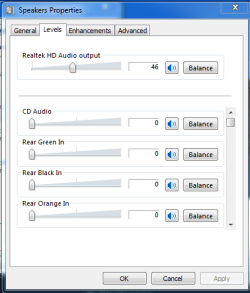
Here is a snap shot of what I'm looking at:
It says all good.. But its not?
http://img855.imageshack.us/img855/1554/cracklenpop.jpg
I realllllllyyyy Hope you guys can help, its brand new and i just want it to work
Cheers,
- SirBob
Am3 6x 1090T 3.2ghz Phenom II
Gigabyte GA-880GM-USB3
4G (2x2G kit) Kingston HyperX Blue DDR3 1600
1G GTX550 PCI-E Nvidia
1TB Seagate SATA3
Antec True Power TP-550Watt
I've had this issue for about 2 weeks now and i'm getting to the end of my tether here
I've spent way too much money on this machine and to be honest.. I just want it to work :'(
I even bought a new CPU because the guys at MSY said if I bought a new CPU the sound would work. But you guessed it.. It didnt, so yes I did waste $216.
Anyway enough about me whinging, wheres that going to get us?
So save me typing it all out here i'll do a bit of a copy paste from another forum I've tried for help (with no luck) Feel free to see what they have said and what hasn't worked:
(I'm Andy88)
http://forums.whirlpool.net.au/forum-replies.cfm?t=1695358
-------------------
Ive installed all the software that came with my motherboard and its RealTek sound drivers, on screen it says that its playing, that sound is coming through my speakers.. yet when i plug my speakers in its just a static sound.. (crackling popping - Some sound is getting through though very low sound under the snap crackle pop)
---
I'm running 5.1 Logitech sound system from my old computer (works fine), but with my new computer i've tryed all the plugs (yes I know they are colour coded Green[Front Speakers] Orange[Center / Sub] Black[Rear])
But for some reason it just comes out as static & when i plug my headphones in, same deal.
---
Piker Pat writes...
In device manager is anything showing up as an "Unidentified Device"?
No, There are 4 devices under Sound, video and game controllers that are Nvidia Sound Driver and 1 Realtek HD sound driver. All say they are working.
Probably not relevant but, what power supply do you have? Did you connect it to the power before completing the installation of parts?
I have a 550watt antec PSU that i bought seperate to the case for 109$ that easily has enough power to run the system.. Apparently.
Have you checked what the default output device is yet? Right click the volume button > select playback devices > which device has a green tick?
"Speakers Realtek HD Audio" Green tick
There are 2 other options for Digital Output and Optical Output but i've tried all 3 and none work.
The sound im getting is like when you pull the AUX cord out and touch the end with your fingers it gives you a distorted static sound.
Wyrm 1972 writes...
Is it set to 5.1 in the Realtek Control Panel?
Currently yes, but i've tried all the options and none seem to work
Also I just did a windows update 33 important updates installed.. none fixed my sound issue ! ><
Here is a snap shot of what I'm looking at:
It says all good.. But its not?
http://img855.imageshack.us/img855/1554/cracklenpop.jpg
I realllllllyyyy Hope you guys can help, its brand new and i just want it to work
Cheers,
- SirBob
System Specs:
Windows 7 64 bit Home Premium
Am3 6x 1090T 3.2ghz Phenom II
Gigabyte GA-880GM-USB3
4G (2x2G kit) Kingston HyperX Blue DDR3 1600
1G GTX550 PCI-E Nvidia
1TB Seagate SATA3
Antec True Power TP-550Watt
My Computer
- OS
- Windows 7 64 bit Home Premium
- CPU
- Am3 6x 1090T 3.2ghz Phenom II
- Motherboard
- Gigabyte GA-880GM-USB3
- Memory
- 4G (2x2G kit) Kingston HyperX Blue DDR3 1600
- Graphics Card(s)
- 1G GTX550 PCI-E Nvidia
- Sound Card
- Onboard
- Monitor(s) Displays
- 22" Acer / 17" Samsung
- Hard Drives
- 1TB Seagate SATA3
- PSU
- Antec True Power TP-550Watt
- Case
- Antec 300 Series