Windows 7 Profesional more than 50GB on my SSD

bultack

New member
Local time
8:29 PM
Messages
5
Hi there,

last week i bought a new PC that came with a SSD 120GB and i've installed a Windows 7 Professional 32b/64b. That whas the unique available version of W7 on Microsfot Dreamsparks for students and after install it and update it i saw that i had 60GB free. I've installed Avast Free, Steam (no games for now), Office 365 Home and PHP Storm. Now i only have 25GB of free space.

I can't understand how is possible that only with a OS and 4 programs my SSD is close to be full. Maybe it's something wrong with the SSD or that version of W7 requires a lot of space to be working on 32b and 64b versions?
 

My Computer My Computer

At a glance

Windows 7 Home Premium x64Intel Core i3-2310M 2.10GHz4GBnVidia GeForce GT520M CUDA 1GB
Computer type
Laptop
Computer Manufacturer/Model Number
Acer Aspire 5750G
OS
Windows 7 Home Premium x64
CPU
Intel Core i3-2310M 2.10GHz
Memory
4GB
Graphics Card(s)
nVidia GeForce GT520M CUDA 1GB
Antivirus
Avast Free
Browser
Google Chrome
Did you actually install 32 bit and 64 bit windows ? 2 installs ?

Start again and delete the entire ssd during the install then just click next, get back to us with the results and a shot of disk
management.

Install 32 bit or 64 bit.
 

My Computer My Computer

At a glance

Windows 10 Pro x64Intel Core i7 6700KGSkill TridentZ RGB 16GB 3600 16-16-16-36EVGA GTX 980 Ti SC x2
Computer type
PC/Desktop
Computer Manufacturer/Model Number
Skylake Special #666
OS
Windows 10 Pro x64
CPU
Intel Core i7 6700K
Motherboard
Asus Sabertooth Z170 Mark 1
Memory
GSkill TridentZ RGB 16GB 3600 16-16-16-36
Graphics Card(s)
EVGA GTX 980 Ti SC x2
Sound Card
Realtek High Definition
Monitor(s) Displays
AOC G2460PG
Screen Resolution
1920 x 1080 144Hz
Hard Drives
Samsung 860 Pro 256GB, Seagate Barracuda 4TB x2
PSU
EVGA 1000 P2, EVGA White Custom Braided Cables
Case
Corsair Vengeance C70 Gunmetal Black
Cooling
Corsair H100i v2, Corsair ML120 x2, Thermal Grizzly Kryonaut
Keyboard
Logitech G910 Orion Spectrum
Mouse
Logitech G700s
Internet Speed
Verizon Fios Quantum Gateway 75/75
Antivirus
Windows Defender, Malwarebytes Free 3.8.3
Browser
Chrome
Other Info
Corsair SP120 x4, LG Blu-ray Drive, Durabrand HT-395 100 Watt Dolby Digital Amp, Corsair H2100 Wireless 7.1 Headset
I didn't install it twice, i mean that the version that i have is available to 32b and 64b chips
 

My Computer My Computer

At a glance

Windows 7 Home Premium x64Intel Core i3-2310M 2.10GHz4GBnVidia GeForce GT520M CUDA 1GB
Computer type
Laptop
Computer Manufacturer/Model Number
Acer Aspire 5750G
OS
Windows 7 Home Premium x64
CPU
Intel Core i3-2310M 2.10GHz
Memory
4GB
Graphics Card(s)
nVidia GeForce GT520M CUDA 1GB
Antivirus
Avast Free
Browser
Google Chrome
Some of the space is taken by the page file and the hibernation file.
The size of those files depends on how much ram you have. In my case since I have 16gb,it took +32gb and the windows(without installing anything yet)was below 20gb(can't remember the exact size but it was between 10 and 18).

Right now I have 20gb used after one month and a lot of things installed on the 120gb ssd
 

My Computer My Computer

At a glance

Windows 7 Ultimate x64 SP1i7 4771 3.5Ghz2x8GB DDR3 GEIL EVO LEGGERAPALIT GTX 750 TI StormX Duo
Computer type
PC/Desktop
Computer Manufacturer/Model Number
Custom Build
OS
Windows 7 Ultimate x64 SP1
CPU
i7 4771 3.5Ghz
Motherboard
ASUS B85 Plus
Memory
2x8GB DDR3 GEIL EVO LEGGERA
Graphics Card(s)
PALIT GTX 750 TI StormX Duo
Monitor(s) Displays
Samsung T24D390
Screen Resolution
1920x1080
Hard Drives
Samsung SSD 840 EVO 128GB
2TB Seagate SATA 3
600GB WD Blue SATA 2
PSU
Seasonic S12II 520W Bronze
Case
Cooler Master Force 500
Antivirus
Avast Free
Browser
Firefox
I have 16GB RAM too, then i think that i need to stop that services to get back all that spaces that i think that a SSD don't needs to keep
 

My Computer My Computer

At a glance

Windows 7 Home Premium x64Intel Core i3-2310M 2.10GHz4GBnVidia GeForce GT520M CUDA 1GB
Computer type
Laptop
Computer Manufacturer/Model Number
Acer Aspire 5750G
OS
Windows 7 Home Premium x64
CPU
Intel Core i3-2310M 2.10GHz
Memory
4GB
Graphics Card(s)
nVidia GeForce GT520M CUDA 1GB
Antivirus
Avast Free
Browser
Google Chrome
My OS and programs take up a bit over 64GB. I have over a hundred programs (and yes, I use all of them; granted some rarely), some of which are pretty fair sized, and 32GB RAM. The hyberfil.sys file is 24GB; I need to keep Hibernate enabled for my UPS.
 

My Computer My Computer

At a glance

Win 7 Ultimate 64 bitIntel i7-3930KKingston HyperX Genesis 32GB Kit (8x4GB Modul...MSI R7850 Twin Frozr 2GD5/OC Radeon HD 7850 2...
Computer type
PC/Desktop
Computer Manufacturer/Model Number
Custom Build
OS
Win 7 Ultimate 64 bit
CPU
Intel i7-3930K
Motherboard
ASUS P9X79 WS
Memory
Kingston HyperX Genesis 32GB Kit (8x4GB Modules) 1600MHz DDR
Graphics Card(s)
MSI R7850 Twin Frozr 2GD5/OC Radeon HD 7850 2GB 256-bit GDDR
Sound Card
Asus Xonar Essence STX
Monitor(s) Displays
3x Asus VG248QE 24", Vizio 32" TV
Screen Resolution
1920 x 1080, ?
Hard Drives
Samsung 128GB 840 Pro SSD (1),
Samsung 4TB 850 EVO SSDs (4)
Samsung 4TB 850 EVO SSDs (16) external backup drives used in 2.5" hot swap bays in the computer.
PSU
Corsair HX750w
Case
Antec Two Hundred v2 (modified)
Cooling
Cooler Master GeminII S524 120mm (fan replaced with a 140mm)
Keyboard
Logitech G510s
Mouse
Logitech M525 (two in use)
Internet Speed
=< 32Mbps down, 8Mbps up
Antivirus
AVAST!, MBAM, SAS, Spybot S&D (all but MBAM free) Glary Util
Browser
IE11
Other Info
LSI 9211-8i HBA card (8 SATA III ports), 2.5" & 3.5" Hot Swap Bays, HooToo HT-CR001 PCI-E to USB 3.0 Internal Hub + 6 Slot Card Reader, and LG Model CH12LS28 BD-ROM Optical Drive. Also, ScanSnap S1500 ADF duplexing scanner, Canon 9000F flat bed scanner, Corsair SP2500 2.1 speakers, Samsung CLP 415nw laser color printer, Cyberpower PP2200SW UPS
If you have 16gb of RAM then Windows has probably set your page file to 24gb. You can reduce the page file to 1 or 2gb when using a SSD without any speed loss.
I am running Windows 7 Home Premium & have Office Pro installed & the total used on my SSD is about 30gb.
 

My Computer My Computer

At a glance

Windows 7 Home Premium 64 bit sp1Intel i5 3570 3.4Ghz Ivy Bridge SKT 1155 quad...G-Skill Rip Jaws 16Gb (8x2) DDR3 -1600 PC3 12...Gigabyte NVIDIA GT610 1Gb DDR3 810/1200 PCI-E...
Computer type
PC/Desktop
Computer Manufacturer/Model Number
Self built using existing case
OS
Windows 7 Home Premium 64 bit sp1
CPU
Intel i5 3570 3.4Ghz Ivy Bridge SKT 1155 quad core
Motherboard
Gigabyte Z77-HD3 SKT 1155 2xSata 3, 4x USB 3.0
Memory
G-Skill Rip Jaws 16Gb (8x2) DDR3 -1600 PC3 12800 CL 10 red
Graphics Card(s)
Gigabyte NVIDIA GT610 1Gb DDR3 810/1200 PCI-E 2.0 Silent
Sound Card
NVIDIA High Definition & Realtech High Definition Audio
Monitor(s) Displays
2 x Philips 226V4L 16:9 aspect ratio
Screen Resolution
1920 x 1080 HD
Hard Drives
Samsung 840 Pro 256gb SSD, SATA 3.
Hitachi Touro Portable 1tb, USB 3.0 HDD used for image b/ups.
PSU
Corsair VS450
Case
Codeng
Cooling
PSU fan & CPU fan
Keyboard
Logitech
Mouse
Logitech Wireless trackball M570
Internet Speed
Wireless 3G. 3mg down & 550kb up.
Antivirus
Bitdefender Internet Security 2020
Browser
Opera (Current Version) & Firefox
Other Info
MS Office 2013 Pro. Davis weather station software. MGE Nova 600 avr UPS.
If you aren't sure what's using the space, check out WinDirStat.
 

My Computer My Computer

At a glance

Windows 7 Ultimate x64 SP1Intel Core i7-260012 GB Patriot Extreme DDR3-1333Nvidia GTX 470
OS
Windows 7 Ultimate x64 SP1
CPU
Intel Core i7-2600
Motherboard
Gigabyte GA-P67A-UD3P-B3
Memory
12 GB Patriot Extreme DDR3-1333
Graphics Card(s)
Nvidia GTX 470
Monitor(s) Displays
Dell UltraSharp 2209WA
Hard Drives
OCZ Agility3 240 GB, WD5001AALS, WD7501AALS
PSU
OCZ ModStream 700W
Case
CoolerMaster HAF 912 Advanced
Cooling
CoolerMaster Hyper 212 Plus
What operating system did the computer come with?
 

My Computer My Computer

At a glance

Windows 10 Pro. 64/ version 1709 Windows 7 Pr...Intel i7-6800K @ 4.3Corsair Platinum 16 gig @2400EVGA GTX 1070 OC
Computer type
PC/Desktop
Computer Manufacturer/Model Number
Home made Desktop
OS
Windows 10 Pro. 64/ version 1709 Windows 7 Pro/64
CPU
Intel i7-6800K @ 4.3
Motherboard
ASUS X-99 Deluxe II
Memory
Corsair Platinum 16 gig @2400
Graphics Card(s)
EVGA GTX 1070 OC
Monitor(s) Displays
Asus 27" LED LCD/VE278Q
Screen Resolution
1920-1080 or 1280-720 HDMI
Hard Drives
INTEL SSD 730-240 Gb Sata 3.0/
PSU
EVGA Platium 1200W
Case
Phanteks Luxe Tempered Glass 8 fans/ one radiator
Cooling
XSPC/ Water Cooled CPU
Keyboard
Das 4 Professional
Mouse
Logitech M705/MX Anywhere 2-S
Internet Speed
100 mbits
Antivirus
Microsoft Security Essentials/ Malwarebytes Premium 3.0/ SAS
Browser
I.E. 11 default/Firefox/ ISP Time Warner Cable/Spectrum
Other Info
LG BluRay Burner/
Sound system-KLipsch-THX/
Icy Dock ssd Hot Swap bays.
last week i bought a new PC that came with a SSD 120GB and i've installed a Windows 7 Professional 32b/64b. That whas the unique available version of W7 on Microsfot Dreamsparks for students and after install it and update it i saw that i had 60GB free. I've installed Avast Free, Steam (no games for now), Office 365 Home and PHP Storm. Now i only have 25GB of free space.

I can't understand how is possible that only with a OS and 4 programs my SSD is close to be full.
Everybody's usage is different. If you installed MS Office, did you take "custom install" and opt out of some features? Or did you install everything. I installed MS Office 2007 Home and Student and opted out of what I don't need, selecting only Word, Excel and PowerPoint. Total is 280MB used.

There's really no difference between space requirements for SSD vs. hard drive spinner. Your C-drive requirements depend entirely on you, and what you install, and what data you keep in \My Documents etc., and how much space you have allowed for "system restore points" (which can get very large if you don't configure it in System Protection to be "modest" such as no more than 5-6%).

Very often the expansion of driver installers (especially from laptop manufacturers) go into the C drive fully expanded, from which the SETUP.EXE is then run. These expanded driver installer folders aren't really needed to be retained permanently, if you keep the original compressed installer files. Plus, if you then download a newer installer file the original expanded folder (if it's got a different name than the newer one) is definitely no longer needed. Space management is up to you.

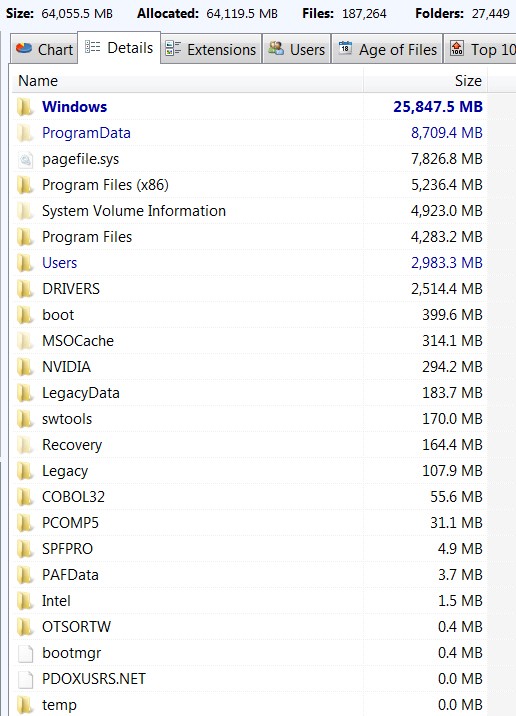
You should install TreeSize Free, which gives you a very nice visualization and detail info on your usage.

Here's my own 512GB SSD usage on the C-partition (86GB allocated, of which 26GB is free) where the PAGEFIL.SYS is 8GB (as is my RAM). Note that my own \Users is quite small, as I place all of my real "data" off of C into data folders on other partitions. Win7 Pro x64.

7mRy7X.jpg
 

My Computer My Computer

At a glance

Windows 7 Pro x64 (1), Win7 Pro X64 (2)i5-3350p 3.1Ghz/6MB-cache (1); E8400 3.0Ghz/6...8GB PC3-12800 DDR3 (1); 4GB PC3-10600 DDR3 (2)ATI HD7750 (1), (see TV cards); ATI R7 250 (2)
Computer type
PC/Desktop
Computer Manufacturer/Model Number
Home-built, two systems (1) and (2)
OS
Windows 7 Pro x64 (1), Win7 Pro X64 (2)
CPU
i5-3350p 3.1Ghz/6MB-cache (1); E8400 3.0Ghz/6MB-cache (2)
Motherboard
ASUS P8Z77-V Pro (1); ASUS P5Q3 (2)
Memory
8GB PC3-12800 DDR3 (1); 4GB PC3-10600 DDR3 (2)
Graphics Card(s)
ATI HD7750 (1), (see TV cards); ATI R7 250 (2)
Sound Card
Realtek ALC892 HD Audio (1); Realtek ALC1200 HD Audio (2)
Monitor(s) Displays
Eizo HD2441W LCD, Eizo S2433W (1); Eizo 24" S2433W (2)
Screen Resolution
1920x1200, 1920x1200 (1); 1920x1200 (2)
Hard Drives
(1) 1TB SATA-II (7200RPM), 2x2TB SATA-III (7200RPM), 250GB SATA-III (10000RPM) for OS; 2x2TB external USB 3.0

(2) 320GB SATA-II (7200RPM), 750GB SATA-II (7200RPM), 150GB SATA-II (10000RPM) for OS; 2TB external USB 3.0
PSU
Nesteq ECS-6001 600W (1); Nesteq ECS-5001 500W (2)
Case
Acousti-Case 360 (1) and (2)
Cooling
Noctua NH-U12P SE2 for CPU, 2x120mm case fans (1) and (2)
Keyboard
IBM PS/2 (1) and (2)
Mouse
Logitech MX Revolution wireless (1); Microsoft wired (2)
Internet Speed
100mbps down / 10mbps up
Antivirus
Microsoft Security Essentials; Malwarebyte Anti-Malware Pro
Browser
Firefox
Other Info
Ceton InfiniTV 4-tuner cablecard-enabled TV card as well as Hauppauge HVR-2250 OTA/ATSC 2-tuner TV card in (1), running under Win7 WMC
There is nothing wrong. I suggest 2 things:

1. Get rid of the hiberfile. The command is

powercfg -h off

Reducing the pagefile to 2GBs was already suggested.

2. Check the space of the restore points (the shadowstorage). The command is:

vssadmin list shadowstorage

The Allocated is what's currently taken.
 

My Computer My Computer

At a glance

Vista, Windows7, Mint Mate, Zorin, Windows 8from 1.6GHz Duo to i7
Computer Manufacturer/Model Number
HP, Dell, Gateway, Toshiba - 4 laptops and 2 desktops
OS
Vista, Windows7, Mint Mate, Zorin, Windows 8
CPU
from 1.6GHz Duo to i7
Monitor(s) Displays
2x HP w2207
Hard Drives
5x HDD, 7x SSD, 12x Externals
Keyboard
with trackball - no mices
Mouse
Trackball mice
Internet Speed
DSL 6000
Just be aware that getting rid of the hyberfil.sys file will disable hibernation.
 

My Computer My Computer

At a glance

Win 7 Ultimate 64 bitIntel i7-3930KKingston HyperX Genesis 32GB Kit (8x4GB Modul...MSI R7850 Twin Frozr 2GD5/OC Radeon HD 7850 2...
Computer type
PC/Desktop
Computer Manufacturer/Model Number
Custom Build
OS
Win 7 Ultimate 64 bit
CPU
Intel i7-3930K
Motherboard
ASUS P9X79 WS
Memory
Kingston HyperX Genesis 32GB Kit (8x4GB Modules) 1600MHz DDR
Graphics Card(s)
MSI R7850 Twin Frozr 2GD5/OC Radeon HD 7850 2GB 256-bit GDDR
Sound Card
Asus Xonar Essence STX
Monitor(s) Displays
3x Asus VG248QE 24", Vizio 32" TV
Screen Resolution
1920 x 1080, ?
Hard Drives
Samsung 128GB 840 Pro SSD (1),
Samsung 4TB 850 EVO SSDs (4)
Samsung 4TB 850 EVO SSDs (16) external backup drives used in 2.5" hot swap bays in the computer.
PSU
Corsair HX750w
Case
Antec Two Hundred v2 (modified)
Cooling
Cooler Master GeminII S524 120mm (fan replaced with a 140mm)
Keyboard
Logitech G510s
Mouse
Logitech M525 (two in use)
Internet Speed
=< 32Mbps down, 8Mbps up
Antivirus
AVAST!, MBAM, SAS, Spybot S&D (all but MBAM free) Glary Util
Browser
IE11
Other Info
LSI 9211-8i HBA card (8 SATA III ports), 2.5" & 3.5" Hot Swap Bays, HooToo HT-CR001 PCI-E to USB 3.0 Internal Hub + 6 Slot Card Reader, and LG Model CH12LS28 BD-ROM Optical Drive. Also, ScanSnap S1500 ADF duplexing scanner, Canon 9000F flat bed scanner, Corsair SP2500 2.1 speakers, Samsung CLP 415nw laser color printer, Cyberpower PP2200SW UPS
Back
Top