Hey guys. This is my first post here, so Hello. Before you turn away and refer me to the other threads on the same problem, I'd like to tell you that I've checked out every thread, forum and discussion on the topic all over the internet, and no solutions worked for me.
I'm using an Asus K53E laptop (details given below), and I've been using it for a year. Two weeks ago, I reinstalled windows OS, and even then everything was fine. For the last three or four days, however, there's been a problem.
1. When the computer goes to sleep automatically (due to power management settings) it wakes up immediately after that, and then it doesn't go back to sleep on its own.
2. If I put the computer to sleep, it wakes up in the same way, but after it wakes up once if I press sleep again, it works fine. If I wake it up and try putting it to sleep after about 15 minutes, it wakes up immediately again.
Every time, when it wakes up on its own, it does not turn on the screen. It only lights up if I touch the touchpad, and it's on the log in screen.
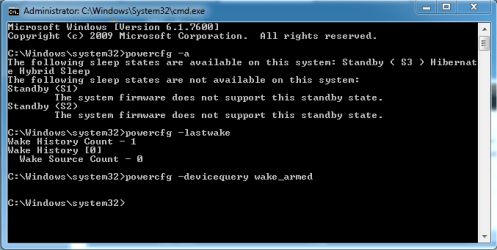
I've tried all powercfg commands: S3 sleep is activated, devicequery returns no results, last wake says wake source is 0. I've checked power management and sleeping while media sharing is allowed. I've checked device settings and network adapter is not allowed to wake up computer.
Just as a last resort I reinstalled my OS again, because since the last year nothing had gone wrong with it. Right now I only have mozilla firefox installed, and this problem persists even without it, so I'm quite sure it's not a software issue.
Can ANYONE help me with this? This is not a life changer, but it's a habit and having to change that would be really, really annoying. Please let me know as soon as possible.
I'm uploading a screenshot of my powercfg results.
My system:
Windows 7 Professional 64 bit
Intel Core i5 230 GHz
4 gb of RAM
I'm using an Asus K53E laptop (details given below), and I've been using it for a year. Two weeks ago, I reinstalled windows OS, and even then everything was fine. For the last three or four days, however, there's been a problem.
1. When the computer goes to sleep automatically (due to power management settings) it wakes up immediately after that, and then it doesn't go back to sleep on its own.
2. If I put the computer to sleep, it wakes up in the same way, but after it wakes up once if I press sleep again, it works fine. If I wake it up and try putting it to sleep after about 15 minutes, it wakes up immediately again.
Every time, when it wakes up on its own, it does not turn on the screen. It only lights up if I touch the touchpad, and it's on the log in screen.
I've tried all powercfg commands: S3 sleep is activated, devicequery returns no results, last wake says wake source is 0. I've checked power management and sleeping while media sharing is allowed. I've checked device settings and network adapter is not allowed to wake up computer.
Just as a last resort I reinstalled my OS again, because since the last year nothing had gone wrong with it. Right now I only have mozilla firefox installed, and this problem persists even without it, so I'm quite sure it's not a software issue.
Can ANYONE help me with this? This is not a life changer, but it's a habit and having to change that would be really, really annoying. Please let me know as soon as possible.
I'm uploading a screenshot of my powercfg results.
My system:
Windows 7 Professional 64 bit
Intel Core i5 230 GHz
4 gb of RAM
Attachments
My Computer
At a glance
windows 7 Professional 64 bitIntel Core i5-2410M @ 2.30 GHz4 GBIntel integrated
- Computer Manufacturer/Model Number
- Asus K53E
- OS
- windows 7 Professional 64 bit
- CPU
- Intel Core i5-2410M @ 2.30 GHz
- Memory
- 4 GB
- Graphics Card(s)
- Intel integrated
- Hard Drives
- 640 GB