Windows 7: Program to customize style of window title text?

TsunamiZ

New member
Member
Local time
3:11 AM
Messages
72
For Windows 7, does anyone know of an editor/tool to modify the window title text? I use a dark black style so I want to change the window title text to white [even when maximized], the text glow to black, and center the title text. Is there a program to allow us to do this?
 

My Computer My Computer

At a glance

Windows 7 Ultimate x64
OS
Windows 7 Ultimate x64
Hi,

There are plenty of apps that can make the changes you require, just a quick google search can give loads of results. Stardock.com - Your Edge In Software is a great tool.

In the mean time,

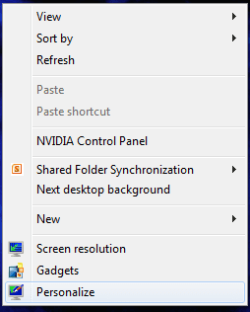
Right-Click the desktop and select Personalize
Desktop Personalize.PNG

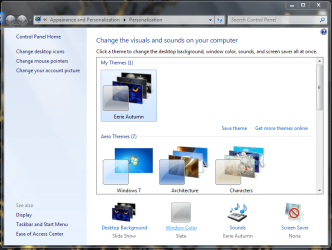
Click Windows Color
Desktop Windows Color.PNG

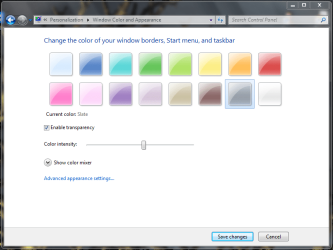
Click Advanced Appearence settings
Desktop Windows Color 2.PNG

From here...
Desktop Advanced Settings.PNG
...you can customize quite a bit.


OS
 

My Computer My Computer

At a glance

Windows 7 Ultimate x64AMD Sempron Dual Core3GBNVIDIA GeForce 6150SE nForce 430
Computer Manufacturer/Model Number
Compaq Desktop
OS
Windows 7 Ultimate x64
CPU
AMD Sempron Dual Core
Memory
3GB
Graphics Card(s)
NVIDIA GeForce 6150SE nForce 430
Screen Resolution
1024x768
Hard Drives
150GB Sata
but u cant change what i requested that way. also, the custom title text color changes back to black on maximized windows.

also, i dont want to change the skin. just the title text visuals...
 

My Computer My Computer

At a glance

Windows 7 Ultimate x64
OS
Windows 7 Ultimate x64
I can make it! And I don't know if you still need it now. Contact me with my mail: [email protected]
 

My Computer My Computer

At a glance

Windows xp 32bit; Windows 7 Ultimate x64
OS
Windows xp 32bit; Windows 7 Ultimate x64
if you can make it, can you just post it here?
 

My Computer My Computer

At a glance

Windows 7 Ultimate x64
OS
Windows 7 Ultimate x64
With Ave's Windows7 Style Builder you can change the text color and maybe add a text glow but you can not move the text to the center (In the Windows 8 preview it is centered)
If you are using the default aero theme I can change that for you. I have Windows Style Builder and can post it here in a zip.
If you are using a custom theme you will need to ask the theme maker. It's not cool to change someone else work.
&
You will need to do 1 of these 2 ways of Enabling custom themes for it to work.
http://www.sevenforums.com/tutorials/34579-enabling-custom-themes-windows-7-a.html
Or
http://www.sevenforums.com/tutorials/28377-theme-how-apply-custom-themes.html?filter
Jerry
 

My Computer My Computer

At a glance

Win 7 Pro x64 / Win 10 ProIntel(R) Core(TM) i7-3630QM CPU @ 2.40GHz12 GB(1) Intel(R) HD Graphics 4000 (2) NVIDIA GeFo...
Computer type
Laptop
Computer Manufacturer/Model Number
Sager NP9170
OS
Win 7 Pro x64 / Win 10 Pro
CPU
Intel(R) Core(TM) i7-3630QM CPU @ 2.40GHz
Motherboard
CLEVO P170EM
Memory
12 GB
Graphics Card(s)
(1) Intel(R) HD Graphics 4000 (2) NVIDIA GeForce GTX 675M
Sound Card
(1) Realtek High Definition Audio (2) Intel(R) Display Aud
Monitor(s) Displays
17.3
Screen Resolution
1920x1080
Hard Drives
(1) Samsung 860 EVO 500GB(OS) (1) Samsung 860 EVO 500GB(Data)
Keyboard
Backlite
Antivirus
MSE, Malwarebytes Pro
Browser
Firefox
Other Info
DESKTOP: Custom-built.
OS: Win 10 Pro x64.
CASE: Rosewill R5.
CPU: Intel I5 4670K CPU @ 3.40GHz.
CPU COOLER: Cool Master Hyper 212 EVO.
MOTHERBOARD: Asus Z87-A.
MEMORY: Kingston HyperX 2x4 GB.
GPU: Nvidia Geforce 650 TI.
PSU: Corsair TX750.
DRIVES: (1) Samsung 840 120 GB SSD (2) Western Digital blue 500 GB 7200 RPM.
Back
Top