Windows 7 RAM crash

Wowdude

New member
Member
VIP
Local time
8:25 PM
Messages
98
Location
West Midlands
Hey!

I've bought a stick of Corsair 1Gb DDR2 800MHz desktop gaming RAM the other day as a nice simple upgrade to my system.

I added the new RAM into my system and when Windows 7 booted, I logged in and after about 1-2 minutes of being logged in Windows 7 crashed.

The CPU usage was low, my harddrives are fine. When I take the stick out my system still works fine. Also my system works in safe mode with the stick in. My motherboard Bios and under "Properties" on My Computer both show 3Gb of memory but the system crashes when I boot it up normally.

This could be a rookie mistake for all I know as i'm not very good with hardware compatibility.

Any help you could give would be great thanks.

P.S. I've got the specs to my PC to the best of my knowledge and my pc has been stable until now.
 

My Computer

Computer Manufacturer/Model Number
Home Built
OS
Windows 7 Home Premium 64-bit, Windows 10 Home Premium 64-bit
CPU
Intel Core i5-2400 3.10GHz Quad Core
Motherboard
Asus P8H61-M LE
Memory
2 x 4Gb XMS3 DDR3
Graphics Card(s)
Asus nVidia GeForce GTX 550Ti
Sound Card
On-Board
Monitor(s) Displays
Acer S220 HQL & Hanns-G HWD191D
Screen Resolution
1920 x 1080 & 1440 x 900
Hard Drives
1Tb Seagate(Windows 7), 2Tb Western Digital & 120Gb SSD (Windows 10)
PSU
750W Alpine
Case
TTake Dokker Case
Cooling
Corsair H60 all-in-one water cooling CPU block
Keyboard
ACT K-8108 Skype multimedia keyboard
Mouse
Trust GTX 145
Internet Speed
10Mb
Antivirus
MSE
Hi Wowdude, welcome to SevenForums.

When I look at the specifications of your old ram and the one you just bought (if I found the correct one) the problem is that they are very different from each other:

Micron PC2-4300U: Speed: 533Mhz, Latency: 4-4-4-12

Corsair CM2X1024-6400: Speed: 800Mhz, Latency: 5-5-5-18

I would set the memory in the bios at the slowest speed: 533Mhz (if it not still is) and the latency timings at the slowest of the two at 5-5-5-18 and check if it runs stable.

You can set the memory timings of your motherboards bios in: Advanced, Memory Configuration.

At first you can check what the memory settings are at the top of the page.

If they are incorrect you can set Memclock mode to 533Mhz, CAS Latency (CL) to 5.0,
TRCD to 5, TRP to 5 and TRAS to 18

If you can go into Windows normally you can check further stability with a program called Memtest, you can find a tutorial and memtest here: http://www.sevenforums.com/tutorials/105647-ram-test-memtest86.html

If you want to check in Windows if your memory is running at the speed you set in the bios you can use a program called CPU-Z, you can find it here: CPUID - System & hardware benchmark, monitoring, reporting

MK2
 

My Computer

OS
7
Hey MK2!

Firstly thank you for the fast response. It is nice to be replied to on the same day let alone within a few hours. By the way the speeds that you retireved for my old memory is correct (used SiSandra Lite).

I attempted the changes you suggested.
In the bios iIchanged:
Memlock speed - Manual - 533MHz (I also tried Limit to 533)
CAS Latency - 5
TRCD - 5
TRP - 5
TRAS - 18

I checked the memory using the built in windows diagnostic tool (from boot up) before I posted on here to make sure it wasn't the RAM itself. The tool came back with no errors at all.

However windows 7 still crashes 1 minute after logging in. I still have no idea what's going on with it.

Any other ideas?
 

My Computer

Computer Manufacturer/Model Number
Home Built
OS
Windows 7 Home Premium 64-bit, Windows 10 Home Premium 64-bit
CPU
Intel Core i5-2400 3.10GHz Quad Core
Motherboard
Asus P8H61-M LE
Memory
2 x 4Gb XMS3 DDR3
Graphics Card(s)
Asus nVidia GeForce GTX 550Ti
Sound Card
On-Board
Monitor(s) Displays
Acer S220 HQL & Hanns-G HWD191D
Screen Resolution
1920 x 1080 & 1440 x 900
Hard Drives
1Tb Seagate(Windows 7), 2Tb Western Digital & 120Gb SSD (Windows 10)
PSU
750W Alpine
Case
TTake Dokker Case
Cooling
Corsair H60 all-in-one water cooling CPU block
Keyboard
ACT K-8108 Skype multimedia keyboard
Mouse
Trust GTX 145
Internet Speed
10Mb
Antivirus
MSE
OK, did I find the correct Corsair memory as well?
Could you give me the specs or type number of it?

It is also possible that the two just don't work together, the best thing with memory is to mach new ones with the ones already in your system, but let's try some more.

If you can't get it working another option is to look on Ebay for matching RAM, I already found thes two: Micron PC2-4300U Memory 1GB (2) 512 Sticks - eBay (item 140458456482 end time Oct-02-10 15:11:21 PDT) or: MICRON 512MB 2RX8 PC2-4300U-444-11-00 ECC on eBay.ca (item 110454304500 end time 01-Oct-10 16:50:26 EDT)

MK2
 

My Computer

OS
7
Hey!

Unfortunately the only details I can give you about the new RAM are:
CGM2X1G800 G - PC2-6400 DDR2-800DIMM RAM 1GB

Apart from that looks like i'm buying some more RAM.
I've always been very wary about buying RAM off ebay. I've seen it done a few times and the RAM can sometimes arrive dead and the seller refuses to take it back.

However I think this is the only way to actually find some matching RAM for my machine.

Please reply if you can suggest anything else, if not, thanks for your help!

Really useful and quick replies!
 
Last edited:

My Computer

Computer Manufacturer/Model Number
Home Built
OS
Windows 7 Home Premium 64-bit, Windows 10 Home Premium 64-bit
CPU
Intel Core i5-2400 3.10GHz Quad Core
Motherboard
Asus P8H61-M LE
Memory
2 x 4Gb XMS3 DDR3
Graphics Card(s)
Asus nVidia GeForce GTX 550Ti
Sound Card
On-Board
Monitor(s) Displays
Acer S220 HQL & Hanns-G HWD191D
Screen Resolution
1920 x 1080 & 1440 x 900
Hard Drives
1Tb Seagate(Windows 7), 2Tb Western Digital & 120Gb SSD (Windows 10)
PSU
750W Alpine
Case
TTake Dokker Case
Cooling
Corsair H60 all-in-one water cooling CPU block
Keyboard
ACT K-8108 Skype multimedia keyboard
Mouse
Trust GTX 145
Internet Speed
10Mb
Antivirus
MSE
It's not the ram that I first tought it was but the little information that I could find on the
CGM2X1G800 is that it also is CL5 ram.

Did you already try to run your system only on the new ram stick just to try if it will run stable with that one?
I would set the speed to 800Mhz if you are going to try.

If it runs stable with that one you just could buy another one.
You won't have compatibility problems and it will run at 800Mhz instead of the 533Mhz of the slowest ram in your system.

MK2
 

My Computer

OS
7
I actually already have 2Gbs of RAM in my system as it is and was looking to add a third to toal to 3Gb. I didn't see the point in getting 4Gb's as my 32bit system can only register 3.5Gb.

My Girlfriend has an old hp pavilion PC. I was wondering if I can't get it to work in my PC replace the RAM in her PC (I think it only contains 512Mb).

Just need to find myself some new matching RAM or replace the lot xD
 

My Computer

Computer Manufacturer/Model Number
Home Built
OS
Windows 7 Home Premium 64-bit, Windows 10 Home Premium 64-bit
CPU
Intel Core i5-2400 3.10GHz Quad Core
Motherboard
Asus P8H61-M LE
Memory
2 x 4Gb XMS3 DDR3
Graphics Card(s)
Asus nVidia GeForce GTX 550Ti
Sound Card
On-Board
Monitor(s) Displays
Acer S220 HQL & Hanns-G HWD191D
Screen Resolution
1920 x 1080 & 1440 x 900
Hard Drives
1Tb Seagate(Windows 7), 2Tb Western Digital & 120Gb SSD (Windows 10)
PSU
750W Alpine
Case
TTake Dokker Case
Cooling
Corsair H60 all-in-one water cooling CPU block
Keyboard
ACT K-8108 Skype multimedia keyboard
Mouse
Trust GTX 145
Internet Speed
10Mb
Antivirus
MSE
Ah okay, I misunderstood.
I tought you had 2x 512MB and wanted to ad 1GB extra.
That's why I pointed to the 2x 512MB modules on Ebay, so you would get 4 of the same DIMMS.

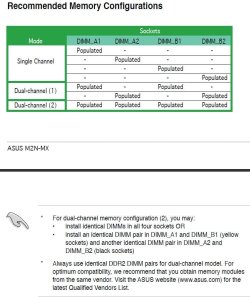
This is what the manual of your motherboard says:
 

Attachments

  • M2N-MX memory.jpg
    M2N-MX memory.jpg
    70.8 KB · Views: 15

My Computer

OS
7
Ah I see. Looks like I will be gettings more RAM then. May as well go for the 4Gb then (4 x 1Gb).

Do you think the Corsair RAM that I bought would work in the HP Pavillion I mentioned?
 

My Computer

Computer Manufacturer/Model Number
Home Built
OS
Windows 7 Home Premium 64-bit, Windows 10 Home Premium 64-bit
CPU
Intel Core i5-2400 3.10GHz Quad Core
Motherboard
Asus P8H61-M LE
Memory
2 x 4Gb XMS3 DDR3
Graphics Card(s)
Asus nVidia GeForce GTX 550Ti
Sound Card
On-Board
Monitor(s) Displays
Acer S220 HQL & Hanns-G HWD191D
Screen Resolution
1920 x 1080 & 1440 x 900
Hard Drives
1Tb Seagate(Windows 7), 2Tb Western Digital & 120Gb SSD (Windows 10)
PSU
750W Alpine
Case
TTake Dokker Case
Cooling
Corsair H60 all-in-one water cooling CPU block
Keyboard
ACT K-8108 Skype multimedia keyboard
Mouse
Trust GTX 145
Internet Speed
10Mb
Antivirus
MSE
Would have to have more information about the system to say something about that.
But if it's a DDR2 system and it can handle 800Mhz and you only put this stick in it it probably would, just give it a try if it is.
Let me know how it goes.
 

My Computer

OS
7

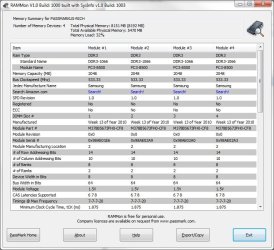
Attachments

  • rammonscreenshot.jpg
    rammonscreenshot.jpg
    84 KB · Views: 7

My Computer

Computer Manufacturer/Model Number
packard bell IXTREME M5722
OS
Operating System : Windows 7 Home Premium Edition 6.01.7600 SP1 (x64)
CPU
Processor : Intel Core 2 Quad Q8300 @ 2500 MHz
Motherboard
Mainboard : Packard Bell (Acer EG43M )
Memory
Physical Memory :8GB Corsair4x 2GB 800MHz C5 DDR2
Graphics Card(s)
Video Card : XFX 6700 AMD
Monitor(s) Displays
Maestro 234DL - BenQ V2220 - BenQ VW2420H
Screen Resolution
Current Display :1920x1080p pixels at 60 Hz in HD LED
Hard Drives
Hard Disks : WDC (1000 GB)
Drive C: (Hard Disk) : 428 GB available on 491 GB
Drive D: (Hard Disk) : 426 GB available on 492 GB
SAMSUNG spinpoint HD103SJ 1000.2 GB
(X 2) KINGSTON SSD NOW V 30GB
PSU
XFX ProSeries 550W PSU
Case
PACKARD BELL IXTREME
Cooling
System Blower Current: 150mA Air Flow16CFM ;Akasa 90mm rear
Keyboard
Gigabyte Aivia K8100
Mouse
TRUST-Wireless Laser Mouse - Carbon edition MI-7770C
Internet Speed
TP-LINK > TL-WN951N / AV500 Gigabit Powerline Adapters
Browser
chrome dev
Other Info
EXTRA COOLING>(FAN CONTROLLER) PC Bay Cooler 3 x 40mm fans; Akasa AK-HD-BL Blue hard drive cooler 2 x 40 mm fan 4500 rpm 29.7 dBA
Bios> American Megatrends Inc.
Version : P01-A1
Date : 08/31/2009
Hey!

Sorry for the late reply.

After strenuous reading of the motherboard manual I discovered it basically doens't like this stick of RAM. So instead I am upgrading to 4Gb (2x2Gb) instead.

However this is now the least of my problems.
 

My Computer

Computer Manufacturer/Model Number
Home Built
OS
Windows 7 Home Premium 64-bit, Windows 10 Home Premium 64-bit
CPU
Intel Core i5-2400 3.10GHz Quad Core
Motherboard
Asus P8H61-M LE
Memory
2 x 4Gb XMS3 DDR3
Graphics Card(s)
Asus nVidia GeForce GTX 550Ti
Sound Card
On-Board
Monitor(s) Displays
Acer S220 HQL & Hanns-G HWD191D
Screen Resolution
1920 x 1080 & 1440 x 900
Hard Drives
1Tb Seagate(Windows 7), 2Tb Western Digital & 120Gb SSD (Windows 10)
PSU
750W Alpine
Case
TTake Dokker Case
Cooling
Corsair H60 all-in-one water cooling CPU block
Keyboard
ACT K-8108 Skype multimedia keyboard
Mouse
Trust GTX 145
Internet Speed
10Mb
Antivirus
MSE
Hey!

Sorry for the late reply.

After strenuous reading of the motherboard manual I discovered it basically doens't like this stick of RAM. So instead I am upgrading to 4Gb (2x2Gb) instead.

However this is now the least of my problems.

i hope you establish your ram best of luck:D
 

My Computer

Computer Manufacturer/Model Number
packard bell IXTREME M5722
OS
Operating System : Windows 7 Home Premium Edition 6.01.7600 SP1 (x64)
CPU
Processor : Intel Core 2 Quad Q8300 @ 2500 MHz
Motherboard
Mainboard : Packard Bell (Acer EG43M )
Memory
Physical Memory :8GB Corsair4x 2GB 800MHz C5 DDR2
Graphics Card(s)
Video Card : XFX 6700 AMD
Monitor(s) Displays
Maestro 234DL - BenQ V2220 - BenQ VW2420H
Screen Resolution
Current Display :1920x1080p pixels at 60 Hz in HD LED
Hard Drives
Hard Disks : WDC (1000 GB)
Drive C: (Hard Disk) : 428 GB available on 491 GB
Drive D: (Hard Disk) : 426 GB available on 492 GB
SAMSUNG spinpoint HD103SJ 1000.2 GB
(X 2) KINGSTON SSD NOW V 30GB
PSU
XFX ProSeries 550W PSU
Case
PACKARD BELL IXTREME
Cooling
System Blower Current: 150mA Air Flow16CFM ;Akasa 90mm rear
Keyboard
Gigabyte Aivia K8100
Mouse
TRUST-Wireless Laser Mouse - Carbon edition MI-7770C
Internet Speed
TP-LINK > TL-WN951N / AV500 Gigabit Powerline Adapters
Browser
chrome dev
Other Info
EXTRA COOLING>(FAN CONTROLLER) PC Bay Cooler 3 x 40mm fans; Akasa AK-HD-BL Blue hard drive cooler 2 x 40 mm fan 4500 rpm 29.7 dBA
Bios> American Megatrends Inc.
Version : P01-A1
Date : 08/31/2009
Back
Top