Solved Windows 7 randomly restarts itself while playing game

I'll do a clean reinstall now. May I know which nvidia driver are you using?
 

My Computer My Computer

Computer type
PC/Desktop
Computer Manufacturer/Model Number
Custom build
OS
Windows 7 Pro x64 / Windows 10 Pro x64
CPU
Intel i5 4590 3.30GHz
Motherboard
Gigabyte B85M-DS3H-A
Memory
Corsair Vengeance Pro Series — 8GB (2 x 4GB) DDR3 DRAM
Graphics Card(s)
Asus Nvidia GeForce GTX 750 Ti OC
PSU
Corsair VS550
Keyboard
Razer DeathStalker
Mouse
Razer Naga Molten
Antivirus
Malwarebytes Anti-Malware
That's a random google image I'm not running NVidia but go for the most recent WHQL certified one or if that is the one you are using go back one version and try
 

My Computer My Computer

Computer type
PC/Desktop
Computer Manufacturer/Model Number
Pauly Special
OS
Win7 Ultimate X64
CPU
Intel i5 3570K
Motherboard
Gigabyte Z77X-DS3H
Memory
8GB DDR3 1600
Graphics Card(s)
Onboard
Sound Card
Onboard
Screen Resolution
1280x1024
Hard Drives
Samsung 840 Evo SSD (OS)
1TB Spinner (Data)
PSU
800W Arctic
Case
Cooler Master
Cooling
3x120mm Fans
Keyboard
MS Wireless
Mouse
MS Wireless
Internet Speed
20M
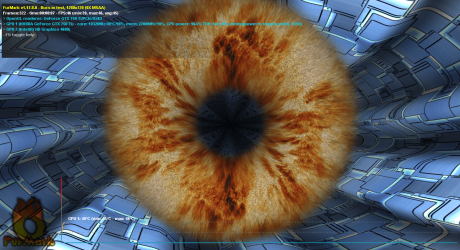
Ah I found out why you said the first the screenshot looks distorted. After I unticked xtreme burn-in and post-fx in the settings, it looks similar to the screenshot you posted. I also tried running GPU benchmarks test with furmark. Sometimes it resulted in immediate reboot, other times it let me do the test without restart.
 

Attachments

  • FurMark 2015-10-05 11-42-45-55.png
    FurMark 2015-10-05 11-42-45-55.png
    526.5 KB · Views: 4
  • FurMark 2015-10-05 11-24-24-90.png
    FurMark 2015-10-05 11-24-24-90.png
    546 KB · Views: 3

My Computer My Computer

Computer type
PC/Desktop
Computer Manufacturer/Model Number
Custom build
OS
Windows 7 Pro x64 / Windows 10 Pro x64
CPU
Intel i5 4590 3.30GHz
Motherboard
Gigabyte B85M-DS3H-A
Memory
Corsair Vengeance Pro Series — 8GB (2 x 4GB) DDR3 DRAM
Graphics Card(s)
Asus Nvidia GeForce GTX 750 Ti OC
PSU
Corsair VS550
Keyboard
Razer DeathStalker
Mouse
Razer Naga Molten
Antivirus
Malwarebytes Anti-Malware
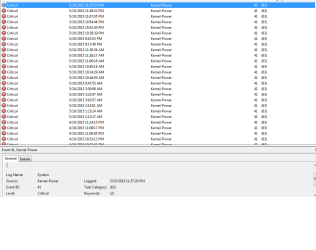
I guess today's condition is the worst one. Booting into Windows would cause restart as well. It happened like 4 times in a row (or probably more, kinda lost count here...)

Other time it let me get into Windows without auto rebooting then I tried opening Google Chrome, bam it restarted yet again. Very frustrating.

Well, at least this time it let me opened the browser to make a forum post.
 

Attachments

  • eventviewer.png
    eventviewer.png
    13.3 KB · Views: 4

My Computer My Computer

Computer type
PC/Desktop
Computer Manufacturer/Model Number
Custom build
OS
Windows 7 Pro x64 / Windows 10 Pro x64
CPU
Intel i5 4590 3.30GHz
Motherboard
Gigabyte B85M-DS3H-A
Memory
Corsair Vengeance Pro Series — 8GB (2 x 4GB) DDR3 DRAM
Graphics Card(s)
Asus Nvidia GeForce GTX 750 Ti OC
PSU
Corsair VS550
Keyboard
Razer DeathStalker
Mouse
Razer Naga Molten
Antivirus
Malwarebytes Anti-Malware
Did you find any solutions to your problem?

I am experiencing a very similar issue, and I am dying to find a solution :(((((
 

My Computer My Computer

Computer type
PC/Desktop
OS
Windows 7 Home Premium x64
I guess today's condition is the worst one. Booting into Windows would cause restart as well. It happened like 4 times in a row (or probably more, kinda lost count here...)

Other time it let me get into Windows without auto rebooting then I tried opening Google Chrome, bam it restarted yet again. Very frustrating.

Well, at least this time it let me opened the browser to make a forum post.
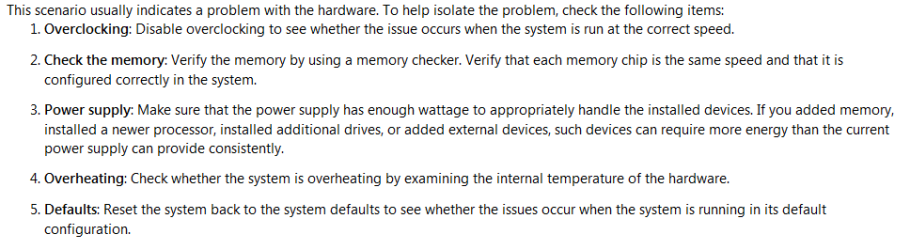
The Kernel Stop 41 error is a power interruption fault. There are five potential causes as listed by Microsoft:

Kernel 41.PNG

I think your power supply may not be up to the task.

Here's the whole article:

https://support.microsoft.com/en-us/kb/2028504
 

My Computer My Computer

Computer type
PC/Desktop
Computer Manufacturer/Model Number
Mellon Labs (custom build)
OS
Win 7 Pro x64/Win 10 Pro x64 dual boot
CPU
AMD FX 8350 Vishera @ 4200
Motherboard
ASUS M5A97 R2.0
Memory
16 GB Mushkin Blackline DDR3-2400 @ 1866 (9-10-10-10-31)
Graphics Card(s)
XFX Radeon R9 280 Double D Black Edition
Sound Card
Realtek HD Audio on MB. Sounds great.
Monitor(s) Displays
Acer 24", Acer 22"
Screen Resolution
3840 x 1080
Hard Drives
1 x Mushkin Chronos 120 GB SSD (Win 10)
1 x Samsung 850 EVO 250 GB SSD (Win 7)
1 x WD 1TB SATA Blue
1 x WD 1TB SATA Green
PSU
Corsair TX-750
Case
CoolerMaster HAF 912+
Cooling
Coolermaster Seidon 240M Liquid AIO. 6 case fans
Keyboard
Logitech G710+
Mouse
Logitech G500s
Internet Speed
Much better since I got fiber, but still way overpriced.
Antivirus
MSE, Malware Bytes for scanning
Browser
Firefox
Other Info
Corsair VOID USB headphones.

A Mellon Labs X-1 - LCD Smartie driven system status display.

Brought to you by the letter E
I was under the impression that te author of this topic has found a solution, given that he hasn't further replied for 2 weeks.

So I am eager to hear what his solution was/is :-)
 

My Computer My Computer

Computer type
PC/Desktop
OS
Windows 7 Home Premium x64
bump
 

My Computer My Computer

Computer type
PC/Desktop
OS
Windows 7 Home Premium x64
It was power supply failure. I returned it to the shop and they gave me a new one. It is working fine now.
 

My Computer My Computer

Computer type
PC/Desktop
Computer Manufacturer/Model Number
Custom build
OS
Windows 7 Pro x64 / Windows 10 Pro x64
CPU
Intel i5 4590 3.30GHz
Motherboard
Gigabyte B85M-DS3H-A
Memory
Corsair Vengeance Pro Series — 8GB (2 x 4GB) DDR3 DRAM
Graphics Card(s)
Asus Nvidia GeForce GTX 750 Ti OC
PSU
Corsair VS550
Keyboard
Razer DeathStalker
Mouse
Razer Naga Molten
Antivirus
Malwarebytes Anti-Malware
Very glad to hear that you've solved your pproblem.

My issue is pretty much the same as you had. Started out slowly, then graduately getting worse.

The past few times I have opened Heroes of the Storm my computer has crashed within 10 seconds of being in the menus. (The crashes are reboots - no BSOD etc.)

So I kind of started using Hots as a "test".. If I could open it, and I would crash, whatever I had changed didn't work.

I was thinking that it was GPU related, so I decided to try and take the GPU out the my system, and then open the same game, this resulted in no crash - So I thought I had a faulty GPU. However, after some internet browsing my computer rebooted again, and when it turned back on (after being completely idle) after 20 minutes it rebooted again...

So I am thinking I have a faulty PSU aswell.. Thanks for the update :-)
 

My Computer My Computer

Computer type
PC/Desktop
OS
Windows 7 Home Premium x64
Back
Top