Solved Windows 7 randomly restarts itself while playing game

nolimit87

New member
Local time
3:33 AM
Messages
31
The random restart first happened 3 weeks ago. I was playing game when it happened. The computer suddenly restarted itself but I have no idea why and I chose to ignore since it didn't happen anymore on that day. Then after more or less a week, the same thing happened again.

Same as the first one. It restarted the Windows once and it didn't happen anymore on that same day. So I couldn't really track what is wrong. Then after that, it started happening more and more often until I lost count of how many times the Windows have restarted itself.

I used to run Windows 10 Pro and due to the random restart, I reinstalled Windows 7. Hoping it would fix the issue but it doesn't.

Here is my computer specs:
Windows 7 Pro 64 bit 8GM RAM
Intel i5 4590 CPU 3.30GHz
GeForce GTX 750 Ti
Corsair VS550

I would really really appreciate it if anyone could help me.
 

My Computer

Computer type
PC/Desktop
Computer Manufacturer/Model Number
Custom build
OS
Windows 7 Pro x64 / Windows 10 Pro x64
CPU
Intel i5 4590 3.30GHz
Motherboard
Gigabyte B85M-DS3H-A
Memory
Corsair Vengeance Pro Series — 8GB (2 x 4GB) DDR3 DRAM
Graphics Card(s)
Asus Nvidia GeForce GTX 750 Ti OC
PSU
Corsair VS550
Keyboard
Razer DeathStalker
Mouse
Razer Naga Molten
Antivirus
Malwarebytes Anti-Malware
Check your temperatures while idle and while gaming sounds like they could be going to high
If needs be try stress testing your cpu (prime95)and/or gpu (furmark)
 

My Computer

Computer type
PC/Desktop
Computer Manufacturer/Model Number
Pauly Special
OS
Win7 Ultimate X64
CPU
Intel i5 3570K
Motherboard
Gigabyte Z77X-DS3H
Memory
8GB DDR3 1600
Graphics Card(s)
Onboard
Sound Card
Onboard
Screen Resolution
1280x1024
Hard Drives
Samsung 840 Evo SSD (OS)
1TB Spinner (Data)
PSU
800W Arctic
Case
Cooler Master
Cooling
3x120mm Fans
Keyboard
MS Wireless
Mouse
MS Wireless
Internet Speed
20M
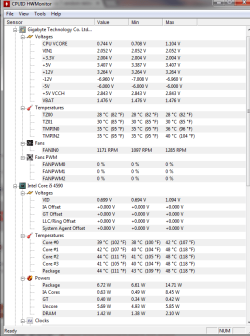
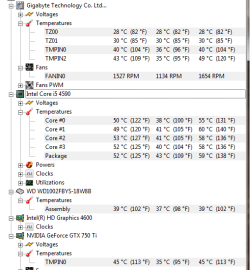
Attached pics

temp: IDLE
temp2: GAMING
 

Attachments

  • temp.png
    temp.png
    26.3 KB · Views: 5
  • temp2.png
    temp2.png
    15.8 KB · Views: 42

My Computer

Computer type
PC/Desktop
Computer Manufacturer/Model Number
Custom build
OS
Windows 7 Pro x64 / Windows 10 Pro x64
CPU
Intel i5 4590 3.30GHz
Motherboard
Gigabyte B85M-DS3H-A
Memory
Corsair Vengeance Pro Series — 8GB (2 x 4GB) DDR3 DRAM
Graphics Card(s)
Asus Nvidia GeForce GTX 750 Ti OC
PSU
Corsair VS550
Keyboard
Razer DeathStalker
Mouse
Razer Naga Molten
Antivirus
Malwarebytes Anti-Malware
Wow those are sure some low voltages. I don't even know how the computer runs at all.

What power supply are you using?
 

My Computer

Computer type
PC/Desktop
Computer Manufacturer/Model Number
Home made Desktop
OS
Windows 10 Pro. 64/ version 1709 Windows 7 Pro/64
CPU
Intel i7-6800K @ 4.3
Motherboard
ASUS X-99 Deluxe II
Memory
Corsair Platinum 16 gig @2400
Graphics Card(s)
EVGA GTX 1070 OC
Monitor(s) Displays
Asus 27" LED LCD/VE278Q
Screen Resolution
1920-1080 or 1280-720 HDMI
Hard Drives
INTEL SSD 730-240 Gb Sata 3.0/
PSU
EVGA Platium 1200W
Case
Phanteks Luxe Tempered Glass 8 fans/ one radiator
Cooling
XSPC/ Water Cooled CPU
Keyboard
Das 4 Professional
Mouse
Logitech M705/MX Anywhere 2-S
Internet Speed
100 mbits
Antivirus
Microsoft Security Essentials/ Malwarebytes Premium 3.0/ SAS
Browser
I.E. 11 default/Firefox/ ISP Time Warner Cable/Spectrum
Other Info
LG BluRay Burner/
Sound system-KLipsch-THX/
Icy Dock ssd Hot Swap bays.
I am using Corsair VS550 PSU.
 

My Computer

Computer type
PC/Desktop
Computer Manufacturer/Model Number
Custom build
OS
Windows 7 Pro x64 / Windows 10 Pro x64
CPU
Intel i5 4590 3.30GHz
Motherboard
Gigabyte B85M-DS3H-A
Memory
Corsair Vengeance Pro Series — 8GB (2 x 4GB) DDR3 DRAM
Graphics Card(s)
Asus Nvidia GeForce GTX 750 Ti OC
PSU
Corsair VS550
Keyboard
Razer DeathStalker
Mouse
Razer Naga Molten
Antivirus
Malwarebytes Anti-Malware
I would borrow another PSU and swap it out and see if it improves the restart issue, or even if those detected voltages come up a bit. As Layback Bear said, I don't know how it even runs at those voltages.

If those voltage readings are correct, your power supply is failing.
 

My Computer

Computer type
PC/Desktop
Computer Manufacturer/Model Number
Mellon Labs (custom build)
OS
Win 7 Pro x64/Win 10 Pro x64 dual boot
CPU
AMD FX 8350 Vishera @ 4200
Motherboard
ASUS M5A97 R2.0
Memory
16 GB Mushkin Blackline DDR3-2400 @ 1866 (9-10-10-10-31)
Graphics Card(s)
XFX Radeon R9 280 Double D Black Edition
Sound Card
Realtek HD Audio on MB. Sounds great.
Monitor(s) Displays
Acer 24", Acer 22"
Screen Resolution
3840 x 1080
Hard Drives
1 x Mushkin Chronos 120 GB SSD (Win 10)
1 x Samsung 850 EVO 250 GB SSD (Win 7)
1 x WD 1TB SATA Blue
1 x WD 1TB SATA Green
PSU
Corsair TX-750
Case
CoolerMaster HAF 912+
Cooling
Coolermaster Seidon 240M Liquid AIO. 6 case fans
Keyboard
Logitech G710+
Mouse
Logitech G500s
Internet Speed
Much better since I got fiber, but still way overpriced.
Antivirus
MSE, Malware Bytes for scanning
Browser
Firefox
Other Info
Corsair VOID USB headphones.

A Mellon Labs X-1 - LCD Smartie driven system status display.

Brought to you by the letter E
This is the Voltage readings from BIOS.
2qa8zrl.jpg
 

My Computer

Computer type
PC/Desktop
Computer Manufacturer/Model Number
Custom build
OS
Windows 7 Pro x64 / Windows 10 Pro x64
CPU
Intel i5 4590 3.30GHz
Motherboard
Gigabyte B85M-DS3H-A
Memory
Corsair Vengeance Pro Series — 8GB (2 x 4GB) DDR3 DRAM
Graphics Card(s)
Asus Nvidia GeForce GTX 750 Ti OC
PSU
Corsair VS550
Keyboard
Razer DeathStalker
Mouse
Razer Naga Molten
Antivirus
Malwarebytes Anti-Malware
Well, that certainly seems healthy. I wonder why HWMonitor is reading the voltages that low?

Assuming that there isn't a problem with the power supply, I wonder if you have a memory problem? You could try testing the memory with Memtest86+. Let it run overnight for about 8 passes if the machine can run that long without restarting.

Memtest86+ - Advanced Memory Diagnostic Tool

What make and model of RAM do you have?
 

My Computer

Computer type
PC/Desktop
Computer Manufacturer/Model Number
Mellon Labs (custom build)
OS
Win 7 Pro x64/Win 10 Pro x64 dual boot
CPU
AMD FX 8350 Vishera @ 4200
Motherboard
ASUS M5A97 R2.0
Memory
16 GB Mushkin Blackline DDR3-2400 @ 1866 (9-10-10-10-31)
Graphics Card(s)
XFX Radeon R9 280 Double D Black Edition
Sound Card
Realtek HD Audio on MB. Sounds great.
Monitor(s) Displays
Acer 24", Acer 22"
Screen Resolution
3840 x 1080
Hard Drives
1 x Mushkin Chronos 120 GB SSD (Win 10)
1 x Samsung 850 EVO 250 GB SSD (Win 7)
1 x WD 1TB SATA Blue
1 x WD 1TB SATA Green
PSU
Corsair TX-750
Case
CoolerMaster HAF 912+
Cooling
Coolermaster Seidon 240M Liquid AIO. 6 case fans
Keyboard
Logitech G710+
Mouse
Logitech G500s
Internet Speed
Much better since I got fiber, but still way overpriced.
Antivirus
MSE, Malware Bytes for scanning
Browser
Firefox
Other Info
Corsair VOID USB headphones.

A Mellon Labs X-1 - LCD Smartie driven system status display.

Brought to you by the letter E
Unfortunately, I am not sure how accurate HWMonitor reading is either. I will be doing the memtest tonight and report back ASAP.

I'm using Corsair Vengeance Pro Series — 8GB (2 x 4GB) DDR3 DRAM 1600MHz C9 Memory Kit (CMY8GX3M2A1600C9).

The PC that I am currently using is a 5-month-old PC so it was running the game fine until the restart problem happened.
First time - Sep 12 (rebooted once)
Second time - Sep 20 (rebooted once)
Third time and so on - Sept 25 and it has been happening everyday since then. It rebooted so many times (maybe like 5-7 times a day or could be more if I keep logging back into game).

Mostly happens when I'm in game and it seems quite safe if I'm not in game. Sometimes it rebooted after 10 mins (in game), other times it rebooted after 1 hour or so. It has no specific pattern, very random.

I'll state more detailed PC specs in case it helps to identify the problem:
OS: Windows 7 Pro 64 bit
CPU: Intel i5 4590 3.30GHz
GPU: Asus NVIDIA GeForce GTX 750 Ti OC
MOBO: Gigabyte B85M-DS3H-A
RAM: 8GB (2x4GB) Corsair Vengeance Pro Series CMY8GX3M2A1600C9
PSU: Corsair VS550
 

My Computer

Computer type
PC/Desktop
Computer Manufacturer/Model Number
Custom build
OS
Windows 7 Pro x64 / Windows 10 Pro x64
CPU
Intel i5 4590 3.30GHz
Motherboard
Gigabyte B85M-DS3H-A
Memory
Corsair Vengeance Pro Series — 8GB (2 x 4GB) DDR3 DRAM
Graphics Card(s)
Asus Nvidia GeForce GTX 750 Ti OC
PSU
Corsair VS550
Keyboard
Razer DeathStalker
Mouse
Razer Naga Molten
Antivirus
Malwarebytes Anti-Malware
Memtest 8 passes 0 errors done for the first card. Gonna try the second one tonight.
 

My Computer

Computer type
PC/Desktop
Computer Manufacturer/Model Number
Custom build
OS
Windows 7 Pro x64 / Windows 10 Pro x64
CPU
Intel i5 4590 3.30GHz
Motherboard
Gigabyte B85M-DS3H-A
Memory
Corsair Vengeance Pro Series — 8GB (2 x 4GB) DDR3 DRAM
Graphics Card(s)
Asus Nvidia GeForce GTX 750 Ti OC
PSU
Corsair VS550
Keyboard
Razer DeathStalker
Mouse
Razer Naga Molten
Antivirus
Malwarebytes Anti-Malware
I would investigate the GPU more, check have updated drivers (but if only 5 months old they must be quite recent) then run furmark while monitoring temperatures, sounds like the card may be overheating, earlier screenshots only showed CPU temps not GPU
 

My Computer

Computer type
PC/Desktop
Computer Manufacturer/Model Number
Pauly Special
OS
Win7 Ultimate X64
CPU
Intel i5 3570K
Motherboard
Gigabyte Z77X-DS3H
Memory
8GB DDR3 1600
Graphics Card(s)
Onboard
Sound Card
Onboard
Screen Resolution
1280x1024
Hard Drives
Samsung 840 Evo SSD (OS)
1TB Spinner (Data)
PSU
800W Arctic
Case
Cooler Master
Cooling
3x120mm Fans
Keyboard
MS Wireless
Mouse
MS Wireless
Internet Speed
20M
You could see the GPU temp while gaming on the second screenshot. It says 45 degrees C, it has never gone above 50 degrees C (when gaming). The drivers are up to date.

Something to add on: it seems the restart happens when I'm gaming + browsing.

I found someone with a similar problem: Computer Rebooting Frequently - Homebuilt - Systems
 
Last edited:

My Computer

Computer type
PC/Desktop
Computer Manufacturer/Model Number
Custom build
OS
Windows 7 Pro x64 / Windows 10 Pro x64
CPU
Intel i5 4590 3.30GHz
Motherboard
Gigabyte B85M-DS3H-A
Memory
Corsair Vengeance Pro Series — 8GB (2 x 4GB) DDR3 DRAM
Graphics Card(s)
Asus Nvidia GeForce GTX 750 Ti OC
PSU
Corsair VS550
Keyboard
Razer DeathStalker
Mouse
Razer Naga Molten
Antivirus
Malwarebytes Anti-Malware
So it does, I would still try out your GPU for a run see what the results are, if crashes are always when gaming then its likely to be graphics related
 

My Computer

Computer type
PC/Desktop
Computer Manufacturer/Model Number
Pauly Special
OS
Win7 Ultimate X64
CPU
Intel i5 3570K
Motherboard
Gigabyte Z77X-DS3H
Memory
8GB DDR3 1600
Graphics Card(s)
Onboard
Sound Card
Onboard
Screen Resolution
1280x1024
Hard Drives
Samsung 840 Evo SSD (OS)
1TB Spinner (Data)
PSU
800W Arctic
Case
Cooler Master
Cooling
3x120mm Fans
Keyboard
MS Wireless
Mouse
MS Wireless
Internet Speed
20M
I just did furmark test and it rebooted when reaching 69 degrees C. So does that mean the problem is with the GPU?
 

My Computer

Computer type
PC/Desktop
Computer Manufacturer/Model Number
Custom build
OS
Windows 7 Pro x64 / Windows 10 Pro x64
CPU
Intel i5 4590 3.30GHz
Motherboard
Gigabyte B85M-DS3H-A
Memory
Corsair Vengeance Pro Series — 8GB (2 x 4GB) DDR3 DRAM
Graphics Card(s)
Asus Nvidia GeForce GTX 750 Ti OC
PSU
Corsair VS550
Keyboard
Razer DeathStalker
Mouse
Razer Naga Molten
Antivirus
Malwarebytes Anti-Malware
See if it does it more than once. It could have been a coincidence. 69C is a little warm for an ATI card, but I don't know about Nvidia cards. That temp may not be a problem for them. Someone with some Nvidia knowledge would know more about that than I would.
 

My Computer

Computer type
PC/Desktop
Computer Manufacturer/Model Number
Mellon Labs (custom build)
OS
Win 7 Pro x64/Win 10 Pro x64 dual boot
CPU
AMD FX 8350 Vishera @ 4200
Motherboard
ASUS M5A97 R2.0
Memory
16 GB Mushkin Blackline DDR3-2400 @ 1866 (9-10-10-10-31)
Graphics Card(s)
XFX Radeon R9 280 Double D Black Edition
Sound Card
Realtek HD Audio on MB. Sounds great.
Monitor(s) Displays
Acer 24", Acer 22"
Screen Resolution
3840 x 1080
Hard Drives
1 x Mushkin Chronos 120 GB SSD (Win 10)
1 x Samsung 850 EVO 250 GB SSD (Win 7)
1 x WD 1TB SATA Blue
1 x WD 1TB SATA Green
PSU
Corsair TX-750
Case
CoolerMaster HAF 912+
Cooling
Coolermaster Seidon 240M Liquid AIO. 6 case fans
Keyboard
Logitech G710+
Mouse
Logitech G500s
Internet Speed
Much better since I got fiber, but still way overpriced.
Antivirus
MSE, Malware Bytes for scanning
Browser
Firefox
Other Info
Corsair VOID USB headphones.

A Mellon Labs X-1 - LCD Smartie driven system status display.

Brought to you by the letter E
Second try, I let it run for about 30 minutes, it stayed at 70°C (max) so I stopped it because I am not sure how safe it is to run furmark for a long time.
 

My Computer

Computer type
PC/Desktop
Computer Manufacturer/Model Number
Custom build
OS
Windows 7 Pro x64 / Windows 10 Pro x64
CPU
Intel i5 4590 3.30GHz
Motherboard
Gigabyte B85M-DS3H-A
Memory
Corsair Vengeance Pro Series — 8GB (2 x 4GB) DDR3 DRAM
Graphics Card(s)
Asus Nvidia GeForce GTX 750 Ti OC
PSU
Corsair VS550
Keyboard
Razer DeathStalker
Mouse
Razer Naga Molten
Antivirus
Malwarebytes Anti-Malware
Did it render ok ? any artifacts ?
google the picture to see what its supposed to look like and check yours is displaying correctly or post a screenshot of the image when running
 

My Computer

Computer type
PC/Desktop
Computer Manufacturer/Model Number
Pauly Special
OS
Win7 Ultimate X64
CPU
Intel i5 3570K
Motherboard
Gigabyte Z77X-DS3H
Memory
8GB DDR3 1600
Graphics Card(s)
Onboard
Sound Card
Onboard
Screen Resolution
1280x1024
Hard Drives
Samsung 840 Evo SSD (OS)
1TB Spinner (Data)
PSU
800W Arctic
Case
Cooler Master
Cooling
3x120mm Fans
Keyboard
MS Wireless
Mouse
MS Wireless
Internet Speed
20M
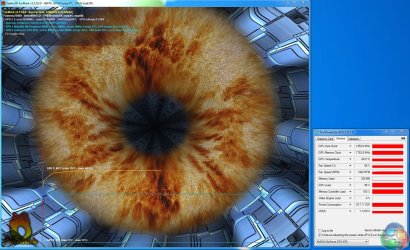
Here I attached the screenshot. No artifacts after running it for 30 minutes. Do I need to run it again? How long should I run it for?
 

Attachments

  • FurMark 2015-10-02 15-19-13-97.png
    FurMark 2015-10-02 15-19-13-97.png
    532.3 KB · Views: 8

My Computer

Computer type
PC/Desktop
Computer Manufacturer/Model Number
Custom build
OS
Windows 7 Pro x64 / Windows 10 Pro x64
CPU
Intel i5 4590 3.30GHz
Motherboard
Gigabyte B85M-DS3H-A
Memory
Corsair Vengeance Pro Series — 8GB (2 x 4GB) DDR3 DRAM
Graphics Card(s)
Asus Nvidia GeForce GTX 750 Ti OC
PSU
Corsair VS550
Keyboard
Razer DeathStalker
Mouse
Razer Naga Molten
Antivirus
Malwarebytes Anti-Malware
So, out of curiosity I tried to run WEI (windows experience index) today. It seems to reboot the PC every time I try to run it. It's like rebooting my PC within the first 30-60 secs running it. I know it used to be able to do the assessment when I first got my PC.

Also I found another condition whereby my PC would reboot. It is when I have my game clients opened and at the same time I have my browser opened to do some browsing. However, just gaming (without opening browser to do some surfing) seems to be quite safe.
 

My Computer

Computer type
PC/Desktop
Computer Manufacturer/Model Number
Custom build
OS
Windows 7 Pro x64 / Windows 10 Pro x64
CPU
Intel i5 4590 3.30GHz
Motherboard
Gigabyte B85M-DS3H-A
Memory
Corsair Vengeance Pro Series — 8GB (2 x 4GB) DDR3 DRAM
Graphics Card(s)
Asus Nvidia GeForce GTX 750 Ti OC
PSU
Corsair VS550
Keyboard
Razer DeathStalker
Mouse
Razer Naga Molten
Antivirus
Malwarebytes Anti-Malware
That furmark screenshot is not rendering properly and is massively distorted, the background blue is supposed to be smooth curves like this
furmark.jpg
I would investigate your gpu further, try uninstalling your gfx driver and running http://www.sevenforums.com/tutorials/83814-drivers-clean-left-over-files-after-uninstalling.html to clean everything out then reinstall a different driver but only install the basic package and leave out any extras like CCC/optimus and see if you can get your gfx rendering properly
 

My Computer

Computer type
PC/Desktop
Computer Manufacturer/Model Number
Pauly Special
OS
Win7 Ultimate X64
CPU
Intel i5 3570K
Motherboard
Gigabyte Z77X-DS3H
Memory
8GB DDR3 1600
Graphics Card(s)
Onboard
Sound Card
Onboard
Screen Resolution
1280x1024
Hard Drives
Samsung 840 Evo SSD (OS)
1TB Spinner (Data)
PSU
800W Arctic
Case
Cooler Master
Cooling
3x120mm Fans
Keyboard
MS Wireless
Mouse
MS Wireless
Internet Speed
20M
Back
Top