Windows 7 Recovery Console says Win7's partition drive letter is diff.

BelGarion

New member
Local time
8:40 PM
Messages
35
Had one of the drive cables come loose while the system was powered up. On fixing the problem and powering the system back up I got the dreaded "Unable to Boot, insert System Disk" error. Booted up with my Windows 7 install cd, went into Recovery Console, and discovered the Console was saying that Disk 0 / Partition 0 is F:\ . Even though the auto repair didn't work I was able to use Bootrec /fixmbr and Bootrec /fixboot , but should I be worried that C: is F: in the Recovery Console? The drive is on SATA 1 (System calls them SATA 1 to SATA 4), so it's Disk 0, and Win 7 is on the first partition, so Partition 0, so by system logic that should be C:. O.o

And poking at the files on the harddrive the /fixboot and /fixmbr put the boot files (win7ldr, grldr, /boot folder, etc) onto the second partition (D:) which is Disk 0 / Partition 1. O.o Or should be...
 
Last edited:

My Computer My Computer

At a glance

Windows 7 x64AMD Athlon 64 X2 3000+4gbnVidia 8600 GTS
Computer Manufacturer/Model Number
Self built
OS
Windows 7 x64
CPU
AMD Athlon 64 X2 3000+
Motherboard
Asus Crosshair II
Memory
4gb
Graphics Card(s)
nVidia 8600 GTS
Sound Card
SoundBlaster X-Fi Titanium
Monitor(s) Displays
LG L192WS 19" 16:10 1440x900 max
Hard Drives
Seagate 2Tb
Seagate 600gb
Can you post a picture of disk management. That would help.
 

My Computer My Computer

At a glance

Vista, Windows7, Mint Mate, Zorin, Windows 8from 1.6GHz Duo to i7
Computer Manufacturer/Model Number
HP, Dell, Gateway, Toshiba - 4 laptops and 2 desktops
OS
Vista, Windows7, Mint Mate, Zorin, Windows 8
CPU
from 1.6GHz Duo to i7
Monitor(s) Displays
2x HP w2207
Hard Drives
5x HDD, 7x SSD, 12x Externals
Keyboard
with trackball - no mices
Mouse
Trackball mice
Internet Speed
DSL 6000
Can you post a picture of disk management. That would help.

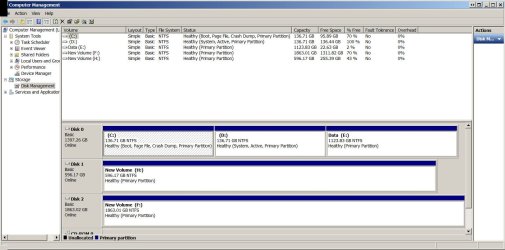
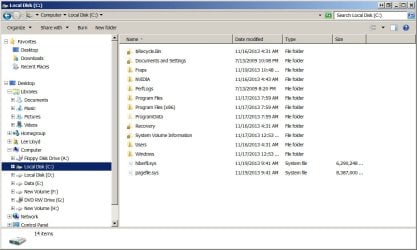
Ok, and included File Explorer view for C: and D: .
 

Attachments

  • Drive Management 11 19 2013.jpg
    Drive Management 11 19 2013.jpg
    125.3 KB · Views: 7
  • Drive C - 11 19 2013.jpg
    Drive C - 11 19 2013.jpg
    82.8 KB · Views: 1
  • Drive D - 11 19 2013.jpg
    Drive D - 11 19 2013.jpg
    67.2 KB · Views: 0

My Computer My Computer

At a glance

Windows 7 x64AMD Athlon 64 X2 3000+4gbnVidia 8600 GTS
Computer Manufacturer/Model Number
Self built
OS
Windows 7 x64
CPU
AMD Athlon 64 X2 3000+
Motherboard
Asus Crosshair II
Memory
4gb
Graphics Card(s)
nVidia 8600 GTS
Sound Card
SoundBlaster X-Fi Titanium
Monitor(s) Displays
LG L192WS 19" 16:10 1440x900 max
Hard Drives
Seagate 2Tb
Seagate 600gb
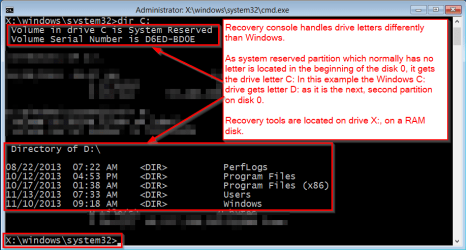
The Windows Recovery Console handles drive ID letters in a different way than Windows. See the screenshot for more information.

2013-11-20 02_38_27-Windows 8.1 Pro Recovery Console.png

Notice that this only describes drive letters on this Windows installation used in this example. Your situation and drive letters in recovery console might be totally different but the principle is the same: it uses its own system, "restoring" your normal drive letters when closed and booted back to Windows.

This is totally normal behavior of the recovery console.

Kari
 

My Computer My Computer

At a glance

Windows 10 Pro x64 EN-GB1.6 GHz Intel Core i7-720QM Processor6 GBATI Mobility Radeon HD 5850 Graphics
Computer type
Laptop
Computer Manufacturer/Model Number
HP ENVY 17-1150eg
OS
Windows 10 Pro x64 EN-GB
CPU
1.6 GHz Intel Core i7-720QM Processor
Memory
6 GB
Graphics Card(s)
ATI Mobility Radeon HD 5850 Graphics
Sound Card
Beats sound system with integrated subwoofer
Monitor(s) Displays
17" laptop display, 22" LED and 32" Full HD TV through HDMI
Screen Resolution
1600*900 (1), 1920*1080 (2&3)
Hard Drives
Internal: 2 x 500 GB SATA Hard Disk Drive 7200 rpm
External: 2TB for backups, 3TB USB3 network drive for media
Cooling
As Envy runs a bit warm, I have it on a Cooler Master pad
Keyboard
Logitech diNovo Media Desktop Laser (bluetooth)
Mouse
Logitech Performance Mouse MX
Internet Speed
50/10 Mbps VDSL
Antivirus
Windows Defender 4.3.9431.0
Browser
Maxthon 3.5.2., IE11

My Computer My Computer

At a glance

Vista, Windows7, Mint Mate, Zorin, Windows 8from 1.6GHz Duo to i7
Computer Manufacturer/Model Number
HP, Dell, Gateway, Toshiba - 4 laptops and 2 desktops
OS
Vista, Windows7, Mint Mate, Zorin, Windows 8
CPU
from 1.6GHz Duo to i7
Monitor(s) Displays
2x HP w2207
Hard Drives
5x HDD, 7x SSD, 12x Externals
Keyboard
with trackball - no mices
Mouse
Trackball mice
Internet Speed
DSL 6000
Back
Top