I searched for my specific issue but haven't been able to find it.
I've a dual-boot setup with XP Home SP3 and Win7 Pro 32bit on one hard drive, data on the others, and two DVD writers.
After Win7 was installed, the XP partition received the letter D:
This screwed up my optical drive letter assignments.
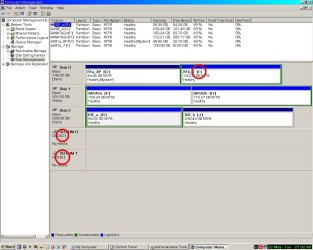
Shown in the pic is Disk Management in Win7. (In XP, the Win7 partition shows up as I:, which causes no problems)
When I went to change the XP partition letter to X:, so that I could reassign my opticals to the standard D: and E: letters, I got the message shown in the box.
My question is, is it possible to reassign the XP partition's letter, so that I can get D: and E: back as optical drive letter assignements? Will reassigning the XP partition a letter other than D: screw up booting Win7?

I've a dual-boot setup with XP Home SP3 and Win7 Pro 32bit on one hard drive, data on the others, and two DVD writers.
After Win7 was installed, the XP partition received the letter D:
This screwed up my optical drive letter assignments.
Shown in the pic is Disk Management in Win7. (In XP, the Win7 partition shows up as I:, which causes no problems)
When I went to change the XP partition letter to X:, so that I could reassign my opticals to the standard D: and E: letters, I got the message shown in the box.
My question is, is it possible to reassign the XP partition's letter, so that I can get D: and E: back as optical drive letter assignements? Will reassigning the XP partition a letter other than D: screw up booting Win7?
Last edited by a moderator:
My Computer
At a glance
Win10 Pro 64-bitAMD Ryzen 7 3800X32 GB Kingston DDR4-2666MSI nVidia GT 710 (2GB)
- Computer type
- PC/Desktop
- Computer Manufacturer/Model Number
- Self-Built
- OS
- Win10 Pro 64-bit
- CPU
- AMD Ryzen 7 3800X
- Motherboard
- Gigabyte X570 UD
- Memory
- 32 GB Kingston DDR4-2666
- Graphics Card(s)
- MSI nVidia GT 710 (2GB)
- Sound Card
- Creative Audigy FX 5.1
- Monitor(s) Displays
- ViewSonic VG2439Smh 24"
- Screen Resolution
- 1920x1080
- Hard Drives
- 3xWD1TB; 1xSeagate 1TB... all spinning rust
- PSU
- EVGA 100-W1-0500-KR (500w)
- Case
- SilverStone PS10 (modified)
- Cooling
- CPU:AMD Wraith Prism. Case:3x Noctua 120mm
- Keyboard
- Compaq Professional PS/2
- Mouse
- Microsoft Basic Optical Mouse 2.0
- Internet Speed
- Fiber 1Gbit/sec down/up
- Antivirus
- Avast Free
- Browser
- FF, Chrome
- Other Info
- 2x LG GH24NSC0 DVD burners, Mackie CR3 monitor speakers