Solved Windows 7 refuses any update

AzzKickr

New member
Local time
6:52 PM
Messages
11
Hi users,

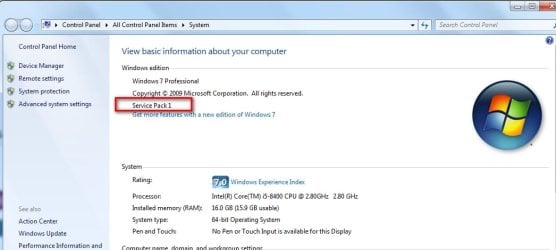
I could use some help ... I have fresh install of Win7 Home Premium (from official retail dvd I own) and it won't do any updates. I also think I don't have SP1 yet, but don't know how to check
Windows Update returns error [FONT=&quot]80072EFE.[/FONT]
 

My Computer

Computer type
PC/Desktop
OS
Windows 7 Ultimate x64
In both cases, you need to have SP1 first.

Either download and install this
KB3138612
just dble click on it to install then you will be able to get the post SP1 updates, which will take a long while

OR an easier and quicker way is to d/l simplix pack , then just run it and it do will everything, rebooting when needed and cleaning up at the end

https://update7.simplix.info/UpdatePack7R2.exe


If your installation media is ancient:

You can still download the service pack and go through all that upgrading to SP1 pallaver, or you can download a more recent .iso file which already contains SP1 and save yourself a lot of time if you ever need to do another install.

you can search tinternet for

en_windows_7_home_premium_with_sp1_x64_dvd_u_676549.iso

OR

X17-58997.iso

They are identical. just different names
 

My Computers

System One System Two

  • Computer type
    PC/Desktop
    OS
    7 X64
    CPU
    i5 8400
    Motherboard
    gigabyte b365m ds3h
    Memory
    2x8gb 3200mhz
    Hard Drives
    various
    PSU
    pure power 11 400w cm
    Case
    Coolermaster
    Cooling
    cryorig m9i
  • Computer type
    PC/Desktop
    OS
    7x64
    CPU
    g5400
    Motherboard
    ga b365m ds3h
    Memory
    8gb ddr4 2400
    PSU
    xfx pro 450w
Thank you for your attempt, but it will be trickier than that. KB3138612 Says it's not applicable for my installation.
I'll give your suggestion for that "all-in-one" solution a try though.
 

My Computer

Computer type
PC/Desktop
OS
Windows 7 Ultimate x64
I'll give your suggestion for that "all-in-one" solution a try though

That also requires SP1.

do yourself a favor and d/l a proper win7 .iso with SP1 already included. Install it. Then run simplix after
 

My Computers

System One System Two

  • Computer type
    PC/Desktop
    OS
    7 X64
    CPU
    i5 8400
    Motherboard
    gigabyte b365m ds3h
    Memory
    2x8gb 3200mhz
    Hard Drives
    various
    PSU
    pure power 11 400w cm
    Case
    Coolermaster
    Cooling
    cryorig m9i
  • Computer type
    PC/Desktop
    OS
    7x64
    CPU
    g5400
    Motherboard
    ga b365m ds3h
    Memory
    8gb ddr4 2400
    PSU
    xfx pro 450w
Ah no ok, I have too many programs already installed/running/configured. Also, I suffer from a form of OCD and need/want to know why it's not letting me update anything.
 

My Computer

Computer type
PC/Desktop
OS
Windows 7 Ultimate x64

My Computers

System One System Two

  • Computer type
    PC/Desktop
    OS
    7 X64
    CPU
    i5 8400
    Motherboard
    gigabyte b365m ds3h
    Memory
    2x8gb 3200mhz
    Hard Drives
    various
    PSU
    pure power 11 400w cm
    Case
    Coolermaster
    Cooling
    cryorig m9i
  • Computer type
    PC/Desktop
    OS
    7x64
    CPU
    g5400
    Motherboard
    ga b365m ds3h
    Memory
    8gb ddr4 2400
    PSU
    xfx pro 450w

My Computers

System One System Two

  • Computer type
    Laptop
    Computer Manufacturer/Model Number
    Toshiba satellite C650D
    OS
    Windows 7 Home Premium x64
    CPU
    AMD V120
    Memory
    4GB
    Internet Speed
    150 Mbps
    Antivirus
    MSE
    Browser
    IE11, Edge, Firefox
    Other Info
    I also have W7 Pro on my System Two, and several W7 Hyper-V VMs. My other machines run Windows 10/11. Their specs are in my Ten Forums & Eleven Forum profiles.
  • Computer type
    Laptop
    System Manufacturer/Model Number
    Lenovo Thinkpad T430
    OS
    Windows 7 Pro x64
    CPU
    Intel i5-3320M
    Memory
    8 GB
    Hard Drives
    250GB Samsung SSD 860 EVO
    Other Info
    Antivirus: MSE

My Computers

System One System Two

  • Computer type
    PC/Desktop
    Computer Manufacturer/Model Number
    Custom build
    OS
    Windows 7 Home Premium 64-bits
    CPU
    AMD FX-8350
    Motherboard
    Gigabyte GA-990FXA-UD3 (AM3+)
    Memory
    GSKILL Ripjaw-X PC3 12800 8GB (2x4GB)
    Graphics Card(s)
    ASUS ROG STRIX GTX 1060 6GB
    Sound Card
    Integrated
    Monitor(s) Displays
    Asus VE228H (21.5-in)
    Screen Resolution
    1920x1080 60Hz
    Hard Drives
    SAMSUNG 870 EVO 2.5 Inch SATA SSD (1TB)
    SAMSUNG 870 EVO 2.5 Inch SATA SSD (1TB)
    SAMSUNG 870 EVO 2.5 Inch SATA SSD (1TB)
    PSU
    Corsair RM750x (750 watts)
    Case
    Corsair Carbide Series 200R
    Cooling
    Corsair Hydro Series H60 (CWCH60)
    Keyboard
    Logitech Elite
    Mouse
    Logitech M510 Wireless Mouse
    Internet Speed
    Comcast Gigabit Extra (1200Mbps down / 35Mbps up)
    Antivirus
    Malwarebytes
    Browser
    Firefox, Edge, Chrome
    Other Info
    ASUS DRW-24B1ST DVD-RW (24X) optical drive
    Seagate Expansion Desk (5TB) external SATA/USB HDD
    Comcast XB8 Internet Gateway
  • Computer type
    PC/Desktop
    System Manufacturer/Model Number
    Custom
    OS
    Windows 7 Pro (64-bit)
    CPU
    AMD Phenom II 960T X4
    Motherboard
    ASUS M4N82 Deluxe
    Memory
    Corsair XMS2 DDR2-800 8GB (4x2GB)
    Graphics Card(s)
    ASUS ENGTX560 DCII OC/2DI/1GD5 1GB
    Monitor(s) Displays
    Samsung 930B 19-inch LCD
    Screen Resolution
    1280x1024
    Hard Drives
    Samsung SSD 870 EVO 1000 GB (Windows 10)
    Seagate ST1000DM003 1000 GB (Windows 7)
    PSU
    Antec TruePower (new) TP-650
    Case
    Antec Three Hundred
    Cooling
    AMD stock cooler from FX8350
    Mouse
    Logitech M100
    Internet Speed
    Xfinity Gigabit Extra 1200/35 Mbps
Or you could do an upgrade install with the more recent media.
change the sources\cversion.ini to this:

cversion-min.JPG

I have done it several times.
 

My Computers

System One System Two

  • Computer type
    PC/Desktop
    OS
    7 X64
    CPU
    i5 8400
    Motherboard
    gigabyte b365m ds3h
    Memory
    2x8gb 3200mhz
    Hard Drives
    various
    PSU
    pure power 11 400w cm
    Case
    Coolermaster
    Cooling
    cryorig m9i
  • Computer type
    PC/Desktop
    OS
    7x64
    CPU
    g5400
    Motherboard
    ga b365m ds3h
    Memory
    8gb ddr4 2400
    PSU
    xfx pro 450w
I installed Windows 7 Home several times over the past year on several computers. I use the following as a guide:

How to obtain and install Windows 7 SP2
https://answers.microsoft.com/en-us...ws-7-sp2/c2c7009f-3a10-4199-9c89-48e1e883051e

Once a computer had SP1 and the Rollup they were able to use Windows Update to do updates automatically.

The only exception was a computer with a CPU did not support SSE2. It seems starting in 2019 updates were assuming that the computer's CPU supported SSE2. If the CPU did not support SSE2 then the update failed.

BTW, back in 2011 I bought the following: Windows 7 Home Premium Family Pack (32/64-bit) (Upgrade from XP or Vista) ($129.99).
This was a special version sold by Microsoft to encourage people to upgrade to Windows 7. It included both 32-bit and 64-bit DVDs. It was also special because you could upgrade up to 3 computers with it.

What Microsoft never admitted and was commonly known was that you really didn't have to use them to upgrade a previously version of Windows. You could to a clean install on up to 3 computers without Windows complaining.
 

My Computers

System One System Two

  • Computer type
    PC/Desktop
    Computer Manufacturer/Model Number
    Custom build
    OS
    Windows 7 Home Premium 64-bits
    CPU
    AMD FX-8350
    Motherboard
    Gigabyte GA-990FXA-UD3 (AM3+)
    Memory
    GSKILL Ripjaw-X PC3 12800 8GB (2x4GB)
    Graphics Card(s)
    ASUS ROG STRIX GTX 1060 6GB
    Sound Card
    Integrated
    Monitor(s) Displays
    Asus VE228H (21.5-in)
    Screen Resolution
    1920x1080 60Hz
    Hard Drives
    SAMSUNG 870 EVO 2.5 Inch SATA SSD (1TB)
    SAMSUNG 870 EVO 2.5 Inch SATA SSD (1TB)
    SAMSUNG 870 EVO 2.5 Inch SATA SSD (1TB)
    PSU
    Corsair RM750x (750 watts)
    Case
    Corsair Carbide Series 200R
    Cooling
    Corsair Hydro Series H60 (CWCH60)
    Keyboard
    Logitech Elite
    Mouse
    Logitech M510 Wireless Mouse
    Internet Speed
    Comcast Gigabit Extra (1200Mbps down / 35Mbps up)
    Antivirus
    Malwarebytes
    Browser
    Firefox, Edge, Chrome
    Other Info
    ASUS DRW-24B1ST DVD-RW (24X) optical drive
    Seagate Expansion Desk (5TB) external SATA/USB HDD
    Comcast XB8 Internet Gateway
  • Computer type
    PC/Desktop
    System Manufacturer/Model Number
    Custom
    OS
    Windows 7 Pro (64-bit)
    CPU
    AMD Phenom II 960T X4
    Motherboard
    ASUS M4N82 Deluxe
    Memory
    Corsair XMS2 DDR2-800 8GB (4x2GB)
    Graphics Card(s)
    ASUS ENGTX560 DCII OC/2DI/1GD5 1GB
    Monitor(s) Displays
    Samsung 930B 19-inch LCD
    Screen Resolution
    1280x1024
    Hard Drives
    Samsung SSD 870 EVO 1000 GB (Windows 10)
    Seagate ST1000DM003 1000 GB (Windows 7)
    PSU
    Antec TruePower (new) TP-650
    Case
    Antec Three Hundred
    Cooling
    AMD stock cooler from FX8350
    Mouse
    Logitech M100
    Internet Speed
    Xfinity Gigabit Extra 1200/35 Mbps
I bought some licenses on the special intro offer £25 iirc for each win 7 pro license , cant remember the date, I presume 2009. The win8 pro keys were the same deal a few years later- I have just found one of the invoices £24.99 in 2012. They sent them by email and the iso was downloaded from I think Digital River in those days. Quite handy to have a few of these .
 
Last edited:

My Computers

System One System Two

  • Computer type
    PC/Desktop
    OS
    7 X64
    CPU
    i5 8400
    Motherboard
    gigabyte b365m ds3h
    Memory
    2x8gb 3200mhz
    Hard Drives
    various
    PSU
    pure power 11 400w cm
    Case
    Coolermaster
    Cooling
    cryorig m9i
  • Computer type
    PC/Desktop
    OS
    7x64
    CPU
    g5400
    Motherboard
    ga b365m ds3h
    Memory
    8gb ddr4 2400
    PSU
    xfx pro 450w
I just got done installing Windows 7 Home Premium (no SPs). I used the method I described in post #10 and installed SP1 and the Rollup.

Windows 7 activated over the internet fine. I just checked for Windows updates. It found 56 and is installing them now.

One gotcha is that the CPU does not support SSE2. At some point the Windows updates will start failing. At that point I will turn off automatic updates.

UPDATE:

Didn't go as expected. 48 of the 56 updates succeeded. Unfortunately, after the computer booted there was a black screen. I had to use system restore to go all the back before SP1 for the computer to boot again. I have SP1 installed again and have drivers installed for most of the hardware. I have automatic updates turned off for now until I decide how to proceed.

That is enough for today. When I continue tomorrow I will first back up the computer.

This serves as a precaution. Back up the computer before you start with Windows updates. This will save having to start over if one of the Windows updates borks the computer.
 
Last edited:

My Computers

System One System Two

  • Computer type
    PC/Desktop
    Computer Manufacturer/Model Number
    Custom build
    OS
    Windows 7 Home Premium 64-bits
    CPU
    AMD FX-8350
    Motherboard
    Gigabyte GA-990FXA-UD3 (AM3+)
    Memory
    GSKILL Ripjaw-X PC3 12800 8GB (2x4GB)
    Graphics Card(s)
    ASUS ROG STRIX GTX 1060 6GB
    Sound Card
    Integrated
    Monitor(s) Displays
    Asus VE228H (21.5-in)
    Screen Resolution
    1920x1080 60Hz
    Hard Drives
    SAMSUNG 870 EVO 2.5 Inch SATA SSD (1TB)
    SAMSUNG 870 EVO 2.5 Inch SATA SSD (1TB)
    SAMSUNG 870 EVO 2.5 Inch SATA SSD (1TB)
    PSU
    Corsair RM750x (750 watts)
    Case
    Corsair Carbide Series 200R
    Cooling
    Corsair Hydro Series H60 (CWCH60)
    Keyboard
    Logitech Elite
    Mouse
    Logitech M510 Wireless Mouse
    Internet Speed
    Comcast Gigabit Extra (1200Mbps down / 35Mbps up)
    Antivirus
    Malwarebytes
    Browser
    Firefox, Edge, Chrome
    Other Info
    ASUS DRW-24B1ST DVD-RW (24X) optical drive
    Seagate Expansion Desk (5TB) external SATA/USB HDD
    Comcast XB8 Internet Gateway
  • Computer type
    PC/Desktop
    System Manufacturer/Model Number
    Custom
    OS
    Windows 7 Pro (64-bit)
    CPU
    AMD Phenom II 960T X4
    Motherboard
    ASUS M4N82 Deluxe
    Memory
    Corsair XMS2 DDR2-800 8GB (4x2GB)
    Graphics Card(s)
    ASUS ENGTX560 DCII OC/2DI/1GD5 1GB
    Monitor(s) Displays
    Samsung 930B 19-inch LCD
    Screen Resolution
    1280x1024
    Hard Drives
    Samsung SSD 870 EVO 1000 GB (Windows 10)
    Seagate ST1000DM003 1000 GB (Windows 7)
    PSU
    Antec TruePower (new) TP-650
    Case
    Antec Three Hundred
    Cooling
    AMD stock cooler from FX8350
    Mouse
    Logitech M100
    Internet Speed
    Xfinity Gigabit Extra 1200/35 Mbps
I think it's solved in my case. Turns out I got the wrong file for "SP1". The site I downloaded it from had it labeled as "SP1" while in fact it's the "SP2" update.
By downloading the one from MajorGeeks, everything started working, update after update. Am now running that "all-in-one" solution.
Thanks all for your much appreciated help/insights.
 

My Computer

Computer type
PC/Desktop
OS
Windows 7 Ultimate x64
That's because to download and install the more recent update your Win7 needs SHA2 signing support.
No. Different issue. You cannot fix 80072EFE by applying KB4474419 or KB4490628 or both.

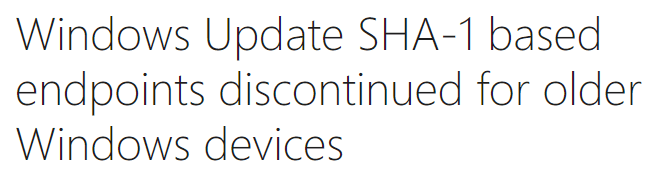
This particular case is due to

Discontinued.PNG


including Windows 7 RTM, which is not to be confused with 2019 SHA-2 Code Signing Support required.

It is yet another issue than Windows Update broken upon reinstalling in Windows 7 Service Pack 1, which of course hits immediately after upgrading to SP1.
 

My Computer

Computer type
PC/Desktop
OS
Windows 7 Home Premium
It is much easier to d/l the iso with SP1 already included. Then run simplix for the updates.

*****************************************************

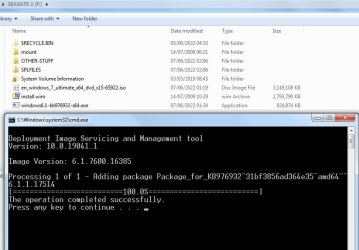
[For the geeky types who want to play, it is possible to integrate SP1 into the rtm install.wim file.

I have just done this. Takes a little while, probabaly because I did it on an SMR mechanical disk.

In outline it involves extracting the sp1 file. Then make a small adjustment to 3 of the extracted text files. Then mount the rtm install.wim and use dism to integrate the extracted files

sp1-23.jpg

I did a test install to a spare partition and it works fine :-)

]

***************************************************
 
Last edited:

My Computers

System One System Two

  • Computer type
    PC/Desktop
    OS
    7 X64
    CPU
    i5 8400
    Motherboard
    gigabyte b365m ds3h
    Memory
    2x8gb 3200mhz
    Hard Drives
    various
    PSU
    pure power 11 400w cm
    Case
    Coolermaster
    Cooling
    cryorig m9i
  • Computer type
    PC/Desktop
    OS
    7x64
    CPU
    g5400
    Motherboard
    ga b365m ds3h
    Memory
    8gb ddr4 2400
    PSU
    xfx pro 450w
Back
Top