rebeltaz
New member
- Local time
- 12:44 PM
- Messages
- 2
First, let me state up front that I have NEVER been a fan of Windows. I am a Linux guy, through and through. After Windows XP, the entire system makes absolutely no sense to me at all!
My dad has Windows 7 on his laptop and is having a couple of issues. They may or may not be related. Since I know nothing about Windows 7, I will let y'all decide.
1. My Documents does not show up on the Start Menu, even though under customize, Show As Menu is selected.
2. When you try to move or rename an item in explorer, you are presented with Item Not Found... Could not find this item... This is no longer located in... Verify the item's location and try again. If you click Try Again, it performs the instructed task with no further issue.
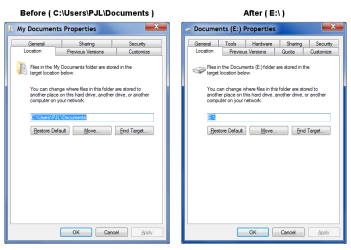
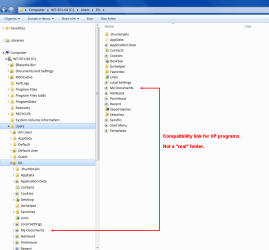
3. There is a folder under users\stan\New Folder (3) called My Documents. If you remove New Folder (3) or My Documents then explorer refuses to open until the removed folder is restored from the Recycle Bin. I determined that the My Documents folder is what Windows is considering the system My Documents, so I attempted to redirect it. I right-clicked on My Documents, selected Properties and went to Location. I changed to location to C:\users\stan\Documents and clicked Apply. It tried to perform the operation and then failed with Folder Redirection Failed... Failed to build the list of known sub folders. The system cannot find the file specified. I went to Libraries and removed any reference to this folder from the Documents, Music, Pictures, Text and Videos links(?) and I am still unable to redirect the My Documents folder to a more respectable side of town.
This is why I use Linux...
Can someone PLEASE help? Thanks.
My dad has Windows 7 on his laptop and is having a couple of issues. They may or may not be related. Since I know nothing about Windows 7, I will let y'all decide.
1. My Documents does not show up on the Start Menu, even though under customize, Show As Menu is selected.
2. When you try to move or rename an item in explorer, you are presented with Item Not Found... Could not find this item... This is no longer located in... Verify the item's location and try again. If you click Try Again, it performs the instructed task with no further issue.
3. There is a folder under users\stan\New Folder (3) called My Documents. If you remove New Folder (3) or My Documents then explorer refuses to open until the removed folder is restored from the Recycle Bin. I determined that the My Documents folder is what Windows is considering the system My Documents, so I attempted to redirect it. I right-clicked on My Documents, selected Properties and went to Location. I changed to location to C:\users\stan\Documents and clicked Apply. It tried to perform the operation and then failed with Folder Redirection Failed... Failed to build the list of known sub folders. The system cannot find the file specified. I went to Libraries and removed any reference to this folder from the Documents, Music, Pictures, Text and Videos links(?) and I am still unable to redirect the My Documents folder to a more respectable side of town.
This is why I use Linux...
Can someone PLEASE help? Thanks.
My Computer
At a glance
Ubuntu Linux 10.04
- OS
- Ubuntu Linux 10.04

 You should create a backup system image before you start (in case of disaster).