
Windows 7 Repair from...

squirtmph

New member
I have huge question I have recovery media CD
and I would like to run it, but I am afraid to change register software installed.

How safe would be to RUN them and not change software installed in windows?


Thank for your response!

Note:
I have never use Windows 7 repair
 

My Computer

Computer type
Laptop
Computer Manufacturer/Model Number
Azure Blade 15.6
OS
Windows 10 Pro Version 22H2 64-bit Edition
CPU
Intel(R) Core(TM) i7-10875H CPU @ 2.30GHz 2.30 GHz
Memory
2.0 GB (31.8 GB usable)
Monitor(s) Displays
4K UHD OLED TOUCH
Screen Resolution
3840 x 2160
Hard Drives
1 TB
Mouse
Logitech MX Master 3S
Antivirus
Windows Security
Browser
Google Chrome
Other Info
______________________________________________


______________________________________________
What repair are you talking about?. If you are talking about Start Up Repair, you will need a Windows installation DVD.

If you are talking about an Operating System image or clone, please name which program you used.
 

My Computer

Computer type
PC/Desktop
Computer Manufacturer/Model Number
Self built using existing case
OS
Windows 7 Home Premium 64 bit sp1
CPU
Intel i5 3570 3.4Ghz Ivy Bridge SKT 1155 quad core
Motherboard
Gigabyte Z77-HD3 SKT 1155 2xSata 3, 4x USB 3.0
Memory
G-Skill Rip Jaws 16Gb (8x2) DDR3 -1600 PC3 12800 CL 10 red
Graphics Card(s)
Gigabyte NVIDIA GT610 1Gb DDR3 810/1200 PCI-E 2.0 Silent
Sound Card
NVIDIA High Definition & Realtech High Definition Audio
Monitor(s) Displays
2 x Philips 226V4L 16:9 aspect ratio
Screen Resolution
1920 x 1080 HD
Hard Drives
Samsung 840 Pro 256gb SSD, SATA 3.
Hitachi Touro Portable 1tb, USB 3.0 HDD used for image b/ups.
PSU
Corsair VS450
Case
Codeng
Cooling
PSU fan & CPU fan
Keyboard
Logitech
Mouse
Logitech Wireless trackball M570
Internet Speed
Wireless 3G. 3mg down & 550kb up.
Antivirus
Bitdefender Internet Security 2020
Browser
Opera (Current Version) & Firefox
Other Info
MS Office 2013 Pro. Davis weather station software. MGE Nova 600 avr UPS.
Factory DVD

I would like to RUN OEM Recovery Media CD


There is some DVD wont read, and I would to be available to fix it


Thanks for you're response
 

Attachments

  • Capture22.PNG
    Capture22.PNG
    20.2 KB · Views: 24

My Computer

Computer type
Laptop
Computer Manufacturer/Model Number
Azure Blade 15.6
OS
Windows 10 Pro Version 22H2 64-bit Edition
CPU
Intel(R) Core(TM) i7-10875H CPU @ 2.30GHz 2.30 GHz
Memory
2.0 GB (31.8 GB usable)
Monitor(s) Displays
4K UHD OLED TOUCH
Screen Resolution
3840 x 2160
Hard Drives
1 TB
Mouse
Logitech MX Master 3S
Antivirus
Windows Security
Browser
Google Chrome
Other Info
______________________________________________


______________________________________________
Hi squirtmph,

I have recovery media CD and I would like to run it, but I am afraid to change register software installed.

How safe would be to RUN them and not change software installed in windows?

There is some DVD wont read, and I would to be available to fix it.

Some questions first please!

[1] What exactly is wrong with the computer?
[2] Are you talking about a Repair Install because you mention about not changing the software installed [please see note below]?
[3] When you say recovery media CD, do you mean [3a] an installation disk that can with the computer, [3b] a recovery disk that you made when you got the computer, or [3c] a recovery disk that you created when you made a system image of the HDD?
[4] What do you mean by the DVD wont read?
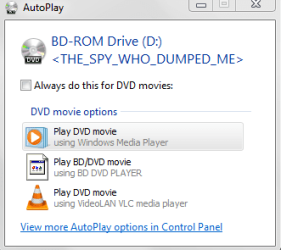
[5] Why have you included the AutoPlay image of The Spy Who Dumped Me?

NOTE: A repair install differs from a clean install in the fact that it ONLY replaces the corrupted OS with a new fresh copy. This means that ALL your User Accounts, Folders, Files, Documents, Pictures, Music, Videos, Data Files, Icons, and any installed programs are left intact. It does however, delete ALL the Window updates, so these will have to be re-installed!

I hope this helps!
 

My Computer

Computer type
Laptop
Computer Manufacturer/Model Number
Fujitsu LIFEBOOK
OS
Win 7 HP SP1 64-bit Vista HB SP2 32-bit Linux Mint 18.3
CPU
Intel(R) Pentium(R) CPU P6200 @ 2.13GHz
Motherboard
FUJITSU FJNBB06
Memory
4.00 GB
Graphics Card(s)
Intel(R) Graphics Media Accelerator HD
Sound Card
[1] Realtek High Definition Audio [2] Intel(R) Display Audio
Screen Resolution
1366 x 768 x 32 bits (4294967296 colors) @ 59 Hz
Hard Drives
TOSHIBA MK5076GSX
Antivirus
AVG FREE
Your so-called recovery media says you've been spied on and dumped. LOL

Serious question: Is English not your native language?
 

My Computer

Computer type
PC/Desktop
OS
Windows 7 Ultimate x64

My Computer

Computer type
Laptop
Computer Manufacturer/Model Number
Fujitsu LIFEBOOK
OS
Win 7 HP SP1 64-bit Vista HB SP2 32-bit Linux Mint 18.3
CPU
Intel(R) Pentium(R) CPU P6200 @ 2.13GHz
Motherboard
FUJITSU FJNBB06
Memory
4.00 GB
Graphics Card(s)
Intel(R) Graphics Media Accelerator HD
Sound Card
[1] Realtek High Definition Audio [2] Intel(R) Display Audio
Screen Resolution
1366 x 768 x 32 bits (4294967296 colors) @ 59 Hz
Hard Drives
TOSHIBA MK5076GSX
Antivirus
AVG FREE
If you plan on running a repair install it won't affect the installed programs. I just ran a repair install myself. Though .net and a few other things were out of place. I had to repair .net and shutdown services that went back on. Other than that no issues.
 

My Computer

Computer type
PC/Desktop
OS
Windows 7 Ultimate x64
Response 01

Paul Black
[1] What exactly is wrong with the computer?


I Have three DVD I would like to rip ISO Images and one of them It docent play it.
also, I have check second computer same windows & it does play.


[2] Are you talking about a Repair Install because you mention about not changing the software installed [please see note below]?


Yes, RUN Recovery Media with repair windows options, since I am not intended to restore out box windows!


[3] When you say recovery media CD, do you mean [3a] an installation disk that can with the computer, YES I purchase Recovery Media from Toshiba (3Cd's)
[3b] a recovery disk that you made when you got the computer, or [3c] a recovery disk that you created when you made a system image of the HDD?
[4] What do you mean by the DVD wont read?
Just doesn't read nor Play

[5] Why have you included the AutoPlay image of The Spy Who Dumped Me?
I was thinking Cause when I remove spam software I remove factory DVD software player, But not big deal for me, Cause I use VLC Media Player I thought it might have something to do, since there is not drivers or codecs.
NOTE: A repair install

as I mention If I run Repair so might as well get Toshiba DVD Player back since as you know from images its broken.

differs from a clean install in the fact that it ONLY replaces the corrupted OS with a new fresh copy. This means that ALL your User Accounts, Folders, Files, Documents, Pictures, Music, Videos, Data Files, Icons, and any installed programs are left intact. It does however, delete ALL the Window updates, so these will have to be re-installed!

I hope this helps!
Thank you, very much
 

My Computer

Computer type
Laptop
Computer Manufacturer/Model Number
Azure Blade 15.6
OS
Windows 10 Pro Version 22H2 64-bit Edition
CPU
Intel(R) Core(TM) i7-10875H CPU @ 2.30GHz 2.30 GHz
Memory
2.0 GB (31.8 GB usable)
Monitor(s) Displays
4K UHD OLED TOUCH
Screen Resolution
3840 x 2160
Hard Drives
1 TB
Mouse
Logitech MX Master 3S
Antivirus
Windows Security
Browser
Google Chrome
Other Info
______________________________________________

______________________________________________
F22Simpilot

Q1.If you plan on running a repair install it won't affect the installed programs. Q2. I just ran a repair install myself. Though .net and a few other things were out of place. I had to repair .net and shutdown services that went back on. Other than that no issues.
Q1.Okay thanks, I ask the question cause I have installed couple software, and I'm afraid to change software settings. Since I haven only done before "windows restore out the box", and again I have never use DVD media for Windows restore point.
So I wont know the process or changes on other programs not related to Microsoft .
Q2. Thanks, since as you know from Image I posted one out three DVD, I have issues with. So I thought I don't have the source to play it, By ruining "repair" I would get back Toshiba DVD Player platform.
by the way, these computer is capable to play blue-ray DVD media. and from these point I can't play Media, but not big deal. I don't have allot Blue ray any way.


Thanks for you response & feedback as well
 

My Computer

Computer type
Laptop
Computer Manufacturer/Model Number
Azure Blade 15.6
OS
Windows 10 Pro Version 22H2 64-bit Edition
CPU
Intel(R) Core(TM) i7-10875H CPU @ 2.30GHz 2.30 GHz
Memory
2.0 GB (31.8 GB usable)
Monitor(s) Displays
4K UHD OLED TOUCH
Screen Resolution
3840 x 2160
Hard Drives
1 TB
Mouse
Logitech MX Master 3S
Antivirus
Windows Security
Browser
Google Chrome
Other Info
______________________________________________


______________________________________________
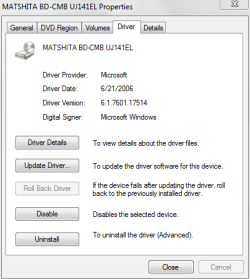
Matshita BD-CMB UJ141EL
What I did today was:
Update Driver ( No update being found)

Uninstall driver
&
re-Boot


Negative result...
 

Attachments

  • Capture.PNG
    Capture.PNG
    24.1 KB · Views: 17
Last edited:

My Computer

Computer type
Laptop
Computer Manufacturer/Model Number
Azure Blade 15.6
OS
Windows 10 Pro Version 22H2 64-bit Edition
CPU
Intel(R) Core(TM) i7-10875H CPU @ 2.30GHz 2.30 GHz
Memory
2.0 GB (31.8 GB usable)
Monitor(s) Displays
4K UHD OLED TOUCH
Screen Resolution
3840 x 2160
Hard Drives
1 TB
Mouse
Logitech MX Master 3S
Antivirus
Windows Security
Browser
Google Chrome
Other Info
______________________________________________


______________________________________________
Hi squirtmph,

OK, let's do this in stages.

STAGE 1: Let's see if we can sort out the DVD player first!

[1] What exactly is wrong with the computer?

I have three DVD I would like to rip ISO Images and one of them it docent play it. also, I have check second computer same windows & it does play.

[3] When you say recovery media CD, do you mean [3a] an installation disk that can with the computer.

YES I purchase Recovery Media from Toshiba (3Cd's).

[4] What do you mean by the DVD wont read?
Just doesn't read nor Play.

[5] Why have you included the AutoPlay image of The Spy Who Dumped Me?

I was thinking Cause when I remove spam software I remove factory DVD software player, But not big deal for me, Cause I use VLC Media Player. I thought it might have something to do, since there is not drivers or codecs.

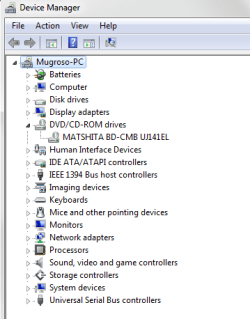
Click Start > Control Panel > Device Manager > expand ALL the + signs. Are there ANY yellow triangles [maybe on DVD/CD-ROM drives]?

If there are yellow triangles in the Device Manager and it is caused by drivers, is one of the disks you got from Toshiba a drivers CD?

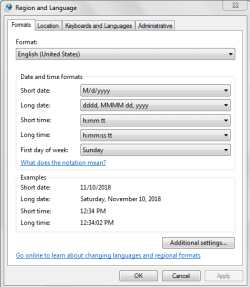
Is the region set correctly?

I hope this helps!
 

My Computer

Computer type
Laptop
Computer Manufacturer/Model Number
Fujitsu LIFEBOOK
OS
Win 7 HP SP1 64-bit Vista HB SP2 32-bit Linux Mint 18.3
CPU
Intel(R) Pentium(R) CPU P6200 @ 2.13GHz
Motherboard
FUJITSU FJNBB06
Memory
4.00 GB
Graphics Card(s)
Intel(R) Graphics Media Accelerator HD
Sound Card
[1] Realtek High Definition Audio [2] Intel(R) Display Audio
Screen Resolution
1366 x 768 x 32 bits (4294967296 colors) @ 59 Hz
Hard Drives
TOSHIBA MK5076GSX
Antivirus
AVG FREE
Than again for coming back!

Before I star responding to all question .
I have look before for yellow triangles none of them on display
(Picture posted below)
Q1.Click Start > Control Panel > Device Manager > expand ALL the + signs. Are there ANY yellow triangles [maybe on DVD/CD-ROM drives]?


I don't know about that here in the USA are Region 01
But I dont know, to response to your question

Q2.Is the region set correctly?
 

Attachments

  • Capture.PNG
    Capture.PNG
    27.6 KB · Views: 4
  • Capture01.PNG
    Capture01.PNG
    30.2 KB · Views: 4
Last edited:

My Computer

Computer type
Laptop
Computer Manufacturer/Model Number
Azure Blade 15.6
OS
Windows 10 Pro Version 22H2 64-bit Edition
CPU
Intel(R) Core(TM) i7-10875H CPU @ 2.30GHz 2.30 GHz
Memory
2.0 GB (31.8 GB usable)
Monitor(s) Displays
4K UHD OLED TOUCH
Screen Resolution
3840 x 2160
Hard Drives
1 TB
Mouse
Logitech MX Master 3S
Antivirus
Windows Security
Browser
Google Chrome
Other Info
______________________________________________


______________________________________________
Back
Top