Solved Windows-7 reports using only 3G of the 4GB's installed memory?

Mike Lynch

New member
Pro User
VIP
Local time
5:41 PM
Messages
958
Location
Clearwater Florida
SOLVED: Windows-7 reports using only 3G of the 4GB's installed memory?

My Hardware System is 64 Bit capable.
I use the 64 Bit Version of Windows-7 Pro.
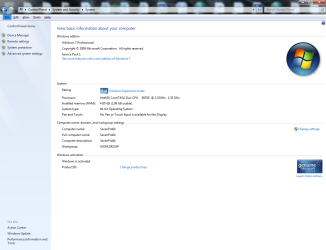
Windows-7 reports only using 3G of the 4GB's installed Memory.
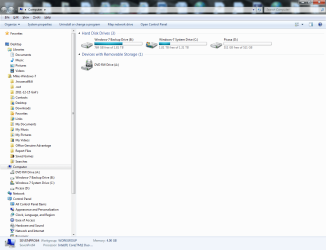
Belarc reports 4GB's installed Memory.
CPU-ID reports 4GB's installed Memory.
Intel lists my E6550 CPU as 64 Bit.

Do I have something set up wrong?
 
Last edited:

My Computer My Computer

At a glance

Microsoft Windows 7 Professional 64-bit 7601 ...Intel(R) Core(TM) i7-3770 CPU @ 3.40GHz8.00 GBIntel(R) HD Graphics 4000
Computer type
PC/Desktop
Computer Manufacturer/Model Number
Two HP Desktops. One in the Laundry Room / Bed Room.
OS
Microsoft Windows 7 Professional 64-bit 7601 Multiprocessor Free Service Pack 1
CPU
Intel(R) Core(TM) i7-3770 CPU @ 3.40GHz
Motherboard
Hewlett-Packard 3396
Memory
8.00 GB
Graphics Card(s)
Intel(R) HD Graphics 4000
Sound Card
(1) Realtek High Definition Audio (2) Intel(R) Display Aud
Monitor(s) Displays
Hanns-G
Screen Resolution
1440 x 900 x 32 bits (4294967296 colors) @ 59 Hz
Hard Drives
(1) ATA WDC WD40EZRX-00S SCSI Disk Device (2) HP Officejet Pro 86 USB Device (3) WD My Book 1230 USB Device
PSU
Whatever came with the CMT.
Case
HP CMT Black.
Cooling
Whatever came with the CMT.
Keyboard
Logitech K740.
Mouse
Microsoft Optical Mouse 1000.
Internet Speed
Spectrum 25Mbs.
Antivirus
WebRoot, Microsoft Security Essentials.
Browser
EDGE
Other Info
HP Officejet Pro 8600 Plus.
WD MyBook 4TB.
If this is the same laptop as in your specs, then there isn't much you can do unless there is a memory remap option in the bios (doubtful). From what I can see it has the Intel 945 chipset on it and it only supports up to 4 GB of memory, which as a result without the memory remap option is what is happening in your case. This should help explain it some (says for Vista but the same applies to Windows 7),

The system memory that is reported in the System Information dialog box in Windows Vista is less than you expect if 4 GB of RAM is installed

  • The chipset must support at least 8 GB of address space. Chipsets that have this capability include the following:
    • Intel 975X
    • Intel P965
    • Intel 955X on Socket 775
    • Chipsets that support AMD processors that use socket F, socket 940, socket 939, or socket AM2. These chipsets include any AMD socket and CPU combination in which the memory controller resides in the CPU.
  • The CPU must support the x64 instruction set. The AMD64 CPU and the Intel EM64T CPU support this instruction set.
  • The BIOS must support the memory remapping feature. The memory remapping feature allows for the segment of system memory that was previously overwritten by the Peripheral Component Interconnect (PCI) configuration space to be remapped above the 4 GB address line. This feature must be enabled in the BIOS configuration utility on the computer. View your computer product documentation for instructions that explain how to enable this feature. Many consumer-oriented computers may not support the memory remapping feature. No standard terminology is used in documentation or in BIOS configuration utilities for this feature. Therefore, you may have to read the descriptions of the various BIOS configuration settings that are available to determine whether any of the settings enable the memory remapping feature.
  • An x64 (64-bit) version of Windows Vista must be used.
 

My Computer My Computer

At a glance

Win 7 Ultimate x64FX-8350 @ 4.6 GHz so farADATA XPG V1 Series Black 8GB DDR3 1600Sapphire R9 270x Dual-X
Computer type
PC/Desktop
Computer Manufacturer/Model Number
Me
OS
Win 7 Ultimate x64
CPU
FX-8350 @ 4.6 GHz so far
Motherboard
Asus M5A97 EVO
Memory
ADATA XPG V1 Series Black 8GB DDR3 1600
Graphics Card(s)
Sapphire R9 270x Dual-X
Sound Card
Xonar DGX w/ Corsair Vengence 1300
Monitor(s) Displays
Acer S232HL Abid
Screen Resolution
1920x1080
Hard Drives
120 GB OCZ Vertex 3
500 GB Seagate 7200.12
PSU
Antec Earthwatts 650W Green
Case
Antec Three Hundred
Cooling
Cooler Master 212 EVO
Keyboard
Logitech G510
Mouse
Logitech G500s
Internet Speed
35000/3000
Gateway Profile 6.5 All-In-One.

The Profile is an AIO Desktop.

I have looked at those items that I think I know about but I am stymied.

When I ran Vista on the same machine, it used all 4GB's.

Any advice would be appreciated.

Best regards,

Mike Lynch
 

Attachments

  • 3GB of 4GB Usable.png
    3GB of 4GB Usable.png
    68.2 KB · Views: 16
  • Belarc.png
    Belarc.png
    71.5 KB · Views: 12
  • SEVENPRO64.txt
    SEVENPRO64.txt
    66.4 KB · Views: 4
Last edited:

My Computer My Computer

At a glance

Microsoft Windows 7 Professional 64-bit 7601 ...Intel(R) Core(TM) i7-3770 CPU @ 3.40GHz8.00 GBIntel(R) HD Graphics 4000
Computer type
PC/Desktop
Computer Manufacturer/Model Number
Two HP Desktops. One in the Laundry Room / Bed Room.
OS
Microsoft Windows 7 Professional 64-bit 7601 Multiprocessor Free Service Pack 1
CPU
Intel(R) Core(TM) i7-3770 CPU @ 3.40GHz
Motherboard
Hewlett-Packard 3396
Memory
8.00 GB
Graphics Card(s)
Intel(R) HD Graphics 4000
Sound Card
(1) Realtek High Definition Audio (2) Intel(R) Display Aud
Monitor(s) Displays
Hanns-G
Screen Resolution
1440 x 900 x 32 bits (4294967296 colors) @ 59 Hz
Hard Drives
(1) ATA WDC WD40EZRX-00S SCSI Disk Device (2) HP Officejet Pro 86 USB Device (3) WD My Book 1230 USB Device
PSU
Whatever came with the CMT.
Case
HP CMT Black.
Cooling
Whatever came with the CMT.
Keyboard
Logitech K740.
Mouse
Microsoft Optical Mouse 1000.
Internet Speed
Spectrum 25Mbs.
Antivirus
WebRoot, Microsoft Security Essentials.
Browser
EDGE
Other Info
HP Officejet Pro 8600 Plus.
WD MyBook 4TB.
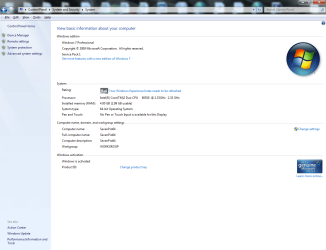
Just in case I took two 2GB Memory Modules out of my other Profile and installed them in this one.
It did not make any difference, Window-7 still reported only 2.99 usable.
I seated the Modules and restarted the System twice.
I also cleaned the thing you insert them into with Air just in case.
I reran the Windows assessment, no change.
I removed the ReadyBoost Drive, no change.
My System is very generic and there are not a lot of options in the Bios.

Does anyone else have any other Ideas?

Best regards,

Mike Lynch
 

My Computer My Computer

At a glance

Microsoft Windows 7 Professional 64-bit 7601 ...Intel(R) Core(TM) i7-3770 CPU @ 3.40GHz8.00 GBIntel(R) HD Graphics 4000
Computer type
PC/Desktop
Computer Manufacturer/Model Number
Two HP Desktops. One in the Laundry Room / Bed Room.
OS
Microsoft Windows 7 Professional 64-bit 7601 Multiprocessor Free Service Pack 1
CPU
Intel(R) Core(TM) i7-3770 CPU @ 3.40GHz
Motherboard
Hewlett-Packard 3396
Memory
8.00 GB
Graphics Card(s)
Intel(R) HD Graphics 4000
Sound Card
(1) Realtek High Definition Audio (2) Intel(R) Display Aud
Monitor(s) Displays
Hanns-G
Screen Resolution
1440 x 900 x 32 bits (4294967296 colors) @ 59 Hz
Hard Drives
(1) ATA WDC WD40EZRX-00S SCSI Disk Device (2) HP Officejet Pro 86 USB Device (3) WD My Book 1230 USB Device
PSU
Whatever came with the CMT.
Case
HP CMT Black.
Cooling
Whatever came with the CMT.
Keyboard
Logitech K740.
Mouse
Microsoft Optical Mouse 1000.
Internet Speed
Spectrum 25Mbs.
Antivirus
WebRoot, Microsoft Security Essentials.
Browser
EDGE
Other Info
HP Officejet Pro 8600 Plus.
WD MyBook 4TB.
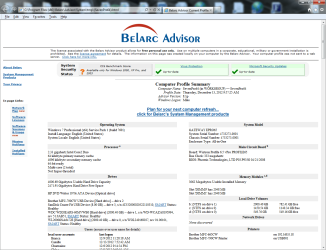
I do not understand how this applies, please explain!

My System is a Desktop All-In-One.
It only supports 4GB's of memory.
I do not want to use memory beyond 4GB's as the System cannot / does not support that much.
I'd just like to use the 4GB's that is installed.

I want to use Windows-7 NOT Vista.
I have 64-Bit Versions of 7-Pro and Vista Ultimate.

Your feedback is appreciated.

Best regards,

Mike Lynch

If this is the same laptop as in your specs, then there isn't much you can do unless there is a memory remap option in the bios (doubtful). From what I can see it has the Intel 945 chipset on it and it only supports up to 4 GB of memory, which as a result without the memory remap option is what is happening in your case. This should help explain it some (says for Vista but the same applies to Windows 7),

The system memory that is reported in the System Information dialog box in Windows Vista is less than you expect if 4 GB of RAM is installed


  • The chipset must support at least 8 GB of address space. Chipsets that have this capability include the following:
    • Intel 975X
    • Intel P965
    • Intel 955X on Socket 775
    • Chipsets that support AMD processors that use socket F, socket 940, socket 939, or socket AM2. These chipsets include any AMD socket and CPU combination in which the memory controller resides in the CPU.
  • The CPU must support the x64 instruction set. The AMD64 CPU and the Intel EM64T CPU support this instruction set.
  • The BIOS must support the memory remapping feature. The memory remapping feature allows for the segment of system memory that was previously overwritten by the Peripheral Component Interconnect (PCI) configuration space to be remapped above the 4 GB address line. This feature must be enabled in the BIOS configuration utility on the computer. View your computer product documentation for instructions that explain how to enable this feature. Many consumer-oriented computers may not support the memory remapping feature. No standard terminology is used in documentation or in BIOS configuration utilities for this feature. Therefore, you may have to read the descriptions of the various BIOS configuration settings that are available to determine whether any of the settings enable the memory remapping feature.
  • An x64 (64-bit) version of Windows Vista must be used.
 

My Computer My Computer

At a glance

Microsoft Windows 7 Professional 64-bit 7601 ...Intel(R) Core(TM) i7-3770 CPU @ 3.40GHz8.00 GBIntel(R) HD Graphics 4000
Computer type
PC/Desktop
Computer Manufacturer/Model Number
Two HP Desktops. One in the Laundry Room / Bed Room.
OS
Microsoft Windows 7 Professional 64-bit 7601 Multiprocessor Free Service Pack 1
CPU
Intel(R) Core(TM) i7-3770 CPU @ 3.40GHz
Motherboard
Hewlett-Packard 3396
Memory
8.00 GB
Graphics Card(s)
Intel(R) HD Graphics 4000
Sound Card
(1) Realtek High Definition Audio (2) Intel(R) Display Aud
Monitor(s) Displays
Hanns-G
Screen Resolution
1440 x 900 x 32 bits (4294967296 colors) @ 59 Hz
Hard Drives
(1) ATA WDC WD40EZRX-00S SCSI Disk Device (2) HP Officejet Pro 86 USB Device (3) WD My Book 1230 USB Device
PSU
Whatever came with the CMT.
Case
HP CMT Black.
Cooling
Whatever came with the CMT.
Keyboard
Logitech K740.
Mouse
Microsoft Optical Mouse 1000.
Internet Speed
Spectrum 25Mbs.
Antivirus
WebRoot, Microsoft Security Essentials.
Browser
EDGE
Other Info
HP Officejet Pro 8600 Plus.
WD MyBook 4TB.
Are you sure that the full 4 GB was available under Vista? Reason for asking is that when Vista came out it reported 4 GB of memory (on a system that only supported up to 4 GB) the same as what you are seeing in Windows 7. When Service Pack 1 for Vista came out this happened,

Windows Vista SP1 includes reporting of Installed System Memory (RAM)

After you install Windows Vista Service Pack 1 (SP1), the memory (RAM) value reported by Windows Vista may increase if the following conditions are true:
  • The system BIOS has reserved physical memory for graphics or for other peripherals.
  • Your computer has more than 3 GB of system memory installed.
This change occurs because Windows Vista with SP1 reports how much physical memory installed on your computer. All versions of Windows NT-based operating systems before Windows Vista Service SP1 report how much memory available to the operating system. This change in Windows Vista SP1 is a reporting change only.

I'd be willing to bet that you still only had the same 3 GB available in Vista even though it showed all 4 GB.

As I mentioned previously (and in the first Microsoft link I posted), unless there is a memory remap option in the bios there is nothing you can do.
 

My Computer My Computer

At a glance

Win 7 Ultimate x64FX-8350 @ 4.6 GHz so farADATA XPG V1 Series Black 8GB DDR3 1600Sapphire R9 270x Dual-X
Computer type
PC/Desktop
Computer Manufacturer/Model Number
Me
OS
Win 7 Ultimate x64
CPU
FX-8350 @ 4.6 GHz so far
Motherboard
Asus M5A97 EVO
Memory
ADATA XPG V1 Series Black 8GB DDR3 1600
Graphics Card(s)
Sapphire R9 270x Dual-X
Sound Card
Xonar DGX w/ Corsair Vengence 1300
Monitor(s) Displays
Acer S232HL Abid
Screen Resolution
1920x1080
Hard Drives
120 GB OCZ Vertex 3
500 GB Seagate 7200.12
PSU
Antec Earthwatts 650W Green
Case
Antec Three Hundred
Cooling
Cooler Master 212 EVO
Keyboard
Logitech G510
Mouse
Logitech G500s
Internet Speed
35000/3000
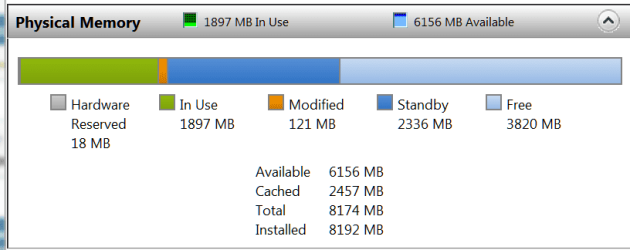
Can you post a picture of the colored bar in Resource Monitor > Memory tab. Something like this:
 

Attachments

  • 2012-12-14_1214.png
    2012-12-14_1214.png
    8.2 KB · Views: 5

My Computer My Computer

At a glance

Vista, Windows7, Mint Mate, Zorin, Windows 8from 1.6GHz Duo to i7
Computer Manufacturer/Model Number
HP, Dell, Gateway, Toshiba - 4 laptops and 2 desktops
OS
Vista, Windows7, Mint Mate, Zorin, Windows 8
CPU
from 1.6GHz Duo to i7
Monitor(s) Displays
2x HP w2207
Hard Drives
5x HDD, 7x SSD, 12x Externals
Keyboard
with trackball - no mices
Mouse
Trackball mice
Internet Speed
DSL 6000
From a quick glance, my guess is you were seeing Vista report how much memory was installed, not what was usable.
 

My Computer My Computer

At a glance

Windows 7 Ultimate x64 SP1Intel Core i7-260012 GB Patriot Extreme DDR3-1333Nvidia GTX 470
OS
Windows 7 Ultimate x64 SP1
CPU
Intel Core i7-2600
Motherboard
Gigabyte GA-P67A-UD3P-B3
Memory
12 GB Patriot Extreme DDR3-1333
Graphics Card(s)
Nvidia GTX 470
Monitor(s) Displays
Dell UltraSharp 2209WA
Hard Drives
OCZ Agility3 240 GB, WD5001AALS, WD7501AALS
PSU
OCZ ModStream 700W
Case
CoolerMaster HAF 912 Advanced
Cooling
CoolerMaster Hyper 212 Plus
Are you using a dedicated video card? Because if you not, then windows is more than likely using that 1GB of RAM as shared video memory. If you can, borrow someone’s video card to see that lets you have 4GB useable.

Hope that was helpfull :)
 

My Computer My Computer

At a glance

Windows 7 Home Premium 64 bitIntel Celeron 2.2GHz2GB DDR3I Wish
Computer Manufacturer/Model Number
Compaq Laptop
OS
Windows 7 Home Premium 64 bit
CPU
Intel Celeron 2.2GHz
Memory
2GB DDR3
Graphics Card(s)
I Wish
Hard Drives
250GB internal, 2TB external
Cooling
A Fan
Are you using a dedicated video card? Because if you not, then windows is more than likely using that 1GB of RAM as shared video memory. If you can, borrow someone’s video card to see that lets you have 4GB useable.

Hope that was helpfull :)
That's what I suspect too. But that would show up on the Resource Monitor picture as 'Hardware reserved'.
 

My Computer My Computer

At a glance

Vista, Windows7, Mint Mate, Zorin, Windows 8from 1.6GHz Duo to i7
Computer Manufacturer/Model Number
HP, Dell, Gateway, Toshiba - 4 laptops and 2 desktops
OS
Vista, Windows7, Mint Mate, Zorin, Windows 8
CPU
from 1.6GHz Duo to i7
Monitor(s) Displays
2x HP w2207
Hard Drives
5x HDD, 7x SSD, 12x Externals
Keyboard
with trackball - no mices
Mouse
Trackball mice
Internet Speed
DSL 6000
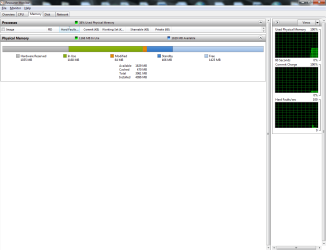
I run Windows-7 Pro on the System in question.

See the Attachment requested.
 

Attachments

  • I use Windows-7 on the System in question..png
    I use Windows-7 on the System in question..png
    25.7 KB · Views: 11

My Computer My Computer

At a glance

Microsoft Windows 7 Professional 64-bit 7601 ...Intel(R) Core(TM) i7-3770 CPU @ 3.40GHz8.00 GBIntel(R) HD Graphics 4000
Computer type
PC/Desktop
Computer Manufacturer/Model Number
Two HP Desktops. One in the Laundry Room / Bed Room.
OS
Microsoft Windows 7 Professional 64-bit 7601 Multiprocessor Free Service Pack 1
CPU
Intel(R) Core(TM) i7-3770 CPU @ 3.40GHz
Motherboard
Hewlett-Packard 3396
Memory
8.00 GB
Graphics Card(s)
Intel(R) HD Graphics 4000
Sound Card
(1) Realtek High Definition Audio (2) Intel(R) Display Aud
Monitor(s) Displays
Hanns-G
Screen Resolution
1440 x 900 x 32 bits (4294967296 colors) @ 59 Hz
Hard Drives
(1) ATA WDC WD40EZRX-00S SCSI Disk Device (2) HP Officejet Pro 86 USB Device (3) WD My Book 1230 USB Device
PSU
Whatever came with the CMT.
Case
HP CMT Black.
Cooling
Whatever came with the CMT.
Keyboard
Logitech K740.
Mouse
Microsoft Optical Mouse 1000.
Internet Speed
Spectrum 25Mbs.
Antivirus
WebRoot, Microsoft Security Essentials.
Browser
EDGE
Other Info
HP Officejet Pro 8600 Plus.
WD MyBook 4TB.
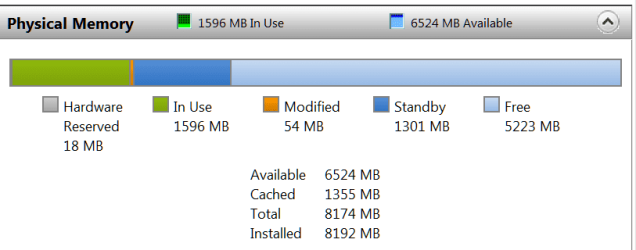
Well, here we go. You have 1GB of hardware reserved. Probably your graphics facility.
 

My Computer My Computer

At a glance

Vista, Windows7, Mint Mate, Zorin, Windows 8from 1.6GHz Duo to i7
Computer Manufacturer/Model Number
HP, Dell, Gateway, Toshiba - 4 laptops and 2 desktops
OS
Vista, Windows7, Mint Mate, Zorin, Windows 8
CPU
from 1.6GHz Duo to i7
Monitor(s) Displays
2x HP w2207
Hard Drives
5x HDD, 7x SSD, 12x Externals
Keyboard
with trackball - no mices
Mouse
Trackball mice
Internet Speed
DSL 6000
I went into the Bios twice and made changes.

First, I changed the Memory Size from Max to 256 and tried it, no change at all.
Second I changed DVMT Mode from DVMT to Fixed leaving the Memory Size at 256, no change at all.
I re-took the Resource Snaps you had asked for before.
They are listed as Second and Third below.

Does / could ReadyBoost be involved with the Hardware Reserve?
I do have a Thumb Drive assigned to ReadyBoost.
 

Attachments

  • Second time with BIOS Video set to 256 vs Max..png
    Second time with BIOS Video set to 256 vs Max..png
    26.5 KB · Views: 7
  • Third time after DVMT Mode set to Fixed (256).png
    Third time after DVMT Mode set to Fixed (256).png
    27 KB · Views: 7

My Computer My Computer

At a glance

Microsoft Windows 7 Professional 64-bit 7601 ...Intel(R) Core(TM) i7-3770 CPU @ 3.40GHz8.00 GBIntel(R) HD Graphics 4000
Computer type
PC/Desktop
Computer Manufacturer/Model Number
Two HP Desktops. One in the Laundry Room / Bed Room.
OS
Microsoft Windows 7 Professional 64-bit 7601 Multiprocessor Free Service Pack 1
CPU
Intel(R) Core(TM) i7-3770 CPU @ 3.40GHz
Motherboard
Hewlett-Packard 3396
Memory
8.00 GB
Graphics Card(s)
Intel(R) HD Graphics 4000
Sound Card
(1) Realtek High Definition Audio (2) Intel(R) Display Aud
Monitor(s) Displays
Hanns-G
Screen Resolution
1440 x 900 x 32 bits (4294967296 colors) @ 59 Hz
Hard Drives
(1) ATA WDC WD40EZRX-00S SCSI Disk Device (2) HP Officejet Pro 86 USB Device (3) WD My Book 1230 USB Device
PSU
Whatever came with the CMT.
Case
HP CMT Black.
Cooling
Whatever came with the CMT.
Keyboard
Logitech K740.
Mouse
Microsoft Optical Mouse 1000.
Internet Speed
Spectrum 25Mbs.
Antivirus
WebRoot, Microsoft Security Essentials.
Browser
EDGE
Other Info
HP Officejet Pro 8600 Plus.
WD MyBook 4TB.
I have never seen such a phenomenon with Ready Boost. But then I have not used it since my first Vista PC. Why don't you take it out. At 4GB of RAM, Ready Boost generates nothing but overhead - and that is counterproductive.
 

My Computer My Computer

At a glance

Vista, Windows7, Mint Mate, Zorin, Windows 8from 1.6GHz Duo to i7
Computer Manufacturer/Model Number
HP, Dell, Gateway, Toshiba - 4 laptops and 2 desktops
OS
Vista, Windows7, Mint Mate, Zorin, Windows 8
CPU
from 1.6GHz Duo to i7
Monitor(s) Displays
2x HP w2207
Hard Drives
5x HDD, 7x SSD, 12x Externals
Keyboard
with trackball - no mices
Mouse
Trackball mice
Internet Speed
DSL 6000
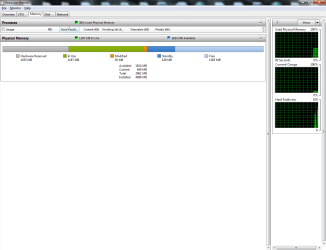
Here is what it looks like without ReadyBoost:

This is a dilema!
 

Attachments

  • ReadyBoost removed no change in Usable Memory still 2.99GB.png
    ReadyBoost removed no change in Usable Memory still 2.99GB.png
    67.4 KB · Views: 10
  • After removing ReadyBoost..png
    After removing ReadyBoost..png
    59.8 KB · Views: 6
  • After ReadyBoost Removal.png
    After ReadyBoost Removal.png
    26.7 KB · Views: 8
  • Before removing ReadyBoost..png
    Before removing ReadyBoost..png
    60.5 KB · Views: 8

My Computer My Computer

At a glance

Microsoft Windows 7 Professional 64-bit 7601 ...Intel(R) Core(TM) i7-3770 CPU @ 3.40GHz8.00 GBIntel(R) HD Graphics 4000
Computer type
PC/Desktop
Computer Manufacturer/Model Number
Two HP Desktops. One in the Laundry Room / Bed Room.
OS
Microsoft Windows 7 Professional 64-bit 7601 Multiprocessor Free Service Pack 1
CPU
Intel(R) Core(TM) i7-3770 CPU @ 3.40GHz
Motherboard
Hewlett-Packard 3396
Memory
8.00 GB
Graphics Card(s)
Intel(R) HD Graphics 4000
Sound Card
(1) Realtek High Definition Audio (2) Intel(R) Display Aud
Monitor(s) Displays
Hanns-G
Screen Resolution
1440 x 900 x 32 bits (4294967296 colors) @ 59 Hz
Hard Drives
(1) ATA WDC WD40EZRX-00S SCSI Disk Device (2) HP Officejet Pro 86 USB Device (3) WD My Book 1230 USB Device
PSU
Whatever came with the CMT.
Case
HP CMT Black.
Cooling
Whatever came with the CMT.
Keyboard
Logitech K740.
Mouse
Microsoft Optical Mouse 1000.
Internet Speed
Spectrum 25Mbs.
Antivirus
WebRoot, Microsoft Security Essentials.
Browser
EDGE
Other Info
HP Officejet Pro 8600 Plus.
WD MyBook 4TB.
Same thing. But I would not worry too much. I was running Windows 7 on 3GB for a long time. Now I have 6 and 8GB and really do not notice any difference. Half of my RAM is always unused (see picture). And that machine was running all day doing a lot of different things.
 

Attachments

  • 2012-12-16_2055.png
    2012-12-16_2055.png
    9.4 KB · Views: 5

My Computer My Computer

At a glance

Vista, Windows7, Mint Mate, Zorin, Windows 8from 1.6GHz Duo to i7
Computer Manufacturer/Model Number
HP, Dell, Gateway, Toshiba - 4 laptops and 2 desktops
OS
Vista, Windows7, Mint Mate, Zorin, Windows 8
CPU
from 1.6GHz Duo to i7
Monitor(s) Displays
2x HP w2207
Hard Drives
5x HDD, 7x SSD, 12x Externals
Keyboard
with trackball - no mices
Mouse
Trackball mice
Internet Speed
DSL 6000
Is it over?

Can any Forum Member refer me to perhaps another Site with additional expertise in this Hardware related area?

I'd really like to know "how or what is using the Memory" in question and decide for myself if I choose to continue using it (that is the "how or what is using the Memory").
 

My Computer My Computer

At a glance

Microsoft Windows 7 Professional 64-bit 7601 ...Intel(R) Core(TM) i7-3770 CPU @ 3.40GHz8.00 GBIntel(R) HD Graphics 4000
Computer type
PC/Desktop
Computer Manufacturer/Model Number
Two HP Desktops. One in the Laundry Room / Bed Room.
OS
Microsoft Windows 7 Professional 64-bit 7601 Multiprocessor Free Service Pack 1
CPU
Intel(R) Core(TM) i7-3770 CPU @ 3.40GHz
Motherboard
Hewlett-Packard 3396
Memory
8.00 GB
Graphics Card(s)
Intel(R) HD Graphics 4000
Sound Card
(1) Realtek High Definition Audio (2) Intel(R) Display Aud
Monitor(s) Displays
Hanns-G
Screen Resolution
1440 x 900 x 32 bits (4294967296 colors) @ 59 Hz
Hard Drives
(1) ATA WDC WD40EZRX-00S SCSI Disk Device (2) HP Officejet Pro 86 USB Device (3) WD My Book 1230 USB Device
PSU
Whatever came with the CMT.
Case
HP CMT Black.
Cooling
Whatever came with the CMT.
Keyboard
Logitech K740.
Mouse
Microsoft Optical Mouse 1000.
Internet Speed
Spectrum 25Mbs.
Antivirus
WebRoot, Microsoft Security Essentials.
Browser
EDGE
Other Info
HP Officejet Pro 8600 Plus.
WD MyBook 4TB.
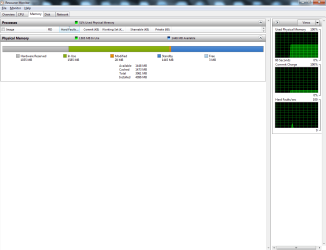
If you tell us the exact serial number of your mobo, we may be able to find out what graphics facility you have (which is the most likely culprit). Look into the on-line specifications of your system at the manufacturer's site.

But if you think you get better help elsewhere, suit yourself.
 

My Computer My Computer

At a glance

Vista, Windows7, Mint Mate, Zorin, Windows 8from 1.6GHz Duo to i7
Computer Manufacturer/Model Number
HP, Dell, Gateway, Toshiba - 4 laptops and 2 desktops
OS
Vista, Windows7, Mint Mate, Zorin, Windows 8
CPU
from 1.6GHz Duo to i7
Monitor(s) Displays
2x HP w2207
Hard Drives
5x HDD, 7x SSD, 12x Externals
Keyboard
with trackball - no mices
Mouse
Trackball mice
Internet Speed
DSL 6000

Attachments

  • Solved-2.png
    Solved-2.png
    64.9 KB · Views: 6
  • Solved-1.png
    Solved-1.png
    21.5 KB · Views: 6

My Computer My Computer

At a glance

Microsoft Windows 7 Professional 64-bit 7601 ...Intel(R) Core(TM) i7-3770 CPU @ 3.40GHz8.00 GBIntel(R) HD Graphics 4000
Computer type
PC/Desktop
Computer Manufacturer/Model Number
Two HP Desktops. One in the Laundry Room / Bed Room.
OS
Microsoft Windows 7 Professional 64-bit 7601 Multiprocessor Free Service Pack 1
CPU
Intel(R) Core(TM) i7-3770 CPU @ 3.40GHz
Motherboard
Hewlett-Packard 3396
Memory
8.00 GB
Graphics Card(s)
Intel(R) HD Graphics 4000
Sound Card
(1) Realtek High Definition Audio (2) Intel(R) Display Aud
Monitor(s) Displays
Hanns-G
Screen Resolution
1440 x 900 x 32 bits (4294967296 colors) @ 59 Hz
Hard Drives
(1) ATA WDC WD40EZRX-00S SCSI Disk Device (2) HP Officejet Pro 86 USB Device (3) WD My Book 1230 USB Device
PSU
Whatever came with the CMT.
Case
HP CMT Black.
Cooling
Whatever came with the CMT.
Keyboard
Logitech K740.
Mouse
Microsoft Optical Mouse 1000.
Internet Speed
Spectrum 25Mbs.
Antivirus
WebRoot, Microsoft Security Essentials.
Browser
EDGE
Other Info
HP Officejet Pro 8600 Plus.
WD MyBook 4TB.
Back
Top