Solved Windows 7 Restore ..please help I cannot create od restore

artinusa

New member
Member
VIP
Local time
10:11 AM
Messages
229
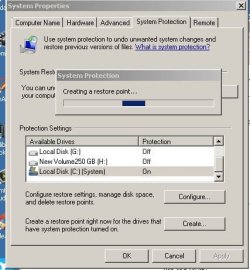
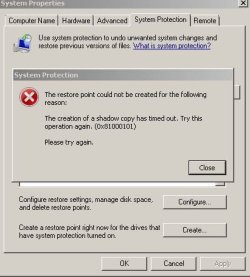
I am unable to create or restore in windows 7..unsure why but the pics show that I can see restore facility start it but then it fails dues to a time out. *(See maessages) I have nade sure all necessary processes are running and all dependants. Ihave invoked volsnap and resized the restore chosen size.. I have to my knowledge changed any system files SFC /f is good CHKDSK is Good

NOTE: I wait many minutes for the search in system protection to find the working drive when seeking restore..it does find the action drive eventually. I have tried the restore VSB's to no avail..can anyone suggest more to try please. I checked out the error and did as suggested no success
 

Attachments
  • Restore cannott be created.JPG
    Restore cannott be created.JPG
    42.1 KB · Views: 32
  • Restore in action does notr complete.JPG
    Restore in action does notr complete.JPG
    51.5 KB · Views: 32
Last edited:

My Computer

Computer type
PC/Desktop
Computer Manufacturer/Model Number
Compaq Presario
OS
Windows 7 64 bit
How much free space do you have on your (C) partition?
 

My Computer

Computer type
PC/Desktop
Computer Manufacturer/Model Number
Home made Desktop
OS
Windows 10 Pro. 64/ version 1709 Windows 7 Pro/64
CPU
Intel i7-6800K @ 4.3
Motherboard
ASUS X-99 Deluxe II
Memory
Corsair Platinum 16 gig @2400
Graphics Card(s)
EVGA GTX 1070 OC
Monitor(s) Displays
Asus 27" LED LCD/VE278Q
Screen Resolution
1920-1080 or 1280-720 HDMI
Hard Drives
INTEL SSD 730-240 Gb Sata 3.0/
PSU
EVGA Platium 1200W
Case
Phanteks Luxe Tempered Glass 8 fans/ one radiator
Cooling
XSPC/ Water Cooled CPU
Keyboard
Das 4 Professional
Mouse
Logitech M705/MX Anywhere 2-S
Internet Speed
100 mbits
Antivirus
Microsoft Security Essentials/ Malwarebytes Premium 3.0/ SAS
Browser
I.E. 11 default/Firefox/ ISP Time Warner Cable/Spectrum
Other Info
LG BluRay Burner/
Sound system-KLipsch-THX/
Icy Dock ssd Hot Swap bays.
Thank you for your reply ..I have 300 GB
 

My Computer

Computer type
PC/Desktop
Computer Manufacturer/Model Number
Compaq Presario
OS
Windows 7 64 bit

My Computer

Computer type
PC/Desktop
Computer Manufacturer/Model Number
Home made Desktop
OS
Windows 10 Pro. 64/ version 1709 Windows 7 Pro/64
CPU
Intel i7-6800K @ 4.3
Motherboard
ASUS X-99 Deluxe II
Memory
Corsair Platinum 16 gig @2400
Graphics Card(s)
EVGA GTX 1070 OC
Monitor(s) Displays
Asus 27" LED LCD/VE278Q
Screen Resolution
1920-1080 or 1280-720 HDMI
Hard Drives
INTEL SSD 730-240 Gb Sata 3.0/
PSU
EVGA Platium 1200W
Case
Phanteks Luxe Tempered Glass 8 fans/ one radiator
Cooling
XSPC/ Water Cooled CPU
Keyboard
Das 4 Professional
Mouse
Logitech M705/MX Anywhere 2-S
Internet Speed
100 mbits
Antivirus
Microsoft Security Essentials/ Malwarebytes Premium 3.0/ SAS
Browser
I.E. 11 default/Firefox/ ISP Time Warner Cable/Spectrum
Other Info
LG BluRay Burner/
Sound system-KLipsch-THX/
Icy Dock ssd Hot Swap bays.
Win 7 Restore

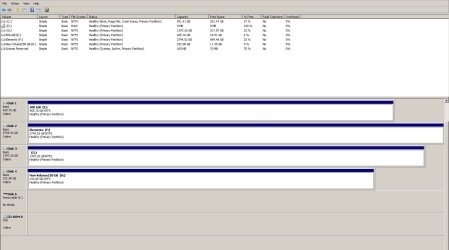
Here is the Disk management widow.. I have added some 40 GB today so it is down from 300GB to about 251GB TIA for your help
 

Attachments

  • Disk Management screen.JPG
    Disk Management screen.JPG
    159.8 KB · Views: 5

My Computer

Computer type
PC/Desktop
Computer Manufacturer/Model Number
Compaq Presario
OS
Windows 7 64 bit
I don't see a problem there.

Take you time and go through this tutorial by Brink.

http://www.sevenforums.com/tutorials/697-system-restore-point-create.html

At the bottom of the same page their are a ton of other tutorials concerning restore points.
Don't let the long list overwhelm you. Just about every thing known to mankind concerning Windows 7 restore points is covered.

Any questions, just ask.


My Computer

Computer type
PC/Desktop
Computer Manufacturer/Model Number
Home made Desktop
OS
Windows 10 Pro. 64/ version 1709 Windows 7 Pro/64
CPU
Intel i7-6800K @ 4.3
Motherboard
ASUS X-99 Deluxe II
Memory
Corsair Platinum 16 gig @2400
Graphics Card(s)
EVGA GTX 1070 OC
Monitor(s) Displays
Asus 27" LED LCD/VE278Q
Screen Resolution
1920-1080 or 1280-720 HDMI
Hard Drives
INTEL SSD 730-240 Gb Sata 3.0/
PSU
EVGA Platium 1200W
Case
Phanteks Luxe Tempered Glass 8 fans/ one radiator
Cooling
XSPC/ Water Cooled CPU
Keyboard
Das 4 Professional
Mouse
Logitech M705/MX Anywhere 2-S
Internet Speed
100 mbits
Antivirus
Microsoft Security Essentials/ Malwarebytes Premium 3.0/ SAS
Browser
I.E. 11 default/Firefox/ ISP Time Warner Cable/Spectrum
Other Info
LG BluRay Burner/
Sound system-KLipsch-THX/
Icy Dock ssd Hot Swap bays.
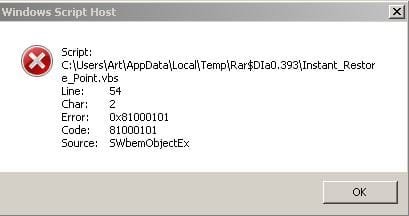
Thank you for your help...I tried the VBS program and got the attached result..So I tried the system protection again to do a restore and now find that I had to wait a litle while till it found my drives some 20 mins is this symptomatic of another issue. and could this be part of the problem I am having I made sure it was turned on I checked volsnap and volume shadow and dependants and all were Ok and started. The restore configure is set to well over 100GB about 12%..I also notice that revo and Easus cannot do a reg back up for the same reasons? Is there a solution? Does anyone know if recent updatescould have caused the errors
 

Attachments

  • Restire script error.JPG
    Restire script error.JPG
    20.9 KB · Views: 16

My Computer

Computer type
PC/Desktop
Computer Manufacturer/Model Number
Compaq Presario
OS
Windows 7 64 bit
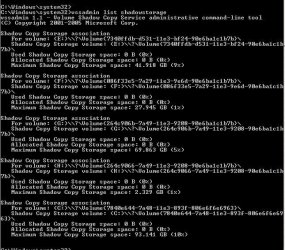
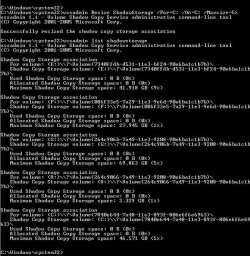
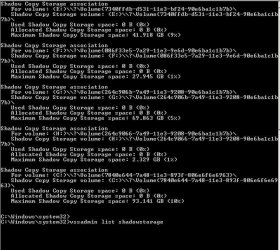
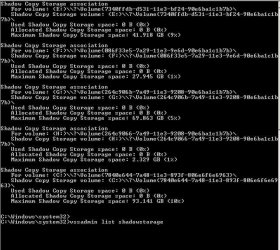
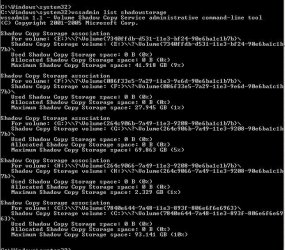
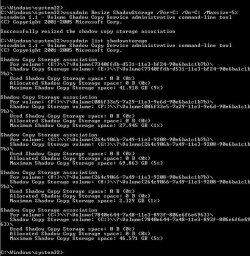
I did several of the helps tutorials and noticed that even though I resized the storage and it show it the allocated space was zero please see attached files results is this normal for allocted to show zero..or is this the problem
 

Attachments

  • restore 10% as set before adjustment.JPG
    restore 10% as set before adjustment.JPG
    105.6 KB · Views: 15
  • restore resized.JPG
    restore resized.JPG
    129.3 KB · Views: 15
  • shadow coppy availability.JPG
    shadow coppy availability.JPG
    107 KB · Views: 15

My Computer

Computer type
PC/Desktop
Computer Manufacturer/Model Number
Compaq Presario
OS
Windows 7 64 bit
Elevated command data..restore: I might have to apologise I am sending (3times) detail to the forum but not seeing it in the current post..If for some strange reason I am duplicating then I am sorry and ask mods to remove
 

Attachments

  • shadow coppy availability.JPG
    shadow coppy availability.JPG
    107 KB · Views: 15
  • restore 10% as set before adjustment.JPG
    restore 10% as set before adjustment.JPG
    105.6 KB · Views: 15
  • restore resized.JPG
    restore resized.JPG
    129.3 KB · Views: 15

My Computer

Computer type
PC/Desktop
Computer Manufacturer/Model Number
Compaq Presario
OS
Windows 7 64 bit
Well I have been doing a little research and found that another member had your problem and the fix was found here.

http://www.sevenforums.com/backup-restore/48069-unable-create-system-image-restore-point.html


The problem may be caused by a corrupted restore point that is still in the system. Turn off system restore, turn it back on and then try to create a restore point. This deletes any restore points. Go to help and support, type in turn off system restore and lets see what happens now.


Some folks here have some good ideas.

0x81000101 Shadow copy timeout error - Microsoft Community
 

My Computer

Computer type
PC/Desktop
Computer Manufacturer/Model Number
Home made Desktop
OS
Windows 10 Pro. 64/ version 1709 Windows 7 Pro/64
CPU
Intel i7-6800K @ 4.3
Motherboard
ASUS X-99 Deluxe II
Memory
Corsair Platinum 16 gig @2400
Graphics Card(s)
EVGA GTX 1070 OC
Monitor(s) Displays
Asus 27" LED LCD/VE278Q
Screen Resolution
1920-1080 or 1280-720 HDMI
Hard Drives
INTEL SSD 730-240 Gb Sata 3.0/
PSU
EVGA Platium 1200W
Case
Phanteks Luxe Tempered Glass 8 fans/ one radiator
Cooling
XSPC/ Water Cooled CPU
Keyboard
Das 4 Professional
Mouse
Logitech M705/MX Anywhere 2-S
Internet Speed
100 mbits
Antivirus
Microsoft Security Essentials/ Malwarebytes Premium 3.0/ SAS
Browser
I.E. 11 default/Firefox/ ISP Time Warner Cable/Spectrum
Other Info
LG BluRay Burner/
Sound system-KLipsch-THX/
Icy Dock ssd Hot Swap bays.
I was just reading my logs and see that my hard disk ( 'The device, \Device\Harddisk2\DR2, has a bad block.") has a bad block..could this be the offender and do you know how I can repair or avoid a bad block//will chkdsk do it? I live in hope..
 

My Computer

Computer type
PC/Desktop
Computer Manufacturer/Model Number
Compaq Presario
OS
Windows 7 64 bit

My Computer

Computer type
PC/Desktop
Computer Manufacturer/Model Number
Home made Desktop
OS
Windows 10 Pro. 64/ version 1709 Windows 7 Pro/64
CPU
Intel i7-6800K @ 4.3
Motherboard
ASUS X-99 Deluxe II
Memory
Corsair Platinum 16 gig @2400
Graphics Card(s)
EVGA GTX 1070 OC
Monitor(s) Displays
Asus 27" LED LCD/VE278Q
Screen Resolution
1920-1080 or 1280-720 HDMI
Hard Drives
INTEL SSD 730-240 Gb Sata 3.0/
PSU
EVGA Platium 1200W
Case
Phanteks Luxe Tempered Glass 8 fans/ one radiator
Cooling
XSPC/ Water Cooled CPU
Keyboard
Das 4 Professional
Mouse
Logitech M705/MX Anywhere 2-S
Internet Speed
100 mbits
Antivirus
Microsoft Security Essentials/ Malwarebytes Premium 3.0/ SAS
Browser
I.E. 11 default/Firefox/ ISP Time Warner Cable/Spectrum
Other Info
LG BluRay Burner/
Sound system-KLipsch-THX/
Icy Dock ssd Hot Swap bays.
Good news and thnak for all the info- after the 6th attempt at turning off and turning on system restore if finally got it to work and I now have a restore point which alos mean that I can use backup facilities too..whooo Hoooo..simple in the end but very frustratiing
 

My Computer

Computer type
PC/Desktop
Computer Manufacturer/Model Number
Compaq Presario
OS
Windows 7 64 bit
Very glad things worked out for you.

Happy computing.
 

My Computer

Computer type
PC/Desktop
Computer Manufacturer/Model Number
Home made Desktop
OS
Windows 10 Pro. 64/ version 1709 Windows 7 Pro/64
CPU
Intel i7-6800K @ 4.3
Motherboard
ASUS X-99 Deluxe II
Memory
Corsair Platinum 16 gig @2400
Graphics Card(s)
EVGA GTX 1070 OC
Monitor(s) Displays
Asus 27" LED LCD/VE278Q
Screen Resolution
1920-1080 or 1280-720 HDMI
Hard Drives
INTEL SSD 730-240 Gb Sata 3.0/
PSU
EVGA Platium 1200W
Case
Phanteks Luxe Tempered Glass 8 fans/ one radiator
Cooling
XSPC/ Water Cooled CPU
Keyboard
Das 4 Professional
Mouse
Logitech M705/MX Anywhere 2-S
Internet Speed
100 mbits
Antivirus
Microsoft Security Essentials/ Malwarebytes Premium 3.0/ SAS
Browser
I.E. 11 default/Firefox/ ISP Time Warner Cable/Spectrum
Other Info
LG BluRay Burner/
Sound system-KLipsch-THX/
Icy Dock ssd Hot Swap bays.
I checked my hard disk with Sentinel and it show a perfect disk surface. I guess it was software block and maybe a leftover point..now it gone thanks for the support
 

My Computer

Computer type
PC/Desktop
Computer Manufacturer/Model Number
Compaq Presario
OS
Windows 7 64 bit
You are very welcome.

Remember on this forum we do two things mostly.
1. Learn
2. Help other members.
3. We like doing both.

Tell your friends about this forum we can always use more members.
We only have 357,197 members.
 

My Computer

Computer type
PC/Desktop
Computer Manufacturer/Model Number
Home made Desktop
OS
Windows 10 Pro. 64/ version 1709 Windows 7 Pro/64
CPU
Intel i7-6800K @ 4.3
Motherboard
ASUS X-99 Deluxe II
Memory
Corsair Platinum 16 gig @2400
Graphics Card(s)
EVGA GTX 1070 OC
Monitor(s) Displays
Asus 27" LED LCD/VE278Q
Screen Resolution
1920-1080 or 1280-720 HDMI
Hard Drives
INTEL SSD 730-240 Gb Sata 3.0/
PSU
EVGA Platium 1200W
Case
Phanteks Luxe Tempered Glass 8 fans/ one radiator
Cooling
XSPC/ Water Cooled CPU
Keyboard
Das 4 Professional
Mouse
Logitech M705/MX Anywhere 2-S
Internet Speed
100 mbits
Antivirus
Microsoft Security Essentials/ Malwarebytes Premium 3.0/ SAS
Browser
I.E. 11 default/Firefox/ ISP Time Warner Cable/Spectrum
Other Info
LG BluRay Burner/
Sound system-KLipsch-THX/
Icy Dock ssd Hot Swap bays.
Back
Top