windows 7 scheduled task remote access

Abmiester

New member
Local time
3:49 PM
Messages
2
I recently upgraded my system to Windows 7 and I am unable to access scheduled taks on my remote servers. Before when I was running off win XP i had no problem with this. But now, even when opening up share folders on all my servers, i dont see the scheduled task folder; however, when i check on a workstation running on XP, i can still see the scheduled tasks folder. any help would be appreciated. thanks.
 

My Computer

Computer Manufacturer/Model Number
Gateway
OS
windows 7
Windows7 - no access to remote scheduled tasks

I have this same problem. I am an administrator on all the servers I'm trying to access, but no scheduled tasks folder is available. May be a simple feature I've yet to discover, but this is a pretty important change. Hopefully there is an easy answer.

I've currently resorted to shortcuts for schtasks.exe calls:

ex. schtasks /RUN /S <remoteservername> /TN "Task I want to run"
 

My Computer

OS
Windows7
Hi, just type into the search at the start button Sch and the tasks will open at the top of the page, I hope this is this what you're looking for.
 
Last edited:

My Computer

Computer Manufacturer/Model Number
Self Build 64bit
OS
Vista Ult64, Win7600
CPU
Intel Core 2 Quad Q6600 @ 2400 MHz 64bit OS
Motherboard
Asus P5E3 Deluxe WiFi @p 64 bit OS
Memory
4096 MB DDR3-SDRAM
Graphics Card(s)
ATI Radeon HD 3870 Series x2 Crossfired
Sound Card
Realtek on board
Monitor(s) Displays
Samsung SyncMaster - 23 inches
Screen Resolution
1680x1050 pixels at 60 Hz in True Colors
Hard Drives
Hitachi (250 GB)/Samsung 750 GB. /Barracuda 160 GB.
My Book 1 TB external..
PSU
Cooler Master 1000w
Case
Cooler Master Cosmos 1000.
Cooling
Fans and fresh air,
Keyboard
Wireless
Mouse
Wireless
Internet Speed
Never fast enough
Other Info
I use a Magnum.
Thanks, it looks like that is current way to get to this functionality. That actually will work if I then click on Task Scheduler and connect to the other computer. It flashes up a messages that Task Scheduler service is not available:

---------------------------
Task Scheduler
---------------------------
Task Scheduler service is not available. Task Scheduler will attempt to reconnect to it.
---------------------------
OK
---------------------------

After that message it will then show a list of the scheduled tasks from the other machine.
 

My Computer

OS
Windows7
I am getting that error as well.

Jfar, thanks for replying. I dont have any problem opening up the task scheduler interface. however, when i try to connect to another machine's task scheduler. that's when the issue comes in play....

ERROR:

task scheduler service is not available. Task Scheduler will attemtp to reconnect.

when i do the same on another machine that is currently running on winXP, it works just fine.

note: yes, all machines are on the same domain (no access restrictions whatsoever)
 

My Computer

Computer Manufacturer/Model Number
Gateway
OS
windows 7
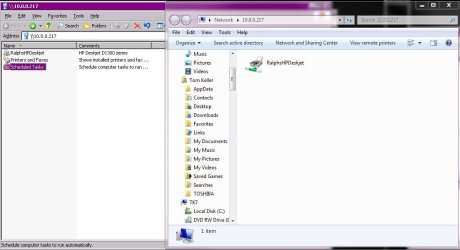
I also have this problem. When viewing a remote computer basic "Network Share" the Scheduled Task icon is not available. This is available on 2003 and XP... I attached a screen shot of two views, 2003 (xp) on the left and 7 Professional on the right.

What gives?
 

Attachments

  • scheduledtasksshare.JPG
    scheduledtasksshare.JPG
    62.5 KB · Views: 881

My Computer

Computer Manufacturer/Model Number
IBM Thinkpad T60
OS
Windows 7 Ultimate 32 and 64 bit
CPU
Intel Core 2 Duo T7200 2GHz
Memory
3GB
Graphics Card(s)
ATI Mobility Radeon X1400
Monitor(s) Displays
HP w2207h
I found another way to work around this limitation in Win7. You'll need to create a custom MMC console and add each remote computer to it. If you normally manage several computers, this actually wouldn't be so bad, but if you were doing a one-off task, it's not the quickest method.

- Open up an empty MMC console (mmc.exe).
- File --> Add/Remove Snap-in --> scroll down and select "Task Scheduler" --> Add --> select "Another computer" --> type the remote computer's name --> OK --> OK.
- File --> Save As --> save the custom MMC console.

Now whenever you open up that MMC, you'll see the scheduled tasks for the remote computers that you added. Note that it could take a minute or so to bring up the Task Scheduler for the remote computers. On the left pane you'll see Task Scheduler (<remote-computer-name>) and then under that will be Task Scheduler Library with all the scheduled tasks.

Note: I only tested by adding one remote computer to the console, but it looks like several can be added.

 
Last edited:

My Computer

Computer Manufacturer/Model Number
Gateway
OS
Windows 7 Ultimate
Outstanding! short and to the point and best of all it works!
Thank you
 

My Computer

Computer Manufacturer/Model Number
Dell
OS
win7-64bit
Memory
8GB
Monitor(s) Displays
Acer
Hard Drives
250MB X 2
Back
Top