windows 7 scheduled task remote access

Abmiester

New member
Local time
3:17 AM
Messages
2
I recently upgraded my system to Windows 7 and I am unable to access scheduled taks on my remote servers. Before when I was running off win XP i had no problem with this. But now, even when opening up share folders on all my servers, i dont see the scheduled task folder; however, when i check on a workstation running on XP, i can still see the scheduled tasks folder. any help would be appreciated. thanks.
 

My Computer My Computer

Computer Manufacturer/Model Number
Gateway
OS
windows 7
Windows7 - no access to remote scheduled tasks

I have this same problem. I am an administrator on all the servers I'm trying to access, but no scheduled tasks folder is available. May be a simple feature I've yet to discover, but this is a pretty important change. Hopefully there is an easy answer.

I've currently resorted to shortcuts for schtasks.exe calls:

ex. schtasks /RUN /S <remoteservername> /TN "Task I want to run"
 

My Computer My Computer

OS
Windows7
Hi, just type into the search at the start button Sch and the tasks will open at the top of the page, I hope this is this what you're looking for.
 
Last edited:

My Computer My Computer

Computer Manufacturer/Model Number
Self Build 64bit
OS
Vista Ult64, Win7600
CPU
Intel Core 2 Quad Q6600 @ 2400 MHz 64bit OS
Motherboard
Asus P5E3 Deluxe WiFi @p 64 bit OS
Memory
4096 MB DDR3-SDRAM
Graphics Card(s)
ATI Radeon HD 3870 Series x2 Crossfired
Sound Card
Realtek on board
Monitor(s) Displays
Samsung SyncMaster - 23 inches
Screen Resolution
1680x1050 pixels at 60 Hz in True Colors
Hard Drives
Hitachi (250 GB)/Samsung 750 GB. /Barracuda 160 GB.
My Book 1 TB external..
PSU
Cooler Master 1000w
Case
Cooler Master Cosmos 1000.
Cooling
Fans and fresh air,
Keyboard
Wireless
Mouse
Wireless
Internet Speed
Never fast enough
Other Info
I use a Magnum.
Thanks, it looks like that is current way to get to this functionality. That actually will work if I then click on Task Scheduler and connect to the other computer. It flashes up a messages that Task Scheduler service is not available:

---------------------------
Task Scheduler
---------------------------
Task Scheduler service is not available. Task Scheduler will attempt to reconnect to it.
---------------------------
OK
---------------------------

After that message it will then show a list of the scheduled tasks from the other machine.
 

My Computer My Computer

OS
Windows7
I am getting that error as well.

Jfar, thanks for replying. I dont have any problem opening up the task scheduler interface. however, when i try to connect to another machine's task scheduler. that's when the issue comes in play....

ERROR:

task scheduler service is not available. Task Scheduler will attemtp to reconnect.

when i do the same on another machine that is currently running on winXP, it works just fine.

note: yes, all machines are on the same domain (no access restrictions whatsoever)
 

My Computer My Computer

Computer Manufacturer/Model Number
Gateway
OS
windows 7
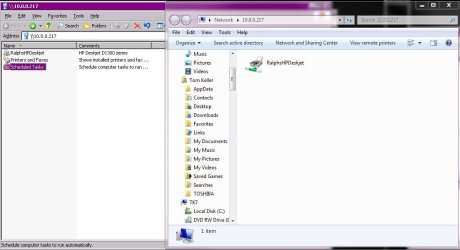
I also have this problem. When viewing a remote computer basic "Network Share" the Scheduled Task icon is not available. This is available on 2003 and XP... I attached a screen shot of two views, 2003 (xp) on the left and 7 Professional on the right.

What gives?
 

Attachments

  • scheduledtasksshare.JPG
    scheduledtasksshare.JPG
    62.5 KB · Views: 881

My Computer My Computer

Computer Manufacturer/Model Number
IBM Thinkpad T60
OS
Windows 7 Ultimate 32 and 64 bit
CPU
Intel Core 2 Duo T7200 2GHz
Memory
3GB
Graphics Card(s)
ATI Mobility Radeon X1400
Monitor(s) Displays
HP w2207h
I found another way to work around this limitation in Win7. You'll need to create a custom MMC console and add each remote computer to it. If you normally manage several computers, this actually wouldn't be so bad, but if you were doing a one-off task, it's not the quickest method.

- Open up an empty MMC console (mmc.exe).
- File --> Add/Remove Snap-in --> scroll down and select "Task Scheduler" --> Add --> select "Another computer" --> type the remote computer's name --> OK --> OK.
- File --> Save As --> save the custom MMC console.

Now whenever you open up that MMC, you'll see the scheduled tasks for the remote computers that you added. Note that it could take a minute or so to bring up the Task Scheduler for the remote computers. On the left pane you'll see Task Scheduler (<remote-computer-name>) and then under that will be Task Scheduler Library with all the scheduled tasks.

Note: I only tested by adding one remote computer to the console, but it looks like several can be added.

 
Last edited:

My Computer My Computer

Computer Manufacturer/Model Number
Gateway
OS
Windows 7 Ultimate
Outstanding! short and to the point and best of all it works!
Thank you
 

My Computer My Computer

Computer Manufacturer/Model Number
Dell
OS
win7-64bit
Memory
8GB
Monitor(s) Displays
Acer
Hard Drives
250MB X 2
Back
Top