Windows 7 Search Function Completely Gone

Banksy

New member
Local time
12:52 AM
Messages
6
Well today, when i tried to search for something, I noticed my search bar was gone from my start menu.

So I went to google, searching for an answer, and...

No go.

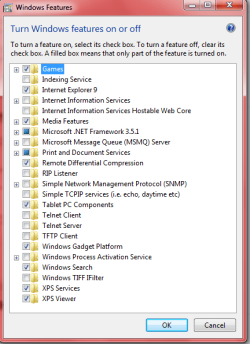
I looked in my "Windows Features", and it is completely gone. Is there any way to help, without doing a system restore, or re-installing?
 

My Computer

Computer Manufacturer/Model Number
Acer Aspire 5745-7247
OS
Windows 7 Ultimate x64
CPU
i3
Motherboard
Dunno
Memory
4 GB
Graphics Card(s)
Intel(R) HD Graphics
Sound Card
Dunno
Monitor(s) Displays
none
Hard Drives
640 GB HDD
What do you mean "It's completely gone" ? It's not showing in features?

Like this;


Regards....Mike Connor
 

My Computer

OS
Several, including Windows 7 x64 Ultimate
Sorry for the late reply, I had to go eat. Anyways, yes it is missing from that list.
 

My Computer

Computer Manufacturer/Model Number
Acer Aspire 5745-7247
OS
Windows 7 Ultimate x64
CPU
i3
Motherboard
Dunno
Memory
4 GB
Graphics Card(s)
Intel(R) HD Graphics
Sound Card
Dunno
Monitor(s) Displays
none
Hard Drives
640 GB HDD
Just to clarify, you get that list but "Windows Search" is not on it?

Can you post a screenshot? I have seen the whole list go missing, where just a blank window appears, but not a single item from the list missing. That is rather odd.

Regards....Mike Connor
 

My Computer

OS
Several, including Windows 7 x64 Ultimate
Yes, that is correct.
fI5EKH.png
 

My Computer

Computer Manufacturer/Model Number
Acer Aspire 5745-7247
OS
Windows 7 Ultimate x64
CPU
i3
Motherboard
Dunno
Memory
4 GB
Graphics Card(s)
Intel(R) HD Graphics
Sound Card
Dunno
Monitor(s) Displays
none
Hard Drives
640 GB HDD
I also am missing SearchIndex.exe, and all DLL's and MUI's that are used by SearchIndex, from System32.
 

My Computer

Computer Manufacturer/Model Number
Acer Aspire 5745-7247
OS
Windows 7 Ultimate x64
CPU
i3
Motherboard
Dunno
Memory
4 GB
Graphics Card(s)
Intel(R) HD Graphics
Sound Card
Dunno
Monitor(s) Displays
none
Hard Drives
640 GB HDD
Just to clarify, you get that list but "Windows Search" is not on it?

Can you post a screenshot? I have seen the whole list go missing, where just a blank window appears, but not a single item from the list missing. That is rather odd.

Regards....Mike Connor
Can you please help me? I really don't want to reinstall.
 

My Computer

Computer Manufacturer/Model Number
Acer Aspire 5745-7247
OS
Windows 7 Ultimate x64
CPU
i3
Motherboard
Dunno
Memory
4 GB
Graphics Card(s)
Intel(R) HD Graphics
Sound Card
Dunno
Monitor(s) Displays
none
Hard Drives
640 GB HDD
Something very fishy is going on there.

First of all, run a Malware scan. Get this,

Malwarebytes

the free version. Download it and run it.

Tell us what it says.

Regards....Mike Connor
 

My Computer

OS
Several, including Windows 7 x64 Ultimate
Uncheck what I circled in your Snip post. Indexing Service
That is for something totally different.

That has to be unchecked @ Brink and his tutorials.
I even asked Brink directly about checking that box or not last week and it was not to be checked.
Post #19, 20 and 21.
http://www.sevenforums.com/tutorials/5023-windows-features-turn-off-3.html#post1311524

It should go back to normal or you may need to restart your PC.

The Search Index may have to rebuild before it is useful.

Look at Mike Connors- unchecked. So is mine.
Snip of my list on right below.
 

Attachments

  • Win XP style.PNG
    Win XP style.PNG
    15.5 KB · Views: 7
  • Win Features.PNG
    Win Features.PNG
    16.4 KB · Views: 7

My Computer

Computer Manufacturer/Model Number
Hopalong/ Godzilla
OS
Windows7 Pro 64bit SP-1; Windows XP Pro 32bit
CPU
Intel Core i7-870 Lynnfield 2.93GHz LGA 1156 95W Quad-Core
Motherboard
ASUS P7P55D-E PRO
Memory
8GB@1400MHz Crucial Ballistix DDR3-1600 4x2GB
Graphics Card(s)
ASUS ENGTX460 DirectCU/2DI/1GD5 1GB 256-bit GDDR5
Sound Card
VIA Onboard
Monitor(s) Displays
Asus VS248H-P 24"; Samsung SyncMaster 941BW 19"ws
Screen Resolution
1920x1080; 1440x900
Hard Drives
Samsung 830 120GB SSD
Intel 320 120GB SSD
Western Digital Caviar Black WD7501AALS 750GB 7200 RPM SATA 3.0Gb/s
Western Digital Caviar Black WD6401AALS 640GB 7200 RPM SATA 3.0Gb/s
PSU
COOLER MASTER Silent Pro RS850-AMBAJ3-US 850W Modular
Case
COOLER MASTER HAF 932 RC-932-KKN5-GP Black
Cooling
Scythe "Mugen-2 Rev.B" (2 ScytheKaze-Jyuni PWM fans)
Keyboard
Logitech K-320
Mouse
Kensington
Antivirus
Avast Inernet Suite
Browser
IE 9 ; Chrome
That's interesting, which tutorial is that?

Am I understanding you correctly, if one checks the "Indexing Service" box, "Windows Search" disappears?

Regards....Mike Connor
 

My Computer

OS
Several, including Windows 7 x64 Ultimate
It turns on an old XP style but I'm not sure exactly what.

It evidently turns off normal Win 7 Search.

Post #19, 20 and 21.
Windows Features - Turn On or Off

It gives backwards compatability to XP networked systems.

@ Brink
Hello Mike,

The Indexing Service in Windows Features is not for the same Index that is used in Windows 7. Instead it's for backwards compatibility. Here's some more information on it: :)


The Indexing Service (Cisvc.exe) used in previous Windows platforms is still available in Windows 7 and Windows Vista as an optional feature that administrators can turn on in Windows Features if needed.

The main reason enterprises might need to enable the previous Indexing Service would be for application compatibility reasons. For example, if enterprises develop applications that depend on Cisvc.exe, they can enable this service to support those applications. The Microsoft Office Visio shape-finding process also uses Cisvc.exe to index shapes. Therefore, if you need to search for shapes quickly in Office or Office Visio on some computers, you can enable Cisvc.exe on those computers.

Note Microsoft does not recommend running the older Indexing Service on computers running Windows 7 unless you have a compelling need to do so. The Indexing Service will likely be removed in a future version of Windows.
 

My Computer

Computer Manufacturer/Model Number
Hopalong/ Godzilla
OS
Windows7 Pro 64bit SP-1; Windows XP Pro 32bit
CPU
Intel Core i7-870 Lynnfield 2.93GHz LGA 1156 95W Quad-Core
Motherboard
ASUS P7P55D-E PRO
Memory
8GB@1400MHz Crucial Ballistix DDR3-1600 4x2GB
Graphics Card(s)
ASUS ENGTX460 DirectCU/2DI/1GD5 1GB 256-bit GDDR5
Sound Card
VIA Onboard
Monitor(s) Displays
Asus VS248H-P 24"; Samsung SyncMaster 941BW 19"ws
Screen Resolution
1920x1080; 1440x900
Hard Drives
Samsung 830 120GB SSD
Intel 320 120GB SSD
Western Digital Caviar Black WD7501AALS 750GB 7200 RPM SATA 3.0Gb/s
Western Digital Caviar Black WD6401AALS 640GB 7200 RPM SATA 3.0Gb/s
PSU
COOLER MASTER Silent Pro RS850-AMBAJ3-US 850W Modular
Case
COOLER MASTER HAF 932 RC-932-KKN5-GP Black
Cooling
Scythe "Mugen-2 Rev.B" (2 ScytheKaze-Jyuni PWM fans)
Keyboard
Logitech K-320
Mouse
Kensington
Antivirus
Avast Inernet Suite
Browser
IE 9 ; Chrome
OK. If that's the case maybe that will fix his problem. I have used the indexing service on a server, but not on any of my other machines, I have never noticed that.

This is what the indexing service is for;

How to install and configure the Indexing Service on a Windows Server 2008-based computer

and how to administer it;

Chapter 9 - Administering the Indexing Service

Anyway, if that does not solve the problem then "Banksy" can try this;

Fix Windows Search when it crashes or is not showing results

Regards....Mike Connor
 

My Computer

OS
Several, including Windows 7 x64 Ultimate
Server may be different I'm just going with Brinks advice.
He needs to uncheck it.

Unchecking may not solve it but will allow for repair per your advice in the above post.

With it checked Win 7 Search can't work evidently.

No expert but I remembered my conversation with Brink last week. ;)

mike
 

My Computer

Computer Manufacturer/Model Number
Hopalong/ Godzilla
OS
Windows7 Pro 64bit SP-1; Windows XP Pro 32bit
CPU
Intel Core i7-870 Lynnfield 2.93GHz LGA 1156 95W Quad-Core
Motherboard
ASUS P7P55D-E PRO
Memory
8GB@1400MHz Crucial Ballistix DDR3-1600 4x2GB
Graphics Card(s)
ASUS ENGTX460 DirectCU/2DI/1GD5 1GB 256-bit GDDR5
Sound Card
VIA Onboard
Monitor(s) Displays
Asus VS248H-P 24"; Samsung SyncMaster 941BW 19"ws
Screen Resolution
1920x1080; 1440x900
Hard Drives
Samsung 830 120GB SSD
Intel 320 120GB SSD
Western Digital Caviar Black WD7501AALS 750GB 7200 RPM SATA 3.0Gb/s
Western Digital Caviar Black WD6401AALS 640GB 7200 RPM SATA 3.0Gb/s
PSU
COOLER MASTER Silent Pro RS850-AMBAJ3-US 850W Modular
Case
COOLER MASTER HAF 932 RC-932-KKN5-GP Black
Cooling
Scythe "Mugen-2 Rev.B" (2 ScytheKaze-Jyuni PWM fans)
Keyboard
Logitech K-320
Mouse
Kensington
Antivirus
Avast Inernet Suite
Browser
IE 9 ; Chrome
Server may be different I'm just going with Brinks advice.
He needs to uncheck it.

Unchecking may not solve it but will allow for repair per your advice in the above post.

With it checked Win 7 Search can't work evidently.

No expert but I remembered my conversation with Brink last week. ;)

mike

Thanks for the info. I didn't know that using it affected windows search. I don't think many people would use it anyway.

Regards....Mike Connor
 

My Computer

OS
Several, including Windows 7 x64 Ultimate
Your welcome.
It was news for me last week.

Now if we can get a response from Banksy on how things are going.
 

My Computer

Computer Manufacturer/Model Number
Hopalong/ Godzilla
OS
Windows7 Pro 64bit SP-1; Windows XP Pro 32bit
CPU
Intel Core i7-870 Lynnfield 2.93GHz LGA 1156 95W Quad-Core
Motherboard
ASUS P7P55D-E PRO
Memory
8GB@1400MHz Crucial Ballistix DDR3-1600 4x2GB
Graphics Card(s)
ASUS ENGTX460 DirectCU/2DI/1GD5 1GB 256-bit GDDR5
Sound Card
VIA Onboard
Monitor(s) Displays
Asus VS248H-P 24"; Samsung SyncMaster 941BW 19"ws
Screen Resolution
1920x1080; 1440x900
Hard Drives
Samsung 830 120GB SSD
Intel 320 120GB SSD
Western Digital Caviar Black WD7501AALS 750GB 7200 RPM SATA 3.0Gb/s
Western Digital Caviar Black WD6401AALS 640GB 7200 RPM SATA 3.0Gb/s
PSU
COOLER MASTER Silent Pro RS850-AMBAJ3-US 850W Modular
Case
COOLER MASTER HAF 932 RC-932-KKN5-GP Black
Cooling
Scythe "Mugen-2 Rev.B" (2 ScytheKaze-Jyuni PWM fans)
Keyboard
Logitech K-320
Mouse
Kensington
Antivirus
Avast Inernet Suite
Browser
IE 9 ; Chrome
Alright, it's not malware, and unchecking it didn't fix it.

@Mike, I tried that, and it told me to install Windows Search 4.0. There were only versions for Windows XP, Windows Server 2003 & 2008, and Vista, because Windows 7 has it already installed.

I google'd this for 2 straight hours and can't seem to find anything to fix this :(
 

My Computer

Computer Manufacturer/Model Number
Acer Aspire 5745-7247
OS
Windows 7 Ultimate x64
CPU
i3
Motherboard
Dunno
Memory
4 GB
Graphics Card(s)
Intel(R) HD Graphics
Sound Card
Dunno
Monitor(s) Displays
none
Hard Drives
640 GB HDD
Try Right-clicking the start button, properties, start menu, customise, and "search other files and libraries" - is "Don't search" checked? - check one of the other options

Is "search programs and control panel" checked? -check it

Try clicking "use default settings"

You may need to reboot before any changes take place.

There is also the Group Policy Editor

You will need to start gpedit.msc - from control panel, Local Group Policy Editor, User configuration, Administrative templates, Start menu and taskbar. Remove Search link from Start Menu and if enabled, disable it.

There are further search-related settings lower down the list:

Do not search... (4 entries)
Remove search Computer link
Remove see more results/search everywhere link

A great alternative to Windows Search for files and folders is "SearchMyFiles"
 
Last edited:

My Computer

Computer Manufacturer/Model Number
Acer 7520, Packard Bell dot se, Acer travelmate 2423
OS
Win 7 Ult + Starter, XP Pro +Home, 2kAS, Linux Mint 8, SuperOS
CPU
AMD 64 Athlon X2 , Intel Atom N450, Intel Celeron M 1.50 Ghz
Motherboard
Acer Fuquene
Memory
2.5GB ; 1GB; 2GB
Graphics Card(s)
Nvidia GeForce7000m; Intel; Intel
Sound Card
Realtek AC57
Monitor(s) Displays
17" ;10.1"; 19"
Screen Resolution
1440x900;1024x600;1440x900;
Hard Drives
WD 80, WD 320;
PSU
19v
Case
Laptop
Cooling
Air
Internet Speed
9.7Mb/s down 0.99Mb/s up
Other Info
ISP VIRGINMEDIA 10M cable broadband - D-Link DIR615 wireless router, 3Com OfficeConnect ASDL router used as wireless extender switch
Alright, it's not malware, and unchecking it didn't fix it.

@Mike, I tried that, and it told me to install Windows Search 4.0. There were only versions for Windows XP, Windows Server 2003 & 2008, and Vista, because Windows 7 has it already installed.

I google'd this for 2 straight hours and can't seem to find anything to fix this :(

Well, sorry, but I don't know anything else to do about it except re-install.

I have no idea at all how it has disappeared, and so I also have no idea how to get it back. I have not seen this before, and not heard of any "fixes".

You can try this;

Get Back Missing Search Option In Windows | Downloads | Technize - Be Techdated

But I don't really think it will help, as it is basically to get the search option back, not to get the feature itself back.

I don't know how one can "lose" one single feature.

Sorry, but you have me stumped on that one. If your machine is otherwise running OK, then you could simply ignore it and use an alternative as posted above, but something must have caused it to disappear, and such "somethings" invariably come back to bite you unless you eradicate them.

Personally, I would go for a reinstall on this one.

Regards....Mike Connor
 

My Computer

OS
Several, including Windows 7 x64 Ultimate
@Mike, I tried that, and it told me to install Windows Search 4.0. There were only versions for Windows XP, Windows Server 2003 & 2008, and Vista, because Windows 7 has it already installed.
:(

http://www.sevenforums.com/tutorials/25343-windows-search-turn-off.html
Turning off Windows Search removes it from Windows 7, but doesn't reduce the amount of hard disk space used by Windows 7. Windows Search will remain stored on your hard disk, so you can turn it back on if you want to.
 

My Computer

Computer Manufacturer/Model Number
Hopalong/ Godzilla
OS
Windows7 Pro 64bit SP-1; Windows XP Pro 32bit
CPU
Intel Core i7-870 Lynnfield 2.93GHz LGA 1156 95W Quad-Core
Motherboard
ASUS P7P55D-E PRO
Memory
8GB@1400MHz Crucial Ballistix DDR3-1600 4x2GB
Graphics Card(s)
ASUS ENGTX460 DirectCU/2DI/1GD5 1GB 256-bit GDDR5
Sound Card
VIA Onboard
Monitor(s) Displays
Asus VS248H-P 24"; Samsung SyncMaster 941BW 19"ws
Screen Resolution
1920x1080; 1440x900
Hard Drives
Samsung 830 120GB SSD
Intel 320 120GB SSD
Western Digital Caviar Black WD7501AALS 750GB 7200 RPM SATA 3.0Gb/s
Western Digital Caviar Black WD6401AALS 640GB 7200 RPM SATA 3.0Gb/s
PSU
COOLER MASTER Silent Pro RS850-AMBAJ3-US 850W Modular
Case
COOLER MASTER HAF 932 RC-932-KKN5-GP Black
Cooling
Scythe "Mugen-2 Rev.B" (2 ScytheKaze-Jyuni PWM fans)
Keyboard
Logitech K-320
Mouse
Kensington
Antivirus
Avast Inernet Suite
Browser
IE 9 ; Chrome
@Mike, I tried that, and it told me to install Windows Search 4.0. There were only versions for Windows XP, Windows Server 2003 & 2008, and Vista, because Windows 7 has it already installed.
:(
Well according to this it is deleted.
http://www.sevenforums.com/tutorials/25343-windows-search-turn-off.html
Turning off Windows Search removes it from Windows 7, but doesn't reduce the amount of hard disk space used by Windows 7. Windows Search will remain stored on your hard disk, so you can turn it back on if you want to.
That is why it requested to install Windows Search 4.0

No, that doesn't delete the feature. It just stops it running on the system. You can turn search on or off just by ticking or unticking the box in the feature list.

The only thing that occurs to me is that downloading "Windows Search" has somehow deleted the feature option. I'm not going to try it in order to find out though! :)

Regards....Mike Connor
 

My Computer

OS
Several, including Windows 7 x64 Ultimate
Back
Top