
How to Uninstall the Windows 7 Service Pack 1 (SP1)
Information
This will show you how to uninstall the Windows 7 Service Pack 1 (SP1) in case you are having issues with it.
You must be logged in as an administrator to be able to do the steps in this tutorial.
You must be logged in as an administrator to be able to do the steps in this tutorial.
Note
If you still have the SP1 beta or RC installed, then you will need to uninstall them using an option in the tutorial below before they stop running and install the Windows 7 Service Pack 1 (SP1) RTM afterwards.
Windows 7 Service Pack 1 (SP1) Beta will stop running on June 30, 2011.
Windows 7 Service Pack 1 (SP1) RC will stop running on November 30, 2011.
In order of release:
Beta = prerelease beta build of SP1
RC = Release Candidate build of SP1
RTM = Release to Market final version SP1
Windows 7 Service Pack 1 (SP1) Beta will stop running on June 30, 2011.
Windows 7 Service Pack 1 (SP1) RC will stop running on November 30, 2011.
In order of release:
Beta = prerelease beta build of SP1
RC = Release Candidate build of SP1
RTM = Release to Market final version SP1
Warning
- If you used the Windows 7 SP1 Disk Cleanup Tool, then you will not be able to uninstall the SP1. Instead you would have to reinstall Windows 7 and the SP1 afterwards.
- If your computer (ex: OEM) came with Windows 7 SP1 already installed or you installed Windows 7 using a Windows 7 with SP1 installation disc (ex: retail or slipstreamed), then you will not be able to uninstall SP1.
OPTION ONE
Uninstall Windows 7 SP1 Beta, RC, or RTM using Programs and Features
1. Open the Control Panel (icons view), and click on Programs and Features.
2. Click on the View installed updates link in the left pane. (see screenshot below)
NOTE: If you don't see Service Pack for Microsoft Windows (KB 976932) in the list of installed updates, or if the uninstall option is disabled, use System Restore (OPTION THREE below) to uninstall the service pack.

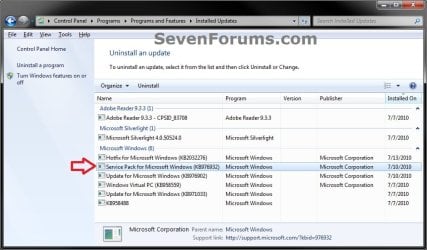
3. Click on Service Pack for Microsoft Windows (KB976932) to uninstall. (see screenshot below)
NOTE: You could also select Service Pack for Microsoft Windows (KB976932) and click on the "Uninstall" button on the toolbar, or right click on Service Pack for Microsoft Windows (KB976932) and click on "Uninstall".
4. Click on Yes. (see screenshot below)

5. Windows 7 Service Pack 1 (SP1) will now start uninstalling. It will take a bit to complete.
6. When prompted, restart the computer to finish.
OPTION TWO
Uninstall Windows 7 SP1 Beta, RC, or RTM using a Elevated Command Prompt
1. Open a elevated command prompt (Run as administrator).
2. In the elevated command prompt, copy and paste the command below and press enter.
Wusa.exe /uninstall /kb:976932
3. Windows 7 Service Pack 1 (SP1) will now start uninstalling. It will take a bit to complete.
4. When prompted, restart the computer to finish.
OPTION THREE
Uninstall Windows 7 SP1 Beta, RC, or RTM using System Restore
:warn: WARNING: Doing a System Restore will also remove any programs and revert any system changes that have been made since you installed the service pack. System Restore will not affect any personal files in your user folders.
1. Do a system restore using a restore point that has the same date or before you installed the Windows 7 Service Pack 1 (SP1).
NOTE: The restore point created automatically when you installed the SP1 beta will be labelled either Install: Windows Update or Install: Windows 7 Service Pack 1.
That's it,
Shawn
Attachments

Last edited:


