
Windows 7 Service Pack 1 (SP1) - Uninstall

How to Uninstall the Windows 7 Service Pack 1 (SP1)

   Information
This will show you how to uninstall the Windows 7 Service Pack 1 (SP1) in case you are having issues with it.

You must be logged in as an administrator to be able to do the steps in this tutorial.

   Note
If you still have the SP1 beta or RC installed, then you will need to uninstall them using an option in the tutorial below before they stop running and install the Windows 7 Service Pack 1 (SP1) RTM afterwards.

Windows 7 Service Pack 1 (SP1) Beta will stop running on June 30, 2011.

Windows 7 Service Pack 1 (SP1) RC will stop running on November 30, 2011.

In order of release:
Beta = prerelease beta build of SP1
RC = Release Candidate build of SP1
RTM = Release to Market final version SP1

   Warning

  • If you used the Windows 7 SP1 Disk Cleanup Tool, then you will not be able to uninstall the SP1. Instead you would have to reinstall Windows 7 and the SP1 afterwards.
  • If your computer (ex: OEM) came with Windows 7 SP1 already installed or you installed Windows 7 using a Windows 7 with SP1 installation disc (ex: retail or slipstreamed), then you will not be able to uninstall SP1.


OPTION ONE

Uninstall Windows 7 SP1 Beta, RC, or RTM using Programs and Features


1. Open the Control Panel (icons view), and click on Programs and Features.

2. Click on the View installed updates link in the left pane. (see screenshot below)
NOTE: If you don't see Service Pack for Microsoft Windows (KB 976932) in the list of installed updates, or if the uninstall option is disabled, use System Restore (OPTION THREE below) to uninstall the service pack.
Step1.jpg
3. Click on Service Pack for Microsoft Windows (KB976932) to uninstall. (see screenshot below)
NOTE: You could also select Service Pack for Microsoft Windows (KB976932) and click on the "Uninstall" button on the toolbar, or right click on Service Pack for Microsoft Windows (KB976932) and click on "Uninstall".
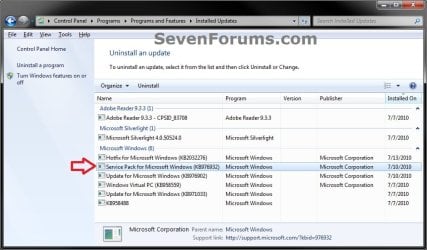
Step2.jpg
4. Click on Yes. (see screenshot below)
Step3.jpg
5. Windows 7 Service Pack 1 (SP1) will now start uninstalling. It will take a bit to complete.

6. When prompted, restart the computer to finish.


OPTION TWO

Uninstall Windows 7 SP1 Beta, RC, or RTM using a Elevated Command Prompt


1. Open a elevated command prompt (Run as administrator).

2. In the elevated command prompt, copy and paste the command below and press enter.
Wusa.exe /uninstall /kb:976932
3. Windows 7 Service Pack 1 (SP1) will now start uninstalling. It will take a bit to complete.

4. When prompted, restart the computer to finish.


OPTION THREE

Uninstall Windows 7 SP1 Beta, RC, or RTM using System Restore


:warn: WARNING: Doing a System Restore will also remove any programs and revert any system changes that have been made since you installed the service pack. System Restore will not affect any personal files in your user folders.
1. Do a system restore using a restore point that has the same date or before you installed the Windows 7 Service Pack 1 (SP1).
NOTE: The restore point created automatically when you installed the SP1 beta will be labelled either Install: Windows Update or Install: Windows 7 Service Pack 1.
That's it,
Shawn


Attachments

  • Watermark.jpg
    Watermark.jpg
    5.5 KB · Views: 515
Last edited:
Hello Larbabe, and welcome to Seven Forums.

This is really a different issue than what the tutorial is for, but you might see if runing the affected program's installation again to do a repair install of the program may be able to fix them.

Hope this helps,
Shawn
 

My Computer My Computer

At a glance

64-bit Windows 11 Pro for WorkstationsIntel i7-8700K OC'd to 5 GHz64 GB (4x16GB) G.SKILL TridentZ RGB DDR4 3600...ASUS ROG-STRIX-GTX1080TI-O11G-GAMING
Computer type
PC/Desktop
Computer Manufacturer/Model Number
Self built custom
OS
64-bit Windows 11 Pro for Workstations
CPU
Intel i7-8700K OC'd to 5 GHz
Motherboard
ASUS ROG Maximus XI Formula Z390
Memory
64 GB (4x16GB) G.SKILL TridentZ RGB DDR4 3600 MHz
Graphics Card(s)
ASUS ROG-STRIX-GTX1080TI-O11G-GAMING
Sound Card
Integrated
Monitor(s) Displays
2 x Samsung Odyssey G7 27"
Screen Resolution
2560x1440
Hard Drives
1TB Samsung 990 PRO M.2,
4TB Samsung 990 PRO PRO M.2,
TerraMaster F8 SSD Plus NAS
PSU
Seasonic Prime Titanium 850W
Case
Thermaltake Core P3
Cooling
Corsair Hydro H115i
Keyboard
Logitech wireless K800
Mouse
Logitech MX Master 4
Internet Speed
2 Gb/s Download and 100 Mb/s Upload
Antivirus
Malwarebyte Anti-Malware Premium
Browser
Google Chrome
Other Info
Logitech Z625 speaker system,
Logitech BRIO 4K Pro webcam,
HP Color LaserJet Pro MFP M477fdn,
APC SMART-UPS RT 1000 XL - SURT1000XLI,
Galaxy S23 Plus phone
Thanks, and...

Thanks for the advice. This evening I ran the repair option of the installer, and when that didn't work, I uninstalled Quickbooks and reinstalled it. Now, when I try to run it, I get to the box where I tell Windows yes, I really do want to run this prog, after which I get nothing. On a side note, it also disabled AVG antivirus and I get an error with outlook, IE and Word that says the plug-in dll's wouldn't load, "contribute" isn't installed properly. But those progs still operate.

Looks like this is a Windows problem rather than just compatibility with Quickbooks.

I'm new to the forum. This thread seemed appropriate since I'm trying to undo the damage SP1 caused. Your advice to remove it worked great, btw. Is there a better thread to haunt for my woes? :sick:

Thanks,
Larry
 

My Computer My Computer

At a glance

Windows 7 Home Premium 32 BitAMD Turion 64x2 2ghz2 gb
Computer Manufacturer/Model Number
Toshiba Satellite
OS
Windows 7 Home Premium 32 Bit
CPU
AMD Turion 64x2 2ghz
Memory
2 gb
Monitor(s) Displays
HP external widescreen
Hard Drives
200gb internal, 1 tb external
No problem Larry. I'd give the "General Discussion" forum section a try with this to see what we can do to help. :)
 

My Computer My Computer

At a glance

64-bit Windows 11 Pro for WorkstationsIntel i7-8700K OC'd to 5 GHz64 GB (4x16GB) G.SKILL TridentZ RGB DDR4 3600...ASUS ROG-STRIX-GTX1080TI-O11G-GAMING
Computer type
PC/Desktop
Computer Manufacturer/Model Number
Self built custom
OS
64-bit Windows 11 Pro for Workstations
CPU
Intel i7-8700K OC'd to 5 GHz
Motherboard
ASUS ROG Maximus XI Formula Z390
Memory
64 GB (4x16GB) G.SKILL TridentZ RGB DDR4 3600 MHz
Graphics Card(s)
ASUS ROG-STRIX-GTX1080TI-O11G-GAMING
Sound Card
Integrated
Monitor(s) Displays
2 x Samsung Odyssey G7 27"
Screen Resolution
2560x1440
Hard Drives
1TB Samsung 990 PRO M.2,
4TB Samsung 990 PRO PRO M.2,
TerraMaster F8 SSD Plus NAS
PSU
Seasonic Prime Titanium 850W
Case
Thermaltake Core P3
Cooling
Corsair Hydro H115i
Keyboard
Logitech wireless K800
Mouse
Logitech MX Master 4
Internet Speed
2 Gb/s Download and 100 Mb/s Upload
Antivirus
Malwarebyte Anti-Malware Premium
Browser
Google Chrome
Other Info
Logitech Z625 speaker system,
Logitech BRIO 4K Pro webcam,
HP Color LaserJet Pro MFP M477fdn,
APC SMART-UPS RT 1000 XL - SURT1000XLI,
Galaxy S23 Plus phone
Thanks!

Cool. Thanks for your help. Your tutorial is just about the only resource for uninstalling the infernal beast they call SP1. Will give that thread a go for the rest.

Thanks!
 

My Computer My Computer

At a glance

Windows 7 Home Premium 32 BitAMD Turion 64x2 2ghz2 gb
Computer Manufacturer/Model Number
Toshiba Satellite
OS
Windows 7 Home Premium 32 Bit
CPU
AMD Turion 64x2 2ghz
Memory
2 gb
Monitor(s) Displays
HP external widescreen
Hard Drives
200gb internal, 1 tb external
You're welcome. I hope we can get the rest sorted for you soon. :)
 

My Computer My Computer

At a glance

64-bit Windows 11 Pro for WorkstationsIntel i7-8700K OC'd to 5 GHz64 GB (4x16GB) G.SKILL TridentZ RGB DDR4 3600...ASUS ROG-STRIX-GTX1080TI-O11G-GAMING
Computer type
PC/Desktop
Computer Manufacturer/Model Number
Self built custom
OS
64-bit Windows 11 Pro for Workstations
CPU
Intel i7-8700K OC'd to 5 GHz
Motherboard
ASUS ROG Maximus XI Formula Z390
Memory
64 GB (4x16GB) G.SKILL TridentZ RGB DDR4 3600 MHz
Graphics Card(s)
ASUS ROG-STRIX-GTX1080TI-O11G-GAMING
Sound Card
Integrated
Monitor(s) Displays
2 x Samsung Odyssey G7 27"
Screen Resolution
2560x1440
Hard Drives
1TB Samsung 990 PRO M.2,
4TB Samsung 990 PRO PRO M.2,
TerraMaster F8 SSD Plus NAS
PSU
Seasonic Prime Titanium 850W
Case
Thermaltake Core P3
Cooling
Corsair Hydro H115i
Keyboard
Logitech wireless K800
Mouse
Logitech MX Master 4
Internet Speed
2 Gb/s Download and 100 Mb/s Upload
Antivirus
Malwarebyte Anti-Malware Premium
Browser
Google Chrome
Other Info
Logitech Z625 speaker system,
Logitech BRIO 4K Pro webcam,
HP Color LaserJet Pro MFP M477fdn,
APC SMART-UPS RT 1000 XL - SURT1000XLI,
Galaxy S23 Plus phone
Hi Shawn, does this uninstall the final released version of SP1 as provided from MS update?
I don't know what all the anagrams mean, RC, PE, CE, RTM, etc.:confused:
 

My Computer My Computer

At a glance

Windows 7 Ultimate X64 SP1Intel i5-2550K, Differing ~4.4-4.8GHz No buil...16GB G.Skill Sniper 1866MHz @ 2133MHz 2x8GBASUS GTX650TIB-DC2OC-2GD5, (650TI Boost)
Computer type
PC/Desktop
Computer Manufacturer/Model Number
Home Built Desktop By DataTech
OS
Windows 7 Ultimate X64 SP1
CPU
Intel i5-2550K, Differing ~4.4-4.8GHz No built in GPU
Motherboard
ASUS P8Z68-V PRO/GEN3
Memory
16GB G.Skill Sniper 1866MHz @ 2133MHz 2x8GB
Graphics Card(s)
ASUS GTX650TIB-DC2OC-2GD5, (650TI Boost)
Sound Card
Onboard Realtek 5-1
Monitor(s) Displays
Samsung P2570HD
Screen Resolution
1920x1080
Hard Drives
Samsung 840 Pro 256GB SSD for OS, 500GB Seagate Constellation (Enterprise drive) for Data
PSU
Corsair HX650W
Case
Inwin Dragon Rider
Cooling
Hyper 212 EVO w/two Noctua fans, push-pull, @1300 RPM
Keyboard
E-Z Eyes, bright yellow keys with large characters
Mouse
steelseries SENSEI Laser Pro Gaming
Internet Speed
48-51Mbs Mbs down, 11 Mbs up Xfinity Cable
Antivirus
Norton Internet Security 2013
Browser
IE 10, Opera, Pale Moon if needed
Other Info
4 case fans, LG BluRay-RE, ASUS DVD-RW, Mr. Fusion power supply, 1.21 gigawatts.
Hello Gary,

I added to the NOTE box at the top of the tutorial to help with all the abreviations for what type of SP1 build they stand for.

The tutorial will uninstall any one of the Beta, RC, or RTM SP1 builds that you have installed in Windows 7. :)
 

My Computer My Computer

At a glance

64-bit Windows 11 Pro for WorkstationsIntel i7-8700K OC'd to 5 GHz64 GB (4x16GB) G.SKILL TridentZ RGB DDR4 3600...ASUS ROG-STRIX-GTX1080TI-O11G-GAMING
Computer type
PC/Desktop
Computer Manufacturer/Model Number
Self built custom
OS
64-bit Windows 11 Pro for Workstations
CPU
Intel i7-8700K OC'd to 5 GHz
Motherboard
ASUS ROG Maximus XI Formula Z390
Memory
64 GB (4x16GB) G.SKILL TridentZ RGB DDR4 3600 MHz
Graphics Card(s)
ASUS ROG-STRIX-GTX1080TI-O11G-GAMING
Sound Card
Integrated
Monitor(s) Displays
2 x Samsung Odyssey G7 27"
Screen Resolution
2560x1440
Hard Drives
1TB Samsung 990 PRO M.2,
4TB Samsung 990 PRO PRO M.2,
TerraMaster F8 SSD Plus NAS
PSU
Seasonic Prime Titanium 850W
Case
Thermaltake Core P3
Cooling
Corsair Hydro H115i
Keyboard
Logitech wireless K800
Mouse
Logitech MX Master 4
Internet Speed
2 Gb/s Download and 100 Mb/s Upload
Antivirus
Malwarebyte Anti-Malware Premium
Browser
Google Chrome
Other Info
Logitech Z625 speaker system,
Logitech BRIO 4K Pro webcam,
HP Color LaserJet Pro MFP M477fdn,
APC SMART-UPS RT 1000 XL - SURT1000XLI,
Galaxy S23 Plus phone
Thanks

Brink, thanks for the direction.

In case anyone else comes looking for a solution to SP1 disabling Quickbooks, uninstalling SP1 doesn't fix it. The only alternative, as least for now, is formatting and starting over. Until another option is found, don't install SP1 at all if you use, or plan to use Quickbooks.

This comes from culling all the forums and spending many hours being passed around by Intuit tech support.

On a positive note, this forum and one of the QB techies were the two sources of help that solved the problem. Thank you very much!
 

My Computer My Computer

At a glance

Windows 7 Home Premium 32 BitAMD Turion 64x2 2ghz2 gb
Computer Manufacturer/Model Number
Toshiba Satellite
OS
Windows 7 Home Premium 32 Bit
CPU
AMD Turion 64x2 2ghz
Memory
2 gb
Monitor(s) Displays
HP external widescreen
Hard Drives
200gb internal, 1 tb external
Thank you for posting back with your results Larbabe. :)
 

My Computer My Computer

At a glance

64-bit Windows 11 Pro for WorkstationsIntel i7-8700K OC'd to 5 GHz64 GB (4x16GB) G.SKILL TridentZ RGB DDR4 3600...ASUS ROG-STRIX-GTX1080TI-O11G-GAMING
Computer type
PC/Desktop
Computer Manufacturer/Model Number
Self built custom
OS
64-bit Windows 11 Pro for Workstations
CPU
Intel i7-8700K OC'd to 5 GHz
Motherboard
ASUS ROG Maximus XI Formula Z390
Memory
64 GB (4x16GB) G.SKILL TridentZ RGB DDR4 3600 MHz
Graphics Card(s)
ASUS ROG-STRIX-GTX1080TI-O11G-GAMING
Sound Card
Integrated
Monitor(s) Displays
2 x Samsung Odyssey G7 27"
Screen Resolution
2560x1440
Hard Drives
1TB Samsung 990 PRO M.2,
4TB Samsung 990 PRO PRO M.2,
TerraMaster F8 SSD Plus NAS
PSU
Seasonic Prime Titanium 850W
Case
Thermaltake Core P3
Cooling
Corsair Hydro H115i
Keyboard
Logitech wireless K800
Mouse
Logitech MX Master 4
Internet Speed
2 Gb/s Download and 100 Mb/s Upload
Antivirus
Malwarebyte Anti-Malware Premium
Browser
Google Chrome
Other Info
Logitech Z625 speaker system,
Logitech BRIO 4K Pro webcam,
HP Color LaserJet Pro MFP M477fdn,
APC SMART-UPS RT 1000 XL - SURT1000XLI,
Galaxy S23 Plus phone
Thanks for info. I could not find the sp to uninstall in option 1
In Option 2 nothing happened except the help screen for wusa came up.
I went to start, typed cmd.
In the command line which was c:\users\ek
Typed in wusa.exe /uninstall /kb976932
Help screen for wusa came up
In option 3 could not find the system restore pt for sp1
I never deleted any restore points since the orig install.
Not able to see any earlier restore points.

This version was a copy that microsoft released as an evaluation copy. I paid microsoft for it. I don't know if that makes any difference.

Is there anything else I can try. Would the update work and override the current version. I am willing to edit the registry if that will help.
EK
 

My Computer My Computer

At a glance

Windows 7 Professional X64I74 GBNvidia GeForce 220
OS
Windows 7 Professional X64
CPU
I7
Motherboard
Gigabyte
Memory
4 GB
Graphics Card(s)
Nvidia GeForce 220
Monitor(s) Displays
Dell
Hello EK, and welcome to Seven Forums.

It sounds like you may have previously used the SP1 Disk Cleanup Tool. If so, you will no longer be able to uninstall the SP1. :(

If the SP1 came already part of the Windows 7 installation in this evaluation copy, then you will not be able to uninstall the SP1.

In Option 2, you needed to open a elevated command prompt (right click - Run as administrator) instead to run the command in. The link in step 1 of Option 2 can show you more on how to open a elevated command prompt.
 

My Computer My Computer

At a glance

64-bit Windows 11 Pro for WorkstationsIntel i7-8700K OC'd to 5 GHz64 GB (4x16GB) G.SKILL TridentZ RGB DDR4 3600...ASUS ROG-STRIX-GTX1080TI-O11G-GAMING
Computer type
PC/Desktop
Computer Manufacturer/Model Number
Self built custom
OS
64-bit Windows 11 Pro for Workstations
CPU
Intel i7-8700K OC'd to 5 GHz
Motherboard
ASUS ROG Maximus XI Formula Z390
Memory
64 GB (4x16GB) G.SKILL TridentZ RGB DDR4 3600 MHz
Graphics Card(s)
ASUS ROG-STRIX-GTX1080TI-O11G-GAMING
Sound Card
Integrated
Monitor(s) Displays
2 x Samsung Odyssey G7 27"
Screen Resolution
2560x1440
Hard Drives
1TB Samsung 990 PRO M.2,
4TB Samsung 990 PRO PRO M.2,
TerraMaster F8 SSD Plus NAS
PSU
Seasonic Prime Titanium 850W
Case
Thermaltake Core P3
Cooling
Corsair Hydro H115i
Keyboard
Logitech wireless K800
Mouse
Logitech MX Master 4
Internet Speed
2 Gb/s Download and 100 Mb/s Upload
Antivirus
Malwarebyte Anti-Malware Premium
Browser
Google Chrome
Other Info
Logitech Z625 speaker system,
Logitech BRIO 4K Pro webcam,
HP Color LaserJet Pro MFP M477fdn,
APC SMART-UPS RT 1000 XL - SURT1000XLI,
Galaxy S23 Plus phone
Thank you for this useful tutorial!
 

My Computer My Computer

At a glance

Windows 7 x64 Ultimate (6.1.7600 Build 16385)Intel Core 2 Extreme QX9650 @ 3400 MHz (8 x 425)G Skill F2-8500CL5 4 GB DDR2-1066 (5-5-5-15 @...GeForce 7950 GX2 (1024 MB)
Computer Manufacturer/Model Number
Intel
OS
Windows 7 x64 Ultimate (6.1.7600 Build 16385)
CPU
Intel Core 2 Extreme QX9650 @ 3400 MHz (8 x 425)
Motherboard
ASUS P5Q-E
Memory
G Skill F2-8500CL5 4 GB DDR2-1066 (5-5-5-15 @ 400 MHz)
Graphics Card(s)
GeForce 7950 GX2 (1024 MB)
Monitor(s) Displays
LG L1970HR
Screen Resolution
1280x1024 32bit
Hard Drives
Drive #1 - ST31500341AS (1397 GB)
Drive #2 - Intel Raid 0 Volume (465 GB)
Drive #3 - ST3500320AS (465 GB)
Drive #4 - ST3500320AS (465 GB)
PSU
Enermax 500W
Keyboard
Logitech G15
Mouse
Logitech G5
Internet Speed
5mbit
You're most welcome Niiiro. :)
 

My Computer My Computer

At a glance

64-bit Windows 11 Pro for WorkstationsIntel i7-8700K OC'd to 5 GHz64 GB (4x16GB) G.SKILL TridentZ RGB DDR4 3600...ASUS ROG-STRIX-GTX1080TI-O11G-GAMING
Computer type
PC/Desktop
Computer Manufacturer/Model Number
Self built custom
OS
64-bit Windows 11 Pro for Workstations
CPU
Intel i7-8700K OC'd to 5 GHz
Motherboard
ASUS ROG Maximus XI Formula Z390
Memory
64 GB (4x16GB) G.SKILL TridentZ RGB DDR4 3600 MHz
Graphics Card(s)
ASUS ROG-STRIX-GTX1080TI-O11G-GAMING
Sound Card
Integrated
Monitor(s) Displays
2 x Samsung Odyssey G7 27"
Screen Resolution
2560x1440
Hard Drives
1TB Samsung 990 PRO M.2,
4TB Samsung 990 PRO PRO M.2,
TerraMaster F8 SSD Plus NAS
PSU
Seasonic Prime Titanium 850W
Case
Thermaltake Core P3
Cooling
Corsair Hydro H115i
Keyboard
Logitech wireless K800
Mouse
Logitech MX Master 4
Internet Speed
2 Gb/s Download and 100 Mb/s Upload
Antivirus
Malwarebyte Anti-Malware Premium
Browser
Google Chrome
Other Info
Logitech Z625 speaker system,
Logitech BRIO 4K Pro webcam,
HP Color LaserJet Pro MFP M477fdn,
APC SMART-UPS RT 1000 XL - SURT1000XLI,
Galaxy S23 Plus phone
How do I uinstall service pack 1 if none of the options work for me?
 

My Computer My Computer

At a glance

Windows 7 enterprise 64biti5 -750 socket 1156corsair xms 1600mhz 8gbAti radeon 5770 powercolor
OS
Windows 7 enterprise 64bit
CPU
i5 -750 socket 1156
Motherboard
Asus p55d pro
Memory
corsair xms 1600mhz 8gb
Graphics Card(s)
Ati radeon 5770 powercolor
Sound Card
onboard VIA VT1828S
Monitor(s) Displays
BenQ 24"
Screen Resolution
1920x1080
Hard Drives
many.... + SSD (Crucial C300)
PSU
Seasonic 750 watt MD12
Case
Corsair Obisidian 800D
Cooling
Noctua NH-D14
Keyboard
Logitech K510
Mouse
Microsoft Touch Mouse
Internet Speed
40/40 mbit fibre optics.
Hello Killbox,

Did your Windows 7 installation media come with SP1 already included with it, and installed SP1 with Windows 7 when you installed Windows 7?

If so, then you will not be able to uninstall SP1. :(
 

My Computer My Computer

At a glance

64-bit Windows 11 Pro for WorkstationsIntel i7-8700K OC'd to 5 GHz64 GB (4x16GB) G.SKILL TridentZ RGB DDR4 3600...ASUS ROG-STRIX-GTX1080TI-O11G-GAMING
Computer type
PC/Desktop
Computer Manufacturer/Model Number
Self built custom
OS
64-bit Windows 11 Pro for Workstations
CPU
Intel i7-8700K OC'd to 5 GHz
Motherboard
ASUS ROG Maximus XI Formula Z390
Memory
64 GB (4x16GB) G.SKILL TridentZ RGB DDR4 3600 MHz
Graphics Card(s)
ASUS ROG-STRIX-GTX1080TI-O11G-GAMING
Sound Card
Integrated
Monitor(s) Displays
2 x Samsung Odyssey G7 27"
Screen Resolution
2560x1440
Hard Drives
1TB Samsung 990 PRO M.2,
4TB Samsung 990 PRO PRO M.2,
TerraMaster F8 SSD Plus NAS
PSU
Seasonic Prime Titanium 850W
Case
Thermaltake Core P3
Cooling
Corsair Hydro H115i
Keyboard
Logitech wireless K800
Mouse
Logitech MX Master 4
Internet Speed
2 Gb/s Download and 100 Mb/s Upload
Antivirus
Malwarebyte Anti-Malware Premium
Browser
Google Chrome
Other Info
Logitech Z625 speaker system,
Logitech BRIO 4K Pro webcam,
HP Color LaserJet Pro MFP M477fdn,
APC SMART-UPS RT 1000 XL - SURT1000XLI,
Galaxy S23 Plus phone
I got it to work now. Had to check "compatibility with vista service pack 2" and run as administrator. I'm currently at the "gathering files, settings..." part now :) Hope it will work.
 

My Computer My Computer

At a glance

Windows 7 enterprise 64biti5 -750 socket 1156corsair xms 1600mhz 8gbAti radeon 5770 powercolor
OS
Windows 7 enterprise 64bit
CPU
i5 -750 socket 1156
Motherboard
Asus p55d pro
Memory
corsair xms 1600mhz 8gb
Graphics Card(s)
Ati radeon 5770 powercolor
Sound Card
onboard VIA VT1828S
Monitor(s) Displays
BenQ 24"
Screen Resolution
1920x1080
Hard Drives
many.... + SSD (Crucial C300)
PSU
Seasonic 750 watt MD12
Case
Corsair Obisidian 800D
Cooling
Noctua NH-D14
Keyboard
Logitech K510
Mouse
Microsoft Touch Mouse
Internet Speed
40/40 mbit fibre optics.
Hi,

I don't have KB976932 in windows update uninstall window. Also in my computer properties, SP1 is not mentioned after OS - Windows 7 Home Basic. I opened winver as well.. it is just showing Version 6.1 (Build 7600). It is seems my system doen't have SP1 installed.

But in my windows update -> view update history...I can see below update is successful
Windows 7 Service Pack 1 for x64-based systems (KB976932).

In my windows update it shows Windows is up to date.

Please help me...as I am not able to install / uninstall windows 7 SP1.

When I try to install IE11 then it shows error as system must have windows 7 SP1. I wanted to install SP1 successfully.

Could you please help... :(
 

My Computer My Computer

At a glance

Windows 7 Home Basic 64 bitIntel core i3
Computer type
Laptop
Computer Manufacturer/Model Number
HP
OS
Windows 7 Home Basic 64 bit
CPU
Intel core i3
Hello javaFresh, and welcome to Seven Forums. :)

Do you have all Windows Updates installed?
 

My Computer My Computer

At a glance

64-bit Windows 11 Pro for WorkstationsIntel i7-8700K OC'd to 5 GHz64 GB (4x16GB) G.SKILL TridentZ RGB DDR4 3600...ASUS ROG-STRIX-GTX1080TI-O11G-GAMING
Computer type
PC/Desktop
Computer Manufacturer/Model Number
Self built custom
OS
64-bit Windows 11 Pro for Workstations
CPU
Intel i7-8700K OC'd to 5 GHz
Motherboard
ASUS ROG Maximus XI Formula Z390
Memory
64 GB (4x16GB) G.SKILL TridentZ RGB DDR4 3600 MHz
Graphics Card(s)
ASUS ROG-STRIX-GTX1080TI-O11G-GAMING
Sound Card
Integrated
Monitor(s) Displays
2 x Samsung Odyssey G7 27"
Screen Resolution
2560x1440
Hard Drives
1TB Samsung 990 PRO M.2,
4TB Samsung 990 PRO PRO M.2,
TerraMaster F8 SSD Plus NAS
PSU
Seasonic Prime Titanium 850W
Case
Thermaltake Core P3
Cooling
Corsair Hydro H115i
Keyboard
Logitech wireless K800
Mouse
Logitech MX Master 4
Internet Speed
2 Gb/s Download and 100 Mb/s Upload
Antivirus
Malwarebyte Anti-Malware Premium
Browser
Google Chrome
Other Info
Logitech Z625 speaker system,
Logitech BRIO 4K Pro webcam,
HP Color LaserJet Pro MFP M477fdn,
APC SMART-UPS RT 1000 XL - SURT1000XLI,
Galaxy S23 Plus phone
Thanks.

OMG!!! just checked for updates it is showing SP1 update. Thanks Let me install it again.
 

My Computer My Computer

At a glance

Windows 7 Home Basic 64 bitIntel core i3
Computer type
Laptop
Computer Manufacturer/Model Number
HP
OS
Windows 7 Home Basic 64 bit
CPU
Intel core i3
One more query.. Before installing SP1..do we need to take Windows backup?
 

My Computer My Computer

At a glance

Windows 7 Home Basic 64 bitIntel core i3
Computer type
Laptop
Computer Manufacturer/Model Number
HP
OS
Windows 7 Home Basic 64 bit
CPU
Intel core i3
Back
Top