Solved Windows 7 service packs

mohab

New member
Local time
1:55 AM
Messages
130
Are they really worth the download or do they just slow things down? Are SSD supported in these SP?
 

My Computer My Computer

Computer type
PC/Desktop
Computer Manufacturer/Model Number
Dell Optiplex 7020
OS
Windows 7 Professional 64 bits
CPU
Core i5 3.3 GHz
Motherboard
original
Memory
12GB
Graphics Card(s)
original (Intel HD graphics 4600
Monitor(s) Displays
Samsung SyncMaster 713N
Screen Resolution
1280 x 1024
Hard Drives
Kingstone SSDnow 480GB
Antivirus
Kaspersky Internet security 2016
Browser
Opera
hi windows 7 only have one service pack that is sp1 and yes you should have it installed.
 

My Computer My Computer

Computer type
PC/Desktop
Computer Manufacturer/Model Number
dell xps 9000
OS
win 10
Yes they are worth the download & are important.

What do you mean by "Are SSD supported in these SP?".
 

My Computer My Computer

Computer type
PC/Desktop
Computer Manufacturer/Model Number
Self built using existing case
OS
Windows 7 Home Premium 64 bit sp1
CPU
Intel i5 3570 3.4Ghz Ivy Bridge SKT 1155 quad core
Motherboard
Gigabyte Z77-HD3 SKT 1155 2xSata 3, 4x USB 3.0
Memory
G-Skill Rip Jaws 16Gb (8x2) DDR3 -1600 PC3 12800 CL 10 red
Graphics Card(s)
Gigabyte NVIDIA GT610 1Gb DDR3 810/1200 PCI-E 2.0 Silent
Sound Card
NVIDIA High Definition & Realtech High Definition Audio
Monitor(s) Displays
2 x Philips 226V4L 16:9 aspect ratio
Screen Resolution
1920 x 1080 HD
Hard Drives
Samsung 840 Pro 256gb SSD, SATA 3.
Hitachi Touro Portable 1tb, USB 3.0 HDD used for image b/ups.
PSU
Corsair VS450
Case
Codeng
Cooling
PSU fan & CPU fan
Keyboard
Logitech
Mouse
Logitech Wireless trackball M570
Internet Speed
Wireless 3G. 3mg down & 550kb up.
Antivirus
Bitdefender Internet Security 2020
Browser
Opera (Current Version) & Firefox
Other Info
MS Office 2013 Pro. Davis weather station software. MGE Nova 600 avr UPS.
Ranger 4 it's obvious from your question that my qyestion "Are SSD supported in these SP?" is a silly one.

Where can I download SP1? I don't have the automatic update service on you see. I've tried to download it from the microsoft site, what I get is a list of files that have to be downloaded but not one SP1 file?
 

My Computer My Computer

Computer type
PC/Desktop
Computer Manufacturer/Model Number
Dell Optiplex 7020
OS
Windows 7 Professional 64 bits
CPU
Core i5 3.3 GHz
Motherboard
original
Memory
12GB
Graphics Card(s)
original (Intel HD graphics 4600
Monitor(s) Displays
Samsung SyncMaster 713N
Screen Resolution
1280 x 1024
Hard Drives
Kingstone SSDnow 480GB
Antivirus
Kaspersky Internet security 2016
Browser
Opera
When you install Windows 7, you should install all the updates. Yes, it does take time but it brings the installation up to date.

You could try turning on Automatic Updates & see if that will fix the problem.

Is Windows activated?.
 

My Computer My Computer

Computer type
PC/Desktop
Computer Manufacturer/Model Number
Self built using existing case
OS
Windows 7 Home Premium 64 bit sp1
CPU
Intel i5 3570 3.4Ghz Ivy Bridge SKT 1155 quad core
Motherboard
Gigabyte Z77-HD3 SKT 1155 2xSata 3, 4x USB 3.0
Memory
G-Skill Rip Jaws 16Gb (8x2) DDR3 -1600 PC3 12800 CL 10 red
Graphics Card(s)
Gigabyte NVIDIA GT610 1Gb DDR3 810/1200 PCI-E 2.0 Silent
Sound Card
NVIDIA High Definition & Realtech High Definition Audio
Monitor(s) Displays
2 x Philips 226V4L 16:9 aspect ratio
Screen Resolution
1920 x 1080 HD
Hard Drives
Samsung 840 Pro 256gb SSD, SATA 3.
Hitachi Touro Portable 1tb, USB 3.0 HDD used for image b/ups.
PSU
Corsair VS450
Case
Codeng
Cooling
PSU fan & CPU fan
Keyboard
Logitech
Mouse
Logitech Wireless trackball M570
Internet Speed
Wireless 3G. 3mg down & 550kb up.
Antivirus
Bitdefender Internet Security 2020
Browser
Opera (Current Version) & Firefox
Other Info
MS Office 2013 Pro. Davis weather station software. MGE Nova 600 avr UPS.
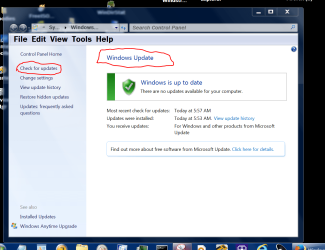
You could also try this. Then wait and wait while it searches. I could take many hours.

WINDOWS UPDATES TODAY.PNG
 

My Computer My Computer

Computer type
PC/Desktop
Computer Manufacturer/Model Number
Home made Desktop
OS
Windows 10 Pro. 64/ version 1709 Windows 7 Pro/64
CPU
Intel i7-6800K @ 4.3
Motherboard
ASUS X-99 Deluxe II
Memory
Corsair Platinum 16 gig @2400
Graphics Card(s)
EVGA GTX 1070 OC
Monitor(s) Displays
Asus 27" LED LCD/VE278Q
Screen Resolution
1920-1080 or 1280-720 HDMI
Hard Drives
INTEL SSD 730-240 Gb Sata 3.0/
PSU
EVGA Platium 1200W
Case
Phanteks Luxe Tempered Glass 8 fans/ one radiator
Cooling
XSPC/ Water Cooled CPU
Keyboard
Das 4 Professional
Mouse
Logitech M705/MX Anywhere 2-S
Internet Speed
100 mbits
Antivirus
Microsoft Security Essentials/ Malwarebytes Premium 3.0/ SAS
Browser
I.E. 11 default/Firefox/ ISP Time Warner Cable/Spectrum
Other Info
LG BluRay Burner/
Sound system-KLipsch-THX/
Icy Dock ssd Hot Swap bays.
But as far as I kmow, Microsoft installs a lot of unnecessary updates that slow down the machine?

Ranger4 my Windows is activated
 

My Computer My Computer

Computer type
PC/Desktop
Computer Manufacturer/Model Number
Dell Optiplex 7020
OS
Windows 7 Professional 64 bits
CPU
Core i5 3.3 GHz
Motherboard
original
Memory
12GB
Graphics Card(s)
original (Intel HD graphics 4600
Monitor(s) Displays
Samsung SyncMaster 713N
Screen Resolution
1280 x 1024
Hard Drives
Kingstone SSDnow 480GB
Antivirus
Kaspersky Internet security 2016
Browser
Opera
But as far as I kmow, Microsoft installs a lot of unnecessary updates that slow down the machine?
You tell us if your computer slows once patched.

Make a backup image of your current install
then measure your computer's performance
apply all updates
then measure your computer's performance again
I doubt that you will see any measurable performance difference.

http://www.sevenforums.com/benchmarks/312922-download-links-all-benchmarks.html

You can always revert to your current install via the backup image.
 

My Computer My Computer

Computer type
Laptop
Computer Manufacturer/Model Number
Employer provided Dell Latitude
OS
W7 Pro SP1 64bit
CPU
i7
Memory
8GB
Graphics Card(s)
Intel HD Graphics
Hard Drives
crappy SSD
Antivirus
Employer mandated Symantec Endpoint Protection
Browser
Pale Moon 64bit, IE11 64bit & Chrome 64bit
mohab where are you getting information that Windows 7 updates slow down computers?
 

My Computer My Computer

Computer type
PC/Desktop
Computer Manufacturer/Model Number
Home made Desktop
OS
Windows 10 Pro. 64/ version 1709 Windows 7 Pro/64
CPU
Intel i7-6800K @ 4.3
Motherboard
ASUS X-99 Deluxe II
Memory
Corsair Platinum 16 gig @2400
Graphics Card(s)
EVGA GTX 1070 OC
Monitor(s) Displays
Asus 27" LED LCD/VE278Q
Screen Resolution
1920-1080 or 1280-720 HDMI
Hard Drives
INTEL SSD 730-240 Gb Sata 3.0/
PSU
EVGA Platium 1200W
Case
Phanteks Luxe Tempered Glass 8 fans/ one radiator
Cooling
XSPC/ Water Cooled CPU
Keyboard
Das 4 Professional
Mouse
Logitech M705/MX Anywhere 2-S
Internet Speed
100 mbits
Antivirus
Microsoft Security Essentials/ Malwarebytes Premium 3.0/ SAS
Browser
I.E. 11 default/Firefox/ ISP Time Warner Cable/Spectrum
Other Info
LG BluRay Burner/
Sound system-KLipsch-THX/
Icy Dock ssd Hot Swap bays.
Service Pack 1 for Windows 7 would be considered an essential update. You need a really compelling reason not to do this update. The belief (faulty) that updates slow down your computer is not such a reason.

Support for Windows 7 without SP1 ended on April 9 2013. Not having SP1 installed puts your computer at a much higher risk of malware infections. SP1 fixes many problems in the OS. Few members of this forum would be inclined to help with a windows 7 computer without SP1. The problem may be caused by it's lack.

Microsoft is devoting a great deal of time, effort, and money to creating updates for Windows 7. They must also devote a great deal of physical resources and pay for the very high bandwidth required to distribute these updates. For all of this Microsoft is receiving zero revenue. Why go to all that trouble just to slow down your computer?

My experience with Windows service packs and updates goes back to Windows 98 days and has been almost entirely positive. Very few problems and not one case where a service pack or update caused a slowdown.

 

My Computer My Computer

Computer type
PC/Desktop
Computer Manufacturer/Model Number
HP
OS
Windows 7 Pro 64 bit
CPU
Xeon W3520
Memory
8 GB
Graphics Card(s)
Nvidia Geforce 210
Service Pack 1 for Windows 7 would be considered an essential update. You need a really compelling reason not to do this update. The belief (faulty) that updates slow down your computer is not such a reason.

Support for Windows 7 without SP1 ended on April 9 2013. Not having SP1 installed puts your computer at a much higher risk of malware infections. SP1 fixes many problems in the OS. Few members of this forum would be inclined to help with a windows 7 computer without SP1. The problem may be caused by it's lack.

Microsoft is devoting a great deal of time, effort, and money to creating updates for Windows 7. They must also devote a great deal of physical resources and pay for the very high bandwidth required to distribute these updates. For all of this Microsoft is receiving zero revenue. Why go to all that trouble just to slow down your computer?

My experience with Windows service packs and updates goes back to Windows 98 days and has been almost entirely positive. Very few problems and not one case where a service pack or update caused a slowdown.


:ditto:
 

My Computer My Computer

Computer type
PC/Desktop
Computer Manufacturer/Model Number
Home made Desktop
OS
Windows 10 Pro. 64/ version 1709 Windows 7 Pro/64
CPU
Intel i7-6800K @ 4.3
Motherboard
ASUS X-99 Deluxe II
Memory
Corsair Platinum 16 gig @2400
Graphics Card(s)
EVGA GTX 1070 OC
Monitor(s) Displays
Asus 27" LED LCD/VE278Q
Screen Resolution
1920-1080 or 1280-720 HDMI
Hard Drives
INTEL SSD 730-240 Gb Sata 3.0/
PSU
EVGA Platium 1200W
Case
Phanteks Luxe Tempered Glass 8 fans/ one radiator
Cooling
XSPC/ Water Cooled CPU
Keyboard
Das 4 Professional
Mouse
Logitech M705/MX Anywhere 2-S
Internet Speed
100 mbits
Antivirus
Microsoft Security Essentials/ Malwarebytes Premium 3.0/ SAS
Browser
I.E. 11 default/Firefox/ ISP Time Warner Cable/Spectrum
Other Info
LG BluRay Burner/
Sound system-KLipsch-THX/
Icy Dock ssd Hot Swap bays.
Layback Bear, Where did I get the idea that updates slow down the PC? All the unnecessary/ irrelevant updates that Windows XP used to download, they used to really slow it down as the processor needs to deal with all these newly installed files
 

My Computer My Computer

Computer type
PC/Desktop
Computer Manufacturer/Model Number
Dell Optiplex 7020
OS
Windows 7 Professional 64 bits
CPU
Core i5 3.3 GHz
Motherboard
original
Memory
12GB
Graphics Card(s)
original (Intel HD graphics 4600
Monitor(s) Displays
Samsung SyncMaster 713N
Screen Resolution
1280 x 1024
Hard Drives
Kingstone SSDnow 480GB
Antivirus
Kaspersky Internet security 2016
Browser
Opera
Once they have been installed files (even in large numbers) have zero impact on CPU usage. How can you really know that Windows updates were responsible for your issues?
 

My Computer My Computer

Computer type
PC/Desktop
Computer Manufacturer/Model Number
HP
OS
Windows 7 Pro 64 bit
CPU
Xeon W3520
Memory
8 GB
Graphics Card(s)
Nvidia Geforce 210
LMiller7,
Maybe I'm looking at it wrong, but I figure that most patched code means having more code added to the old flawed code. Every time that the code runs, the added code must run too. Of course this is not true every single patch; but, I would guess that it is true a lot of the time.

Millions of lines of added/patched code probably does slow things down. I just do not know if it is noticeable. I don't see a slow down on my hardware (unpatched vs. patched - with no 3rd party software installed). Maybe the OP will tell us if a slow down is measurable on his hardware.

As you mentioned: these patches are already expensive to create/distribute. Why would MS go to the added expense to optimize the code for speed?
 

My Computer My Computer

Computer type
Laptop
Computer Manufacturer/Model Number
Employer provided Dell Latitude
OS
W7 Pro SP1 64bit
CPU
i7
Memory
8GB
Graphics Card(s)
Intel HD Graphics
Hard Drives
crappy SSD
Antivirus
Employer mandated Symantec Endpoint Protection
Browser
Pale Moon 64bit, IE11 64bit & Chrome 64bit
Title of thread.

Windows 7 service packs
I know of no proof that Windows 7 SP-1 slows down a computer system that is designed to run Windows 7.
A billion or so people use Windows 7 SP-1 and only a few state that it slows things down.
I have not run Windows 7 with out SP-1 for years. I did install Windows 7 on one of my systems before SP-1 came out.
If SP-1 slowed that old system down, I sure don't remember it doing so.

So to answer the question.
No SP-1 does not slow computers down that are designed for Windows 7.
In my opinion SP-1 is necessary to enjoy everything that Windows 7 has to offer.

That being said, I'm sure someone has posted somewhere that Aunt Mable's computer slows down on the last Friday of every week when I installed SP-1 on her computer.
Poor Aunt Mable.
 

My Computer My Computer

Computer type
PC/Desktop
Computer Manufacturer/Model Number
Home made Desktop
OS
Windows 10 Pro. 64/ version 1709 Windows 7 Pro/64
CPU
Intel i7-6800K @ 4.3
Motherboard
ASUS X-99 Deluxe II
Memory
Corsair Platinum 16 gig @2400
Graphics Card(s)
EVGA GTX 1070 OC
Monitor(s) Displays
Asus 27" LED LCD/VE278Q
Screen Resolution
1920-1080 or 1280-720 HDMI
Hard Drives
INTEL SSD 730-240 Gb Sata 3.0/
PSU
EVGA Platium 1200W
Case
Phanteks Luxe Tempered Glass 8 fans/ one radiator
Cooling
XSPC/ Water Cooled CPU
Keyboard
Das 4 Professional
Mouse
Logitech M705/MX Anywhere 2-S
Internet Speed
100 mbits
Antivirus
Microsoft Security Essentials/ Malwarebytes Premium 3.0/ SAS
Browser
I.E. 11 default/Firefox/ ISP Time Warner Cable/Spectrum
Other Info
LG BluRay Burner/
Sound system-KLipsch-THX/
Icy Dock ssd Hot Swap bays.
This thread has gone off track into discussion not relevant to the original question. It has gone from that of SP 1 to discussion of updates and patches as if they were the same thing. They are not. A service pack does not consist of yet more patches but clean new versions of the system files with the original problems fixed. If the old patches caused a slowdown (which I doubt is significant) then SP 1 should improve performance.
 

My Computer My Computer

Computer type
PC/Desktop
Computer Manufacturer/Model Number
HP
OS
Windows 7 Pro 64 bit
CPU
Xeon W3520
Memory
8 GB
Graphics Card(s)
Nvidia Geforce 210
This thread has gone off track into discussion not relevant to the original question. It has gone from that of SP 1 to discussion of updates and patches as if they were the same thing. They are not. A service pack does not consist of yet more patches but clean new versions of the system files with the original problems fixed. If the old patches caused a slowdown (which I doubt is significant) then SP 1 should improve performance.
I was assuming that the OP had not installed every update that SP1 installs.
If the computer has not been patched (e.g. fresh install via golden media), then applying SP1 will apply many updates.

I would encourage the OP to install SP1 and most other updates... but I understand the OP's concern. My earlier post should deal with those concerns.
 

My Computer My Computer

Computer type
Laptop
Computer Manufacturer/Model Number
Employer provided Dell Latitude
OS
W7 Pro SP1 64bit
CPU
i7
Memory
8GB
Graphics Card(s)
Intel HD Graphics
Hard Drives
crappy SSD
Antivirus
Employer mandated Symantec Endpoint Protection
Browser
Pale Moon 64bit, IE11 64bit & Chrome 64bit
I tried to run Windows update and instead of downloading one service pack 1 file, it wanted to download a bunch of KB files. Is this natural?
 

My Computer My Computer

Computer type
PC/Desktop
Computer Manufacturer/Model Number
Dell Optiplex 7020
OS
Windows 7 Professional 64 bits
CPU
Core i5 3.3 GHz
Motherboard
original
Memory
12GB
Graphics Card(s)
original (Intel HD graphics 4600
Monitor(s) Displays
Samsung SyncMaster 713N
Screen Resolution
1280 x 1024
Hard Drives
Kingstone SSDnow 480GB
Antivirus
Kaspersky Internet security 2016
Browser
Opera

My Computer My Computer

Computer type
Laptop
Computer Manufacturer/Model Number
Employer provided Dell Latitude
OS
W7 Pro SP1 64bit
CPU
i7
Memory
8GB
Graphics Card(s)
Intel HD Graphics
Hard Drives
crappy SSD
Antivirus
Employer mandated Symantec Endpoint Protection
Browser
Pale Moon 64bit, IE11 64bit & Chrome 64bit
UPDATED WINDOW7!!

Thank you very much for all your helpful posts, could have done it without you
 

My Computer My Computer

Computer type
PC/Desktop
Computer Manufacturer/Model Number
Dell Optiplex 7020
OS
Windows 7 Professional 64 bits
CPU
Core i5 3.3 GHz
Motherboard
original
Memory
12GB
Graphics Card(s)
original (Intel HD graphics 4600
Monitor(s) Displays
Samsung SyncMaster 713N
Screen Resolution
1280 x 1024
Hard Drives
Kingstone SSDnow 480GB
Antivirus
Kaspersky Internet security 2016
Browser
Opera
Back
Top