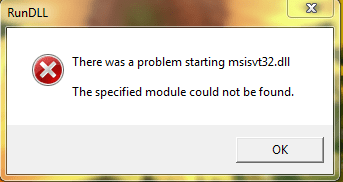
Windows 7 Shows .DLL Error How to solve this problem Help me

mkannan

New member
Local time
10:31 AM
Messages
2
My Windows 7 professional 32 bit shows this problem ..how to solve this problem help me friends.
Capture 1.PNG
 

My Computer My Computer

OS
Windows 7 professional 32 bit
Hello mkannan and welcome to Seven Forums.

When I googled msisvt32.dll I got "no results found". Whenever I see that I immediately start thinking virus or other malware. Legitimate .dll files almost always have information available about them. Suggest you run a full scan with your own updated antivirus suite. No anti-virus product is 100% effective 100% of the time (if there was such a thing we'd all be using it.) So I also recommend you scan your computer with some additional free on-demand scanners. The more scanners you use that come back "no malware found" the more likely your computer is not infected.

Windows Defender Offline

Malwarebytes

ESET Online Scanner

SuperAntispyware

HitmanPro

Kaspersky TDSSKiller

After running the malware scans I'd also check for damaged or corrupt system files. Run a system file checker scan from an elevated command prompt (option two.) If problems are found, run the scan 3 times and reboot the computer after each scan.

http://www.sevenforums.com/tutorials/1538-sfc-scannow-command-system-file-checker.html

Please post back the results of the scans.
 

My Computer My Computer

Computer type
Laptop
Computer Manufacturer/Model Number
Sony Vaio VPCEB47GM Laptop
OS
Win 7 Pro 64-bit
CPU
Intel i5 2.4 Ghz
Memory
8GB DDR3
Graphics Card(s)
Intel HD 3000
Sound Card
IDT High Definition
Monitor(s) Displays
15.6 WGXA Anti-Glare LED
Screen Resolution
1280x800
Hard Drives
640Gb 7200rpm
Antivirus
MSE
Browser
Opera (primary) with IE9 backup
thanks for ur information friend...i will try this method...
 

My Computer My Computer

OS
Windows 7 professional 32 bit
Back
Top