
Windows 7 slow FireWire transfer speeds

XGUNTHERC

I Click Home Too Much
Power User
VIP
Local time
8:01 PM
Messages
440
Location
Viva Las Vegas
Wow. This forum is popping since the 22nd. Nicely done guys.

Anyways I am getting ready to reload the official release over build 7201. So I have a seagate freeagent pro. I can use FireWire or USB 2.0 or esata but I don't have the esata cable

So transfering large or small files from 7 64bit over FireWire is DEAD slow. I am getting 4-12 mb/second transfers. Yes so my 56GB steam backup is taking over 3 1/2 hours to transfer. Any ideas on why it is Soooo slow and what should I try instead. I am going to use USB from now on too I figure it out.

Thanks for any info or ideas. Thanks!
 

My Computer

OS
Windows 7 Ultimate Edition x64
CPU
Q9650 E0 @ 4.0 GHz 1.304v
Motherboard
eVGA 750i FTW!
Memory
2x2GB Corsair Dominator PC2-8500C5D 1100 Mhz 5-5-5-15
Graphics Card(s)
eVGA/Gigabyte GTX 480's SLI
Sound Card
X-Fi XtremeGamer
Monitor(s) Displays
Dell U2410 24" IPS Panel (Beautiful)
Screen Resolution
1900 x 1200 & 1680 x 1050
Hard Drives
WD Caviar Black 640GB AALS x2 (Raid0) + Seagate Pro 500GB External x2
PSU
Enermax Revolution 85+ 1050w PSU
Case
Cooler Master HAF 932 H20
Cooling
Apogee GTZ, Feser 360, D5 Vario, Scythe GT 1850's
Keyboard
Logitech G11
Mouse
Logitech MX-518 / G9
Internet Speed
Fast!
Other Info
Nikon D40 DSLR 18-105mm VR - Nikon 35mm f/1.8 & 55-200mm VR
Bose Companion 3 - 16GB Patriot Xporter USB - ATH AD900's & UR Triple.Fi 10 Custom Phones w/ 32GB iPod Touch 3rd Gen -
Google Nexus One (Phone Rocks!) w/ Kingston 16GB MicroSDHC Class 10 running Amon RA1.7 and Cyan 5.06.1
I too find it slow on my Seagate 320Gber. I don't think it's the type of cable rather a combo of speed property of the device and power source.

Also how much curent is used or required by your seagate (USB Controller property)?
 

My Computer

Computer Manufacturer/Model Number
Lenovo ThinkPad T60
OS
Windows 7 Ultimate 64Bit
CPU
GenuineIntel Intel(R) Core(TM) DuoCore T2400 @ 1.83GHz
Motherboard
Intel(R) 82801G (ICH7 Family)
Memory
2.00 GB
Graphics Card(s)
Mobile Intel(R) 945 Express Chipset
Sound Card
SoundMAX Integrated Digital HD Audio
Monitor(s) Displays
ThinkPad Display
Screen Resolution
1400x1050
Hard Drives
100Gb SATA
Keyboard
Standard Keyboard
Mouse
HID-compliant Mouse
Internet Speed
Cable Broadband - 54Mbps
Other Info
Intel(R) PRO/1000 PL Network Connection
11a/b/g Wireless LAN Mini PCI Express Adapter
Well, here's the deal. I was using the mini Firewire to regular size that was provided by seagate.. There's a USB Mini, FireWire Mini, and eSATA port on the back on the FreeAgent Pro.. I switched from the Firewire to USB and my speeds increased from 4-12mb/s up to 29-44 mb/s

Lets just say that files started transfering MUCH faster.. how lame when everyone says FW is faster. Maybe I need a full size cable and use that, but I'm just going to buy a eSATA cable and call it a day in the future.
 

My Computer

OS
Windows 7 Ultimate Edition x64
CPU
Q9650 E0 @ 4.0 GHz 1.304v
Motherboard
eVGA 750i FTW!
Memory
2x2GB Corsair Dominator PC2-8500C5D 1100 Mhz 5-5-5-15
Graphics Card(s)
eVGA/Gigabyte GTX 480's SLI
Sound Card
X-Fi XtremeGamer
Monitor(s) Displays
Dell U2410 24" IPS Panel (Beautiful)
Screen Resolution
1900 x 1200 & 1680 x 1050
Hard Drives
WD Caviar Black 640GB AALS x2 (Raid0) + Seagate Pro 500GB External x2
PSU
Enermax Revolution 85+ 1050w PSU
Case
Cooler Master HAF 932 H20
Cooling
Apogee GTZ, Feser 360, D5 Vario, Scythe GT 1850's
Keyboard
Logitech G11
Mouse
Logitech MX-518 / G9
Internet Speed
Fast!
Other Info
Nikon D40 DSLR 18-105mm VR - Nikon 35mm f/1.8 & 55-200mm VR
Bose Companion 3 - 16GB Patriot Xporter USB - ATH AD900's & UR Triple.Fi 10 Custom Phones w/ 32GB iPod Touch 3rd Gen -
Google Nexus One (Phone Rocks!) w/ Kingston 16GB MicroSDHC Class 10 running Amon RA1.7 and Cyan 5.06.1
I'm having the same problem with my TrueImage backups. I have a 2TB external drive which uses USB and Firewire. On Firewire the backup takes more than 18 hours while on USB it only takes 4-5 hours. What's going on here? When I used winxp the firewire was the fastest and the same backup only took a few hours.
 

My Computer

OS
Windows 7
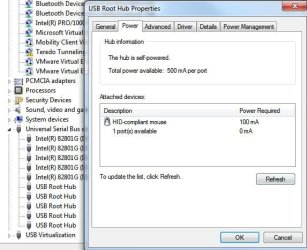
Can you check in Device Manager> USB controllers. Check with each type of cable the Power required table, and total Power available in the Power table.

Are they registering the same amounts? I'm not sure where this is going but it could settle the debat about power.

Here is my USB mouse, as an example.
 

Attachments

  • Noname.jpg
    Noname.jpg
    44.1 KB · Views: 296

My Computer

Computer Manufacturer/Model Number
Lenovo ThinkPad T60
OS
Windows 7 Ultimate 64Bit
CPU
GenuineIntel Intel(R) Core(TM) DuoCore T2400 @ 1.83GHz
Motherboard
Intel(R) 82801G (ICH7 Family)
Memory
2.00 GB
Graphics Card(s)
Mobile Intel(R) 945 Express Chipset
Sound Card
SoundMAX Integrated Digital HD Audio
Monitor(s) Displays
ThinkPad Display
Screen Resolution
1400x1050
Hard Drives
100Gb SATA
Keyboard
Standard Keyboard
Mouse
HID-compliant Mouse
Internet Speed
Cable Broadband - 54Mbps
Other Info
Intel(R) PRO/1000 PL Network Connection
11a/b/g Wireless LAN Mini PCI Express Adapter
hey i'm having trouble with firewire on win 7 ultimate too...recently using driver default from microsop via 1394 OHCI compliant host controller from win 7 6.1.7600.16385

before installing win 7, my firewire work fine on vista 64 ultimate...

but on win7 ultimatex64 just now , if i'm starting my pc , my ext hdd(seagate extreme) detected...but if i remove it then plug it on again, it just detect 1 part drive from my ext hdd(i have 2 partition)

-have tested, on : other pc in win xp with firewire , work fine, about 60mbps speed....
-have tested on firewire(my pc) default slot from my motherboard REX, and via add on slot(wich contain firewire and usb port) still trouble like i mention above....

*have trying copy file from/to my ekst HDD(via firewire) large file/take a view minute , it'll get stuck...and if i'm cancel it, takes a lottt timee..
 

My Computer

OS
windows 7 ultimate
Motherboard
rex
Graphics Card(s)
gtx 275 winfast
Sound Card
supremex x-fi ad2000
PSU
corsair hx620w
Case
scout storm
mine solved....

just try using the 1394 legacy driver....it works....
my firewire function normally(but it runs slow just at 40mbps)
 

My Computer

OS
windows 7 ultimate
Motherboard
rex
Graphics Card(s)
gtx 275 winfast
Sound Card
supremex x-fi ad2000
PSU
corsair hx620w
Case
scout storm
im dumb...how do you do that w/ legacy driver
 

My Computer

Computer Manufacturer/Model Number
HP
OS
Windows Seven 64 bit
CPU
AMD Phenom 9150e Quad-core 1.80 GHz
Memory
5 gigs
Graphics Card(s)
GeForce 9600 GT
Sound Card
stock
Monitor(s) Displays
HP w2207h
Screen Resolution
1680x1050
Hard Drives
external Maxtor 250 gig
2nd internal 225 gig
Keyboard
HP
Mouse
MS Lasermouse 5000
Internet Speed
5 MB
device manager > ur firewire device(1394)>click it, and the driver name appear > properties > driver,update driver>browse.. >let me pick... >there the legacy driver appear , if not uncheck (show compatible hardware) then manual search on 1394

btw , it runs normally now, but only got about 40's mbps speed
 

My Computer

OS
windows 7 ultimate
Motherboard
rex
Graphics Card(s)
gtx 275 winfast
Sound Card
supremex x-fi ad2000
PSU
corsair hx620w
Case
scout storm
Thanks sugiik

RE: device manager > ur firewire device(1394)>click it, and the driver name appear > properties > driver,update driver>browse.. >let me pick... >there the legacy driver appear , if not uncheck (show compatible hardware) then manual search on 1394

I just wanted to clarify what sugiik posted for us since I noticed that it looked a bit different as I went through the process on my own machine... and i know that I have some friends who would not know what to do if it weren't in the simplest of terms:


  1. Click on Start and Type device manager into the search window
  2. When it shows up - click it open
  3. Click the arrow on IEEE 3194 Bus host controllers and see the driver name that you are currently using "1394 OHCI ...something"
  4. Right Click on that icon and drag to Properties
  5. Click on the Driver tab at the top of that window
  6. Click on UpDate Driver
  7. Then click Browse my computer for driver software
  8. Pick the one that has the word (legacy) added to its name
  9. Relax - The computer will do the rest
  10. I had to restart twice for some reason - but it worked exactly as advertised:D
sugiik rocks!
 

My Computer

Computer Manufacturer/Model Number
HP-Pavilion p6130f
OS
Windows 7 Home Premium
CPU
2.40 gigahertz AMD Phenom 9750 Quad-Core
Motherboard
PEGATRON CORPORATION VIOLET 3.02
Memory
8192 Megabytes
Graphics Card(s)
NVIDIA Quadro FX 570
Sound Card
Realtek High Definition Audio
Monitor(s) Displays
ViewSonic VX2433wm
Hard Drives
750.15 Gigabytes Usable Hard
Maxtor OneTouch IEEE 1394 SBP2 Device
RE: device manager > ur firewire device(1394)>click it, and the driver name appear > properties > driver,update driver>browse.. >let me pick... >there the legacy driver appear , if not uncheck (show compatible hardware) then manual search on 1394

I just wanted to clarify what sugiik posted for us since I noticed that it looked a bit different as I went through the process on my own machine... and i know that I have some friends who would not know what to do if it weren't in the simplest of terms:


  1. Click on Start and Type device manager into the search window
  2. When it shows up - click it open
  3. Click the arrow on IEEE 3194 Bus host controllers and see the driver name that you are currently using "1394 OHCI ...something"
  4. Right Click on that icon and drag to Properties
  5. Click on the Driver tab at the top of that window
  6. Click on UpDate Driver
  7. Then click Browse my computer for driver software
  8. Pick the one that has the word (legacy) added to its name
  9. Relax - The computer will do the rest
  10. I had to restart twice for some reason - but it worked exactly as advertised:D
sugiik rocks!

sorry for my bad guide >_<
 

My Computer

OS
windows 7 ultimate
Motherboard
rex
Graphics Card(s)
gtx 275 winfast
Sound Card
supremex x-fi ad2000
PSU
corsair hx620w
Case
scout storm
Thanks sugiik, you rock! I had 2Mb/s transfer rate before with the regular 1394 driver... switched to legacy and now it varies from 16 to 40mb.... better than before! :)

Ben
 

My Computer

Computer Manufacturer/Model Number
Custom PC
OS
Windows 7 Ultimate 64 Bit
CPU
Intel Core2 Duo E7200
Motherboard
Asus P5QL Pro
Memory
G.SKILL 2x2GB
Graphics Card(s)
ATI Radeon 4890
Sound Card
OnBoard Realtek
Monitor(s) Displays
CRT 21"
Screen Resolution
1280x1024
Hard Drives
1x 150GB Raptor
1x 500GB Seagate
2x 750GB Seagate
PSU
Corsair 620W
Case
Antec Sonata
Cooling
Arctic Cooling Freezer 7
Keyboard
Microsoft SideWinder X6
Mouse
Logitech MX518
Internet Speed
Cable 7.5M
Found a solution!

In my case, a client had 2 external RAIDs, 2 different brands, 1 Firewire 800 the other firewire 400, Windows 7 Ultimate X64. The speed was terribly slow. I first installed the {Legacy} drivers for the IEEE devices and it did improve a little but barely. With a little digging I found a solution in the External Drives Properties.

The default Windows settings for FireWire-connected drives can reduce your External drive performance by as much as 90%. This problem is easily corrected, just follow these instructions:

1. Open "My Computer" or "Computer" from your (Start) Menu or Button.
2. Right-click the external Hard disk drive from the list and select "properties"
7. Click the "Hardware" tab.
8. Highlight the drive your having problems with from the drive list and click on "Properties".
9. Click on the “Policies” tab.
10. You will see two radio buttons - "Optimize for quick removal" and "optimize for performance".
11. If not selected, select "Optimize for performance" and click on "OK". If running Vista or Windows 7 also check "enable write caching on the disk".
12. Click on "OK" and exit.

Lighting speeds should now be reached.

This problem can affect XP, Vista or Windows 7. It may improve performance for any drive connected via FireWire.

Good Luck!
 

My Computer

OS
Windows 7 Ultimate x64
Slow Firewire transfers - Windows 7 - driver problem

Thank you for the solution, I too was having painfully slow firewire transfers from a direct to edit hard drive, I think it was using the RICOH/Dell driver for the firewire, I rolled it back to the legacy driver and it is working well.
 

My Computer

Computer Manufacturer/Model Number
Dell E6500
OS
Windows 7 Enterprise
CPU
Intel Core 2 Duo 2.66
Memory
8GB
Graphics Card(s)
NVIDIA
Sound Card
IDT
Monitor(s) Displays
Dell 29
Hard Drives
WDC2500BJKT
In my case, a client had 2 external RAIDs, 2 different brands, 1 Firewire 800 the other firewire 400, Windows 7 Ultimate X64. The speed was terribly slow. I first installed the {Legacy} drivers for the IEEE devices and it did improve a little but barely. With a little digging I found a solution in the External Drives Properties.

The default Windows settings for FireWire-connected drives can reduce your External drive performance by as much as 90%. This problem is easily corrected, just follow these instructions:

1. Open "My Computer" or "Computer" from your (Start) Menu or Button.
2. Right-click the external Hard disk drive from the list and select "properties"
7. Click the "Hardware" tab.
8. Highlight the drive your having problems with from the drive list and click on "Properties".
9. Click on the “Policies” tab.
10. You will see two radio buttons - "Optimize for quick removal" and "optimize for performance".
11. If not selected, select "Optimize for performance" and click on "OK". If running Vista or Windows 7 also check "enable write caching on the disk".
12. Click on "OK" and exit.

Lighting speeds should now be reached.

This problem can affect XP, Vista or Windows 7. It may improve performance for any drive connected via FireWire.

Good Luck!
Hi there,
Are you still using the legacy drivers with this solution?
I'm testing some transfers right now and I'm getting ~20mb/sec
thxs
-MD
 

My Computer

OS
Windows 7 Pro 64-bit
These two fixes combined worked perfectly for me, thanks! :D

I was trying to migrate about 200GBs of files from my old system, and it was looking like it was gonna take 3 straight days to do it.

In my case, a client had 2 external RAIDs, 2 different brands, 1 Firewire 800 the other firewire 400, Windows 7 Ultimate X64. The speed was terribly slow. I first installed the {Legacy} drivers for the IEEE devices and it did improve a little but barely. With a little digging I found a solution in the External Drives Properties.

The default Windows settings for FireWire-connected drives can reduce your External drive performance by as much as 90%. This problem is easily corrected, just follow these instructions:

1. Open "My Computer" or "Computer" from your (Start) Menu or Button.
2. Right-click the external Hard disk drive from the list and select "properties"
7. Click the "Hardware" tab.
8. Highlight the drive your having problems with from the drive list and click on "Properties".
9. Click on the “Policies” tab.
10. You will see two radio buttons - "Optimize for quick removal" and "optimize for performance".
11. If not selected, select "Optimize for performance" and click on "OK". If running Vista or Windows 7 also check "enable write caching on the disk".
12. Click on "OK" and exit.

Lighting speeds should now be reached.

This problem can affect XP, Vista or Windows 7. It may improve performance for any drive connected via FireWire.

Good Luck!

  1. Click on Start and Type device manager into the search window
  2. When it shows up - click it open
  3. Click the arrow on IEEE 3194 Bus host controllers and see the driver name that you are currently using "1394 OHCI ...something"
  4. Right Click on that icon and drag to Properties
  5. Click on the Driver tab at the top of that window
  6. Click on UpDate Driver
  7. Then click Browse my computer for driver software
  8. Pick the one that has the word (legacy) added to its name
  9. Relax - The computer will do the rest
  10. I had to restart twice for some reason - but it worked exactly as advertised:D
sugiik rocks!
 

My Computer

OS
Windows 7 Home Premium (64-bit)
Thx for the link Paddywack0! It solved my problem. File transfers would freeze after 30 seconds.
 

My Computer

OS
Windows 7 ultimate 64 bit
In my case, a client had 2 external RAIDs, 2 different brands, 1 Firewire 800 the other firewire 400, Windows 7 Ultimate X64. The speed was terribly slow. I first installed the {Legacy} drivers for the IEEE devices and it did improve a little but barely. With a little digging I found a solution in the External Drives Properties.

The default Windows settings for FireWire-connected drives can reduce your External drive performance by as much as 90%. This problem is easily corrected, just follow these instructions:

1. Open "My Computer" or "Computer" from your (Start) Menu or Button.
2. Right-click the external Hard disk drive from the list and select "properties"
7. Click the "Hardware" tab.
8. Highlight the drive your having problems with from the drive list and click on "Properties".
9. Click on the “Policies” tab.
10. You will see two radio buttons - "Optimize for quick removal" and "optimize for performance".
11. If not selected, select "Optimize for performance" and click on "OK". If running Vista or Windows 7 also check "enable write caching on the disk".
12. Click on "OK" and exit.

Lighting speeds should now be reached.

This problem can affect XP, Vista or Windows 7. It may improve performance for any drive connected via FireWire.

Good Luck!


Hi,

I'm sorry to jump on this old thread (and I'm also sorry for my english, by the way...) ; but I have a very similar problem except it is not with a firewire harddrive but with firewire soundcard... everything seems fine, the setup went fine, the drivers are updated, my computer recognized the card, I can access to all its features... but no sound at all... and when I try to read sound, all is slowed down... I think it is the same problem as with the hard drive devices and I also think your solution (or something close to that) would work for me, except I don't know how to do it with a sound card instead of a harddrive... I don't have access to the same settings... And all signs point to a firewire port working way too slowly...

If you (or anybody) have any idea about how I could handle this, then I have to say you would save my life...

Paul.
 

My Computer

OS
windows 7 home 64
Back
Top