Windows 7 slower than xp

babbleon

New member
Local time
2:09 AM
Messages
1
I have a similar problem and it is not that I have a weak computer. If I open a directory and it has say 300 files in it, Win7 takes forever to read through and display them. It SLOWLY counts them while that stupid green bar moves horizontally across the top of the screen, sometimes stopping and going back to do it again. I can open similarly sized folders on much older and slower computers and they are twice as fast. This has been going on since I installed 7 and is really frustrating me. I have another folder with 10 mp3's in it and that folder takes nearly 10 seconds to fully open before I can do anything with the files. I don't know enough about indexing and windows explorer to figure out how/if I can tweak something to enhance performance. Any ideas greatly appreciated.
 
Last edited by a moderator:

My Computer

Computer Manufacturer/Model Number
IntelR
OS
Windows 7 Home Premium
CPU
Intel Pentium Dual CPU 2.2Ghz
Memory
4GB
Graphics Card(s)
NVIDIA GeForce 7300
Sound Card
Realtek High Definition Audio
Monitor(s) Displays
15" LCD
Screen Resolution
1280X1024
Hard Drives
640GB
Mouse
Kensington Laser Pilot
Internet Speed
Cable Modem
I think that if you type indexing in

the support and help section

you will find a lot of valuable

information in the FAQ section.

Read it, then come back with any questions.

It is truly our pleasure to try to give

you any assistance that you

may require.
 

My Computer

Computer type
PC/Desktop
Computer Manufacturer/Model Number
Dell XPS 420
OS
Windows 10, Home Clean Install
CPU
Intel Core2 processsor Q8200(2.33Ghz 1333FSB) Quad Core Tech
Motherboard
Dell
Memory
6 gb
Graphics Card(s)
ATI Radeon 256MB HD3650
Sound Card
Intergrated 7.1 Channel Audio
Monitor(s) Displays
Dell SP2009W 20"
Hard Drives
640 GB Serial ATA Hard drive
Cooling
Fan
Keyboard
Dell USB Keyboard
Mouse
Dell Premium Optical USB
Internet Speed
DSL 2.85
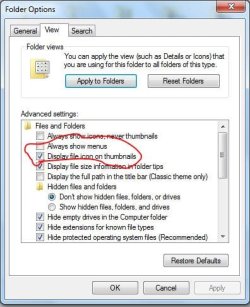
Try turning off display file icon on thumbnails; and see if that makes a difference. See image below.

folder.jpg
 

Attachments

  • folder.JPG
    folder.JPG
    45.5 KB · Views: 61

My Computer

OS
Windows 7 64-bit
CPU
AMD Athlon II X4 620 Propus @ 2.6ghz
Motherboard
GIGABYTE GA-MA785GM-US2H
Memory
OCZ Platinum 4GB (2 x 2GB) 240-Pin DDR2 SDRAM DDR2 1066 (PC2
Graphics Card(s)
ATI Radeon HD 4200 [on board]
Sound Card
Realtek ALC889A [on board]
Case
APEVIA X-QPACK-NW-BK/420 Black Aluminum

My Computer

Computer Manufacturer/Model Number
Samsung NP550P5C-S02IN
OS
Windows 7 Ultimate - 64-bit | Windows 8 Pro - 64-bit
CPU
Intel® Core™ i7 Processor 3,610QM (2.30Hz, 6MB L3 Cach
Memory
8 GB
Graphics Card(s)
NVIDIA® GeForce® GT 650M 2GB Graphics, Optimus™ techno
Sound Card
SoundAlive™ JBL 3 Speakers (With sub-Woofer)
Monitor(s) Displays
39.62cm (15.6) SuperBright 300nit HD+ LED Display
Screen Resolution
1,600 x 900, Anti-Reflective
Hard Drives
1TB S-ATA II Hard Drive (5,400RPM)
Slowed down Win7

Thanks for the very informative tutorial. I got a lot of VERY useful tips from it. Thanks again!:D
 

My Computer

Computer Manufacturer/Model Number
home grown
OS
Windows 7 Home Premium (x64) (build 7600)
CPU
2.00 gigahertz AMD Athlon 64 X2 Dual Core
Motherboard
ASUSTeK Computer Inc. A8V Rev 1.xx FSB200 megahertz
Memory
3328 Megabytes Usable Installed Memory 4x1024 DIMM
Graphics Card(s)
NVIDIA GeForce 6800 GS/XT (Microsoft Corporation - WDDM) [Di
Sound Card
SB Audigy LS
Monitor(s) Displays
Samsung SyncMaster [Monitor] (18.5"vis, s/n H9LS521761, May
Hard Drives
1-500G IDE (C:), 2-SATA 1TB, 3-USB2 1TB
= 5501.11 Gigabytes Usable Hard Drive Capacity
The thing that most people fail to understand is that new features don't just magically appear. They take CPU cycles, and disk accesses. The OS does more, so yes, it will be slower than previous versions.

Imagine if you were doing a job, then your boss put 2x as much work on your desk. It would take you longer to finish, would it not?

You can make windows faster, but in order to do that, you have to disable all the stuff that makes the new version.. well.. the new version.
 

My Computer

Computer Manufacturer/Model Number
Self-Built
OS
Windows 7 64 bit SP1
CPU
Core i7 920
Motherboard
Gigabyte GA-X58A-UD3R
Memory
12 GB (6x2GB Corsair)
Graphics Card(s)
nVidia 250GTS
Sound Card
Built-in
Monitor(s) Displays
2x Samsung SyncMaster 2343 (23" Widescreen)
Keyboard
Microsoft Natural Keyboard
Mouse
Logitech Laser

My Computer

Computer Manufacturer/Model Number
HP/p6207c
OS
Windows 7 Professional 64-bit
CPU
Pentium(R) Dual-Core CPU E5300 @260GHz
Sound Card
RealTek High Def Audio
Monitor(s) Displays
HP 2159m
Screen Resolution
1920 x 1080 x 60
Mouse
HP M/N: M-U0009-HP1
Internet Speed
Broadband
You can also refer to BlackViper's configuration of services guide Windows 7 Service Configurations by Black Viper

Please notice that these different Win 7 OP's are all mentioned
  • S ~ Windows 7 Starter
  • HB ~ Windows 7 Home Basic
  • HP ~ Windows 7 Home Premium
  • P ~ Windows 7 Professional
  • U ~ Windows 7 Ultimate
  • E ~ Windows 7 Enterprise
 

My Computer

Computer type
PC/Desktop
Computer Manufacturer/Model Number
Bruce ... somewhere in his 40's
OS
Windows 7 Ultimate 32bit SP1
CPU
Intel(R) Core(TM)2 Quad CPU @ 2.40GHz, 2400 MHz
Motherboard
INTEL/D975XBX2
Memory
4 GB
Graphics Card(s)
ATI Radeon HD 2600 Pro
Monitor(s) Displays
Samsung SyncMaster 914v
Screen Resolution
1280 x 1024
Hard Drives
2/500GB each ... ST3500630AS ATA Device.
One is not connected
PSU
Rocketfish 700 W
Case
G.Skill Gigabyte Chassis
Keyboard
Standard PS/2 Keyboard
Mouse
Microsoft PS/2 Mouse
Internet Speed
DSL
Antivirus
Avira Internet Security
Browser
IE 11
Other Info
ATI HDMI Audio
Back
Top