Windows 7 Sound Stopped Working, All Diagnostics Fine

wpettine

New member
Local time
1:32 PM
Messages
4
After installing a new Ethernet card, all audio output from my Dell desktop stopped working (front and back). I am using the factory installed Realtek High Definition Audio which is at Location 0 (Internal High Definition Audio Bus). Every diagnostic on the desktop, however, is showing no issues. This includes the volume mixer, the Realtek Audio Manager, Device Manger, the Control Panel's Sound tab and everything else I could find recommended in various online forums. These all show normally functioning audio. This means that when I play something on youtube, or invoke system sounds via Matlab, the mixer shows everything is good, but there is no actual audio output. I have a NVIDIA video card running two monitors, but they are DVI and their sound output is disabled.

Solutions tried:
-Restarting the computer
-Uninstalling driver and reinstalling driver
-Uninstalling driver and reinstalling latest Reaktek driver
-Sound troubleshooter (no issues)
-Fiddling with the Realtek Audio manager advanced settings, connector settings and speaker configuration
-Taking out the new Ethernet card
-Disabling and then re-enabling the reaktek driver
-Disabling and then re-enabling the NVIDIA sound driver
-Plugging into the front jacks
-Plugging into the back jacks
-Plugging into the monitors
-Connecting speakers to the above locations
-Connecting headphones to the above locations

We use this as an experimental machine in a research lab, and really need the audio for subject feedback.
 

My Computer My Computer

Computer type
PC/Desktop
Computer Manufacturer/Model Number
Precision Tower 3620
OS
Windows 7 Professional 64 Bit
CPU
Intel(R) Core(TM) i7-6700K CPU @ 4.00GHz, 4001 Mhz
Motherboard
Dell 09WH54
Memory
16 GB
Graphics Card(s)
NVIDIA Quadro M4000
Hard Drives
INTEL SSDSC2BF360A5 2. SCSI Disk Device
Browser
Explorer
First thought, is the "Speakers" (Realtek) set as default playback device?

Also, since an expansion card was installed, check the motherboard for a connector that could have been inadvertently disconnected or cocked.
 

My Computer My Computer

Computer type
PC/Desktop
Computer Manufacturer/Model Number
My Own Build
OS
Windows 10 64 bit
CPU
Intel i7 6700K
Motherboard
ASUS ROG Maximus VIII Hero
Memory
16GB Corsair Dominator
Graphics Card(s)
Intel CPU Graphics
Sound Card
RealTek
Monitor(s) Displays
27" Dell S2719dgf
Screen Resolution
2560X1440
Hard Drives
1 TB Samsung 850 EVO SSD for Win 10 Pro
500GB Samsung 850 EVO SSD for Win 10 Insider
2 TB drive for backup
PSU
EVGA Supernova 750G2
Case
BeQuiet Silent Base 600
Cooling
Deepcool Captain 120EX
Keyboard
Microsoft Wireless 2000
Mouse
Microsoft wireless
Internet Speed
100 MB/sec (Cable)
Antivirus
Microsoft Defender and Malwarebytes
Browser
Edge/Firefox
Other Info
Cakewalk (Sonar) by BandLab and Studio One 4.1 Pro recording studio software. MOTU 896Mk3 Hybrid recording interface, Frontier Tranzport wireless control unit, Behringer X-Touch Control Surface.
Five USB connected optical drives for CD Audio production using Nero BurningROM
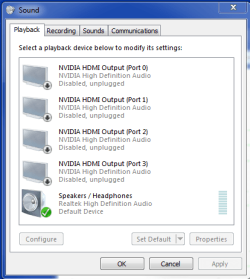
Thanks so much for the reply. As you can see from screenshot, the speakers/headphones are set as the default and the HDMI outputs are disabled. I inspected the motherboard, and all cabling is intact.
 

Attachments

  • Sound Output defaults.PNG
    Sound Output defaults.PNG
    13.4 KB · Views: 12

My Computer My Computer

Computer type
PC/Desktop
Computer Manufacturer/Model Number
Precision Tower 3620
OS
Windows 7 Professional 64 Bit
CPU
Intel(R) Core(TM) i7-6700K CPU @ 4.00GHz, 4001 Mhz
Motherboard
Dell 09WH54
Memory
16 GB
Graphics Card(s)
NVIDIA Quadro M4000
Hard Drives
INTEL SSDSC2BF360A5 2. SCSI Disk Device
Browser
Explorer
When you have uninstalled/reinstalled the sound drivers, did you (1) uninstall (2) restart the PC (3) reinstall the drivers? If not then the original problem can still be there.

If you uninstall the Realtek in the Device Manager and also uninstall the drivers, then restart, when Windows starts it will install the generic, basic function, High Definition Audio drivers. See if it works with this. If it does, that says the hardware is OK, however, if it does not work that would suggest a possible hardware problem with the sound chip/motherboard.
If it does work OK with the High Definition Audio drivers, install the correct Realtek drivers and test to see if its working OK.
 

My Computer My Computer

Computer type
PC/Desktop
Computer Manufacturer/Model Number
My Own Build
OS
Windows 10 64 bit
CPU
Intel i7 6700K
Motherboard
ASUS ROG Maximus VIII Hero
Memory
16GB Corsair Dominator
Graphics Card(s)
Intel CPU Graphics
Sound Card
RealTek
Monitor(s) Displays
27" Dell S2719dgf
Screen Resolution
2560X1440
Hard Drives
1 TB Samsung 850 EVO SSD for Win 10 Pro
500GB Samsung 850 EVO SSD for Win 10 Insider
2 TB drive for backup
PSU
EVGA Supernova 750G2
Case
BeQuiet Silent Base 600
Cooling
Deepcool Captain 120EX
Keyboard
Microsoft Wireless 2000
Mouse
Microsoft wireless
Internet Speed
100 MB/sec (Cable)
Antivirus
Microsoft Defender and Malwarebytes
Browser
Edge/Firefox
Other Info
Cakewalk (Sonar) by BandLab and Studio One 4.1 Pro recording studio software. MOTU 896Mk3 Hybrid recording interface, Frontier Tranzport wireless control unit, Behringer X-Touch Control Surface.
Five USB connected optical drives for CD Audio production using Nero BurningROM
Thanks again for the response!

When I did the first driver uninstall/install, yes I restarted the computer. I actually did this a couple times.

I just tried with the High Definition Audio drivers and there was no change.

I'm a bit confused as to how installing the Ethernet card would damage the motherboard. 1) The slot for the card is far from the audio components, 2) both the front and back audio ports stopped working simultaneously, 3) all diagnostics are fine. Are these assumptions wrong? I don't know a ton about how Windows 7 works under the hood.

Thanks again for helping me solve this issue. I appreciate your time!
 

My Computer My Computer

Computer type
PC/Desktop
Computer Manufacturer/Model Number
Precision Tower 3620
OS
Windows 7 Professional 64 Bit
CPU
Intel(R) Core(TM) i7-6700K CPU @ 4.00GHz, 4001 Mhz
Motherboard
Dell 09WH54
Memory
16 GB
Graphics Card(s)
NVIDIA Quadro M4000
Hard Drives
INTEL SSDSC2BF360A5 2. SCSI Disk Device
Browser
Explorer
Static electricity potentially can harm components on the motherboard. When I work on a PC (I'm a retired network and help desk manager) I use a "grounded wrist strap" to avoid any static electricity problems. Whether that is what happened ?????

If it is a hardware problem as both front and rear ports stopped working points to the sound chip, too.

One remote possibility is that Windows is causing the problem. However, the only way to prove that would be to do a complete reinstallation. I've seen some audio problems that were fixed by a reinstall.

Another way to determine if the sound chip is bad or good would be to load Ubuntu Linux (it can be run from a CD) and see if sound works in Linux. If it does that would point to a Windows problem. If sound does not work in Linux it points to a hardware problem.

Sorry if I'm rambling on. Just typing as thoughts come up.
 

My Computer My Computer

Computer type
PC/Desktop
Computer Manufacturer/Model Number
My Own Build
OS
Windows 10 64 bit
CPU
Intel i7 6700K
Motherboard
ASUS ROG Maximus VIII Hero
Memory
16GB Corsair Dominator
Graphics Card(s)
Intel CPU Graphics
Sound Card
RealTek
Monitor(s) Displays
27" Dell S2719dgf
Screen Resolution
2560X1440
Hard Drives
1 TB Samsung 850 EVO SSD for Win 10 Pro
500GB Samsung 850 EVO SSD for Win 10 Insider
2 TB drive for backup
PSU
EVGA Supernova 750G2
Case
BeQuiet Silent Base 600
Cooling
Deepcool Captain 120EX
Keyboard
Microsoft Wireless 2000
Mouse
Microsoft wireless
Internet Speed
100 MB/sec (Cable)
Antivirus
Microsoft Defender and Malwarebytes
Browser
Edge/Firefox
Other Info
Cakewalk (Sonar) by BandLab and Studio One 4.1 Pro recording studio software. MOTU 896Mk3 Hybrid recording interface, Frontier Tranzport wireless control unit, Behringer X-Touch Control Surface.
Five USB connected optical drives for CD Audio production using Nero BurningROM
So, what is the final outcome?
 

My Computer My Computer

Computer type
PC/Desktop
Computer Manufacturer/Model Number
My Own Build
OS
Windows 10 64 bit
CPU
Intel i7 6700K
Motherboard
ASUS ROG Maximus VIII Hero
Memory
16GB Corsair Dominator
Graphics Card(s)
Intel CPU Graphics
Sound Card
RealTek
Monitor(s) Displays
27" Dell S2719dgf
Screen Resolution
2560X1440
Hard Drives
1 TB Samsung 850 EVO SSD for Win 10 Pro
500GB Samsung 850 EVO SSD for Win 10 Insider
2 TB drive for backup
PSU
EVGA Supernova 750G2
Case
BeQuiet Silent Base 600
Cooling
Deepcool Captain 120EX
Keyboard
Microsoft Wireless 2000
Mouse
Microsoft wireless
Internet Speed
100 MB/sec (Cable)
Antivirus
Microsoft Defender and Malwarebytes
Browser
Edge/Firefox
Other Info
Cakewalk (Sonar) by BandLab and Studio One 4.1 Pro recording studio software. MOTU 896Mk3 Hybrid recording interface, Frontier Tranzport wireless control unit, Behringer X-Touch Control Surface.
Five USB connected optical drives for CD Audio production using Nero BurningROM
Thanks again for following up! For now, I've configured an arduino to act as a hacked sound card, allowing us to output audio feedback to subjects during the experiment. I gave a quick pass at booting from Linux, but there were driver issues for the monitor that will take more time to work out than I have available at the moment. When I take a deeper look, I'll make sure and post the results back on the forum.
 

My Computer My Computer

Computer type
PC/Desktop
Computer Manufacturer/Model Number
Precision Tower 3620
OS
Windows 7 Professional 64 Bit
CPU
Intel(R) Core(TM) i7-6700K CPU @ 4.00GHz, 4001 Mhz
Motherboard
Dell 09WH54
Memory
16 GB
Graphics Card(s)
NVIDIA Quadro M4000
Hard Drives
INTEL SSDSC2BF360A5 2. SCSI Disk Device
Browser
Explorer
Back
Top