Windows 7 sp1 Activation Bug

Hi SysAdmin,

Well that looks better, Lets hope it sticks.

Waiting with fingers crossed

If it sticks then:-

looks like kb971033 needs to be re-installed.


Roy

Unfortunately...just 10 hours after my last post, the user reported that the problem returned.
 

My Computer

Computer type
PC/Desktop
OS
Windows 7 Professional x64
Hi SysAdmin,

Getting stranger by the minute.

Lets have a look see what happened 9hrs 59mins ago

Open Event Viewer
click on the Windows logs entry in the left pane to expand it.
Now click on the Application entry - wait while it loads.
Click on 'File' in the menu bar and select Save...
Save the file as Appevt.evtx
Repeat for the System log
then zip both, and upload them

As a matter of interest which AV are you running, and can you check its log

Roy


My Computer

Computer type
PC/Desktop
Computer Manufacturer/Model Number
medionl/Aspire 6930G/acer x55a
OS
W7 home premium 32bit/W7HP 64bit/w10 tp insider ring
CPU
E5300 dual core
Motherboard
medion MS7366
Memory
3gb
Graphics Card(s)
Nvidia Geforce 7100 Nforce 630i
Monitor(s) Displays
avixc
Internet Speed
n (isp resticted to 72)
Antivirus
mse/pands
Browser
palemoon
Other Info
Belkin Fd7050 n USB using Railink RT2870 drivers, more upto date
Hi Roy,

I got the event logs from a different computer than I mentioned in my last 2 posts, but also one that regularly experiences the same issue. The user mentioned that he had the issue again this morning (18/02/2019).

Thanks for your help BTW, I really appreciate it.
 

My Computer

Computer type
PC/Desktop
OS
Windows 7 Professional x64
Hi Sysadmin,

Can we just keep it at the one comp please.
once you settle on it, can you run this tool
Event Viewer One Click Clear

wait for the next non-genuine and post the 2 logs

because i was going to specifically look at the events Immediatly prior to the non-genuine.
No idea when it happened on this machine

Had a look at those logs anyway
I see 2 AV's Panda and Kapersky thats a NO NO, they will conflict at some point
I also saw a Zonal Internet policy restriction that came into play

Roy
 

My Computer

Computer type
PC/Desktop
Computer Manufacturer/Model Number
medionl/Aspire 6930G/acer x55a
OS
W7 home premium 32bit/W7HP 64bit/w10 tp insider ring
CPU
E5300 dual core
Motherboard
medion MS7366
Memory
3gb
Graphics Card(s)
Nvidia Geforce 7100 Nforce 630i
Monitor(s) Displays
avixc
Internet Speed
n (isp resticted to 72)
Antivirus
mse/pands
Browser
palemoon
Other Info
Belkin Fd7050 n USB using Railink RT2870 drivers, more upto date
Hi Roy,

I found a new test subject.
So on this computer I:
  1. cleared the event logs
  2. reactivated Windows
  3. waited for the user to contact me again after Windows has gone back to the non genuine state
  4. reactivated Windows
  5. exported the event logs

He told me the non genuine error returned at 07:05 (GMT+1) on 20/02/2019.

A strange thing I'm noticing is: a couple of users including him have told me that when they work from home and then the next day log into our domain, they'll get the error. So it could be fine for a couple of days as long as they don't use the computer outside our network. Then they work from home, but still don't get the error. And then the first time they log back into our network, boom, they're hit with the non genuine error.
 

Attachments

My Computer

Computer type
PC/Desktop
OS
Windows 7 Professional x64
Hi SysAdmin,

The little snippet at the end Home v Domain, could prove very usefull.

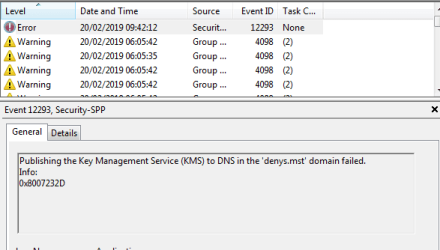
When i was looking over the logs there was indeed 1, and only 1, Error message
see screenshot

It appears that it cant contact or reach your server

In one of my earlier posts i mentioned about Internet Zones, and the error code of 0x8007232d kind of backs this up.
Have a read of this, METHOD 5 is the relevant part
Access Denied
(ignore the title it takes you to an MS KMS article- forum problem)


I have a theory as to why its failing
MS published a slightly iffy fix details:zip:
If you look at my post regarding the SPP reset theres a difference
MS ask you to remove the cache data folder I DIDNT, states - leave it alone

Easy to check - compare the Reg data - known good against this comp

Let me know


Roy
 

Attachments

  • sysadmin.PNG
    sysadmin.PNG
    17.5 KB · Views: 19

My Computer

Computer type
PC/Desktop
Computer Manufacturer/Model Number
medionl/Aspire 6930G/acer x55a
OS
W7 home premium 32bit/W7HP 64bit/w10 tp insider ring
CPU
E5300 dual core
Motherboard
medion MS7366
Memory
3gb
Graphics Card(s)
Nvidia Geforce 7100 Nforce 630i
Monitor(s) Displays
avixc
Internet Speed
n (isp resticted to 72)
Antivirus
mse/pands
Browser
palemoon
Other Info
Belkin Fd7050 n USB using Railink RT2870 drivers, more upto date
I have a theory as to why its failing
MS published a slightly iffy fix details:zip:
If you look at my post regarding the SPP reset theres a difference
MS ask you to remove the cache data folder I DIDNT, states - leave it alone

Easy to check - compare the Reg data - known good against this comp

Sorry, I don't think I fully understand what you mean. Should I take the cache folder and tokens file from a good computer and restore those on a malfunctioning computer?
 

My Computer

Computer type
PC/Desktop
OS
Windows 7 Professional x64
Had another one yesterday btw. This was a new one since the user usually only works from the office, so hadn't experienced the issue before.
But because the user was sick they were working from home and got the non genuine error.

So on this computer I hadn't yet ran the Microsoft script which just deletes the cache and tokens files.
Instead I followed the steps in your post.

  1. I stopped the sppsvc service.
  2. I renamed the tokens file.
  3. I executed slui and entered a MAK key.
Windows was activated succesfully again.

This all took place between 17:00 and 17:30 (GMT+1) on 21/02/2019.

Fast forward to this morning (9:30 on 22/02/2019) and the user e-mails me that the problem's back.

I checked the things from method 5 of this article.
  • I could ping the DNS server
  • The DNS server contains an SRV record for the KMS host
  • I ran this command on the user's computer and verified that it does contain the correct IP address, host name and port of the KMS host.
    Code:
    nslookup -type=all _vlmcs._tcp>kms.txt

Then I proceeded to activate Windows with the following commands and the public KMS client key from Microsoft.
Code:
cscript \windows\system32\slmgr.vbs /ipk FJ82H-XT6CR-J8D7P-XQJJ2-GPDD4
cscript \windows\system32\slmgr.vbs /ato

In attachment you'll find the event logs of the past 24 hours. Hope you can find the time to take a look. Thanks in advance.
 

Attachments

My Computer

Computer type
PC/Desktop
OS
Windows 7 Professional x64
Hi Systemadmin,

sorry bout the delay been laid-up,

re post 27
First step compare the details within a known good to those within a Bad one.
would have only looked at the Cache folder, wont hurt to check tokens as well
If they are different then i would replace it/them

Roy
 
Last edited:

My Computer

Computer type
PC/Desktop
Computer Manufacturer/Model Number
medionl/Aspire 6930G/acer x55a
OS
W7 home premium 32bit/W7HP 64bit/w10 tp insider ring
CPU
E5300 dual core
Motherboard
medion MS7366
Memory
3gb
Graphics Card(s)
Nvidia Geforce 7100 Nforce 630i
Monitor(s) Displays
avixc
Internet Speed
n (isp resticted to 72)
Antivirus
mse/pands
Browser
palemoon
Other Info
Belkin Fd7050 n USB using Railink RT2870 drivers, more upto date
Hi Systemadmin,
sorry bout the delay been laid-up, will go over everything and come back.


Roy

Thanks Roy, appreciate it!

I've had several more instances in the meantime and the events I always see returning are:
Code:
Log Name:      Application
Source:        Microsoft-Windows-Security-SPP
Date:          26/02/2019 14:58:44
Event ID:      1022
Task Category: None
Level:         Warning
Keywords:      Classic
User:          N/A
Computer:      PRJ-PORT-CT03.denys.mst
Description:
The system has been tampered. 0xC004D301
Event Xml:
<Event xmlns="http://schemas.microsoft.com/win/2004/08/events/event">
  <System>
    <Provider Name="Microsoft-Windows-Security-SPP" Guid="{E23B33B0-C8C9-472C-A5F9-F2BDFEA0F156}" EventSourceName="Software Protection Platform Service" />
    <EventID Qualifiers="32768">1022</EventID>
    <Version>0</Version>
    <Level>3</Level>
    <Task>0</Task>
    <Opcode>0</Opcode>
    <Keywords>0x80000000000000</Keywords>
    <TimeCreated SystemTime="2019-02-26T13:58:44.000000000Z" />
    <EventRecordID>261885</EventRecordID>
    <Correlation />
    <Execution ProcessID="0" ThreadID="0" />
    <Channel>Application</Channel>
    <Computer>PRJ-PORT-CT03.denys.mst</Computer>
    <Security />
  </System>
  <EventData>
    <Data>0xC004D301</Data>
  </EventData>
</Event>

Log Name:      Application
Source:        Microsoft-Windows-Security-SPP
Date:          26/02/2019 14:58:44
Event ID:      1056
Task Category: None
Level:         Warning
Keywords:      Classic
User:          N/A
Computer:      PRJ-PORT-CT03.denys.mst
Description:
Some data has been reset. 0x00000000 [3].
Event Xml:
<Event xmlns="http://schemas.microsoft.com/win/2004/08/events/event">
  <System>
    <Provider Name="Microsoft-Windows-Security-SPP" Guid="{E23B33B0-C8C9-472C-A5F9-F2BDFEA0F156}" EventSourceName="Software Protection Platform Service" />
    <EventID Qualifiers="32768">1056</EventID>
    <Version>0</Version>
    <Level>3</Level>
    <Task>0</Task>
    <Opcode>0</Opcode>
    <Keywords>0x80000000000000</Keywords>
    <TimeCreated SystemTime="2019-02-26T13:58:44.000000000Z" />
    <EventRecordID>261884</EventRecordID>
    <Correlation />
    <Execution ProcessID="0" ThreadID="0" />
    <Channel>Application</Channel>
    <Computer>PRJ-PORT-CT03.denys.mst</Computer>
    <Security />
  </System>
  <EventData>
    <Data>0x00000000</Data>
    <Data>3</Data>
  </EventData>
</Event>

Log Name:      Application
Source:        Microsoft-Windows-Security-SPP
Date:          26/02/2019 14:58:44
Event ID:      1056
Task Category: None
Level:         Warning
Keywords:      Classic
User:          N/A
Computer:      PRJ-PORT-CT03.denys.mst
Description:
Some data has been reset. 0x00000000 [2].
Event Xml:
<Event xmlns="http://schemas.microsoft.com/win/2004/08/events/event">
  <System>
    <Provider Name="Microsoft-Windows-Security-SPP" Guid="{E23B33B0-C8C9-472C-A5F9-F2BDFEA0F156}" EventSourceName="Software Protection Platform Service" />
    <EventID Qualifiers="32768">1056</EventID>
    <Version>0</Version>
    <Level>3</Level>
    <Task>0</Task>
    <Opcode>0</Opcode>
    <Keywords>0x80000000000000</Keywords>
    <TimeCreated SystemTime="2019-02-26T13:58:44.000000000Z" />
    <EventRecordID>261883</EventRecordID>
    <Correlation />
    <Execution ProcessID="0" ThreadID="0" />
    <Channel>Application</Channel>
    <Computer>PRJ-PORT-CT03.denys.mst</Computer>
    <Security />
  </System>
  <EventData>
    <Data>0x00000000</Data>
    <Data>2</Data>
  </EventData>
</Event>

Log Name:      Application
Source:        Microsoft-Windows-Security-SPP
Date:          26/02/2019 14:58:41
Event ID:      1056
Task Category: None
Level:         Warning
Keywords:      Classic
User:          N/A
Computer:      PRJ-PORT-CT03.denys.mst
Description:
Some data has been reset. 0x00000000 [1].
Event Xml:
<Event xmlns="http://schemas.microsoft.com/win/2004/08/events/event">
  <System>
    <Provider Name="Microsoft-Windows-Security-SPP" Guid="{E23B33B0-C8C9-472C-A5F9-F2BDFEA0F156}" EventSourceName="Software Protection Platform Service" />
    <EventID Qualifiers="32768">1056</EventID>
    <Version>0</Version>
    <Level>3</Level>
    <Task>0</Task>
    <Opcode>0</Opcode>
    <Keywords>0x80000000000000</Keywords>
    <TimeCreated SystemTime="2019-02-26T13:58:41.000000000Z" />
    <EventRecordID>261880</EventRecordID>
    <Correlation />
    <Execution ProcessID="0" ThreadID="0" />
    <Channel>Application</Channel>
    <Computer>PRJ-PORT-CT03.denys.mst</Computer>
    <Security />
  </System>
  <EventData>
    <Data>0x00000000</Data>
    <Data>1</Data>
  </EventData>
</Event>

Log Name:      Application
Source:        Microsoft-Windows-Winlogon
Date:          26/02/2019 14:59:21
Event ID:      4105
Task Category: None
Level:         Warning
Keywords:      Classic
User:          N/A
Computer:      PRJ-PORT-CT03.denys.mst
Description:
Windows is in Notification period.
Event Xml:
<Event xmlns="http://schemas.microsoft.com/win/2004/08/events/event">
  <System>
    <Provider Name="Microsoft-Windows-Winlogon" Guid="{DBE9B383-7CF3-4331-91CC-A3CB16A3B538}" EventSourceName="Winlogon" />
    <EventID Qualifiers="32768">4105</EventID>
    <Version>0</Version>
    <Level>3</Level>
    <Task>0</Task>
    <Opcode>0</Opcode>
    <Keywords>0x80000000000000</Keywords>
    <TimeCreated SystemTime="2019-02-26T13:59:21.000000000Z" />
    <EventRecordID>261886</EventRecordID>
    <Correlation />
    <Execution ProcessID="0" ThreadID="0" />
    <Channel>Application</Channel>
    <Computer>PRJ-PORT-CT03.denys.mst</Computer>
    <Security />
  </System>
  <EventData>
    <Data>0x00000000</Data>
    <Data>0x00000000</Data>
  </EventData>
</Event>

Could this be the moment that the product key gets "lost"?
 

My Computer

Computer type
PC/Desktop
OS
Windows 7 Professional x64
There is a problem with reinstalling KB971033 - if the machine is not allowed by firewalls to connect with the MS activation servers every 90 days (at least!) then the activation will break.
This is why it's not recommended for VM's, or for corporate networks.

My suspicion here is that the problem is permissions-related - but it's not one I've ever seen before, and none of my researches have been done using KMS activation so I'm fairly fuzzy on the details for that.

It may be worth checking the permissions on the files deleted by the VBS script of a broken and fixed machine to see if they are different?

The 0xC004D301 error simply means that there has been a tamper to the trusted data store
 
Last edited:

My Computer

Computer type
Laptop
Computer Manufacturer/Model Number
Asus K52F or Lenovo B51-80
OS
Win 7 x64 Home Premium (and x86 VirtualBox VM)/Win10
CPU
i3 370M/i7 6500U
Motherboard
Asus/Lenovo
Memory
8GB - finally :)/8GB
Graphics Card(s)
it's an i3, dude!/dual Intel&nVidia
Sound Card
onboard
Monitor(s) Displays
15.6" built-in
Screen Resolution
1366x768/1920x1080
Hard Drives
750GB Seagate internal
Sundry external drives attached to other computers on the local network
1TB SSD on the Lenovo
PSU
n/a
Internet Speed
as much as I can get - usually on a dongle/phone, so <1MB/s
Antivirus
MSE/Defender
Browser
IE11/12/Edge/Chrome/FF(if I must)
Back
Top