
Windows 7 SP1 Disk Cleanup Tool

How Use the Windows 7 SP1 Disk Cleanup Tool

   Information
This will show you how to run the Windows 7 SP1 cleanup tool to permanently remove the backed up files created during the installation of the Windows 7 SP1 to gain back more hard drive space, and remove the Service Pack for Microsoft Windows (KB976932) entry in Installed Updates.

You must be logged in as an administrator to be able to do this tutorial.

   Note
The Windows 7 SP1 disk cleanup tool gave me back around 1.5 GB on my hard drive. This amount may vary on your computer.

To see how much space you recovered, make a note of how much free space you have on the C:/ drive in Computer before and after you run the Windows 7 SP1 cleanup tool. Afterwards, please post and let us know how much space you have recovered.
   Warning
It is recommended to wait about a week after installing SP1 to see how your Windows 7 is running with SP1 installed before deleting the SP1 backups as in the tutorial below. This way if you discover a issue, you will still have the option to uninstall SP1 if need be.

Once you delete the SP1 backup files, you will no longer be able to uninstall the Windows 7 SP1 afterwards. The only option would be a clean install or custom install.


OPTION ONE

Delete Windows 7 SP1 Backup Files Using Disk Cleanup

1. Open Disk Cleanup.

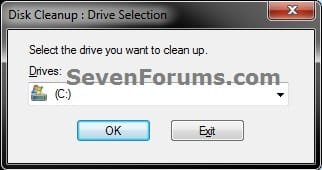
2. Select the drive (ex: C: ) that your Windows 7 is installed on, and click on OK. (see screenshot below) Step1.jpg
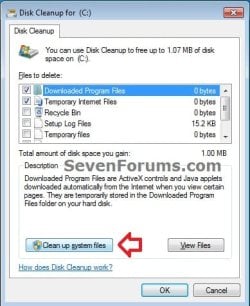
3. Click on the Clean up system files button. (see screenshot below) Step-2.jpg
4. If prompted by UAC, then click on Yes.

5. Select the drive (ex: C: ) that your Windows 7 is installed on, and click on OK. (see screenshot below) Step1.jpg
6. Check the Service Pack Backup Files box and click on OK. (see screenshot below) Step3.jpg
7. Click on Delete Files. (see screenshot below) Step4.jpg

8. The SP1 backup files will now be deleted. You will now no longer be able to uninstall the Windows 7 SP1, but have gained around 1 GB of hard drive space back.


OPTION TWO

Delete Windows 7 SP1 Backup Files Using a Elevated Command Prompt

1. Open a elevated command prompt (Run as administrator).

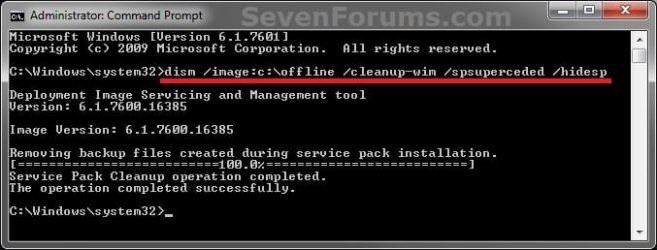
2. In the elevated command prompt, copy and paste the command below and press enter. (see screenshot below) dism /online /cleanup-image /spsuperseded /hidesp
CMD.jpg
3. After a few moments, you will see the The Operation completed successfully message. (see screenshot above)

4. Close the elevated command prompt. You will now no longer be able to uninstall the Windows 7 SP1, but have gained around 1 GB of hard drive space back.


OPTION THREE

Delete Windows 7 SP1 Backup Files Using a Command Prompt at Boot


NOTE: This option will also work on a slipstream Windows 7 SP1 installation at boot. 1. Open a command prompt at boot. (click on link for how)

2. To Verify the Windows 7 Drive Letter at Boot
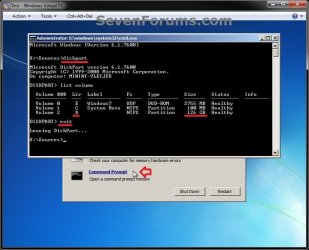
NOTE: This needs to be done since the Windows 7 drive letter may not be C: if you have the 100 MB System Reserver partition created during installation, or if you multiboot with more than one operating system. A) In the command prompt, type diskpart and press Enter. (see screenshot below)

B) In the command prompt, type list volume and press Enter.

C) Make note of the drive letter (ex: D ) that you have Windows 7 installed on.
NOTE: It helps to look at the drive size and label to help ID the Windows 7 partition/drive.

D) In the command prompt, type exit and press Enter. Slipstream-1.jpg
E) Continue on to step 3.
3. To Delete the Windows 7 SP1 Backup Files at Boot A) In the command prompt, type the command below and press Enter. (see screenshot below)
NOTE: Substitute D: in the command below with the drive letter of your Windows 7 from step 2C above instead.
Code:
dism /image:[COLOR=red][B]D:[/B][/COLOR] /cleanup-image /spsuperseded /hidesp
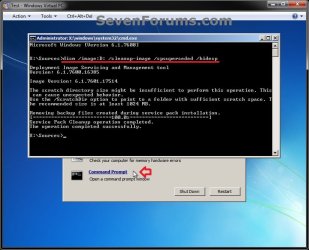
Slipstream-2.jpg
B) After a few moments, you will see the The Operation completed successfully message. (see screenshot above)

C) Close the command prompt window, and restart the computer. You will now no longer be able to uninstall the Windows 7 SP1, but have gained around 1 GB of hard drive space back.
That's it,
Shawn


Last edited:
I just ran the removal on my Dell computer. Gained back almost 3GB. But it said removing windows Ultimate files. I have Home Premium installed. It said the same on my computer which has Professional installed.


Hello Essenbe,

That edition may have also been included in the SP1, and removed since that is not what you had installed.
 
Last edited:

My Computer

Computer type
PC/Desktop
Computer Manufacturer/Model Number
Self built custom
OS
64-bit Windows 11 Pro for Workstations
CPU
Intel i7-8700K OC'd to 5 GHz
Motherboard
ASUS ROG Maximus XI Formula Z390
Memory
64 GB (4x16GB) G.SKILL TridentZ RGB DDR4 3600 MHz
Graphics Card(s)
ASUS ROG-STRIX-GTX1080TI-O11G-GAMING
Sound Card
Integrated
Monitor(s) Displays
2 x Samsung Odyssey G7 27"
Screen Resolution
2560x1440
Hard Drives
1TB Samsung 990 PRO M.2,
4TB Samsung 990 PRO PRO M.2,
TerraMaster F8 SSD Plus NAS
PSU
Seasonic Prime Titanium 850W
Case
Thermaltake Core P3
Cooling
Corsair Hydro H115i
Keyboard
Logitech wireless K800
Mouse
Logitech MX Master 4
Internet Speed
2 Gb/s Download and 100 Mb/s Upload
Antivirus
Malwarebyte Anti-Malware Premium
Browser
Google Chrome
Other Info
Logitech Z625 speaker system,
Logitech BRIO 4K Pro webcam,
HP Color LaserJet Pro MFP M477fdn,
APC SMART-UPS RT 1000 XL - SURT1000XLI,
Galaxy S23 Plus phone
I just ran the removal on my Dell computer. Gained back almost 3GB. But it said removing windows Ultimate files. I have Home Premium installed. It said the same on my computer which has Professional installed.


Mine was the same.

Danny
 

My Computer

Computer Manufacturer/Model Number
acer aspire 5935g
OS
Windows 7 Home Premium x64 SP1
CPU
intel(R)core(TM)2 duo CPU T6600 @ 2.20GHz
Motherboard
intel gm45/gm47 revision 07
Memory
3 gb ddr3
Graphics Card(s)
ati radeon hd4570/512mb
Monitor(s) Displays
lop156wh2-tle1 15.3 flat
Screen Resolution
1366x768
Hard Drives
OCZ-Agility3 60gig ssd
320gig external hdd
500gig external hdd
Mouse
Optical
Internet Speed
30Mbps Down/30Mbps Up
After Disk Cleanup this kind of folder appears in temp folder 1E226330-84E2-4D21-8013-FE258AB25D62 (name changes every time). Folder includes files from c:\windows\system32\dism folder and this folder copy happens every time when disk cleanup tool calculates space it can recover. Microsoft SP1 support person noticed this too when i ask about it, so if you wonder strange folders in your temp folder, those are sp1 related. Microsoft supports person doesn't have clue why this happens.
 

My Computer

Computer type
PC/Desktop
Computer Manufacturer/Model Number
Self made
OS
Microsoft Windows 7 Home Premium 64-bit 7601 Multiprocessor Free Service Pack 1
CPU
Intel(R) Core(TM) i7-3770K CPU @ 4.50GHz
Motherboard
ASRock Z68 Extreme4 Gen3
Memory
16,00 GB Kingston HyperX 1600MHz
Graphics Card(s)
Club3d Radeon R9 280X
Sound Card
Creative SB X-Fi Titanium
Monitor(s) Displays
BenQ G2420 HDBL
Screen Resolution
1920 x 1080 x 32 @60 Hz
Hard Drives
(1) Corsair Performance3 SSD (2) WDC WD1002FAEX-00Z3A0 (3) WDC WD6400AADS-00M2B0
PSU
Corsair TX750
Case
Coolermaster CM690 II Advanced
Cooling
Coolermaster Seidon 120XL
Keyboard
Logitech Wireless Illumnated K800
Mouse
Logitech Wireless Performance MX
Internet Speed
24Mbit/s
Antivirus
MS Security Essentials
Browser
IE 11
Hello Hemphill, and welcome to Seven Forums.

Interesting. Thank you for lettings us know about this. :)
 

My Computer

Computer type
PC/Desktop
Computer Manufacturer/Model Number
Self built custom
OS
64-bit Windows 11 Pro for Workstations
CPU
Intel i7-8700K OC'd to 5 GHz
Motherboard
ASUS ROG Maximus XI Formula Z390
Memory
64 GB (4x16GB) G.SKILL TridentZ RGB DDR4 3600 MHz
Graphics Card(s)
ASUS ROG-STRIX-GTX1080TI-O11G-GAMING
Sound Card
Integrated
Monitor(s) Displays
2 x Samsung Odyssey G7 27"
Screen Resolution
2560x1440
Hard Drives
1TB Samsung 990 PRO M.2,
4TB Samsung 990 PRO PRO M.2,
TerraMaster F8 SSD Plus NAS
PSU
Seasonic Prime Titanium 850W
Case
Thermaltake Core P3
Cooling
Corsair Hydro H115i
Keyboard
Logitech wireless K800
Mouse
Logitech MX Master 4
Internet Speed
2 Gb/s Download and 100 Mb/s Upload
Antivirus
Malwarebyte Anti-Malware Premium
Browser
Google Chrome
Other Info
Logitech Z625 speaker system,
Logitech BRIO 4K Pro webcam,
HP Color LaserJet Pro MFP M477fdn,
APC SMART-UPS RT 1000 XL - SURT1000XLI,
Galaxy S23 Plus phone
Hi!
I was asking myself if method 2 is correct...:
dism /online /cleanup-image /spsuperseded /hidesp
I think there's no need of the /hidesp setting, because it seems to be in excess. In fact, if you look here:
Deployment Guide for Windows Server 2008 R2 with SP1 and Windows 7 with SP1

at section "Removing backup files" they say:
To remove service pack backup files

1. To remove the files online, run the following command:

Code:
DISM.exe /online /Cleanup-Image /spsuperseded

2. To remove the files from an offline image, run the following command:

Code:
DISM.exe /Image:<path_to_offline_image> /Cleanup-Image /spsuperseded

The /spsuperseded option removes the backup files created during installation.
You can use the /hidesp option to hide the service pack from the list of installed updates without removing the files.
...so who is right? :huh:
 

My Computer

OS
Win 7 premium x64
Hello Bubblebobble, and welcome to Seven Forums.

Technically, we are both right since both commands below will remove the SP1 backup files. :)
DISM.exe /online /Cleanup-Image /spsuperseded

dism /online /cleanup-image /spsuperseded /hidesp
However, adding /hidesp at the end of the command will also remove the Service Pack for Microsoft Windows (KB76932) entry in Installed Updates. Theres's no since in having the SP1 uninstall entry there anymore since you cannot uninstall it after deleting the SP1 backup files anyway.
 

My Computer

Computer type
PC/Desktop
Computer Manufacturer/Model Number
Self built custom
OS
64-bit Windows 11 Pro for Workstations
CPU
Intel i7-8700K OC'd to 5 GHz
Motherboard
ASUS ROG Maximus XI Formula Z390
Memory
64 GB (4x16GB) G.SKILL TridentZ RGB DDR4 3600 MHz
Graphics Card(s)
ASUS ROG-STRIX-GTX1080TI-O11G-GAMING
Sound Card
Integrated
Monitor(s) Displays
2 x Samsung Odyssey G7 27"
Screen Resolution
2560x1440
Hard Drives
1TB Samsung 990 PRO M.2,
4TB Samsung 990 PRO PRO M.2,
TerraMaster F8 SSD Plus NAS
PSU
Seasonic Prime Titanium 850W
Case
Thermaltake Core P3
Cooling
Corsair Hydro H115i
Keyboard
Logitech wireless K800
Mouse
Logitech MX Master 4
Internet Speed
2 Gb/s Download and 100 Mb/s Upload
Antivirus
Malwarebyte Anti-Malware Premium
Browser
Google Chrome
Other Info
Logitech Z625 speaker system,
Logitech BRIO 4K Pro webcam,
HP Color LaserJet Pro MFP M477fdn,
APC SMART-UPS RT 1000 XL - SURT1000XLI,
Galaxy S23 Plus phone
Tutorial update:

It took a liitle bit of working with it, but you can now use OPTION THREE in this tutorial on the first page to remove the Windows 7 SP1 backup files from a installed slipstream Windows 7 SP1 installation. :party:
 

My Computer

Computer type
PC/Desktop
Computer Manufacturer/Model Number
Self built custom
OS
64-bit Windows 11 Pro for Workstations
CPU
Intel i7-8700K OC'd to 5 GHz
Motherboard
ASUS ROG Maximus XI Formula Z390
Memory
64 GB (4x16GB) G.SKILL TridentZ RGB DDR4 3600 MHz
Graphics Card(s)
ASUS ROG-STRIX-GTX1080TI-O11G-GAMING
Sound Card
Integrated
Monitor(s) Displays
2 x Samsung Odyssey G7 27"
Screen Resolution
2560x1440
Hard Drives
1TB Samsung 990 PRO M.2,
4TB Samsung 990 PRO PRO M.2,
TerraMaster F8 SSD Plus NAS
PSU
Seasonic Prime Titanium 850W
Case
Thermaltake Core P3
Cooling
Corsair Hydro H115i
Keyboard
Logitech wireless K800
Mouse
Logitech MX Master 4
Internet Speed
2 Gb/s Download and 100 Mb/s Upload
Antivirus
Malwarebyte Anti-Malware Premium
Browser
Google Chrome
Other Info
Logitech Z625 speaker system,
Logitech BRIO 4K Pro webcam,
HP Color LaserJet Pro MFP M477fdn,
APC SMART-UPS RT 1000 XL - SURT1000XLI,
Galaxy S23 Plus phone
Thanks Shaun, got 2.7GB back :cool:

Installed SP1 from the Windows update.

sfc /scannow didn't find anything.
 
Last edited:

My Computer

Computer type
PC/Desktop
Computer Manufacturer/Model Number
76~2.0
OS
Windows 7 Ult x64 - SP1/ Windows 8 Pro x64
CPU
Intel Core i5-3570K 4.6GHz
Motherboard
Gigabyte GA-Z77X UD3H, f18
Memory
8GB (2X4GB) DDR3 1600 Corsair Vengeance CL8 1.5v
Graphics Card(s)
Sapphire HD 7770 Vapor-X OC 1GB DDR5
Sound Card
Onboard VIA VT2021
Monitor(s) Displays
22" LCD Dell
Screen Resolution
1680x1050
Hard Drives
Samsung 840Pro 128GB SSD,
Seagate Barracuda 500GB SATA2 7200rpm 32MB cache, Seagate Barracuda 1TB SATA2 7200rpm 32MB cache,
PSU
Corsair HX650W
Case
Cooler Master Storm Scout
Cooling
Corsair H80 2x12cm Noctua NF P12 , 2x14cm case fans
Keyboard
Logitech Wave
Mouse
CM Sentinel
Internet Speed
Dismal
Antivirus
Avast
Browser
Opera Next
Other Info
Haswell laptop: HP Envy 17t-j, i7-4700MQ, GeForce 740M 2GB DDR3, 17.3" Full HD 1920x1080, 16GB RAM, Samsung 840 Pro 128GB, 1TB Hitachi 7200 HDD,
Desktop: eSATA ports,
External eSATA Seagate 500GB SATA2 7200rpm,
External WD USB 500GB
Hello Dave,

Wow, that's a nice amount to get back. :shock:
 

My Computer

Computer type
PC/Desktop
Computer Manufacturer/Model Number
Self built custom
OS
64-bit Windows 11 Pro for Workstations
CPU
Intel i7-8700K OC'd to 5 GHz
Motherboard
ASUS ROG Maximus XI Formula Z390
Memory
64 GB (4x16GB) G.SKILL TridentZ RGB DDR4 3600 MHz
Graphics Card(s)
ASUS ROG-STRIX-GTX1080TI-O11G-GAMING
Sound Card
Integrated
Monitor(s) Displays
2 x Samsung Odyssey G7 27"
Screen Resolution
2560x1440
Hard Drives
1TB Samsung 990 PRO M.2,
4TB Samsung 990 PRO PRO M.2,
TerraMaster F8 SSD Plus NAS
PSU
Seasonic Prime Titanium 850W
Case
Thermaltake Core P3
Cooling
Corsair Hydro H115i
Keyboard
Logitech wireless K800
Mouse
Logitech MX Master 4
Internet Speed
2 Gb/s Download and 100 Mb/s Upload
Antivirus
Malwarebyte Anti-Malware Premium
Browser
Google Chrome
Other Info
Logitech Z625 speaker system,
Logitech BRIO 4K Pro webcam,
HP Color LaserJet Pro MFP M477fdn,
APC SMART-UPS RT 1000 XL - SURT1000XLI,
Galaxy S23 Plus phone
Where specifically are the Windows 7 SP1 uninstaller files located?
 

My Computer

OS
Windows 7 Pro 64 bit
Hi Shaun, got 2.8 GB back from my laptop.

No problems.
Going to add the 40GB SSD now.
 

My Computer

Computer type
PC/Desktop
Computer Manufacturer/Model Number
76~2.0
OS
Windows 7 Ult x64 - SP1/ Windows 8 Pro x64
CPU
Intel Core i5-3570K 4.6GHz
Motherboard
Gigabyte GA-Z77X UD3H, f18
Memory
8GB (2X4GB) DDR3 1600 Corsair Vengeance CL8 1.5v
Graphics Card(s)
Sapphire HD 7770 Vapor-X OC 1GB DDR5
Sound Card
Onboard VIA VT2021
Monitor(s) Displays
22" LCD Dell
Screen Resolution
1680x1050
Hard Drives
Samsung 840Pro 128GB SSD,
Seagate Barracuda 500GB SATA2 7200rpm 32MB cache, Seagate Barracuda 1TB SATA2 7200rpm 32MB cache,
PSU
Corsair HX650W
Case
Cooler Master Storm Scout
Cooling
Corsair H80 2x12cm Noctua NF P12 , 2x14cm case fans
Keyboard
Logitech Wave
Mouse
CM Sentinel
Internet Speed
Dismal
Antivirus
Avast
Browser
Opera Next
Other Info
Haswell laptop: HP Envy 17t-j, i7-4700MQ, GeForce 740M 2GB DDR3, 17.3" Full HD 1920x1080, 16GB RAM, Samsung 840 Pro 128GB, 1TB Hitachi 7200 HDD,
Desktop: eSATA ports,
External eSATA Seagate 500GB SATA2 7200rpm,
External WD USB 500GB
Thank's Shawn. it ran for about 5 mins on 25% CPU but I got nearly a gig back. It was even kind enough to do an RP first so there is a way back for a time.
 

My Computer

Computer type
Laptop
Computer Manufacturer/Model Number
Hewlett-Packard/G62-107SA Notebook
OS
Microsoft Windows 7 Home Premium 64-bit Service Pack 1
CPU
Intel(R) Core(TM) i3 CPU M 330 @ 2.13GHz
Motherboard
Hewlett-Packard 1425
Memory
8 GB DDR3
Graphics Card(s)
Intel(R) HD Graphics
Sound Card
Realtek High Definition Audio
Monitor(s) Displays
Builtin
Screen Resolution
1366 x 768 x 32 bits (4294967296 colors) @ 60 Hz
Hard Drives
250 GB SATA Hard Disk Drive 7200 rpm
2TB Seagate GoFlex USB 2 Drive
1TB Iomega Prestige USB 2 Drive
1.5TB Iomega Prestige USB 2 Drive (Samsung)
2TB WD MyBook Live NAS.
Mouse
Logitech Anywhere MX
Internet Speed
152 Mbs download 10 Mbs upload
Antivirus
Norton 360
Browser
Chrome
Nice amounts you guys got back. :party:
 

My Computer

Computer type
PC/Desktop
Computer Manufacturer/Model Number
Self built custom
OS
64-bit Windows 11 Pro for Workstations
CPU
Intel i7-8700K OC'd to 5 GHz
Motherboard
ASUS ROG Maximus XI Formula Z390
Memory
64 GB (4x16GB) G.SKILL TridentZ RGB DDR4 3600 MHz
Graphics Card(s)
ASUS ROG-STRIX-GTX1080TI-O11G-GAMING
Sound Card
Integrated
Monitor(s) Displays
2 x Samsung Odyssey G7 27"
Screen Resolution
2560x1440
Hard Drives
1TB Samsung 990 PRO M.2,
4TB Samsung 990 PRO PRO M.2,
TerraMaster F8 SSD Plus NAS
PSU
Seasonic Prime Titanium 850W
Case
Thermaltake Core P3
Cooling
Corsair Hydro H115i
Keyboard
Logitech wireless K800
Mouse
Logitech MX Master 4
Internet Speed
2 Gb/s Download and 100 Mb/s Upload
Antivirus
Malwarebyte Anti-Malware Premium
Browser
Google Chrome
Other Info
Logitech Z625 speaker system,
Logitech BRIO 4K Pro webcam,
HP Color LaserJet Pro MFP M477fdn,
APC SMART-UPS RT 1000 XL - SURT1000XLI,
Galaxy S23 Plus phone
Nice Stealth3si, and welcome to Seven Forums. :)
 

My Computer

Computer type
PC/Desktop
Computer Manufacturer/Model Number
Self built custom
OS
64-bit Windows 11 Pro for Workstations
CPU
Intel i7-8700K OC'd to 5 GHz
Motherboard
ASUS ROG Maximus XI Formula Z390
Memory
64 GB (4x16GB) G.SKILL TridentZ RGB DDR4 3600 MHz
Graphics Card(s)
ASUS ROG-STRIX-GTX1080TI-O11G-GAMING
Sound Card
Integrated
Monitor(s) Displays
2 x Samsung Odyssey G7 27"
Screen Resolution
2560x1440
Hard Drives
1TB Samsung 990 PRO M.2,
4TB Samsung 990 PRO PRO M.2,
TerraMaster F8 SSD Plus NAS
PSU
Seasonic Prime Titanium 850W
Case
Thermaltake Core P3
Cooling
Corsair Hydro H115i
Keyboard
Logitech wireless K800
Mouse
Logitech MX Master 4
Internet Speed
2 Gb/s Download and 100 Mb/s Upload
Antivirus
Malwarebyte Anti-Malware Premium
Browser
Google Chrome
Other Info
Logitech Z625 speaker system,
Logitech BRIO 4K Pro webcam,
HP Color LaserJet Pro MFP M477fdn,
APC SMART-UPS RT 1000 XL - SURT1000XLI,
Galaxy S23 Plus phone
That command "dism /online /cleanup-image /spsuperseded" give me back 7.6GB!
Time to complete - around 5min.
 

My Computer

Computer type
PC/Desktop
OS
Windows 7 Professional x64 sp1
CPU
Intel® Core™ i7-4790К@4600MHz/1.26V
Motherboard
ASRock Z97 PRO 4
Memory
16GB ADATA@1800Mhz
Graphics Card(s)
Gigabyte GTX 660 WF OC
Sound Card
Realtek ALC892
Monitor(s) Displays
Toshiba 32HL833 [32" S-IPS FULL LED]
Screen Resolution
1920x1080
Hard Drives
Samsung 840 Pro 128GB; 0,5TB WD + 2TB WD; 3TB SG|
PSU
Seasonic X-650 SS-650KM3 Gold
Case
Fractal Design 3000 USB3
Cooling
Noctua NH-D14
Keyboard
CM Storm QuickFire Ultimate
Mouse
Mionix Naos 7000
Internet Speed
100Mbps
Antivirus
Eset NOD32
Browser
Firefox
Other Info
+ ASUS DRW-1814BLT
+ Trust Dual Stick Gamepad (GM-1520)
+ Repotec 1000VA Line interactive UPS
That is a very nice return.
 

My Computer

Computer type
PC/Desktop
Computer Manufacturer/Model Number
76~2.0
OS
Windows 7 Ult x64 - SP1/ Windows 8 Pro x64
CPU
Intel Core i5-3570K 4.6GHz
Motherboard
Gigabyte GA-Z77X UD3H, f18
Memory
8GB (2X4GB) DDR3 1600 Corsair Vengeance CL8 1.5v
Graphics Card(s)
Sapphire HD 7770 Vapor-X OC 1GB DDR5
Sound Card
Onboard VIA VT2021
Monitor(s) Displays
22" LCD Dell
Screen Resolution
1680x1050
Hard Drives
Samsung 840Pro 128GB SSD,
Seagate Barracuda 500GB SATA2 7200rpm 32MB cache, Seagate Barracuda 1TB SATA2 7200rpm 32MB cache,
PSU
Corsair HX650W
Case
Cooler Master Storm Scout
Cooling
Corsair H80 2x12cm Noctua NF P12 , 2x14cm case fans
Keyboard
Logitech Wave
Mouse
CM Sentinel
Internet Speed
Dismal
Antivirus
Avast
Browser
Opera Next
Other Info
Haswell laptop: HP Envy 17t-j, i7-4700MQ, GeForce 740M 2GB DDR3, 17.3" Full HD 1920x1080, 16GB RAM, Samsung 840 Pro 128GB, 1TB Hitachi 7200 HDD,
Desktop: eSATA ports,
External eSATA Seagate 500GB SATA2 7200rpm,
External WD USB 500GB
Works fine in Bootcamp

FYI, this tip worked just fine after a clean install of Win 7 and Sp1 under bootcamp.

Diskcleaner said 380 MB, but clearly freed 1.5 GB in my "BOOTCAMP C:" partition.

(Macbook Air 13 inch 2011, obviously OS X Lion)

Great tip, and good instructions, for freeing up memory on SSDs.

Thanx!
 

My Computer

Computer Manufacturer/Model Number
Macbook Air 13 in 2011
OS
Windows 7 Enterprise under Bootcamp
You're most welcome Mpringle, and welcome to Seven Forums. :)
 

My Computer

Computer type
PC/Desktop
Computer Manufacturer/Model Number
Self built custom
OS
64-bit Windows 11 Pro for Workstations
CPU
Intel i7-8700K OC'd to 5 GHz
Motherboard
ASUS ROG Maximus XI Formula Z390
Memory
64 GB (4x16GB) G.SKILL TridentZ RGB DDR4 3600 MHz
Graphics Card(s)
ASUS ROG-STRIX-GTX1080TI-O11G-GAMING
Sound Card
Integrated
Monitor(s) Displays
2 x Samsung Odyssey G7 27"
Screen Resolution
2560x1440
Hard Drives
1TB Samsung 990 PRO M.2,
4TB Samsung 990 PRO PRO M.2,
TerraMaster F8 SSD Plus NAS
PSU
Seasonic Prime Titanium 850W
Case
Thermaltake Core P3
Cooling
Corsair Hydro H115i
Keyboard
Logitech wireless K800
Mouse
Logitech MX Master 4
Internet Speed
2 Gb/s Download and 100 Mb/s Upload
Antivirus
Malwarebyte Anti-Malware Premium
Browser
Google Chrome
Other Info
Logitech Z625 speaker system,
Logitech BRIO 4K Pro webcam,
HP Color LaserJet Pro MFP M477fdn,
APC SMART-UPS RT 1000 XL - SURT1000XLI,
Galaxy S23 Plus phone
I know I'm a few months late to the party, but I got 3.5G back on my main desktop! Now to try on my HTPC where space is even more valuable...
 

My Computer

OS
Windows 7 Professional x64
Back
Top