Windows 7 Start Menu

Raevyn

New member
Local time
4:01 PM
Messages
16
Hai!

So, I am new to Win7 and so far I like it but there are a few tweaks I want to do and I thought maybe I can get help here?

First, I really hate that Start Orb. I would rather have one of two things.. either create a button in QuickLaunch that when I press it the start menu appears, or change the orb to be a button like XP had. Does anyone know how to do that? And actually, I have RightClick from Object Desktop that would be fine but I cant get it to work properly with the normal Windows right click menu.. for some reason I cant turn that off. So.. basically I would like any solution above LOL

The other question I have is, does anyone know of a theme for Win 7 that actually makes it look like XP or media center edition? The one built in it s way drab.
 

My Computer

Computer Manufacturer/Model Number
Custom Built
OS
Windows 7 Ultimate x64
CPU
AMD Phenom II 4 Core
Motherboard
Asus
Memory
8GB of DDR3
Graphics Card(s)
Work in Progress :(
Sound Card
Onboard
Monitor(s) Displays
22inch Acer
Hard Drives
Two 1TB drives synced
PSU
Not Sure
Case
Lian Li
Cooling
Fans

My Computer

Computer type
Laptop
Computer Manufacturer/Model Number
HP EliteBook 8530w Mobile Workstation
OS
Windows 7 Ultimate x64 (XP, 98SE, 95, 3.11, DOS 7.10 on VM) + Ubuntu 10.04 LTS Lucid Lynx
CPU
Intel Core 2 Duo Processor P8600 (2.40 GHz, 3 MB L2 cache)
Motherboard
Mobile Intel PM45 Express Chipset ICH9M-Enhanced
Memory
4GB 800 MHz DDR2 SDRAM
Graphics Card(s)
ATI Mobility FireGL V5700 with 256 MB
Sound Card
SoundMAX Integrated Digital HD Audio
Monitor(s) Displays
15.4-inch WXGA anti-glare (1280 x 800 resolution)
Screen Resolution
1280 x 800
Hard Drives
500GB + 1TB
Mouse
Synaptics PS/2 Port Touchpad, USB Mouse
Internet Speed
4 Mbps
Antivirus
MSE
Browser
Firefox, Chrome, IE
Other Info
Authentec AES2810 Fingerprint Reader

My Computer

Computer type
PC/Desktop
Computer Manufacturer/Model Number
Airbot 2.0
OS
Windows 7 Ultimate x64 SP1
CPU
Core i7 920 (D0) @ 4Ghz, *26c idle *65c full load on air
Motherboard
Asus P6X58D Premium - Sata 6Gb/s - USB 3.0
Memory
12GB DDR3 Corsair Dominator -CMD12GX3M6A1600C8 at 1600MHz
Graphics Card(s)
Zotac Geforce GTX 770
Sound Card
ASUS Xonar D2X
Monitor(s) Displays
1 LG 24" Flatron W2453V-PF 1 Samsung 24" P2450H both 2ms RT
Screen Resolution
1920x1080@60hz
Hard Drives
1 Samsung 250GB 840 Evo SSD
1 OCZ Vertex2 180GB SSD
1 TB Samsung Spinpoint F1 7200RPM 32MB cache
2 500GB WD Caviar Blacks 7200RPM 32MB cache (WD5001AALS)

Pioneer DVD Burner DVR-S18M
PSU
Corsair HX1000W
Case
Cooler Master HAF 932
Cooling
Case Fans *3 230mm, *1 140mm/CPU - *Tuniq Tower 120 Extreme
Keyboard
Logitech Wireless MK700
Mouse
Logitech Wireless MK700
Internet Speed
DL 15 Mbps UL 0.98 Mbps
Antivirus
None
Browser
Firefox Nightly
Other Info
Processor-7.7 *RAM- 7.9 *Graphics-7.9 *Gaming Graphics- 7.9 *SSD- 7.8 W.E.I final score= 7.7
*Phone- LG Nexus 5
Thank you for all the help :) What I ended up doing is hiding it completely so I can use Right Click or I can press the Win button to bring it up. Honestly i think i like the bar better without it.

As a side question.. where are all the Control Panels settings located at? I am using Right Click and set up a link to Control Panel but in Windows 7, it seems to be in a different spot then in XP.. it cant find them. And also, is there an actual directory for a users Libraries that is able to be found, or is it a symbolic link?
 

My Computer

Computer Manufacturer/Model Number
Custom Built
OS
Windows 7 Ultimate x64
CPU
AMD Phenom II 4 Core
Motherboard
Asus
Memory
8GB of DDR3
Graphics Card(s)
Work in Progress :(
Sound Card
Onboard
Monitor(s) Displays
22inch Acer
Hard Drives
Two 1TB drives synced
PSU
Not Sure
Case
Lian Li
Cooling
Fans
you should be able to type any of those things into the search bar, basically press windows key and then start typing. control panel, libraries, and you may also RIGHT click the toolbar (taskbar?) start menu thing, go down to properties, and have the ability to edit the start menu items and everything dealing with that (this is also found in the control panel)

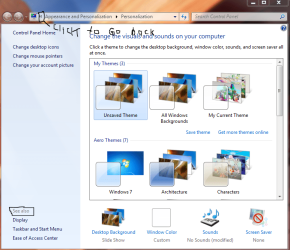
Control panel looks different than xp, and has categories of things and should be pretty simple to find what you're looking for. You may also RIGHT click the desktop and go down to Personalize, which brings up the appearance section of the control panel. At the very bottom left, there is the option once again to change "taskbar and start menu" settings:

I did a quick snip for you of the display section of the control panel, hopefully you can read my writing with a mouse
 

Attachments

  • Capture.PNG
    Capture.PNG
    264.2 KB · Views: 12

My Computer

Computer type
PC/Desktop
Computer Manufacturer/Model Number
Custom Asus Build
OS
Microsoft Windows 8.1 Pro 64-bit
CPU
Intel(R) Core(TM) i3-4130 CPU @ 3.40GHz
Motherboard
B85M-E
Memory
8.00 GB
Graphics Card(s)
None
Sound Card
Realtek High Definition Audio
Monitor(s) Displays
Asus 23.6" Monitor
Screen Resolution
1920 x 1080 x 32 bits (4294967296 colors) @ 60 Hz
Hard Drives
INTEL SSDSC2BW180A4
Samsung SSD 840 PRO Series
PSU
Seasonic S12II-380Bronze
Case
Lian Li
Cooling
Fan, Passive
Keyboard
Logitech K120
Mouse
Microsoft Touch Mouse
Internet Speed
4ms Ping, 19.0 Mbps Download, 19.0 Mbps Upload
Antivirus
Eset Endpoint
Browser
Internet Explorer, Chrome

My Computer

Computer type
PC/Desktop
Computer Manufacturer/Model Number
Self Assembled
OS
Microsoft Windows 10 Pro Insider Preview 64-bit
CPU
Intel(R) Core(TM) i3-4130 CPU @ 3.40GHz
Motherboard
Gigabyte Technology Co., Ltd. B85M-D3H
Memory
Corsair Vengence 4GB x2 (8.00GB Dual-Channel DDR3 @ 798MHz)
Graphics Card(s)
2047MB GeForce GTS 450 (ZOTAC International)
Sound Card
Onboard (Realtek High Definition Audio)
Monitor(s) Displays
LG Flatron E2040T
Screen Resolution
1600x900
Hard Drives
Western Digital 1 TB
Seagate 500 GB
PSU
Corsair VS550
Case
Cooler Master K380
Cooling
Cooler Master Seidon 120V Plus
Keyboard
Logitech MK260r
Mouse
Logitech MK260r
Internet Speed
PMPL Broadband
Antivirus
Windows Defender + MBAM
Browser
Firefox
Other Info
Dell Studio 15" Laptop
Back
Top