Windows 7 Start Up Repair Say's "System Volume Is Corrupt"

jeffro97

New member
Local time
3:04 PM
Messages
7
Location
Virginia Beach, VA
I recently bought and installed Windows 7 Home Premium OEM onto my HP G42 (which is now 2.5 years old). I had Win 7 home Premium on it when I bought it, but the hard drive broke and I ended up getting a new drive (Seagate Momentus 7200 750 GB 7200RPM SATA 3Gb/s 16 MB Cache). I installed it onto there, and it seemed to be working fine for a few start ups. Then when I tried doing an update, I got blue screened the when rebooting, and it wouldn't let me back in.

From there, I decided to completely re-install Win 7 (I really had nothing of value on there), and that worked longer. It still had trouble doing an update, but after trying it again, it worked fine. It was a few days ago that it began giving me blue screens telling me a "critical system process has stopped working or terminated". Now, when I try booting to it, it will get to the start up screen with the animation, then it'll reboot after a minute and tell me it had trouble booting.

I ran start up repair, and it told me that the root cause was that the system volume was corrupt. I'm not really sure of what I can do now. Is there any way to fix this problem or to prevent it from happening in the future?

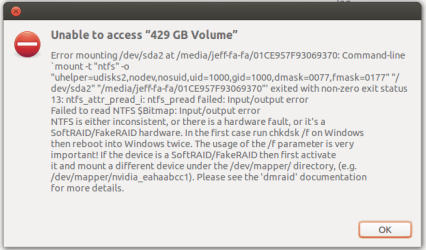
Side note: I don't know if any of you are proficient in the Ubuntu system (I dual-boot with ubuntu 13.04), but I tried accessing the Win 7 partition from there and it gave me this message (see attachment):
 

Attachments
  • windowspartition.png
    windowspartition.png
    16.6 KB · Views: 17

My Computer My Computer

At a glance

Windows 7 Home Premium 64-bitAMD Athlon(tm) II P340 Dual-Core Processor × 2AMD RS880
Computer type
Laptop
Computer Manufacturer/Model Number
HP
OS
Windows 7 Home Premium 64-bit
Memory
AMD Athlon(tm) II P340 Dual-Core Processor × 2
Graphics Card(s)
AMD RS880
Screen Resolution
1366 x 768 (16:9)
Hard Drives
Seagate Momentus 750Gb Hard Drive
Antivirus
Comodo
Browser
Firefox, Chrome, Opera
Okay, so I ran
Code:
chkdsk
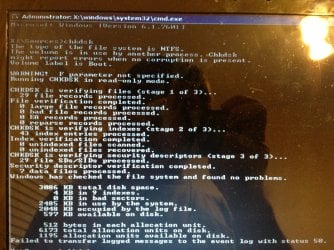
via the repair disk, and it gave me this. Also, it said my system was in D:, which is odd because it should be in C:
IMG_2087.jpg
 

My Computer My Computer

At a glance

Windows 7 Home Premium 64-bitAMD Athlon(tm) II P340 Dual-Core Processor × 2AMD RS880
Computer type
Laptop
Computer Manufacturer/Model Number
HP
OS
Windows 7 Home Premium 64-bit
Memory
AMD Athlon(tm) II P340 Dual-Core Processor × 2
Graphics Card(s)
AMD RS880
Screen Resolution
1366 x 768 (16:9)
Hard Drives
Seagate Momentus 750Gb Hard Drive
Antivirus
Comodo
Browser
Firefox, Chrome, Opera
Try pointing it at the system volume. That will likely be C from the booted repair disc.

chkdsk c: /r
 

My Computers My Computers

  • At a glance

    7 X64i5 84002x8gb 3200mhz
    Computer type
    PC/Desktop
    OS
    7 X64
    CPU
    i5 8400
    Motherboard
    gigabyte b365m ds3h
    Memory
    2x8gb 3200mhz
    Hard Drives
    various
    PSU
    pure power 11 400w cm
    Case
    Coolermaster
    Cooling
    cryorig m9i
  • At a glance

    7x64g54008gb ddr4 2400
    Computer type
    PC/Desktop
    OS
    7x64
    CPU
    g5400
    Motherboard
    ga b365m ds3h
    Memory
    8gb ddr4 2400
    PSU
    xfx pro 450w
I ran it, but I pretty much got the same thing as the last time I ran it.IMG_2093.jpg
 

My Computer My Computer

At a glance

Windows 7 Home Premium 64-bitAMD Athlon(tm) II P340 Dual-Core Processor × 2AMD RS880
Computer type
Laptop
Computer Manufacturer/Model Number
HP
OS
Windows 7 Home Premium 64-bit
Memory
AMD Athlon(tm) II P340 Dual-Core Processor × 2
Graphics Card(s)
AMD RS880
Screen Resolution
1366 x 768 (16:9)
Hard Drives
Seagate Momentus 750Gb Hard Drive
Antivirus
Comodo
Browser
Firefox, Chrome, Opera
Looks like you ran it against the system volume this time. 102399kb total disk space. Compare that with your first screenshot, which was 3086kb.

It appears to be ok.

Seems it is the windows partition which needs checking.

Try chkdsk d: /r
 

My Computers My Computers

  • At a glance

    7 X64i5 84002x8gb 3200mhz
    Computer type
    PC/Desktop
    OS
    7 X64
    CPU
    i5 8400
    Motherboard
    gigabyte b365m ds3h
    Memory
    2x8gb 3200mhz
    Hard Drives
    various
    PSU
    pure power 11 400w cm
    Case
    Coolermaster
    Cooling
    cryorig m9i
  • At a glance

    7x64g54008gb ddr4 2400
    Computer type
    PC/Desktop
    OS
    7x64
    CPU
    g5400
    Motherboard
    ga b365m ds3h
    Memory
    8gb ddr4 2400
    PSU
    xfx pro 450w
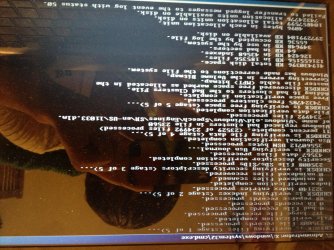
Okay, so I ran
Code:
chkdsk d: /r
a few hours later, it finished. Here's the results from that.

IMG_2097.jpg

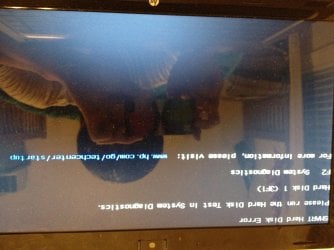
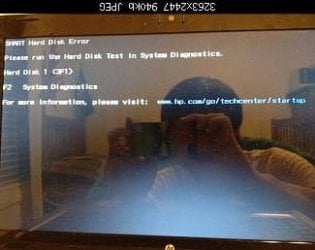
I rebooted, and it started successfully. I was able to get in, and nothing seemed wrong. Then, I got a blue screen that told me a "crucial system process had been terminated or stopped working". It rebooted, and came to this.

IMG_2098.jpg

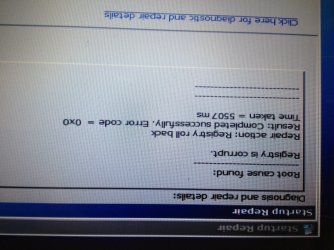
I rebooted after that, but it wouldn't start then. So, I ran Startup Repair, and it gave me this.

IMG_2099.jpg

So, I rebooted, and it came back up successfully. I've been noticing that over the many times this has happened to me, Windows Aero has been effected by this. It keeps turning off. It will just give me the sky blue solid bar at the bottom of my screen. It's after I change it though that eventually something goes wrong. Could this be part of the problem? A problem with Aero?

*Sidenote: I know the pictures are upside down. I tried editing them, then I re-uploaded them. They still won't change.*
 
Last edited:

My Computer My Computer

At a glance

Windows 7 Home Premium 64-bitAMD Athlon(tm) II P340 Dual-Core Processor × 2AMD RS880
Computer type
Laptop
Computer Manufacturer/Model Number
HP
OS
Windows 7 Home Premium 64-bit
Memory
AMD Athlon(tm) II P340 Dual-Core Processor × 2
Graphics Card(s)
AMD RS880
Screen Resolution
1366 x 768 (16:9)
Hard Drives
Seagate Momentus 750Gb Hard Drive
Antivirus
Comodo
Browser
Firefox, Chrome, Opera
Looks like SMART has been tripped on that hard drive. I would run a hard drive diagnostics. What your describing is similar to a pending hard drive failure.
 

My Computer My Computer

At a glance

Windows 7 Professional x64AMD Athlon II x4 3.00 GHz16GB Kingston DDR3Nvidia 8600 (dual DVI out for 2 monitors)
Computer type
PC/Desktop
Computer Manufacturer/Model Number
Custom Build MPCBS AMII
OS
Windows 7 Professional x64
CPU
AMD Athlon II x4 3.00 GHz
Motherboard
MSI GF615M-p33
Memory
16GB Kingston DDR3
Graphics Card(s)
Nvidia 8600 (dual DVI out for 2 monitors)
Sound Card
Onboard
Monitor(s) Displays
Acer H233H 23", ASUS 23"
Screen Resolution
1366 x 768
Hard Drives
(2) WD Blue 1 TB 3 partitions, (1) Seagate 7200 500GB with 2 partitions for useless and frequently deleted data Looking forward do an ssd for os soon.
PSU
Corsair 1100Watt
Case
Apevia HAF
Cooling
HAF AMD High Profile Heat sink and fan
Keyboard
wireless Logitech
Mouse
wireless Logitech
Internet Speed
16 mbps
Antivirus
eSet, AVG, Clam and Clamwin (depends on machine)
Browser
Firefox
Other Info
(9) Win 7 machines all x64 (POS Updated to Windows 7 pro YEA), (4) Linux machines x64 and x86 including a v3000 compaq lappy brought back to life with Mint 9 used to scan drives, (1) Linux Machine dual boot XP Pro (for testing and destroying), (1) Win 7 pro x64/Win 8.1 Lenovo Laptop Dual Boot.
"similar to a pending hard drive failure." NOT AGAIN!!!!! (My first hard disk failed and had to be replaced).

Seagate had a program for this. Downloaded, booted to it, and it told me everything was fine. It didn't find anything wrong with it.
 

My Computer My Computer

At a glance

Windows 7 Home Premium 64-bitAMD Athlon(tm) II P340 Dual-Core Processor × 2AMD RS880
Computer type
Laptop
Computer Manufacturer/Model Number
HP
OS
Windows 7 Home Premium 64-bit
Memory
AMD Athlon(tm) II P340 Dual-Core Processor × 2
Graphics Card(s)
AMD RS880
Screen Resolution
1366 x 768 (16:9)
Hard Drives
Seagate Momentus 750Gb Hard Drive
Antivirus
Comodo
Browser
Firefox, Chrome, Opera
What gives with the upside down stuff?

Did you try seatools for dos bootable disc?

IMG_2098.jpg

Wouldn't surprise me if it passed. I had a similar issue recently. At least Seagate are pretty quick sending out a new drive.

If F2 gives you some kind of HP disk diag thing, you may as well try it.
 

My Computers My Computers

  • At a glance

    7 X64i5 84002x8gb 3200mhz
    Computer type
    PC/Desktop
    OS
    7 X64
    CPU
    i5 8400
    Motherboard
    gigabyte b365m ds3h
    Memory
    2x8gb 3200mhz
    Hard Drives
    various
    PSU
    pure power 11 400w cm
    Case
    Coolermaster
    Cooling
    cryorig m9i
  • At a glance

    7x64g54008gb ddr4 2400
    Computer type
    PC/Desktop
    OS
    7x64
    CPU
    g5400
    Motherboard
    ga b365m ds3h
    Memory
    8gb ddr4 2400
    PSU
    xfx pro 450w
I would suggest that you return the Seagate Momentus drive to the vendor and get a replacement. Being what it is, part solid state memory, I would think there is something finicky in the drive you got.
 

My Computer My Computer

At a glance

Windows 7 Home Premium 32 bit
OS
Windows 7 Home Premium 32 bit
Any time I see a S.M.A.R.T. Error of any kind I have had to replace the drive. that "Self Test" is pretty accurate when it comes to failure. I have had "SeaTools", "WD Data Lifegaurd" as well as the Toshiba tools tell me a drive is good even thought the smart has tripped. That error means it can't read the smart data. partial failure to begin with. I use MRI from Eurosoft and it's pretty dang spot on.

Also Noted on your First Screenshot there is listed by chkdsk the 16 bad clusters added to the bad cluster file. that means failure is imminent. sorry but I would return it asap
 
Last edited:

My Computer My Computer

At a glance

Windows 7 Professional x64AMD Athlon II x4 3.00 GHz16GB Kingston DDR3Nvidia 8600 (dual DVI out for 2 monitors)
Computer type
PC/Desktop
Computer Manufacturer/Model Number
Custom Build MPCBS AMII
OS
Windows 7 Professional x64
CPU
AMD Athlon II x4 3.00 GHz
Motherboard
MSI GF615M-p33
Memory
16GB Kingston DDR3
Graphics Card(s)
Nvidia 8600 (dual DVI out for 2 monitors)
Sound Card
Onboard
Monitor(s) Displays
Acer H233H 23", ASUS 23"
Screen Resolution
1366 x 768
Hard Drives
(2) WD Blue 1 TB 3 partitions, (1) Seagate 7200 500GB with 2 partitions for useless and frequently deleted data Looking forward do an ssd for os soon.
PSU
Corsair 1100Watt
Case
Apevia HAF
Cooling
HAF AMD High Profile Heat sink and fan
Keyboard
wireless Logitech
Mouse
wireless Logitech
Internet Speed
16 mbps
Antivirus
eSet, AVG, Clam and Clamwin (depends on machine)
Browser
Firefox
Other Info
(9) Win 7 machines all x64 (POS Updated to Windows 7 pro YEA), (4) Linux machines x64 and x86 including a v3000 compaq lappy brought back to life with Mint 9 used to scan drives, (1) Linux Machine dual boot XP Pro (for testing and destroying), (1) Win 7 pro x64/Win 8.1 Lenovo Laptop Dual Boot.
I would like to add a note to this thread just an opinion really. I have noted that a lot of people want a simple single test to tell them what is wrong with their PC.

Not picking on you Jeffro97 it's just an observation.

No singe test can be definitive as to the issue at hand. I have seen Malwarebytes and Superantispyware along with resident AV come up clean and an Eset online scan find a ton of trash. I have seen it the other way around too. I have used all the Hard drive tools listed and have had them say all is good but the bad cluster file looks like a role call at a marine boot camp.

Test and test again with a different tool will give you at least a good indication of where the failure is.

Your screen shots tell the tale as smart failure along with bad cluster recognition means the disk is not retaining the info as it should. It could be a bad disk or a bad controller on the drive itself. The only way to know for sure is to have someone with a forensics machine diagnose each part individually. That's why they charge hundreds to rescue data. The machine is expensive as is the labor involved.

**sorry for the rant. I guess I just needed to say it.**
 

My Computer My Computer

At a glance

Windows 7 Professional x64AMD Athlon II x4 3.00 GHz16GB Kingston DDR3Nvidia 8600 (dual DVI out for 2 monitors)
Computer type
PC/Desktop
Computer Manufacturer/Model Number
Custom Build MPCBS AMII
OS
Windows 7 Professional x64
CPU
AMD Athlon II x4 3.00 GHz
Motherboard
MSI GF615M-p33
Memory
16GB Kingston DDR3
Graphics Card(s)
Nvidia 8600 (dual DVI out for 2 monitors)
Sound Card
Onboard
Monitor(s) Displays
Acer H233H 23", ASUS 23"
Screen Resolution
1366 x 768
Hard Drives
(2) WD Blue 1 TB 3 partitions, (1) Seagate 7200 500GB with 2 partitions for useless and frequently deleted data Looking forward do an ssd for os soon.
PSU
Corsair 1100Watt
Case
Apevia HAF
Cooling
HAF AMD High Profile Heat sink and fan
Keyboard
wireless Logitech
Mouse
wireless Logitech
Internet Speed
16 mbps
Antivirus
eSet, AVG, Clam and Clamwin (depends on machine)
Browser
Firefox
Other Info
(9) Win 7 machines all x64 (POS Updated to Windows 7 pro YEA), (4) Linux machines x64 and x86 including a v3000 compaq lappy brought back to life with Mint 9 used to scan drives, (1) Linux Machine dual boot XP Pro (for testing and destroying), (1) Win 7 pro x64/Win 8.1 Lenovo Laptop Dual Boot.
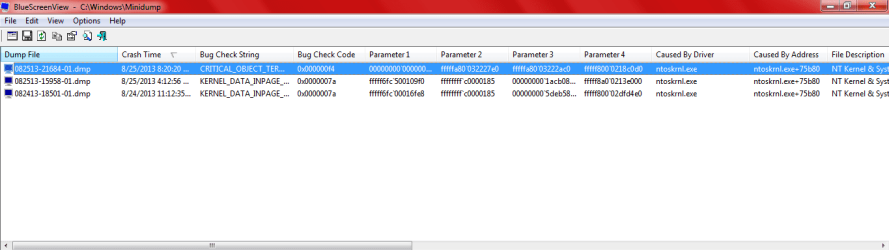
I did some searching, since this problem is associated with a lot of blue screens. I downloaded and installed BlueScreen Viewer by Nirsoft, and it showed me that the reason it was crashing was due to a system process.

Here's a screenshot.
problem.PNG

Is there any way I can fix this?
 

My Computer My Computer

At a glance

Windows 7 Home Premium 64-bitAMD Athlon(tm) II P340 Dual-Core Processor × 2AMD RS880
Computer type
Laptop
Computer Manufacturer/Model Number
HP
OS
Windows 7 Home Premium 64-bit
Memory
AMD Athlon(tm) II P340 Dual-Core Processor × 2
Graphics Card(s)
AMD RS880
Screen Resolution
1366 x 768 (16:9)
Hard Drives
Seagate Momentus 750Gb Hard Drive
Antivirus
Comodo
Browser
Firefox, Chrome, Opera
In your first post Ubuntu has clearly indicated "input/output error. NTFS is either inconsistent or there is a hardware fault" A hardware - read HDD - fault can make NTFS inconsistent. A disk check may correct the problem but if the problem returns again in a few days/weeks, that is a clear indication of a deteriorating HDD.

Even a new hard drive can be faulty.

In your situation, I would have returned it to the vendor and replaced it taking advantage of the vendor's return policy :) and would indulge in further research only if even that second new drive exhibits the same problem.:D

I am not going to get a phd. from Palo Alto in trying to find out what exactly is causing this problem.:D
 

My Computer My Computer

At a glance

Windows 7 Home Premium 32 bit
OS
Windows 7 Home Premium 32 bit
I did some searching, since this problem is associated with a lot of blue screens. I downloaded and installed BlueScreen Viewer by Nirsoft, and it showed me that the reason it was crashing was due to a system process.

Here's a screenshot.
View attachment 283208

Is there any way I can fix this?
in short?
no
failing drive
sorry
 

My Computer My Computer

At a glance

Windows 7 Professional x64AMD Athlon II x4 3.00 GHz16GB Kingston DDR3Nvidia 8600 (dual DVI out for 2 monitors)
Computer type
PC/Desktop
Computer Manufacturer/Model Number
Custom Build MPCBS AMII
OS
Windows 7 Professional x64
CPU
AMD Athlon II x4 3.00 GHz
Motherboard
MSI GF615M-p33
Memory
16GB Kingston DDR3
Graphics Card(s)
Nvidia 8600 (dual DVI out for 2 monitors)
Sound Card
Onboard
Monitor(s) Displays
Acer H233H 23", ASUS 23"
Screen Resolution
1366 x 768
Hard Drives
(2) WD Blue 1 TB 3 partitions, (1) Seagate 7200 500GB with 2 partitions for useless and frequently deleted data Looking forward do an ssd for os soon.
PSU
Corsair 1100Watt
Case
Apevia HAF
Cooling
HAF AMD High Profile Heat sink and fan
Keyboard
wireless Logitech
Mouse
wireless Logitech
Internet Speed
16 mbps
Antivirus
eSet, AVG, Clam and Clamwin (depends on machine)
Browser
Firefox
Other Info
(9) Win 7 machines all x64 (POS Updated to Windows 7 pro YEA), (4) Linux machines x64 and x86 including a v3000 compaq lappy brought back to life with Mint 9 used to scan drives, (1) Linux Machine dual boot XP Pro (for testing and destroying), (1) Win 7 pro x64/Win 8.1 Lenovo Laptop Dual Boot.
Back
Top