Windows 7 Startup Error: different system settings

hex808080

New member
Local time
3:47 AM
Messages
3
Hi,
I'm new here and I don't know if my question is relevant, so I apologize in advance.
I've just started my pc, and after the password screen, appeared the default loading light blue screen, but instead of the word "Windows" there was "Preparing the desktop". After that, the desktop appeared, but there were no icons but the bin, no wallpaper, and all the system settings (sounds at startup, start bar icons) were different. Then appeared a window communicating the correct installation of Service Pack 1, but there were no updates to be installed when I turned off the pc, and I already had SP1. The system folder had checkboxes near the icons (i.e. the C disk icon), so that a tick appeared when selected. All files on the desktop where still present in the desktop folder, but not shown (all but the bin).
So I restarted, the desktop returned ok, but the system settings are still messed up: I removed system sounds, but now they are enabled; no start bar icons; different interface colors. I restarted again, but nothing changed.

What's the problem? Is it possible that it's a virus? Am I risking to lose everything on the next startup?
If you need others informations, please ask.
Thank you.
 

My Computer

Computer type
PC/Desktop
OS
Windows 7 Home Premium 64 bit.
Hello Hex808080,

That does certainly seem like a worrying issue.

Run System File Checker and Disk Checker to check for issues.
http://www.sevenforums.com/tutorials/1538-sfc-scannow-command-system-file-checker.html
http://www.sevenforums.com/tutorials/433-disk-check.html

If you think you are infected with Malware, please run Malwarebytes
https://www.malwarebytes.org/

Malwarebytes will product a log, please can you upload it to here? Navigate to: C:\ProgramData\Malwarebytes\Malwarebytes Anti-Malware\Logs and upload the logs to here.

Thank you,
VinnyBuxton
 

My Computer

Computer type
PC/Desktop
Thanks for the answer.
I did what you said, so here the results of the checks:

File Checker, Only Verify
Did not find any integrity violations.

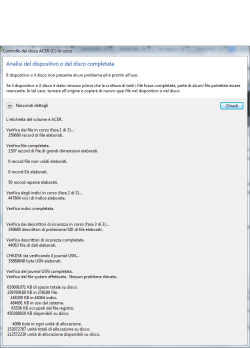
Disk Checher, Only Scan
No problems were found on the device or disk. I'm Italian, and I have an Italian version of Windows7, so I don't know if the log can actually be useful. I put it as a picture anyway.

Malwarebytes
A lot of results, most Iminent stuff (I thought I disinstalled it some months ago), I think I'll quarantine all. Here the logs.

Disk Checker Log.PNG

View attachment Logs.rar
 

My Computer

Computer type
PC/Desktop
OS
Windows 7 Home Premium 64 bit.
Hello Hex808080,

Are you able to upload the actual logs, as I mentioned in my previous reply:

Malwarebytes will product a log, please can you upload it to here? Navigate to: C:\ProgramData\Malwarebytes\Malwarebytes Anti-Malware\Logs and upload the logs to here

Can you clarify one of the problems you are experiencing and we can try to fix them one-by-one.

Thank you,
VinnyBuxton
 

My Computer

Computer type
PC/Desktop
Hi Vinny,
I've already uploaded the logs; they are in the Logs.rar file, just under the picture.
The actual problem is the change in system settings, such as:
-Enabled system sounds (they were disabled);
-Different interface color;
-No start bar icons.
They aren't actually problems (I can just manually reset the previous settings). I'm just worried that the previous problem (no more desktop files icons, messed folder interfaces, strange start procedure), solved by simply restarting the system, could be caused by a bigger problem.
Thanks again.
 

My Computer

Computer type
PC/Desktop
OS
Windows 7 Home Premium 64 bit.
It has booted into a temporary profile since yours is too corrupt to load.

Try System Restore as far back as necessary.

Then run another MBAM full scan to make sure no infection was restored.

If this fails post back up the MBAM in another file format than .rar which is what pirates use.

We must be absolutely sure it is cleaned up and any specialized tools are used if necessary.

Then you can try creating a new User profile to see how it functions for awhile before moving over your files and deleting the old one.

Or you can try a Repair Install
 
Hello Hex808080,

I agree with the previous response about a Repair Install.

Having looked at the Malwarebytes logs, it picks up a-lot of POP.Optional pieces of malware. They usually come into your system when you download programs off the Internet and you don't un-check the optional offers, which you should do.

I would recommend: Unchecky - Keeps your checkboxes clear

Have you ever felt, while installing software, that the installer tries to push additional unwanted programs at all cost? Ever missed a checkbox, and spent hours afterwards removing adware? Ever opened your browser after an installation, only to find out that you have a new homepage, a new search engine, or even a new browser?
Unchecky aims to keep potentially unwanted programs out of your computer.

Please can you run the following programs:
https://toolslib.net/downloads/viewd.../1-adwcleaner/
Junkware Removal Tool Download
https://www.malwarebytes.org/antirootkit/
HitmanPro 3 - SurfRight

Instructions for running Hitman Pro:
After opening Hitman Pro, select next. Click 'no, I only want to perform a one-time scan to check this computer' and select next. It will then scan your computer. After it's finished scanning, click next and click activate free licence, which is a free-trial of it for 30 days.

Are you able to post screenshots of the programs that you have installed on your computer and which browser(s) do you have on your computer?

Thank you,
VinnyBuxton
 

My Computer

Computer type
PC/Desktop
Back
Top