Windows 7 Startup Failuer on a certain computer

DarknessGhost90

New member
Local time
8:26 AM
Messages
1
I have 2 computers Computer#1 and computer#2.
Computer#2 is old and doesn't have a HDD so i thought why not to buy a new HDD for Computer#1 and use the old one for Computer#2 but when i try to turn on Computer#2 everything goes fine until the windows logo screen tries to load then it freezes then restarts (It's on the first Windows 7 screen - the one with a black background which says "Starting Windows" and has 4 balls of light which turn into the Windows logo. It crashes as soon as the first two balls of light appear and start moving) i took the HDD and tried it on Computer#1 works fine with no problems.

Computer#2 specs :
Intel Core 2 Duo
ASRock G41C - VS

Why is this happening ? and how i can fix it?
Note :
I tried to remove the CMOS and putting it back in nothing changed same problem. I heard that it might be the CMOS cuz Computer#2 is old and I haven't been using it for like 1 year and before i used to use ALOT.
any help will be appreciated,
smile.gif
 

My Computer My Computer

At a glance

Windows 7 Ultimate x64Intel Core I3Kingston HyperX Fury 8Gigabyte DDR3MSI GTX 750Ti 2GB GDDR5
Computer type
PC/Desktop
Computer Manufacturer/Model Number
custom build
OS
Windows 7 Ultimate x64
CPU
Intel Core I3
Motherboard
Asus B85 Gamer
Memory
Kingston HyperX Fury 8Gigabyte DDR3
Graphics Card(s)
MSI GTX 750Ti 2GB GDDR5
Antivirus
None
Browser
Mozilla Firefox
When you switch a hard drive onto a new motherboard, windows needs to install a lot of new drivers, which is no problem necessarily But it is a problem if one of the incompatible drivers is the hard drive controller, because then windows can't even get to the desktop. Since your motherboard chipsets are about 5 years apart in vintage, its likely that is the problem. The way to fix it is to use offline regedit to modify the default hard drive controller driver currently in use by windows on the hard drive, and to change it to the windows generic driver. This link will tell you how.

How to replace Motherboard without Reinstalling Windows - wintips.org - Windows Tips How-tos

If that seems too cumbersome, another way to tackle this is just to boot the hard drive on its original machine, then do the below, then shut down, and then move the hard drive to the new machine.

1) move hard drive back to the B85 chipsetl computer, boot up
2) Now that you're booted up on the B85 machine, download all the drivers for the future G41 motherboard and put them on the hard drive somewhere, so you can run them once you are ready to move the hard drive to the G41.
http://www.asrock.com/MB/Intel/G41C-VS/index.asp?cat=Download#osW764
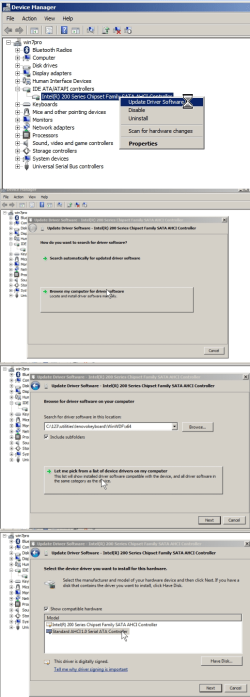
3) do start > run > devmgmt.msc
4) change the driver for your IDE/ATA controller (hard drive) to the standard AHCI controller. I will show 4 pics below so you know the steps to change the driver. Then do the same with your display adapter, changing it to the Standard VGA adapter.
5) Now that you have changed the video and hard drive drivers to generic drivers, shut down immediately (do not reboot, just shut down), then move the hard drive over to the G41 machine, and it should boot up okay. Once you're at the desktop run the driver packages you downloaded earlier.
 

Attachments

  • 5.png
    5.png
    100.5 KB · Views: 1

My Computer My Computer

At a glance

Win7 pro x64stock i7 7700kCorsair Vengeance LPX 16GB (2x8GB) DDR4 @ 320...integrated Intel HD 630
Computer type
PC/Desktop
Computer Manufacturer/Model Number
diy
OS
Win7 pro x64
CPU
stock i7 7700k
Motherboard
Gigabyte Z270N-WIFI mini-ITX
Memory
Corsair Vengeance LPX 16GB (2x8GB) DDR4 @ 3200MHz
Graphics Card(s)
integrated Intel HD 630
Sound Card
onboard Realtek ALC1220
Monitor(s) Displays
two vertically mounted samsung 55" 4k un55mu8000
Screen Resolution
1920x1280
Hard Drives
256GB Samsung EVO 960 M.2 pci-e NVMe SSD
PSU
SilverStone Nightjar ST45NF 450Watt Fanless
Case
No case. Motherboard is mounted directly onto power supply
Cooling
Evercool low profile 815EP with Panaflow 12L fan at 7v
Keyboard
Ortek MCK-86 mini
Mouse
Belkin 5-button USB
Internet Speed
spectrum 400mbps

My Computer My Computer

At a glance

Win-7-Pro64bit 7-H-Prem-64biti7-5930K 2nd i9-9940x both water blocked VRM'...Trident-z 3200C14 2nd Trident-z 3600C16EVGA 1080ti ftw3 2nd Titan Xp both water blocked
Computer type
PC/Desktop
Computer Manufacturer/Model Number
Custom assembled by me :}
OS
Win-7-Pro64bit 7-H-Prem-64bit
CPU
i7-5930K 2nd i9-9940x both water blocked VRM's too
Motherboard
ASUS SABERTOOTH X99 2nd ASUS x299 Apex
Memory
Trident-z 3200C14 2nd Trident-z 3600C16
Graphics Card(s)
EVGA 1080ti ftw3 2nd Titan Xp both water blocked
Sound Card
Built-in Realtek
Monitor(s) Displays
1-AOC G2460PG 24"G-Sync 144Hz/ 2nd 1-ASUS VG248QE 24" 144Hz
Screen Resolution
1920 x 1080 144Hz
Hard Drives
2-Samsung M.2 Evo & Evo Plus
2-Samsung 850 EVO 500GB SSD's/ 3-2.5 W.D. Black 1tb-&3-1tb/3-3.5 WD Black 1tb hdd's
PSU
EVGA SuperNOVA 1000-P2 2nd 1200-P2
Case
2-Corsair Obsidian Series 450D Black ATX Mid Tower
Cooling
Custom water loops
Keyboard
Logitech G710+/ 2nd Logitech G910
Mouse
2-RedDragon M901 Perdition 16400 dpi Gaming mouse = wired
Internet Speed
Comcast Ping 19ms 89.31mbps download speed 6.12mbps upload
Antivirus
Malwarebytes Pro/ Superantispyware Pro
Browser
FireFox & Pale moon
Other Info
2nd ASUS X299 Apex/Intel i9-9940x with Custom water loop/7H-Prem-x64/Corsair 450D case/Ram Trident-z 3600C16 4x8gb / Samsung970Evo plus 500gb SSD/Dual ssd EZ swap evo/PSU EVGA SuperNova 1200w-P2 80+Platinum/GPU Titan Xp /8-ML-140 on push-pull on 2-280GTX rads
Back
Top