Windows 7 Startup Problems

I use GWScan (WD Data Lifeguard) full CD scan which can diagnose and repair failing HD's.

Run the full diagnostics/repair scan followed by chkdsk /r.

Are you using GRUB?
 
I tried running it, I ran Ultimate Boot CD which includes that file. It didn't detect any harddrives though? Is it because the program is not made to detect SATA drives or what????
 

My Computer

OS
W7 x64/x86 Ultimate + XP Mode; Ubuntu
CPU
AMD ATHLON X2 64 3.0GHz
Motherboard
M2N68-AM Plus
Memory
4GB DDR2 Kingston HyperX
Graphics Card(s)
ATI Radeon 4600 Series
Sound Card
Sound Blaster
Monitor(s) Displays
22" BenQ, 22" Samsung
Screen Resolution
1680x1050, 1920x1080
Hard Drives
WD5000AAKS
WDC6400AAK External
PSU
Gigabyte 600W
Case
Custom
Cooling
OCZ
Internet Speed
ADSL
GWScan should detect HD unless it has failed. Is it showing in BIOS now?
 
The Ultimate Boot CD is more generically orientated and rather outdated at this time being an old set of tools seen there. The Lifeguard cd image you download from the WD support site however is intended specifically for the model series you select for the model drive you have there.

With the much larger variety of drives being mainly sata you need to work with the present tools available to see the best results.
 

My Computers

System One System Two

  • Computer type
    PC/Desktop
    Computer Manufacturer/Model Number
    Custom builds = 2
    OS
    W7 Ultimate x64/W10 Pro x64/W11 Pro Triple Boot - Main PC W7 Remote PC Micro ATX W7 Pro x64/W11 Pro
    CPU
    AMD Phenom II X4 975 Deneb 3.6ghz - 965 2nd remote pc
    Motherboard
    Gigabyte GA-790XTA-UD4-Gigabyte GA-880GM-D2H remote pc
    Memory
    Kingston Hyper X DDR3 1600 1.5v 16gb - Hyper X Fury 8gb 2nd
    Graphics Card(s)
    MSI HD Radeon 5750 1gb - MSI HD Radeon 6450 on mini tower
    Sound Card
    Creative Labs X-Fi Xtreme Audio P - Realtek onooard 2nd case
    Monitor(s) Displays
    ASUS VW199T-P 19" HP 2082a Main-HP 2082a 20" remote pc
    Screen Resolution
    Asus 1440x900 - HP 1600x900
    Hard Drives
    WD Black 1TB HD per OS W7, W10, and pending W11 presently on 500gb OS Drive - Pending Triple 1TB HDs for Spanned Storage/backup volume
    Single 2TB external USB enclosure, single 1TB System 7 Host/Boot drive, Pending 8TB external HD for system image b
    PSU
    Corsair 750TX - primary / Corsair CX600 - second
    Case
    Antec 900-2 - SSD compatible / NZXT Vulcan mini tower
    Cooling
    Zalman CNPS9900A
    Keyboard
    AZIO L70 Backlit Letters Gaming - ONN Cordless/USB
    Mouse
    MSI DS200 Programmable, Logitech Cordless
    Internet Speed
    30mbps upgrade - primary hard wired - mini tower usb WiFi
    Antivirus
    GFI VIPRE Internet Security 2014 on W7 2016 beta on W10,
    Browser
    Cyberfox, WaterFox 64bit FF variants, FireFox x64, Pale Moon
    Other Info
    Accomdata fan cooled usb 2.0 PIDE/Sata II, III external enclosure.
    Sambient usb/eSata PATA/Sata II, III external enclosure.
  • Computer type
    PC/Desktop
    System Manufacturer/Model Number
    CUSTOM ASSEMBLY
    OS
    W7 Pro x64/W11 Pro
    CPU
    AMD Deneb 3.6ghz - 965
    Motherboard
    Gigabyte GA-880GM-D2H remote pc
    Memory
    Kingston Hyper X Fury 8gb
    Graphics Card(s)
    MSI HD Radeon 6450 DVI Output
    Sound Card
    Realtek onooard Creative or Other separate PENDING
    Monitor(s) Displays
    VIZIO 32" LCD TV Separate LCD Pending
    Screen Resolution
    1600x1080
    Hard Drives
    WD 500GB OS Host/Boot WD Green 1TB Storage/Backup
    PSU
    Corsair 600W - THERMALTAKE 600W spare case
    Case
    NZXT Vulcan mini tower
    Cooling
    Twin 120mm Top Fans - 240mm Side Cover
    Keyboard
    ONN Cordless/USB Logitech Cordless
    Mouse
    ONN USB/Cordless - Logitech Cordless
    Internet Speed
    DSL 5G
    Browser
    MS Edge, FireFox, WaterFox x64, FireFox Nightly
    Other Info
    OS Testing-Remote Access to Main TeamViewer
The problem I am having now is that I deleted my windows partition and this tool (WD Support > Downloads > SATA & SAS > WD Caviar Blue / SE / SE16 (SATA II)) is only available for Windows installations. I cannot install Windows, that is my whole problem. I need to run this utility in order to repair my harddrive, but I can't because Windows is not installed...

I am running Ubuntu because it was the only OS that I could get running so that I could post on these forums =/


I use GWScan (WD Data Lifeguard) full CD scan which can diagnose and repair failing HD's.

Run the full diagnostics/repair scan followed by chkdsk /r.

Are you using GRUB?

What is GRUB? Are you referring to this Boot Loader? GNU GRUB - GRUB 2
 

My Computer

OS
W7 x64/x86 Ultimate + XP Mode; Ubuntu
CPU
AMD ATHLON X2 64 3.0GHz
Motherboard
M2N68-AM Plus
Memory
4GB DDR2 Kingston HyperX
Graphics Card(s)
ATI Radeon 4600 Series
Sound Card
Sound Blaster
Monitor(s) Displays
22" BenQ, 22" Samsung
Screen Resolution
1680x1050, 1920x1080
Hard Drives
WD5000AAKS
WDC6400AAK External
PSU
Gigabyte 600W
Case
Custom
Cooling
OCZ
Internet Speed
ADSL
You want to run the maker's HD Diagnostics/Repair full scan from CD, not Windows.

If you download GWScan's latest version, it will unzip to C:Cabs where you'll find the ISO to burn to CD. Use ImgBurn at 4x speed with verify to burn to CD - it never fails.
 
The problem I am having now is that I deleted my windows partition and this tool (WD Support > Downloads > SATA & SAS > WD Caviar Blue / SE / SE16 (SATA II)) is only available for Windows installations. I cannot install Windows, that is my whole problem. I need to run this utility in order to repair my harddrive, but I can't because Windows is not installed...

I am running Ubuntu because it was the only OS that I could get running so that I could post on these forums =/


I use GWScan (WD Data Lifeguard) full CD scan which can diagnose and repair failing HD's.

Run the full diagnostics/repair scan followed by chkdsk /r.

Are you using GRUB?

What is GRUB? Are you referring to this Boot Loader? GNU GRUB - GRUB 2

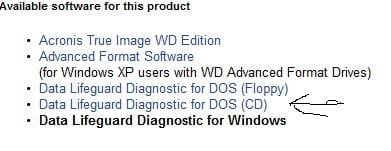
When you are at the WD support site you didn't look close enough or would have noticed that each item serves as a separate link for a different page. The screen here points to the dos cd page for downloading the cd image.

You will see the iso image download button right above the one for the zip file at WD Support > Downloads > SATA & SAS > WD Caviar Blue / SE / SE16 (SATA II)

Once clicked that will be the one you see hightlighted in bold text.
 

Attachments

  • WD Tool Selection.jpg
    WD Tool Selection.jpg
    19.5 KB · Views: 1

My Computers

System One System Two

  • Computer type
    PC/Desktop
    Computer Manufacturer/Model Number
    Custom builds = 2
    OS
    W7 Ultimate x64/W10 Pro x64/W11 Pro Triple Boot - Main PC W7 Remote PC Micro ATX W7 Pro x64/W11 Pro
    CPU
    AMD Phenom II X4 975 Deneb 3.6ghz - 965 2nd remote pc
    Motherboard
    Gigabyte GA-790XTA-UD4-Gigabyte GA-880GM-D2H remote pc
    Memory
    Kingston Hyper X DDR3 1600 1.5v 16gb - Hyper X Fury 8gb 2nd
    Graphics Card(s)
    MSI HD Radeon 5750 1gb - MSI HD Radeon 6450 on mini tower
    Sound Card
    Creative Labs X-Fi Xtreme Audio P - Realtek onooard 2nd case
    Monitor(s) Displays
    ASUS VW199T-P 19" HP 2082a Main-HP 2082a 20" remote pc
    Screen Resolution
    Asus 1440x900 - HP 1600x900
    Hard Drives
    WD Black 1TB HD per OS W7, W10, and pending W11 presently on 500gb OS Drive - Pending Triple 1TB HDs for Spanned Storage/backup volume
    Single 2TB external USB enclosure, single 1TB System 7 Host/Boot drive, Pending 8TB external HD for system image b
    PSU
    Corsair 750TX - primary / Corsair CX600 - second
    Case
    Antec 900-2 - SSD compatible / NZXT Vulcan mini tower
    Cooling
    Zalman CNPS9900A
    Keyboard
    AZIO L70 Backlit Letters Gaming - ONN Cordless/USB
    Mouse
    MSI DS200 Programmable, Logitech Cordless
    Internet Speed
    30mbps upgrade - primary hard wired - mini tower usb WiFi
    Antivirus
    GFI VIPRE Internet Security 2014 on W7 2016 beta on W10,
    Browser
    Cyberfox, WaterFox 64bit FF variants, FireFox x64, Pale Moon
    Other Info
    Accomdata fan cooled usb 2.0 PIDE/Sata II, III external enclosure.
    Sambient usb/eSata PATA/Sata II, III external enclosure.
  • Computer type
    PC/Desktop
    System Manufacturer/Model Number
    CUSTOM ASSEMBLY
    OS
    W7 Pro x64/W11 Pro
    CPU
    AMD Deneb 3.6ghz - 965
    Motherboard
    Gigabyte GA-880GM-D2H remote pc
    Memory
    Kingston Hyper X Fury 8gb
    Graphics Card(s)
    MSI HD Radeon 6450 DVI Output
    Sound Card
    Realtek onooard Creative or Other separate PENDING
    Monitor(s) Displays
    VIZIO 32" LCD TV Separate LCD Pending
    Screen Resolution
    1600x1080
    Hard Drives
    WD 500GB OS Host/Boot WD Green 1TB Storage/Backup
    PSU
    Corsair 600W - THERMALTAKE 600W spare case
    Case
    NZXT Vulcan mini tower
    Cooling
    Twin 120mm Top Fans - 240mm Side Cover
    Keyboard
    ONN Cordless/USB Logitech Cordless
    Mouse
    ONN USB/Cordless - Logitech Cordless
    Internet Speed
    DSL 5G
    Browser
    MS Edge, FireFox, WaterFox x64, FireFox Nightly
    Other Info
    OS Testing-Remote Access to Main TeamViewer
Yes, but when you click on 'Data Lifeguard Diagnostic for DOS (CD)' it shows a list of Supported Operating Systems. I also tried to run it, but it just black screens after it says 'DR-DOS'.
 

My Computer

OS
W7 x64/x86 Ultimate + XP Mode; Ubuntu
CPU
AMD ATHLON X2 64 3.0GHz
Motherboard
M2N68-AM Plus
Memory
4GB DDR2 Kingston HyperX
Graphics Card(s)
ATI Radeon 4600 Series
Sound Card
Sound Blaster
Monitor(s) Displays
22" BenQ, 22" Samsung
Screen Resolution
1680x1050, 1920x1080
Hard Drives
WD5000AAKS
WDC6400AAK External
PSU
Gigabyte 600W
Case
Custom
Cooling
OCZ
Internet Speed
ADSL
Did you make up a bootable cd or simply running it from a prompt?

Once the iso is burned to disk you boot live from the cd itself excluding any OS involvement like you would with GParted or any other live cds. Another option would be mounting the iso on a virtual drive or see it written to a usb flash drive made bootable.

Seeing a black screen is actually normal for anything dos as far as that part is concerned. If the program won't continue however then you likely saw a bad burn or bad blank used.
 

My Computers

System One System Two

  • Computer type
    PC/Desktop
    Computer Manufacturer/Model Number
    Custom builds = 2
    OS
    W7 Ultimate x64/W10 Pro x64/W11 Pro Triple Boot - Main PC W7 Remote PC Micro ATX W7 Pro x64/W11 Pro
    CPU
    AMD Phenom II X4 975 Deneb 3.6ghz - 965 2nd remote pc
    Motherboard
    Gigabyte GA-790XTA-UD4-Gigabyte GA-880GM-D2H remote pc
    Memory
    Kingston Hyper X DDR3 1600 1.5v 16gb - Hyper X Fury 8gb 2nd
    Graphics Card(s)
    MSI HD Radeon 5750 1gb - MSI HD Radeon 6450 on mini tower
    Sound Card
    Creative Labs X-Fi Xtreme Audio P - Realtek onooard 2nd case
    Monitor(s) Displays
    ASUS VW199T-P 19" HP 2082a Main-HP 2082a 20" remote pc
    Screen Resolution
    Asus 1440x900 - HP 1600x900
    Hard Drives
    WD Black 1TB HD per OS W7, W10, and pending W11 presently on 500gb OS Drive - Pending Triple 1TB HDs for Spanned Storage/backup volume
    Single 2TB external USB enclosure, single 1TB System 7 Host/Boot drive, Pending 8TB external HD for system image b
    PSU
    Corsair 750TX - primary / Corsair CX600 - second
    Case
    Antec 900-2 - SSD compatible / NZXT Vulcan mini tower
    Cooling
    Zalman CNPS9900A
    Keyboard
    AZIO L70 Backlit Letters Gaming - ONN Cordless/USB
    Mouse
    MSI DS200 Programmable, Logitech Cordless
    Internet Speed
    30mbps upgrade - primary hard wired - mini tower usb WiFi
    Antivirus
    GFI VIPRE Internet Security 2014 on W7 2016 beta on W10,
    Browser
    Cyberfox, WaterFox 64bit FF variants, FireFox x64, Pale Moon
    Other Info
    Accomdata fan cooled usb 2.0 PIDE/Sata II, III external enclosure.
    Sambient usb/eSata PATA/Sata II, III external enclosure.
  • Computer type
    PC/Desktop
    System Manufacturer/Model Number
    CUSTOM ASSEMBLY
    OS
    W7 Pro x64/W11 Pro
    CPU
    AMD Deneb 3.6ghz - 965
    Motherboard
    Gigabyte GA-880GM-D2H remote pc
    Memory
    Kingston Hyper X Fury 8gb
    Graphics Card(s)
    MSI HD Radeon 6450 DVI Output
    Sound Card
    Realtek onooard Creative or Other separate PENDING
    Monitor(s) Displays
    VIZIO 32" LCD TV Separate LCD Pending
    Screen Resolution
    1600x1080
    Hard Drives
    WD 500GB OS Host/Boot WD Green 1TB Storage/Backup
    PSU
    Corsair 600W - THERMALTAKE 600W spare case
    Case
    NZXT Vulcan mini tower
    Cooling
    Twin 120mm Top Fans - 240mm Side Cover
    Keyboard
    ONN Cordless/USB Logitech Cordless
    Mouse
    ONN USB/Cordless - Logitech Cordless
    Internet Speed
    DSL 5G
    Browser
    MS Edge, FireFox, WaterFox x64, FireFox Nightly
    Other Info
    OS Testing-Remote Access to Main TeamViewer
Did you make up a bootable cd or simply running it from a prompt?

Once the iso is burned to disk you boot live from the cd itself excluding any OS involvement like you would with GParted or any other live cds. Another option would be mounting the iso on a virtual drive or see it written to a usb flash drive made bootable.

Seeing a black screen is actually normal for anything dos as far as that part is concerned. If the program won't continue however then you likely saw a bad burn or bad blank used.

I burned the ISO to the CD using Ubuntu's "CD/DVD Creator"...
 

My Computer

OS
W7 x64/x86 Ultimate + XP Mode; Ubuntu
CPU
AMD ATHLON X2 64 3.0GHz
Motherboard
M2N68-AM Plus
Memory
4GB DDR2 Kingston HyperX
Graphics Card(s)
ATI Radeon 4600 Series
Sound Card
Sound Blaster
Monitor(s) Displays
22" BenQ, 22" Samsung
Screen Resolution
1680x1050, 1920x1080
Hard Drives
WD5000AAKS
WDC6400AAK External
PSU
Gigabyte 600W
Case
Custom
Cooling
OCZ
Internet Speed
ADSL
If the download doesn't have to replaced in case that was in need you likely still saw a bad burn or had a bad blank disk. Have a usb flash drive onhand?

Rather then tossing bad disks you can download the shareware version of UltraISO and see the iso written the flash drive instead plus made bootable. That can work if your board supports booting from usb drives/devices which most recent and new boards do anyways.

But! You would first need to have someone you know with a running Windows system to either burn another cd or download and install UltraISO in order to write the iso to a flash drive. UltraISO will install on XP as well as on Vista and 7 both 32bit and 64bit Windows without problems making that a good flexible program to have onhand since you can also write Linux isos to flash drives as well as GParted. :D

That's a suggestion for at least seeing the WD tools working for you.
 

My Computers

System One System Two

  • Computer type
    PC/Desktop
    Computer Manufacturer/Model Number
    Custom builds = 2
    OS
    W7 Ultimate x64/W10 Pro x64/W11 Pro Triple Boot - Main PC W7 Remote PC Micro ATX W7 Pro x64/W11 Pro
    CPU
    AMD Phenom II X4 975 Deneb 3.6ghz - 965 2nd remote pc
    Motherboard
    Gigabyte GA-790XTA-UD4-Gigabyte GA-880GM-D2H remote pc
    Memory
    Kingston Hyper X DDR3 1600 1.5v 16gb - Hyper X Fury 8gb 2nd
    Graphics Card(s)
    MSI HD Radeon 5750 1gb - MSI HD Radeon 6450 on mini tower
    Sound Card
    Creative Labs X-Fi Xtreme Audio P - Realtek onooard 2nd case
    Monitor(s) Displays
    ASUS VW199T-P 19" HP 2082a Main-HP 2082a 20" remote pc
    Screen Resolution
    Asus 1440x900 - HP 1600x900
    Hard Drives
    WD Black 1TB HD per OS W7, W10, and pending W11 presently on 500gb OS Drive - Pending Triple 1TB HDs for Spanned Storage/backup volume
    Single 2TB external USB enclosure, single 1TB System 7 Host/Boot drive, Pending 8TB external HD for system image b
    PSU
    Corsair 750TX - primary / Corsair CX600 - second
    Case
    Antec 900-2 - SSD compatible / NZXT Vulcan mini tower
    Cooling
    Zalman CNPS9900A
    Keyboard
    AZIO L70 Backlit Letters Gaming - ONN Cordless/USB
    Mouse
    MSI DS200 Programmable, Logitech Cordless
    Internet Speed
    30mbps upgrade - primary hard wired - mini tower usb WiFi
    Antivirus
    GFI VIPRE Internet Security 2014 on W7 2016 beta on W10,
    Browser
    Cyberfox, WaterFox 64bit FF variants, FireFox x64, Pale Moon
    Other Info
    Accomdata fan cooled usb 2.0 PIDE/Sata II, III external enclosure.
    Sambient usb/eSata PATA/Sata II, III external enclosure.
  • Computer type
    PC/Desktop
    System Manufacturer/Model Number
    CUSTOM ASSEMBLY
    OS
    W7 Pro x64/W11 Pro
    CPU
    AMD Deneb 3.6ghz - 965
    Motherboard
    Gigabyte GA-880GM-D2H remote pc
    Memory
    Kingston Hyper X Fury 8gb
    Graphics Card(s)
    MSI HD Radeon 6450 DVI Output
    Sound Card
    Realtek onooard Creative or Other separate PENDING
    Monitor(s) Displays
    VIZIO 32" LCD TV Separate LCD Pending
    Screen Resolution
    1600x1080
    Hard Drives
    WD 500GB OS Host/Boot WD Green 1TB Storage/Backup
    PSU
    Corsair 600W - THERMALTAKE 600W spare case
    Case
    NZXT Vulcan mini tower
    Cooling
    Twin 120mm Top Fans - 240mm Side Cover
    Keyboard
    ONN Cordless/USB Logitech Cordless
    Mouse
    ONN USB/Cordless - Logitech Cordless
    Internet Speed
    DSL 5G
    Browser
    MS Edge, FireFox, WaterFox x64, FireFox Nightly
    Other Info
    OS Testing-Remote Access to Main TeamViewer
This is the one that works best for me for WD drives. I've had problems getting Data Lifeguard to work but GWScan is more user-friendly. In fact it works on almost all makes.

GWSCAN 5.12

It unzips to C:cabs where you can find and burn the ISO to CD using ImgBurn at 4x speed.
 
Gateway uses different makes of drives for their desktops when the option to buy in bulk for any new model comes along. You would expect to see them having a tool of their own available.

The GWSCAN512.iso file is the one to look for once the download is opened and creates a new "cab" folder on the drive while unfortunately again requires you are booted in Windows! since that's where you start the exe file. You will need again to unpack the files on another Windows machine in order to see the iso available.
 

My Computers

System One System Two

  • Computer type
    PC/Desktop
    Computer Manufacturer/Model Number
    Custom builds = 2
    OS
    W7 Ultimate x64/W10 Pro x64/W11 Pro Triple Boot - Main PC W7 Remote PC Micro ATX W7 Pro x64/W11 Pro
    CPU
    AMD Phenom II X4 975 Deneb 3.6ghz - 965 2nd remote pc
    Motherboard
    Gigabyte GA-790XTA-UD4-Gigabyte GA-880GM-D2H remote pc
    Memory
    Kingston Hyper X DDR3 1600 1.5v 16gb - Hyper X Fury 8gb 2nd
    Graphics Card(s)
    MSI HD Radeon 5750 1gb - MSI HD Radeon 6450 on mini tower
    Sound Card
    Creative Labs X-Fi Xtreme Audio P - Realtek onooard 2nd case
    Monitor(s) Displays
    ASUS VW199T-P 19" HP 2082a Main-HP 2082a 20" remote pc
    Screen Resolution
    Asus 1440x900 - HP 1600x900
    Hard Drives
    WD Black 1TB HD per OS W7, W10, and pending W11 presently on 500gb OS Drive - Pending Triple 1TB HDs for Spanned Storage/backup volume
    Single 2TB external USB enclosure, single 1TB System 7 Host/Boot drive, Pending 8TB external HD for system image b
    PSU
    Corsair 750TX - primary / Corsair CX600 - second
    Case
    Antec 900-2 - SSD compatible / NZXT Vulcan mini tower
    Cooling
    Zalman CNPS9900A
    Keyboard
    AZIO L70 Backlit Letters Gaming - ONN Cordless/USB
    Mouse
    MSI DS200 Programmable, Logitech Cordless
    Internet Speed
    30mbps upgrade - primary hard wired - mini tower usb WiFi
    Antivirus
    GFI VIPRE Internet Security 2014 on W7 2016 beta on W10,
    Browser
    Cyberfox, WaterFox 64bit FF variants, FireFox x64, Pale Moon
    Other Info
    Accomdata fan cooled usb 2.0 PIDE/Sata II, III external enclosure.
    Sambient usb/eSata PATA/Sata II, III external enclosure.
  • Computer type
    PC/Desktop
    System Manufacturer/Model Number
    CUSTOM ASSEMBLY
    OS
    W7 Pro x64/W11 Pro
    CPU
    AMD Deneb 3.6ghz - 965
    Motherboard
    Gigabyte GA-880GM-D2H remote pc
    Memory
    Kingston Hyper X Fury 8gb
    Graphics Card(s)
    MSI HD Radeon 6450 DVI Output
    Sound Card
    Realtek onooard Creative or Other separate PENDING
    Monitor(s) Displays
    VIZIO 32" LCD TV Separate LCD Pending
    Screen Resolution
    1600x1080
    Hard Drives
    WD 500GB OS Host/Boot WD Green 1TB Storage/Backup
    PSU
    Corsair 600W - THERMALTAKE 600W spare case
    Case
    NZXT Vulcan mini tower
    Cooling
    Twin 120mm Top Fans - 240mm Side Cover
    Keyboard
    ONN Cordless/USB Logitech Cordless
    Mouse
    ONN USB/Cordless - Logitech Cordless
    Internet Speed
    DSL 5G
    Browser
    MS Edge, FireFox, WaterFox x64, FireFox Nightly
    Other Info
    OS Testing-Remote Access to Main TeamViewer
I'll try and run it in Wine?
 

My Computer

OS
W7 x64/x86 Ultimate + XP Mode; Ubuntu
CPU
AMD ATHLON X2 64 3.0GHz
Motherboard
M2N68-AM Plus
Memory
4GB DDR2 Kingston HyperX
Graphics Card(s)
ATI Radeon 4600 Series
Sound Card
Sound Blaster
Monitor(s) Displays
22" BenQ, 22" Samsung
Screen Resolution
1680x1050, 1920x1080
Hard Drives
WD5000AAKS
WDC6400AAK External
PSU
Gigabyte 600W
Case
Custom
Cooling
OCZ
Internet Speed
ADSL
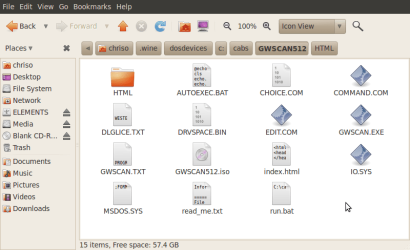
I extracted it to a folder in Wine, but there are a bunch of other files aside from the iso file...?

EDIT: read_me.txt tells me to just burn the ISO, and copy the other files to a bootable floppy, does anyone even own a floppy drive anymore?
 

Attachments

  • Screenshot-GWSCAN512 - File Browser.png
    Screenshot-GWSCAN512 - File Browser.png
    29.5 KB · Views: 2

My Computer

OS
W7 x64/x86 Ultimate + XP Mode; Ubuntu
CPU
AMD ATHLON X2 64 3.0GHz
Motherboard
M2N68-AM Plus
Memory
4GB DDR2 Kingston HyperX
Graphics Card(s)
ATI Radeon 4600 Series
Sound Card
Sound Blaster
Monitor(s) Displays
22" BenQ, 22" Samsung
Screen Resolution
1680x1050, 1920x1080
Hard Drives
WD5000AAKS
WDC6400AAK External
PSU
Gigabyte 600W
Case
Custom
Cooling
OCZ
Internet Speed
ADSL
The last build here had one! :D That was when trying to install Windows 3.1 on a virtual hard disk which didn't! :cry::sarc:

The iso will be your concern there however since you need to make a bootable cd with that and simply ignore the rest for the time being. Those are simply included for the floppy option if available like on an old boat anchor.

Once you see a good burn even with the WD iso and it loads properly you should see the results in only a few minutes once the scans complete.

Meanwhile I have to ask if you had oced anything lately like memory? That can stall 7 at the startup logo or prevent a good install if you have the memory clock raised up on the board at all. When trying a few things out on the new build here the clean install just seen on a new drive would stall at the logo screen! Once the memory clock was back on auto 7 loaded right up like nothing ever happened!

 

My Computers

System One System Two

  • Computer type
    PC/Desktop
    Computer Manufacturer/Model Number
    Custom builds = 2
    OS
    W7 Ultimate x64/W10 Pro x64/W11 Pro Triple Boot - Main PC W7 Remote PC Micro ATX W7 Pro x64/W11 Pro
    CPU
    AMD Phenom II X4 975 Deneb 3.6ghz - 965 2nd remote pc
    Motherboard
    Gigabyte GA-790XTA-UD4-Gigabyte GA-880GM-D2H remote pc
    Memory
    Kingston Hyper X DDR3 1600 1.5v 16gb - Hyper X Fury 8gb 2nd
    Graphics Card(s)
    MSI HD Radeon 5750 1gb - MSI HD Radeon 6450 on mini tower
    Sound Card
    Creative Labs X-Fi Xtreme Audio P - Realtek onooard 2nd case
    Monitor(s) Displays
    ASUS VW199T-P 19" HP 2082a Main-HP 2082a 20" remote pc
    Screen Resolution
    Asus 1440x900 - HP 1600x900
    Hard Drives
    WD Black 1TB HD per OS W7, W10, and pending W11 presently on 500gb OS Drive - Pending Triple 1TB HDs for Spanned Storage/backup volume
    Single 2TB external USB enclosure, single 1TB System 7 Host/Boot drive, Pending 8TB external HD for system image b
    PSU
    Corsair 750TX - primary / Corsair CX600 - second
    Case
    Antec 900-2 - SSD compatible / NZXT Vulcan mini tower
    Cooling
    Zalman CNPS9900A
    Keyboard
    AZIO L70 Backlit Letters Gaming - ONN Cordless/USB
    Mouse
    MSI DS200 Programmable, Logitech Cordless
    Internet Speed
    30mbps upgrade - primary hard wired - mini tower usb WiFi
    Antivirus
    GFI VIPRE Internet Security 2014 on W7 2016 beta on W10,
    Browser
    Cyberfox, WaterFox 64bit FF variants, FireFox x64, Pale Moon
    Other Info
    Accomdata fan cooled usb 2.0 PIDE/Sata II, III external enclosure.
    Sambient usb/eSata PATA/Sata II, III external enclosure.
  • Computer type
    PC/Desktop
    System Manufacturer/Model Number
    CUSTOM ASSEMBLY
    OS
    W7 Pro x64/W11 Pro
    CPU
    AMD Deneb 3.6ghz - 965
    Motherboard
    Gigabyte GA-880GM-D2H remote pc
    Memory
    Kingston Hyper X Fury 8gb
    Graphics Card(s)
    MSI HD Radeon 6450 DVI Output
    Sound Card
    Realtek onooard Creative or Other separate PENDING
    Monitor(s) Displays
    VIZIO 32" LCD TV Separate LCD Pending
    Screen Resolution
    1600x1080
    Hard Drives
    WD 500GB OS Host/Boot WD Green 1TB Storage/Backup
    PSU
    Corsair 600W - THERMALTAKE 600W spare case
    Case
    NZXT Vulcan mini tower
    Cooling
    Twin 120mm Top Fans - 240mm Side Cover
    Keyboard
    ONN Cordless/USB Logitech Cordless
    Mouse
    ONN USB/Cordless - Logitech Cordless
    Internet Speed
    DSL 5G
    Browser
    MS Edge, FireFox, WaterFox x64, FireFox Nightly
    Other Info
    OS Testing-Remote Access to Main TeamViewer
The last build here had one! :D That was when trying to install Windows 3.1 on a virtual hard disk which didn't! :cry::sarc:

The iso will be your concern there however since you need to make a bootable cd with that and simply ignore the rest for the time being. Those are simply included for the floppy option if available like on an old boat anchor.

Once you see a good burn even with the WD iso and it loads properly you should see the results in only a few minutes once the scans complete.

Meanwhile I have to ask if you had oced anything lately like memory? That can stall 7 at the startup logo or prevent a good install if you have the memory clock raised up on the board at all. When trying a few things out on the new build here the clean install just seen on a new drive would stall at the logo screen! Once the memory clock was back on auto 7 loaded right up like nothing ever happened!

Well I have pretty much confirmed it is my HDD, there are bad sectors and it freezes when I try to open certain things on the HDD. I tried running GWScan but it seemed like it froze, I left it on for 3 hours and after 30 minutes it said "Estimated TIme REmaining: 1 hour, 19 minutes, 30 seconds", then 2.5 hours later it still said the same thing and the progress bar hadn't moved at all...
 

My Computer

OS
W7 x64/x86 Ultimate + XP Mode; Ubuntu
CPU
AMD ATHLON X2 64 3.0GHz
Motherboard
M2N68-AM Plus
Memory
4GB DDR2 Kingston HyperX
Graphics Card(s)
ATI Radeon 4600 Series
Sound Card
Sound Blaster
Monitor(s) Displays
22" BenQ, 22" Samsung
Screen Resolution
1680x1050, 1920x1080
Hard Drives
WD5000AAKS
WDC6400AAK External
PSU
Gigabyte 600W
Case
Custom
Cooling
OCZ
Internet Speed
ADSL
Bad sectors or bad read heads I think you will be looking a new drive now. :(

I still have a pair of drives I simply left in the old case about 4yrs. old that still work like new if you need one of those! I noticed the WD5000AAKS and had been running a pair of those until going with the 1tb Black edition model.

It does sound a bit like one older drive I had quit on me only in reverse where you were able to read anything and run anything but couldn't write anything to the drive like installing Windows. This is why I keep an extra onhand and just finished creating 3 new system images on different drives on the new build here in case one lets go.
 

My Computers

System One System Two

  • Computer type
    PC/Desktop
    Computer Manufacturer/Model Number
    Custom builds = 2
    OS
    W7 Ultimate x64/W10 Pro x64/W11 Pro Triple Boot - Main PC W7 Remote PC Micro ATX W7 Pro x64/W11 Pro
    CPU
    AMD Phenom II X4 975 Deneb 3.6ghz - 965 2nd remote pc
    Motherboard
    Gigabyte GA-790XTA-UD4-Gigabyte GA-880GM-D2H remote pc
    Memory
    Kingston Hyper X DDR3 1600 1.5v 16gb - Hyper X Fury 8gb 2nd
    Graphics Card(s)
    MSI HD Radeon 5750 1gb - MSI HD Radeon 6450 on mini tower
    Sound Card
    Creative Labs X-Fi Xtreme Audio P - Realtek onooard 2nd case
    Monitor(s) Displays
    ASUS VW199T-P 19" HP 2082a Main-HP 2082a 20" remote pc
    Screen Resolution
    Asus 1440x900 - HP 1600x900
    Hard Drives
    WD Black 1TB HD per OS W7, W10, and pending W11 presently on 500gb OS Drive - Pending Triple 1TB HDs for Spanned Storage/backup volume
    Single 2TB external USB enclosure, single 1TB System 7 Host/Boot drive, Pending 8TB external HD for system image b
    PSU
    Corsair 750TX - primary / Corsair CX600 - second
    Case
    Antec 900-2 - SSD compatible / NZXT Vulcan mini tower
    Cooling
    Zalman CNPS9900A
    Keyboard
    AZIO L70 Backlit Letters Gaming - ONN Cordless/USB
    Mouse
    MSI DS200 Programmable, Logitech Cordless
    Internet Speed
    30mbps upgrade - primary hard wired - mini tower usb WiFi
    Antivirus
    GFI VIPRE Internet Security 2014 on W7 2016 beta on W10,
    Browser
    Cyberfox, WaterFox 64bit FF variants, FireFox x64, Pale Moon
    Other Info
    Accomdata fan cooled usb 2.0 PIDE/Sata II, III external enclosure.
    Sambient usb/eSata PATA/Sata II, III external enclosure.
  • Computer type
    PC/Desktop
    System Manufacturer/Model Number
    CUSTOM ASSEMBLY
    OS
    W7 Pro x64/W11 Pro
    CPU
    AMD Deneb 3.6ghz - 965
    Motherboard
    Gigabyte GA-880GM-D2H remote pc
    Memory
    Kingston Hyper X Fury 8gb
    Graphics Card(s)
    MSI HD Radeon 6450 DVI Output
    Sound Card
    Realtek onooard Creative or Other separate PENDING
    Monitor(s) Displays
    VIZIO 32" LCD TV Separate LCD Pending
    Screen Resolution
    1600x1080
    Hard Drives
    WD 500GB OS Host/Boot WD Green 1TB Storage/Backup
    PSU
    Corsair 600W - THERMALTAKE 600W spare case
    Case
    NZXT Vulcan mini tower
    Cooling
    Twin 120mm Top Fans - 240mm Side Cover
    Keyboard
    ONN Cordless/USB Logitech Cordless
    Mouse
    ONN USB/Cordless - Logitech Cordless
    Internet Speed
    DSL 5G
    Browser
    MS Edge, FireFox, WaterFox x64, FireFox Nightly
    Other Info
    OS Testing-Remote Access to Main TeamViewer
Just one last thing: can you verify the GWScan CD you burned using ImgBurn, and then run it's diagnostics/repair full scan on another drive so we know for sure it is not your burn or CD that is at fault?

I hate to give up on a HD if it can be saved. I would also myself run the free Partition Wizard CD HD surface scan and file checker to actually see the bad sectors on map, or a similar scan to verify the HD gone.
 
ImgBurn won't run in ubuntu however. This is why Chriso had to use wine to burn the first cd.

If the problem is only with a few bad sectors and not too bad then you can often patch up a drive to some extent. If however it turns out to be worn heads while the platters are intact you would still end needing new drive.

You'll know when getting a known to be good drive in and see that work well if the problem is limited to the drive by itself.

There's one other question I have to ask here about which mode do you have the main drive set for.... ACHI or Native ide? With the ACHI mode set on the new build here Windows would stall at the logo screen until changing it to the Native Ide mode in the bios. Just as as thought try loading the optimized defaults to see if that makes any difference there.
 
Last edited:

My Computers

System One System Two

  • Computer type
    PC/Desktop
    Computer Manufacturer/Model Number
    Custom builds = 2
    OS
    W7 Ultimate x64/W10 Pro x64/W11 Pro Triple Boot - Main PC W7 Remote PC Micro ATX W7 Pro x64/W11 Pro
    CPU
    AMD Phenom II X4 975 Deneb 3.6ghz - 965 2nd remote pc
    Motherboard
    Gigabyte GA-790XTA-UD4-Gigabyte GA-880GM-D2H remote pc
    Memory
    Kingston Hyper X DDR3 1600 1.5v 16gb - Hyper X Fury 8gb 2nd
    Graphics Card(s)
    MSI HD Radeon 5750 1gb - MSI HD Radeon 6450 on mini tower
    Sound Card
    Creative Labs X-Fi Xtreme Audio P - Realtek onooard 2nd case
    Monitor(s) Displays
    ASUS VW199T-P 19" HP 2082a Main-HP 2082a 20" remote pc
    Screen Resolution
    Asus 1440x900 - HP 1600x900
    Hard Drives
    WD Black 1TB HD per OS W7, W10, and pending W11 presently on 500gb OS Drive - Pending Triple 1TB HDs for Spanned Storage/backup volume
    Single 2TB external USB enclosure, single 1TB System 7 Host/Boot drive, Pending 8TB external HD for system image b
    PSU
    Corsair 750TX - primary / Corsair CX600 - second
    Case
    Antec 900-2 - SSD compatible / NZXT Vulcan mini tower
    Cooling
    Zalman CNPS9900A
    Keyboard
    AZIO L70 Backlit Letters Gaming - ONN Cordless/USB
    Mouse
    MSI DS200 Programmable, Logitech Cordless
    Internet Speed
    30mbps upgrade - primary hard wired - mini tower usb WiFi
    Antivirus
    GFI VIPRE Internet Security 2014 on W7 2016 beta on W10,
    Browser
    Cyberfox, WaterFox 64bit FF variants, FireFox x64, Pale Moon
    Other Info
    Accomdata fan cooled usb 2.0 PIDE/Sata II, III external enclosure.
    Sambient usb/eSata PATA/Sata II, III external enclosure.
  • Computer type
    PC/Desktop
    System Manufacturer/Model Number
    CUSTOM ASSEMBLY
    OS
    W7 Pro x64/W11 Pro
    CPU
    AMD Deneb 3.6ghz - 965
    Motherboard
    Gigabyte GA-880GM-D2H remote pc
    Memory
    Kingston Hyper X Fury 8gb
    Graphics Card(s)
    MSI HD Radeon 6450 DVI Output
    Sound Card
    Realtek onooard Creative or Other separate PENDING
    Monitor(s) Displays
    VIZIO 32" LCD TV Separate LCD Pending
    Screen Resolution
    1600x1080
    Hard Drives
    WD 500GB OS Host/Boot WD Green 1TB Storage/Backup
    PSU
    Corsair 600W - THERMALTAKE 600W spare case
    Case
    NZXT Vulcan mini tower
    Cooling
    Twin 120mm Top Fans - 240mm Side Cover
    Keyboard
    ONN Cordless/USB Logitech Cordless
    Mouse
    ONN USB/Cordless - Logitech Cordless
    Internet Speed
    DSL 5G
    Browser
    MS Edge, FireFox, WaterFox x64, FireFox Nightly
    Other Info
    OS Testing-Remote Access to Main TeamViewer
Back
Top