Windows 7 Stereo Mix

Totharious

New member
Local time
6:04 AM
Messages
4
Hi guys and gals,

I'm new to SevenForums and could use some help. I'm trying to resume my let's play series, but I don't have stereo mix on my system. I had it on my old computer using Windows XP Pro, but I built my own system and decided to install windows 7 on it. However, I don't know how to get stereo mix onto my system. Someone please help me. Here is the Summary Report on my System

--------[ Summary ]-----------------------------------------------------------------------------------------------------

Computer:
Operating System Windows 7 Ultimate Professional
OS Service Pack None
Internet Explorer 8.0.7100.0
Computer Name TONY-PC
User Name Tony
Logon Domain Tony-PC

Motherboard:
CPU Type AMD Athlon 64, 2600 MHz
Motherboard Name Unknown
Motherboard Chipset Unknown
System Memory 4094 MB
BIOS Type Unknown
Communication Port Communications Port (COM1)

Display:
Video Adapter ATI Radeon HD 4670
Monitor HSD HF199H [NoDB] (8091039A)

Multimedia:
Audio Adapter High Definition Audio Controller [NoDB]

Storage:
Floppy Drive Floppy disk drive
Disk Drive WDC WD10EADS-00M2B0 ATA Device
Disk Drive WDC WD1600BB-00FTA0 ATA Device
Optical Drive TSSTcorp CDDVDW SH-S223L ATA Device

Partitions:
C: (NTFS) 953766 MB (528704 MB free)
F: (NTFS) 152617 MB (38278 MB free)

Input:
Keyboard Standard PS/2 Keyboard
Mouse HID-compliant mouse
Game Controller Microsoft PC-joystick driver

Network:
Network Adapter Atheros AR8121/AR8113/AR8114 PCI-E Ethernet Controller

Peripherals:
Printer Fax
Printer Microsoft XPS Document Writer
USB Device USB Composite Device
USB Device USB Input Device
USB Device USB PnP Sound Device
 

My Computer

OS
Windows 7
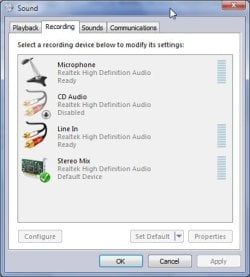
OK, let's try the easiest solution first. Right Click on the speaker in the lower right corner and click on "Recording Devices". Right Click on anything that it shows there and make sure that both "Show Disabled Devices" and "Show Disconnected Devices" are checked.

If they are checked, do you see Stereo Mix and, if so, is it greyed out?

If you see it and it is greyed out, all you have to do is Right Click it and select Enable. After that you should be good to go.
 

My Computer

Computer type
PC/Desktop
Computer Manufacturer/Model Number
SuperBeast
OS
Windows 10 Tech Preview 9926 x64
CPU
AMD FX-8350
Motherboard
Gigabyte GA-990FXA-UD3
Memory
16GB DDR3 1333
Graphics Card(s)
Asus R9 290 DirectCU II OC, Gigabyte Windforce R9 290 OC
Sound Card
Integrated w/ Creative A250 2.1 speakers
Monitor(s) Displays
Main: Asus VN289H 28" Secondary: Acer G246HL 24"
Screen Resolution
1920x1080
Hard Drives
128 GB SanDisk Ultra Plus (Windows drive)

240 GB Crucial M500 SSD (Games drive)

1 TB WDC WD10EACS 7200RPM HDD (Data drive)

2 TB Seagate Expansion Desktop external HDD (Backup drive)
PSU
900w Antec HCG-900
Case
Raidmax Agusta Full ATX
Cooling
Corsair H80
Keyboard
Cooler Master Devastator MB24
Mouse
Cooler Master Devastator MS2K 1000/1600/2000 DPI
Internet Speed
100Mbps cable
Antivirus
Avast!
Browser
Chrome
What sound card does the system have? With mine (IDT Integrated Audio on a Dell Studio 15 laptop), I had to download the drives from Dell's website. Seems the drivers automatically installed by Windows Update didn't have stereo mix, but the Dell ones do.
 

My Computer

Computer Manufacturer/Model Number
Dell Studio 15
OS
Windows 7 Professional 64-bit from MSDNAA
CPU
Intel Core 2 Duo P8600 (2.4 GHz)
Memory
4 GB
Graphics Card(s)
ATI Mobility Radeon HD 4500
I already Tried showing Disabled Devices and disconnected... but it still didn't show up... And I don't know what Kind of Sound card I have... its the Integrated one on my ASUS Motherboard.
 

My Computer

OS
Windows 7
Do you know your mobo model?
 

My Computer

Computer type
PC/Desktop
Computer Manufacturer/Model Number
SuperBeast
OS
Windows 10 Tech Preview 9926 x64
CPU
AMD FX-8350
Motherboard
Gigabyte GA-990FXA-UD3
Memory
16GB DDR3 1333
Graphics Card(s)
Asus R9 290 DirectCU II OC, Gigabyte Windforce R9 290 OC
Sound Card
Integrated w/ Creative A250 2.1 speakers
Monitor(s) Displays
Main: Asus VN289H 28" Secondary: Acer G246HL 24"
Screen Resolution
1920x1080
Hard Drives
128 GB SanDisk Ultra Plus (Windows drive)

240 GB Crucial M500 SSD (Games drive)

1 TB WDC WD10EACS 7200RPM HDD (Data drive)

2 TB Seagate Expansion Desktop external HDD (Backup drive)
PSU
900w Antec HCG-900
Case
Raidmax Agusta Full ATX
Cooling
Corsair H80
Keyboard
Cooler Master Devastator MB24
Mouse
Cooler Master Devastator MS2K 1000/1600/2000 DPI
Internet Speed
100Mbps cable
Antivirus
Avast!
Browser
Chrome
Looks like that motherboard has a VIA VT1708S sound card. Please try the latest drivers (7.300A, dated August 21, 2009) and see if they fix your problem :)
 

My Computer

Computer Manufacturer/Model Number
Dell Studio 15
OS
Windows 7 Professional 64-bit from MSDNAA
CPU
Intel Core 2 Duo P8600 (2.4 GHz)
Memory
4 GB
Graphics Card(s)
ATI Mobility Radeon HD 4500
Ok... I updated my drivers and I got a Stereo mix, but its not picking up my headset or my ingame sounds I'm trying to record. I tried setting it as default, but it didn't pick up on them.
 

My Computer

OS
Windows 7
I too am having the same problem....I can listen to music just fine. I can also play my guitar thru my line-in and hear it thru the headphones plugged into the computer. Yet, I cannot record myself playing to some music on my computer because the STEREO MIX does not work...

It's frustrating!! There must be a fix.

I have an integrated sound card - a VIA VT 1708B on an Asus P5KPL-CM mobo.

And, yes I've tried "enabling" the stereo-mix to no avail, and I've updated my VIA sound wafer with VIA's latest 2009 driver updates....still cant record my guitar sound with music playing over the internet, or from my CD drive.....sucks!
 

My Computer

Computer Manufacturer/Model Number
Ibuypower
OS
windows 7
CPU
E8400 dual core
Motherboard
p5kpl-cm
Memory
4gb
Graphics Card(s)
Nvidia GTS 250 512mb
Sound Card
VIA vt 1708B 8-ch Hi-Def audio
Monitor(s) Displays
viewsonic vx2240w
Hard Drives
300mb hitachi
PSU
600w
Case
ikonic zaria
Cooling
atmospheric
i am familiar with this problem! and you can find it through the whole internet and on all sorts of forums!
there even are video's how to handle this situation on youtube xD
though not all of the problems are the same and need the same solution..
my problem was solved not by updating any drivers or editting any setting at all..
it was solved with an extra cable!
i wanted to record directly from my soundcard and not through a external mic as quality gets lost in that way!
i don't know what ports you have available and what ports you are using..
but if you have 2 ports free you can maybe solve the problem the way i did as well?!

i have a 5.1 surround set on my blue(line in set to back speakers), green (headphone set to front speakers) and pink(mic set to middle & woofer) ports at the back of my pc
which still leaves me 2 ports free @ front of PC
one green and one pink.
just plug in this cable in the ports!
http://img.alibaba.com/photo/11730506/Audio_Extension_Cable.jpg
or any similar cable of course (jack to jack cable)
(make sure you have the setting on that you're having one of those ports play the music you normally play as well, and the other port as mic in)
you might need to check for a setting "let the the audio devices @ the back & the front of the computer play the same audio stream"

hope this will solve some of you their problems..
 

My Computer

OS
-
CPU
Intel I7 950 3.06 Ghz
Motherboard
Asus P6T6 WS Revolution
Memory
Kingston HyperX DDR3 3x 2GB 2000Mhz Tall Heatsink (6 Gb)
Graphics Card(s)
ASUS EAH4890/HTDI/1GD5
Sound Card
ADI 2000B, 8 -Channel High Definition Audio
Monitor(s) Displays
Iiyama ProLite E2407 HDSV
Hard Drives
x
PSU
Antec 750 Watt
Case
Antec Twelvehundred
Cooling
No extra coolings than the onboard ones
Beginning with Windows Vista and further nailed down in Windows 7:

No one can record audio! Microsoft Windows itself is preventing this in an effort to protect Intellectual Rights Management.

Unfortunately, others doing legitimate things (like making a recording of your guitar rifts) lose out.

Microsoft Windows may go a step further with this in the future by preventing video captures as well.
 

My Computer

Computer Manufacturer/Model Number
DELL D630 T7500
OS
Windows 7 64-bit
CPU
Core Duo
Memory
8.00 GB
Graphics Card(s)
NVIDIA Quadro FX 370
Monitor(s) Displays
Dual DELL 2007WPF 22" displays
Screen Resolution
1680 x 1050 (recommended)
Contrary to what the user above posted, there is no such restriction in Windows.
I have StereoMix and used Windows 7 built in sound recorder to record 13 seconds of Kryptonite - 3 Door Down.
http://bit.ly/8WZXhH
 

My Computer

Computer type
PC/Desktop
Computer Manufacturer/Model Number
Alienware Aurora ALX R4
OS
Windows 10 Pro (x64)
CPU
Intel Core i7-3930K (3.2GHz - 4.5GHz)
Motherboard
Alienware Aurora-R4 x79
Memory
4x Samsung 4GB PC3-12800 DDR3 (16GB 1600MHz)
Graphics Card(s)
Nvidia Geforce GTX 690
Sound Card
SteelSeries Siberia Elite
Monitor(s) Displays
Dell UltraSharp U3011
Screen Resolution
2560x1600
Hard Drives
Samsung 850 Pro 256 GB, Seagate 1TB Desktop Hybrid HDD, 2x Western Digital 4TB Green HDD
PSU
875W Some Dell PSU <.<
Case
Alienware Aurora ALX
Cooling
Custom Liquid Cooling (EK CPU & GPU blocks) dual EK 480RAD
Keyboard
Logitech G710+ Mechanical
Mouse
Logitech G700s
Internet Speed
Verizon Fios (50 mbps average)
Other Info
Server: Intel NUC D54250WYK: i5-4250U, 16GB, 256 GB mSATA, Windows Server 2012 R2
Contrary to what the user above posted, there is no such restriction in Windows.


Exactly....

Here's a graphic of my Recording Devices.

RecordDevices.jpg


What may be happening is that some of the different Realtek models do not have this feature... probably because it's cheaper to manufacture.

Ap
 

My Computer

Computer Manufacturer/Model Number
Assembled in my workshop
OS
Windows 7 Home Premium
CPU
Intel Core 2 Duo @ 3.00gHz
Motherboard
Gigabyte GA-P35-S3G
Memory
4 GB
Graphics Card(s)
ATI Radeon HD 2600 XT
Sound Card
RME 24/96 Card, Realtek Internal Audio PreSonus FireStudio
Monitor(s) Displays
Acer 1917 (x2)
Screen Resolution
1280 x 1024 on both monitors
Hard Drives
Three 250GB Seagate SATA Barracuda 7200rpm
PSU
Rosewill 500-watt
Case
Rosewill mid-tower
Cooling
Noctua NH-U9B (CPU), PwrSupply fan + single large case Fan
Keyboard
Macally w/2/USB ports.
Mouse
Trackman Wheel
Other Info
Event 20/20 bas studio monitors, Yamaha sub.
Rackmount Korg/Roland/Yamaha synthesizers,
Cubase MIDI/audio recording. Sony Soundforge audio/mastering software. CD Architect Mastering. RME & Presonus audio interfaces.
Back
Top