Solved Windows 7 stuck at update 100 of 234.!

RogueAngel

New member
Local time
11:24 AM
Messages
4
Location
Heerlen, Netherlands
Newly installed Windows 7 on an HP laptop. 24 hours later, after logging out, it said updates needed. No problem there, except there were 234 updates needed.! I didn't turn it off, just left it overnight to do its thing. This morning, it's installing update 100... and has been for the past 4 hours. I powered down, waited 20 seconds, powered back up, to the same page. "Installing update 100 of 234"... I don't know what to do now.?
 

My Computer My Computer

At a glance

Windows 7 HPIntel Celeron 585/2.16GHz1GB RAMIntel GMA 4500MHD
Computer type
Laptop
Computer Manufacturer/Model Number
HP Compaq 6730s
OS
Windows 7 HP
CPU
Intel Celeron 585/2.16GHz
Motherboard
Mobile Intel GL40 Express - 667MHz
Memory
1GB RAM
Graphics Card(s)
Intel GMA 4500MHD
Sound Card
AD1984A
Monitor(s) Displays
15.4" WXGA
Screen Resolution
1280x800
Hard Drives
160GB
Internet Speed
-47
Antivirus
Avast
Browser
Google Chrome
Can't download or install 'fix'.

Thank you for the tip. Unfortunately, I cannot download or install anything, as I can't access my laptop, due to it being stuck on the 100th update. And I can't dowload from this tablet.
 

My Computer My Computer

At a glance

Windows 7 HPIntel Celeron 585/2.16GHz1GB RAMIntel GMA 4500MHD
Computer type
Laptop
Computer Manufacturer/Model Number
HP Compaq 6730s
OS
Windows 7 HP
CPU
Intel Celeron 585/2.16GHz
Motherboard
Mobile Intel GL40 Express - 667MHz
Memory
1GB RAM
Graphics Card(s)
Intel GMA 4500MHD
Sound Card
AD1984A
Monitor(s) Displays
15.4" WXGA
Screen Resolution
1280x800
Hard Drives
160GB
Internet Speed
-47
Antivirus
Avast
Browser
Google Chrome
Hi and welcome to SevenForums,
I'd sit it out or start over with the install
It's a lot easier to clean install these days with the unofficial sp2
There are essentially 3 updates needed for a clean install of windows that will get you updated through April of 2016

KB3020369 & KB3125574 & KB3172605 all can be downloaded from the M$ catalog using internet explorer
Microsoft Update Catalog

https://blogs.technet.microsoft.com...17/simplifying-updates-for-windows-7-and-8-1/
When manually installing updates you need to switch your update settings to Never check for updates and restart the machine first.

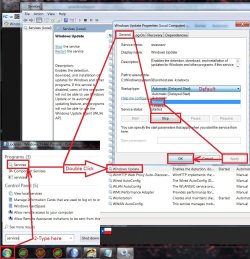
After restart you will need to ensure the built in windows update service is stopped and set to manual first too or it will conflict with the stand alone installer.
service stop windows update.jpg
Afterwards reset the windows updates service to what it was before and update settings to your preference and check for updates
Should be only 50 or so updates left to install.

I have all three updates needed on my OneDrive too if you can't or don't want to deal with the catalog
https://1drv.ms/f/s!AsjD7o6P3KLKj2TjShn8-SumV1rr
 

My Computer My Computer

At a glance

Win-7-Pro64bit 7-H-Prem-64biti7-5930K 2nd i9-9940x both water blocked VRM'...Trident-z 3200C14 2nd Trident-z 3600C16EVGA 1080ti ftw3 2nd Titan Xp both water blocked
Computer type
PC/Desktop
Computer Manufacturer/Model Number
Custom assembled by me :}
OS
Win-7-Pro64bit 7-H-Prem-64bit
CPU
i7-5930K 2nd i9-9940x both water blocked VRM's too
Motherboard
ASUS SABERTOOTH X99 2nd ASUS x299 Apex
Memory
Trident-z 3200C14 2nd Trident-z 3600C16
Graphics Card(s)
EVGA 1080ti ftw3 2nd Titan Xp both water blocked
Sound Card
Built-in Realtek
Monitor(s) Displays
1-AOC G2460PG 24"G-Sync 144Hz/ 2nd 1-ASUS VG248QE 24" 144Hz
Screen Resolution
1920 x 1080 144Hz
Hard Drives
2-Samsung M.2 Evo & Evo Plus
2-Samsung 850 EVO 500GB SSD's/ 3-2.5 W.D. Black 1tb-&3-1tb/3-3.5 WD Black 1tb hdd's
PSU
EVGA SuperNOVA 1000-P2 2nd 1200-P2
Case
2-Corsair Obsidian Series 450D Black ATX Mid Tower
Cooling
Custom water loops
Keyboard
Logitech G710+/ 2nd Logitech G910
Mouse
2-RedDragon M901 Perdition 16400 dpi Gaming mouse = wired
Internet Speed
Comcast Ping 19ms 89.31mbps download speed 6.12mbps upload
Antivirus
Malwarebytes Pro/ Superantispyware Pro
Browser
FireFox & Pale moon
Other Info
2nd ASUS X299 Apex/Intel i9-9940x with Custom water loop/7H-Prem-x64/Corsair 450D case/Ram Trident-z 3600C16 4x8gb / Samsung970Evo plus 500gb SSD/Dual ssd EZ swap evo/PSU EVGA SuperNova 1200w-P2 80+Platinum/GPU Titan Xp /8-ML-140 on push-pull on 2-280GTX rads
Turned off auto-updates and restarted. Had to wait for 29 updates to install. Found and clicked download on the recommended updates. KB3020369 and KB3172605 are already installed. KB3125574 not applicable to my computer. (?) Does this mean it's already installed, or that I don't need it.?
 

My Computer My Computer

At a glance

Windows 7 HPIntel Celeron 585/2.16GHz1GB RAMIntel GMA 4500MHD
Computer type
Laptop
Computer Manufacturer/Model Number
HP Compaq 6730s
OS
Windows 7 HP
CPU
Intel Celeron 585/2.16GHz
Motherboard
Mobile Intel GL40 Express - 667MHz
Memory
1GB RAM
Graphics Card(s)
Intel GMA 4500MHD
Sound Card
AD1984A
Monitor(s) Displays
15.4" WXGA
Screen Resolution
1280x800
Hard Drives
160GB
Internet Speed
-47
Antivirus
Avast
Browser
Google Chrome
Hi,
Once other updates are installed yes KB3125574 becomes not applicable to the machine
Only KB3020369 can and must be stalled in advance to be able to install it
KB3172605 just has the latest update client in it so it should technically be installed last after the other two and should solve any issues searching for the remaining updates not included in KB3125574 which was good up to April 2016.

So if you want to use KB3125574 you'd have to start over from the dvd or flash installer.
 

My Computer My Computer

At a glance

Win-7-Pro64bit 7-H-Prem-64biti7-5930K 2nd i9-9940x both water blocked VRM'...Trident-z 3200C14 2nd Trident-z 3600C16EVGA 1080ti ftw3 2nd Titan Xp both water blocked
Computer type
PC/Desktop
Computer Manufacturer/Model Number
Custom assembled by me :}
OS
Win-7-Pro64bit 7-H-Prem-64bit
CPU
i7-5930K 2nd i9-9940x both water blocked VRM's too
Motherboard
ASUS SABERTOOTH X99 2nd ASUS x299 Apex
Memory
Trident-z 3200C14 2nd Trident-z 3600C16
Graphics Card(s)
EVGA 1080ti ftw3 2nd Titan Xp both water blocked
Sound Card
Built-in Realtek
Monitor(s) Displays
1-AOC G2460PG 24"G-Sync 144Hz/ 2nd 1-ASUS VG248QE 24" 144Hz
Screen Resolution
1920 x 1080 144Hz
Hard Drives
2-Samsung M.2 Evo & Evo Plus
2-Samsung 850 EVO 500GB SSD's/ 3-2.5 W.D. Black 1tb-&3-1tb/3-3.5 WD Black 1tb hdd's
PSU
EVGA SuperNOVA 1000-P2 2nd 1200-P2
Case
2-Corsair Obsidian Series 450D Black ATX Mid Tower
Cooling
Custom water loops
Keyboard
Logitech G710+/ 2nd Logitech G910
Mouse
2-RedDragon M901 Perdition 16400 dpi Gaming mouse = wired
Internet Speed
Comcast Ping 19ms 89.31mbps download speed 6.12mbps upload
Antivirus
Malwarebytes Pro/ Superantispyware Pro
Browser
FireFox & Pale moon
Other Info
2nd ASUS X299 Apex/Intel i9-9940x with Custom water loop/7H-Prem-x64/Corsair 450D case/Ram Trident-z 3600C16 4x8gb / Samsung970Evo plus 500gb SSD/Dual ssd EZ swap evo/PSU EVGA SuperNova 1200w-P2 80+Platinum/GPU Titan Xp /8-ML-140 on push-pull on 2-280GTX rads
As the first and last are already installed, I'm not going to complain. Just hope I don't get the 234 updates window again...

Thank you for your help TZ.
 

My Computer My Computer

At a glance

Windows 7 HPIntel Celeron 585/2.16GHz1GB RAMIntel GMA 4500MHD
Computer type
Laptop
Computer Manufacturer/Model Number
HP Compaq 6730s
OS
Windows 7 HP
CPU
Intel Celeron 585/2.16GHz
Motherboard
Mobile Intel GL40 Express - 667MHz
Memory
1GB RAM
Graphics Card(s)
Intel GMA 4500MHD
Sound Card
AD1984A
Monitor(s) Displays
15.4" WXGA
Screen Resolution
1280x800
Hard Drives
160GB
Internet Speed
-47
Antivirus
Avast
Browser
Google Chrome
Back
Top