Windows 7 Student Edition

nolephin

New member
Local time
2:00 AM
Messages
32
I upgraded from Vista Home to the Student Edition 32. Unfortunately I did not know the computer would run slower cause of the programs and files brought over from Vista.

So now I want to run a clean install of Windows 7 from the download off of Digital River I believe.

My main issue is this:

The only program I really need to backup is Microsoft Office. I do not have the CD anymore, so I need to back it up someway in order to install it again after the clean install. Does anyone know how to do this?
 

My Computer

OS
XP
You need the install disk to reinstall MS office.

Do you have the packaging to find the key?

If not, you can secure the key by downloading and running BelArc advisor, then borrow an installer disk or ask MS to replace it provided it's legit.

Maybe we can help you troubleshoot the slowness of the in-place Upgrade. Look in Computer>Manage>Device manager to see if any yellow exclamation marks show hardware errors.

Look in Computer>Manage>Event Viewer>Administrative view to google any critical or errors to learn about and resolve them.

Click on Computer>Properties>Windows Experience Index highlighted link, then Advanced tools and run Windows Diagnostic Test. Also check the Perfomance Log.

Do you have any specific performance problems?
 
nolephin,
Backing up programs and being able to run them on different Operating Systems can not be done..

However you can install OpenOffice it is a free program and works with Microsoft Office file formats..like the (.docx) Click here to download it if you are interestad...

Hope this Helps..
 

My Computer

Computer Manufacturer/Model Number
HP Pavilion dv5 Notebook PC
OS
Windows Seven x64
CPU
2.2 GHz Dual Core
Motherboard
Quanta 3600
Memory
4GB
Graphics Card(s)
ATI Mobility RADEON HD 3470
Sound Card
ATI
Monitor(s) Displays
Laptop
Hard Drives
ATA Hitachi HTS543215 (5400RPM)
Case
Laptop
Cooling
Fan
Internet Speed
Basic DSL 1.5 up and Down
You need the install disk to reinstall MS office.

Do you have the packaging to find the key?

If not, you can secure the key by downloading and running BelArc advisor, then borrow an installer disk or ask MS to replace it provided it's legit.

Maybe we can help you troubleshoot the slowness of the in-place Upgrade. Look in Computer>Manage>Device manager to see if any yellow exclamation marks show hardware errors.

Look in Computer>Manage>Event Viewer>Administrative view to google any critical or errors to learn about and resolve them.

Click on Computer>Properties>Windows Experience Index highlighted link, then Advanced tools and run Windows Diagnostic Test. Also check the Perfomance Log.

Do you have any specific performance problems?

Basically the problem I have is that the computer boots up terribly slow. I used a program to check the time it took to boot up my computer and it registered 194 seconds. I read on the other Windows 7 forum that this guy has his computer booting up at 17 seconds and he has 3G of memory. I have 4g.

I heard that in order to really maximize your performance you have to run a clean install, so thats where I am at right now. I don't really have many programs that i absolutely need, in fact the only program I do need is Microsoft Office. Unless I start using that Open Office.org program.

Unless you can help me bring my computer up to speed in terms of booting up and overral performance, I think I might just have to run a clean install of Windows 7.
 

My Computer

OS
XP
nolephin,
Try some of these programs and tips to speed up your computer..

  1. Unstall any programs that you do not use..(If you are unsure about a program post it here or search on the web)
  2. Try Disk Cleanup in Windows 7 just search it in the start menu.
  3. Try CCleaner (small program that finds all the junk download HERE (if interested))
  4. Run Disk Defragmenter search it in the start menu..
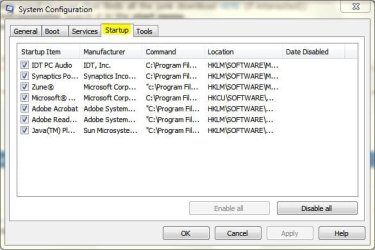
  5. Check your startup programs type msconfig in the search bar in the start menu
msconfig.JPG
..(Just uncheck them again post any questions here if unsure or search them on the web)


Hope this Helps..
 

My Computer

Computer Manufacturer/Model Number
HP Pavilion dv5 Notebook PC
OS
Windows Seven x64
CPU
2.2 GHz Dual Core
Motherboard
Quanta 3600
Memory
4GB
Graphics Card(s)
ATI Mobility RADEON HD 3470
Sound Card
ATI
Monitor(s) Displays
Laptop
Hard Drives
ATA Hitachi HTS543215 (5400RPM)
Case
Laptop
Cooling
Fan
Internet Speed
Basic DSL 1.5 up and Down
Thanks for the suggestions Ryan.

I think in order to give myself the best possibility of an efficient running computer I will need to try the clean install. The upgrade from Vista to Windows 7 just brought too many unneeded programs which I am not knowledgeable enough to remove manually.
 

My Computer

OS
XP

My Computer

Computer Manufacturer/Model Number
HP Pavilion dv5 Notebook PC
OS
Windows Seven x64
CPU
2.2 GHz Dual Core
Motherboard
Quanta 3600
Memory
4GB
Graphics Card(s)
ATI Mobility RADEON HD 3470
Sound Card
ATI
Monitor(s) Displays
Laptop
Hard Drives
ATA Hitachi HTS543215 (5400RPM)
Case
Laptop
Cooling
Fan
Internet Speed
Basic DSL 1.5 up and Down
Basically the problem I have is that the computer boots up terribly slow. I used a program to check the time it took to boot up my computer and it registered 194 seconds. I read on the other Windows 7 forum that this guy has his computer booting up at 17 seconds and he has 3G of memory. I have 4g.

Just a little piece of advice....while 194 seconds is indeed a bit on the slow side....just remember that the person who posts that his computer boots in 17 seconds might not be exactly telling the truth. Or they may just inadvertently be misrepresenting the facts...for example, exactly when are they timing from??

For example, I have a new build that is about 4 months old. It's an Intel Q9550 Quad Core 2.83Ghz overclocked the 3.2Ghz. 8GB of G.Skill DDR2 800 RAM with 4-4-4-12 timings, I'm running an Intel X25-M Gen2 80GB SSD drive as my boot drive, I've got a 1TB Western Digital Caviar Black hosting my page file and providing storage space. It's in an Antec P182 case, with a 620W Corsair HX modular power supply, and a 22X DVD Burner. Total cost of the box, including the OEM license for Vista with free upgrade to Windows 7 came out to about $1500. It's running 64-bit Windows 7.

From the time I hit the power button until my monitor comes to life : 12 seconds
From the time I hit the power button until my POST is complete: 20 seconds
From the time I hit the power button until my login window appears: 35 seconds

So, I would say that my box actually "boots" Windows in about 15 seconds...of course this doesn't take into account the time to actually get to my desktop...but after I type the password it happens almost instantly with my SSD drive. I never consider the time to POST as this time happens regardless of which OS (Windows, Linux, etc)

However, an application that you run which times your boot time, might take into account the 1). Time to POST 2). Time to Boot Windows 3). Time until logged in and the application itself can stop it's timer. Thus, I say my box boots in 15 seconds....but your application might say 45 seconds. That's a big difference when measuring the same thing.


For another reference, I built a machine at work recently with an Intel Core 2 Duo E8400 CPU at 3.0Ghz, 4GB of Corsair RAM, and a 500GB Western Digital Caviar Blue drive. With Windows 7 64-bit , this box clocks in at about 60 seconds from a power button push until I'm at the login screen for Windows.

Note: In both cases, these are pretty clean builds. I've probably only installed about a dozen small apps (like firefox, notpad++, ImgBurn, 7Zip, Paint.net). The only larger apps installed include VMware, VirtualBox, and OpenOffice. So, if I had more stuff installed, my boot times would naturally be longer. I am running Microsoft Security Essentials and have made no other tweaks or modifications to improve my boot times.

 
Last edited:

My Computer

Computer Manufacturer/Model Number
Self-Built in July 2009
OS
Windows 7 Ultimate x64
CPU
Intel Q9550 2.83Ghz OC'd to 3.40Ghz
Motherboard
Gigabyte GA-EP45-UD3R rev. 1.1, F12 BIOS
Memory
8GB G.Skill PI DDR2-800, 4-4-4-12 timings
Graphics Card(s)
EVGA 1280MB Nvidia GeForce GTX570
Sound Card
Realtek ALC899A 8 channel onboard audio
Monitor(s) Displays
23" Acer x233H
Screen Resolution
1920x1080
Hard Drives
Intel X25-M 80GB Gen 2 SSD
Western Digital 1TB Caviar Black, 32MB cache. WD1001FALS
PSU
Corsair 620HX modular
Case
Antec P182
Cooling
stock
Keyboard
ABS M1 Mechanical
Mouse
Logitech G9 Laser Mouse
Internet Speed
15/2 cable modem
Other Info
Windows and Linux enthusiast. Logitech G35 Headset.
Ok that sounds good..

Here is a tutorial to help you do a Clean install with an Upgrade Disk of Windows 7 .
If you have any questions let us know..

Hope this Helps..

Just to make sure, I have to do option 2, correct? The Custom Install? It says something about a Windows.old folder? What exactly is that?

Remember I am running the program from the Digital River download.

Also, after the clean install completes, will programs like "Fingerprint Reader" which came with my computer initially and allows access into my computer by reading my fingerprint be on my computer as well?

I understand programs like AIM, Openoffice, and Mozilla Firefox will have to be re-downloaded, but what about programs that came with the original computer set up?
 

My Computer

OS
XP
Basically the problem I have is that the computer boots up terribly slow. I used a program to check the time it took to boot up my computer and it registered 194 seconds. I read on the other Windows 7 forum that this guy has his computer booting up at 17 seconds and he has 3G of memory. I have 4g.

Just a little piece of advice....while 194 seconds is indeed a bit on the slow side....just remember that the person who posts that his computer boots in 17 seconds might not be exactly telling the truth. Or they may just inadvertently be misrepresenting the facts...for example, exactly when are they timing from??

For example, I have a new build that is about 4 months old. It's an Intel Q9550 Quad Core 2.83Ghz overclocked the 3.2Ghz. 8GB of G.Skill DDR2 800 RAM with 4-4-4-12 timings, I'm running an Intel X25-M Gen2 80GB SSD drive as my boot drive, I've got a 1TB Western Digital Caviar Black hosting my page file and providing storage space. It's in an Antec P182 case, with a 620W Corsair HX modular power supply, and a 22X DVD Burner. Total cost of the box, including the OEM license for Vista with free upgrade to Windows 7 came out to about $1500. It's running 64-bit Windows 7.

From the time I hit the power button until my monitor comes to life : 12 seconds
From the time I hit the power button until my POST is complete: 20 seconds
From the time I hit the power button until my login window appears: 35 seconds

So, I would say that my box actually "boots" Windows in about 15 seconds...of course this doesn't take into account the time to actually get to my desktop...but after I type the password it happens almost instantly with my SSD drive. I never consider the time to POST as this time happens regardless of which OS (Windows, Linux, etc)

However, an application that you run which times your boot time, might take into account the 1). Time to POST 2). Time to Boot Windows 3). Time until logged in and the application itself can stop it's timer. Thus, I say my box boots in 15 seconds....but your application might say 45 seconds. That's a big difference when measuring the same thing.


For another reference, I built a machine at work recently with an Intel Core 2 Duo E8400 CPU at 3.0Ghz, 4GB of Corsair RAM, and a 500GB Western Digital Caviar Blue drive. With Windows 7 64-bit , this box clocks in at about 60 seconds from a power button push until I'm at the login screen for Windows.

Note: In both cases, these are pretty clean builds. I've probably only installed about a dozen small apps (like firefox, notpad++, ImgBurn, 7Zip, Paint.net). The only larger apps installed include VMware, VirtualBox, and OpenOffice. So, if I had more stuff installed, my boot times would naturally be longer. I am running Microsoft Security Essentials and have made no other tweaks or modifications to improve my boot times.

I think he got his times using a boot up timing program or something.

The way he says he got his computer booting so fast was through disabling unneeded programs that slow down the performance of the computer.

Here is the link:

Windows 7 Tweaks, Tricks, Tips, Secrets, Shortcuts, Solutions and Fixes
 

My Computer

OS
XP
Ok that sounds good..

Here is a tutorial to help you do a Clean install with an Upgrade Disk of Windows 7 .
If you have any questions let us know..

Hope this Helps..

Just to make sure, I have to do option 2, correct? The Custom Install? It says something about a Windows.old folder? What exactly is that?

Remember I am running the program from the Digital River download.

Also, after the clean install completes, will programs like "Fingerprint Reader" which came with my computer initially and allows access into my computer by reading my fingerprint be on my computer as well?

I understand programs like AIM, Openoffice, and Mozilla Firefox will have to be re-downloaded, but what about programs that came with the original computer set up?


Yes option 2..

The windows.old folder keeps your files when you do a clean install..after Windows 7 installs you can transfer your files and or just delete the windows.old folder..

What is your computers manufacturer?? and what is you Model??

Yes you will need to download your fingerprint reader and some other drivers they are available at your computers manufacturer website...

Hope this Helps..
 

My Computer

Computer Manufacturer/Model Number
HP Pavilion dv5 Notebook PC
OS
Windows Seven x64
CPU
2.2 GHz Dual Core
Motherboard
Quanta 3600
Memory
4GB
Graphics Card(s)
ATI Mobility RADEON HD 3470
Sound Card
ATI
Monitor(s) Displays
Laptop
Hard Drives
ATA Hitachi HTS543215 (5400RPM)
Case
Laptop
Cooling
Fan
Internet Speed
Basic DSL 1.5 up and Down
Ok that sounds good..

Here is a tutorial to help you do a Clean install with an Upgrade Disk of Windows 7 .
If you have any questions let us know..

Hope this Helps..

Just to make sure, I have to do option 2, correct? The Custom Install? It says something about a Windows.old folder? What exactly is that?

Remember I am running the program from the Digital River download.

Also, after the clean install completes, will programs like "Fingerprint Reader" which came with my computer initially and allows access into my computer by reading my fingerprint be on my computer as well?

I understand programs like AIM, Openoffice, and Mozilla Firefox will have to be re-downloaded, but what about programs that came with the original computer set up?


Yes option 2..

The windows.old folder keeps your files when you do a clean install..after Windows 7 installs you can transfer your files and or just delete the windows.old folder..

What is your computers manufacturer?? and what is you Model??

Yes you will need to download your fingerprint reader and some other drivers they are available at your computers manufacturer website...

Hope this Helps..

I have a Dell XPS M1330 Laptop.

How do I know which drivers I would need to install?
 

My Computer

OS
XP
Vista Drivers will work with your current laptop..

Here is the the Website..

To know if you need the drivers you can either download all of them to a flash drive..and then install Windows 7 or install Windows 7 and after you update it then you can check the Device Manger.. to which drivers are not installed..

Hope this Helps..
 

My Computer

Computer Manufacturer/Model Number
HP Pavilion dv5 Notebook PC
OS
Windows Seven x64
CPU
2.2 GHz Dual Core
Motherboard
Quanta 3600
Memory
4GB
Graphics Card(s)
ATI Mobility RADEON HD 3470
Sound Card
ATI
Monitor(s) Displays
Laptop
Hard Drives
ATA Hitachi HTS543215 (5400RPM)
Case
Laptop
Cooling
Fan
Internet Speed
Basic DSL 1.5 up and Down
Vista Drivers will work with your current laptop..

Here is the the Website..

To know if you need the drivers you can either download all of them to a flash drive..and then install Windows 7 or install Windows 7 and after you update it then you can check the Device Manger.. to which drivers are not installed..

Hope this Helps..

I think I will try to update the drivers after the clean install. I might have to wait a little bit before doing the clean install though.

So the files in the Windows.old folder would be all the files currently on my computer? Including Word files and all that?
 

My Computer

OS
XP
If you want the cleanest possible install, then boot from the installer, wipe the hard drive and format.

You need to back up your files anyway, as you cannot rely on having your files backed up in windows.old in place of doing a file backup before any clean install or Upgrade.
 
Agree with gregrocker,

That way you will have nothing on your computer but the Windows 7 operating system..
And it would be like a new fresh start:)..(Backup your data as this will erase everything)

Hope this Helps...
 

My Computer

Computer Manufacturer/Model Number
HP Pavilion dv5 Notebook PC
OS
Windows Seven x64
CPU
2.2 GHz Dual Core
Motherboard
Quanta 3600
Memory
4GB
Graphics Card(s)
ATI Mobility RADEON HD 3470
Sound Card
ATI
Monitor(s) Displays
Laptop
Hard Drives
ATA Hitachi HTS543215 (5400RPM)
Case
Laptop
Cooling
Fan
Internet Speed
Basic DSL 1.5 up and Down
How do you boot from the installer exactly? I already downloaded the Windows 7 installer from Digital River, I am just waiting on this school semester to be over before I run the clean install.
 

My Computer

OS
XP
Did you download an ISO file? Did you burn it to a DVD or create a bootable flash stick?
 
Did you download an ISO file? Did you burn it to a DVD or create a bootable flash stick?

I don't think so, not exactly sure what you mean.

I initially upgraded Windows 7 from Vista through an online download from Digital River. I don't have Windows 7 on dvd or flash stick.

I re-downloaded the Windows 7 set up, and it is currently sitting on my desktop waiting for me to run it.
 

My Computer

OS
XP
Here is how to convert your files into an ISO which you can then burn to DVD:

http://www.sevenforums.com/tutorials/30470-make-bootable-iso-student-d-l.html

You may need to enter your BIOS (using shortcut key given on very first boot screen) to set DVD drive as first to boot, then Hard Drive. Then when your installer boots up, choose Custom Install>Advanced drive tools to format and install.

Another way is to format a flash stick primary in Disk Management and copy the files into its root. It should boot using the Boot Menu shortcut key given on first boot screen; look under Hard Drives for your flash stick to boot it.
 
Back
Top