Windows 7 superbar?

levelchaser

New member
Member
VIP
Local time
5:59 PM
Messages
119
Location
Brunswick, ME
Is there anyway to get the old taskbar from vista back? not the color and start button but the way it behaves.

I already found the options "use small icons" and "never combine"

but with "never combine" they get all scrambled any way to make them always stay to the right?

Maybe there is a mod or something to install
 

My Computer My Computer

At a glance

Windows 7 Ultimate x64AMD FX 8150 Zambezi 3.6GhzG.SKILL Ares Series 16GB (2 x 8GB) 240-Pin DD...NVIDIA Gigabyte Geforce GTX 560 Fermi
Computer Manufacturer/Model Number
Custom
OS
Windows 7 Ultimate x64
CPU
AMD FX 8150 Zambezi 3.6Ghz
Motherboard
MSI 990XA-GD55 AM3+
Memory
G.SKILL Ares Series 16GB (2 x 8GB) 240-Pin DDR3 1866
Graphics Card(s)
NVIDIA Gigabyte Geforce GTX 560 Fermi
Monitor(s) Displays
Samsung SyncMaster 2494HM
Screen Resolution
1920x1080
Hard Drives
500GB WD don't remember the speed.
PSU
500W Cooler Master
Case
Sentey Extreme Division GS-6510 Burton
Cooling
Stock FX8150 cooler. :( 5+ LED fans on the case.
Keyboard
Wireless Microsoft Keyboard
Mouse
Logitech M510 Wireless Mouse
WOW NO JOKE SOMEONE JUST MADE A THREAD ON THIS AT THE SAME TIME AS ME xD
 

My Computer My Computer

At a glance

Windows 7 Ultimate x64AMD FX 8150 Zambezi 3.6GhzG.SKILL Ares Series 16GB (2 x 8GB) 240-Pin DD...NVIDIA Gigabyte Geforce GTX 560 Fermi
Computer Manufacturer/Model Number
Custom
OS
Windows 7 Ultimate x64
CPU
AMD FX 8150 Zambezi 3.6Ghz
Motherboard
MSI 990XA-GD55 AM3+
Memory
G.SKILL Ares Series 16GB (2 x 8GB) 240-Pin DDR3 1866
Graphics Card(s)
NVIDIA Gigabyte Geforce GTX 560 Fermi
Monitor(s) Displays
Samsung SyncMaster 2494HM
Screen Resolution
1920x1080
Hard Drives
500GB WD don't remember the speed.
PSU
500W Cooler Master
Case
Sentey Extreme Division GS-6510 Burton
Cooling
Stock FX8150 cooler. :( 5+ LED fans on the case.
Keyboard
Wireless Microsoft Keyboard
Mouse
Logitech M510 Wireless Mouse
Why yes there is. If you do a search for vista style taskbar you will find a tutorial in our tut section. Sctually there are several. pick the one you want and go for it

KEn
 

My Computer My Computer

At a glance

Win 8 Release candidate 8400[email protected]4 gigsNvidia 9600M
Computer Manufacturer/Model Number
HP Pavillion dv-7 1005 Tx
OS
Win 8 Release candidate 8400
CPU
[email protected]
Memory
4 gigs
Graphics Card(s)
Nvidia 9600M
Sound Card
HD built-in
Monitor(s) Displays
17" Wxga
Screen Resolution
1440x900
Cooling
none
Internet Speed
45Mb down 5Mb up

My Computer My Computer

At a glance

64-bit Windows 11 Pro for WorkstationsIntel i7-8700K OC'd to 5 GHz64 GB (4x16GB) G.SKILL TridentZ RGB DDR4 3600...ASUS ROG-STRIX-GTX1080TI-O11G-GAMING
Computer type
PC/Desktop
Computer Manufacturer/Model Number
Self built custom
OS
64-bit Windows 11 Pro for Workstations
CPU
Intel i7-8700K OC'd to 5 GHz
Motherboard
ASUS ROG Maximus XI Formula Z390
Memory
64 GB (4x16GB) G.SKILL TridentZ RGB DDR4 3600 MHz
Graphics Card(s)
ASUS ROG-STRIX-GTX1080TI-O11G-GAMING
Sound Card
Integrated
Monitor(s) Displays
2 x Samsung Odyssey G7 27"
Screen Resolution
2560x1440
Hard Drives
1TB Samsung 990 PRO M.2,
4TB Samsung 990 PRO PRO M.2,
TerraMaster F8 SSD Plus NAS
PSU
Seasonic Prime Titanium 850W
Case
Thermaltake Core P3
Cooling
Corsair Hydro H115i
Keyboard
Logitech wireless K800
Mouse
Logitech MX Master 4
Internet Speed
2 Gb/s Download and 100 Mb/s Upload
Antivirus
Malwarebyte Anti-Malware Premium
Browser
Google Chrome
Other Info
Logitech Z625 speaker system,
Logitech BRIO 4K Pro webcam,
HP Color LaserJet Pro MFP M477fdn,
APC SMART-UPS RT 1000 XL - SURT1000XLI,
Galaxy S23 Plus phone
toolbar

If you dont want your unopened windows to mix with your opened ones I would suggest unpinning everything from the taskbar and follow this http://www.sevenforums.com/tutorials/888-quick-launch-enable-disable.html

to enable quick launch and then pin your icons to the classic quick launch toolbar. I don't think this is as nice; if you opened say IE, the icon would remain in the quick launch toolbar and then open again to the right of the toolbar. In my opinion, this is confusing and should've been changed by MS a long time ago. I love the idea that the taskbar arranges itself the way you want it, and the icon positions are customizable, etc..

I use all the shortcuts to save time ( [START + a number] to go to a specific app, [SHIFT+CLICK] to open a new instance, etc..)
 

My Computer My Computer

At a glance

Windows 7 RC build 7100
OS
Windows 7 RC build 7100
I never understood the whole idea behind mixing icons of closed and open applications (other than saving space on the taskbar), it's just dumb.
 

My Computer My Computer

At a glance

Vista Ultimate X64
OS
Vista Ultimate X64
Hello Cziu, and welcome to Seven Forums.

It basically combined Quick Launch as part of the taskbar and more in Windows 7. The icons with open applications are highlighted to make them easy to tell appart from the pinned icons not opened.
 

My Computer My Computer

At a glance

64-bit Windows 11 Pro for WorkstationsIntel i7-8700K OC'd to 5 GHz64 GB (4x16GB) G.SKILL TridentZ RGB DDR4 3600...ASUS ROG-STRIX-GTX1080TI-O11G-GAMING
Computer type
PC/Desktop
Computer Manufacturer/Model Number
Self built custom
OS
64-bit Windows 11 Pro for Workstations
CPU
Intel i7-8700K OC'd to 5 GHz
Motherboard
ASUS ROG Maximus XI Formula Z390
Memory
64 GB (4x16GB) G.SKILL TridentZ RGB DDR4 3600 MHz
Graphics Card(s)
ASUS ROG-STRIX-GTX1080TI-O11G-GAMING
Sound Card
Integrated
Monitor(s) Displays
2 x Samsung Odyssey G7 27"
Screen Resolution
2560x1440
Hard Drives
1TB Samsung 990 PRO M.2,
4TB Samsung 990 PRO PRO M.2,
TerraMaster F8 SSD Plus NAS
PSU
Seasonic Prime Titanium 850W
Case
Thermaltake Core P3
Cooling
Corsair Hydro H115i
Keyboard
Logitech wireless K800
Mouse
Logitech MX Master 4
Internet Speed
2 Gb/s Download and 100 Mb/s Upload
Antivirus
Malwarebyte Anti-Malware Premium
Browser
Google Chrome
Other Info
Logitech Z625 speaker system,
Logitech BRIO 4K Pro webcam,
HP Color LaserJet Pro MFP M477fdn,
APC SMART-UPS RT 1000 XL - SURT1000XLI,
Galaxy S23 Plus phone
I never understood the whole idea behind mixing icons of closed and open applications (other than saving space on the taskbar), it's just dumb.


The purpose of pinned items is to always have your application in the same spot when you want to go to it.

Five pinned items, no matter the order your open them in, you can always head back to the same spot. That's the philoshopy of seven, whenever you need/want something it's always in the same spot, and there shouldn't be eigh millions places to get to it. That's why they got rid of the quicklaunch by default. They didn't want two places on the taskbar to go to IE or Explorer or whatever.

Having them mixed open/close becomes an afterthought after using the new taskbar for a little while. With computing power as it is nowadays it really doesn't matter if it's close or not, it'll probably switch to it at the same speed(same idea on mac OS where you don't really close applications, but put them aside).
 

My Computer My Computer

At a glance

7264x64/7260x86
OS
7264x64/7260x86
Though this looks a bit too small, and the quick launch icons are a bit gimmicky in that if you click the icon to launch it, it doesn't create a new window. It takes the place of that icon.

My start bar is the way it came normally, quick launch icons and all, but it is in Windows Classic theme. I'll show you how it looks like both ways(In Classic and in Aero):
http://h.imagehost.org/view/0539/classic
http://h.imagehost.org/view/0111/aero

To do it:
-Right Click Start Bar > Properties
-Check the box next to "Use small icons"
-Next to Taskbar buttons, click the dropdown arrow and then select "Never combine"
-Hit Apply, then OK.

This really is a nice way to put your start bar if you don't have any quick launch icons.
And just a heads up: The Aero start bar looks a bit bigger in width when compared to the classic start bar. You'll see it.
 

My Computer My Computer

At a glance

Windows 7 32bit(main) and Windows XPAMD Athlon X2 Dual Core 6000+2048 MBATI Radeon HD 2600 Pro
OS
Windows 7 32bit(main) and Windows XP
CPU
AMD Athlon X2 Dual Core 6000+
Motherboard
ASUS M2A-MVP
Memory
2048 MB
Graphics Card(s)
ATI Radeon HD 2600 Pro
Monitor(s) Displays
LG Flatron W2242
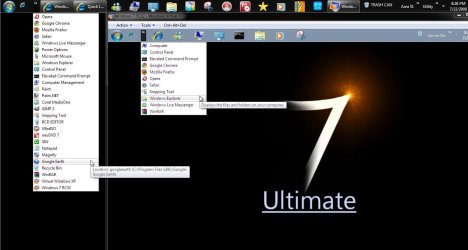
You just showed open windows in IE not the Start taskbar in those images. To free up space on the taskbar as well as the desktop I created a few addon toolbars actually more like dropdown menus for holding quite a bit even for the Windows installation on the Virtual PC.

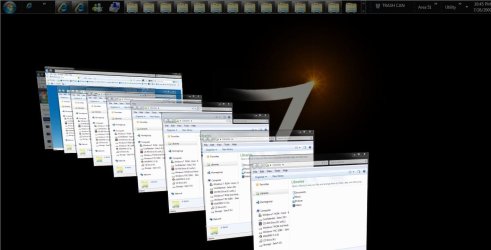
If I tried directly dragging onto if not pinning all those items directly I would be in hard place real fast! The multiple icon and buttons tweaks will likely lessen the load a bit here as well. I even used the Flip 3D effect to illustrate the multiple buttons tweak.
 

Attachments

  • Quick Launch Bar on VPC.jpg
    Quick Launch Bar on VPC.jpg
    83.1 KB · Views: 1,214
  • Multiple Buttons.jpg
    Multiple Buttons.jpg
    81.9 KB · Views: 290
  • Multiple Windows.jpg
    Multiple Windows.jpg
    33.7 KB · Views: 26

My Computers My Computers

  • At a glance

    W7 Ultimate x64/W10 Pro x64/W11 Pro Triple Bo...AMD Phenom II X4 975 Deneb 3.6ghz - 965 2nd r...Kingston Hyper X DDR3 1600 1.5v 16gb - Hyper ...MSI HD Radeon 5750 1gb - MSI HD Radeon 6450 o...
    Computer type
    PC/Desktop
    Computer Manufacturer/Model Number
    Custom builds = 2
    OS
    W7 Ultimate x64/W10 Pro x64/W11 Pro Triple Boot - Main PC W7 Remote PC Micro ATX W7 Pro x64/W11 Pro
    CPU
    AMD Phenom II X4 975 Deneb 3.6ghz - 965 2nd remote pc
    Motherboard
    Gigabyte GA-790XTA-UD4-Gigabyte GA-880GM-D2H remote pc
    Memory
    Kingston Hyper X DDR3 1600 1.5v 16gb - Hyper X Fury 8gb 2nd
    Graphics Card(s)
    MSI HD Radeon 5750 1gb - MSI HD Radeon 6450 on mini tower
    Sound Card
    Creative Labs X-Fi Xtreme Audio P - Realtek onooard 2nd case
    Monitor(s) Displays
    ASUS VW199T-P 19" HP 2082a Main-HP 2082a 20" remote pc
    Screen Resolution
    Asus 1440x900 - HP 1600x900
    Hard Drives
    WD Black 1TB HD per OS W7, W10, and pending W11 presently on 500gb OS Drive - Pending Triple 1TB HDs for Spanned Storage/backup volume
    Single 2TB external USB enclosure, single 1TB System 7 Host/Boot drive, Pending 8TB external HD for system image b
    PSU
    Corsair 750TX - primary / Corsair CX600 - second
    Case
    Antec 900-2 - SSD compatible / NZXT Vulcan mini tower
    Cooling
    Zalman CNPS9900A
    Keyboard
    AZIO L70 Backlit Letters Gaming - ONN Cordless/USB
    Mouse
    MSI DS200 Programmable, Logitech Cordless
    Internet Speed
    30mbps upgrade - primary hard wired - mini tower usb WiFi
    Antivirus
    GFI VIPRE Internet Security 2014 on W7 2016 beta on W10,
    Browser
    Cyberfox, WaterFox 64bit FF variants, FireFox x64, Pale Moon
    Other Info
    Accomdata fan cooled usb 2.0 PIDE/Sata II, III external enclosure.
    Sambient usb/eSata PATA/Sata II, III external enclosure.
  • At a glance

    W7 Pro x64/W11 ProAMD Deneb 3.6ghz - 965Kingston Hyper X Fury 8gbMSI HD Radeon 6450 DVI Output
    Computer type
    PC/Desktop
    System Manufacturer/Model Number
    CUSTOM ASSEMBLY
    OS
    W7 Pro x64/W11 Pro
    CPU
    AMD Deneb 3.6ghz - 965
    Motherboard
    Gigabyte GA-880GM-D2H remote pc
    Memory
    Kingston Hyper X Fury 8gb
    Graphics Card(s)
    MSI HD Radeon 6450 DVI Output
    Sound Card
    Realtek onooard Creative or Other separate PENDING
    Monitor(s) Displays
    VIZIO 32" LCD TV Separate LCD Pending
    Screen Resolution
    1600x1080
    Hard Drives
    WD 500GB OS Host/Boot WD Green 1TB Storage/Backup
    PSU
    Corsair 600W - THERMALTAKE 600W spare case
    Case
    NZXT Vulcan mini tower
    Cooling
    Twin 120mm Top Fans - 240mm Side Cover
    Keyboard
    ONN Cordless/USB Logitech Cordless
    Mouse
    ONN USB/Cordless - Logitech Cordless
    Internet Speed
    DSL 5G
    Browser
    MS Edge, FireFox, WaterFox x64, FireFox Nightly
    Other Info
    OS Testing-Remote Access to Main TeamViewer
You just showed open windows in IE not the Start taskbar in those images. To free up space on the taskbar as well as the desktop I created a few addon toolbars actually more like dropdown menus for holding quite a bit even for the Windows installation on the Virtual PC.

If I tried directly dragging onto if not pinning all those items directly I would be in hard place real fast! The multiple icon and buttons tweaks will likely lessen the load a bit here as well.

You have so many duplicates on there. What's the point?

I also see four or five control panel options that can be jumplisted on the control panel that's already pinned.
 

My Computer My Computer

At a glance

7264x64/7260x86
OS
7264x64/7260x86
You have so many duplicates on there. What's the point?

I also see four or five control panel options that can be jumplisted on the control panel that's already pinned.

Even without anything duplicated the image still shows what would be taking up space on the taskbar or desktop even both. The image there is simply for illustration not for practical application.
 

My Computers My Computers

  • At a glance

    W7 Ultimate x64/W10 Pro x64/W11 Pro Triple Bo...AMD Phenom II X4 975 Deneb 3.6ghz - 965 2nd r...Kingston Hyper X DDR3 1600 1.5v 16gb - Hyper ...MSI HD Radeon 5750 1gb - MSI HD Radeon 6450 o...
    Computer type
    PC/Desktop
    Computer Manufacturer/Model Number
    Custom builds = 2
    OS
    W7 Ultimate x64/W10 Pro x64/W11 Pro Triple Boot - Main PC W7 Remote PC Micro ATX W7 Pro x64/W11 Pro
    CPU
    AMD Phenom II X4 975 Deneb 3.6ghz - 965 2nd remote pc
    Motherboard
    Gigabyte GA-790XTA-UD4-Gigabyte GA-880GM-D2H remote pc
    Memory
    Kingston Hyper X DDR3 1600 1.5v 16gb - Hyper X Fury 8gb 2nd
    Graphics Card(s)
    MSI HD Radeon 5750 1gb - MSI HD Radeon 6450 on mini tower
    Sound Card
    Creative Labs X-Fi Xtreme Audio P - Realtek onooard 2nd case
    Monitor(s) Displays
    ASUS VW199T-P 19" HP 2082a Main-HP 2082a 20" remote pc
    Screen Resolution
    Asus 1440x900 - HP 1600x900
    Hard Drives
    WD Black 1TB HD per OS W7, W10, and pending W11 presently on 500gb OS Drive - Pending Triple 1TB HDs for Spanned Storage/backup volume
    Single 2TB external USB enclosure, single 1TB System 7 Host/Boot drive, Pending 8TB external HD for system image b
    PSU
    Corsair 750TX - primary / Corsair CX600 - second
    Case
    Antec 900-2 - SSD compatible / NZXT Vulcan mini tower
    Cooling
    Zalman CNPS9900A
    Keyboard
    AZIO L70 Backlit Letters Gaming - ONN Cordless/USB
    Mouse
    MSI DS200 Programmable, Logitech Cordless
    Internet Speed
    30mbps upgrade - primary hard wired - mini tower usb WiFi
    Antivirus
    GFI VIPRE Internet Security 2014 on W7 2016 beta on W10,
    Browser
    Cyberfox, WaterFox 64bit FF variants, FireFox x64, Pale Moon
    Other Info
    Accomdata fan cooled usb 2.0 PIDE/Sata II, III external enclosure.
    Sambient usb/eSata PATA/Sata II, III external enclosure.
  • At a glance

    W7 Pro x64/W11 ProAMD Deneb 3.6ghz - 965Kingston Hyper X Fury 8gbMSI HD Radeon 6450 DVI Output
    Computer type
    PC/Desktop
    System Manufacturer/Model Number
    CUSTOM ASSEMBLY
    OS
    W7 Pro x64/W11 Pro
    CPU
    AMD Deneb 3.6ghz - 965
    Motherboard
    Gigabyte GA-880GM-D2H remote pc
    Memory
    Kingston Hyper X Fury 8gb
    Graphics Card(s)
    MSI HD Radeon 6450 DVI Output
    Sound Card
    Realtek onooard Creative or Other separate PENDING
    Monitor(s) Displays
    VIZIO 32" LCD TV Separate LCD Pending
    Screen Resolution
    1600x1080
    Hard Drives
    WD 500GB OS Host/Boot WD Green 1TB Storage/Backup
    PSU
    Corsair 600W - THERMALTAKE 600W spare case
    Case
    NZXT Vulcan mini tower
    Cooling
    Twin 120mm Top Fans - 240mm Side Cover
    Keyboard
    ONN Cordless/USB Logitech Cordless
    Mouse
    ONN USB/Cordless - Logitech Cordless
    Internet Speed
    DSL 5G
    Browser
    MS Edge, FireFox, WaterFox x64, FireFox Nightly
    Other Info
    OS Testing-Remote Access to Main TeamViewer
Back
Top