windows 7 System Restore fails

egozi44

New member
Member
VIP
Local time
11:50 AM
Messages
207
hi there

since i formated my pc (something like 4 months ago) i happend to try to restore my system to some point i create.
however the restore fail and i thought that i at least ganaa try to cancel it... and it fail too.

well i thought it probabaly was pure coincidence because the system failed to restore and not had some to restore after that because it failed.

but today.. after i install the last VIA sound driver for my mobo i happend to get BSOD on the start up... i try to do a restore (i create restore point before i install that driver) and then it end up failed again ... i found a way to fix my BSOD issue that was caused by this curse driver.. but System Restore dosn't seem to work :\ it let me create restore point, claim that "create the restore point successfully" but in real time it Not working.... i don't want to do system repair because it probably make my system to be out of balance... and i want to keep it as last resort.


any suggestions what should i do ? :| before i formated (something like 4 months ago) i was able to restore my system many many times, after i formated i don't try to restore alot but when i had a good reason to this thing not working...

ok i just tried to turn OFF system restore on all of my HDDs (i have 3),
restart,
change it to ON again,
tried to create a test point,
restored,

and again i got this message


Uploaded with ImageShack.us

my system is in Hebrew btw so don't worry, it not some gibberishs.

"the message say: System Restore failed to restore. Your files and settings have not been changed."

"information:
System Restore failed to restored the entry, (not sure if "entry" is the right word here..)
the restore point was defective or was deleted in the restore process". (and btw.. it not true.. the restore points still there and the restore process said that it was complieted before it restart my pc and show this message ...)

"You might want to try System Restore again and choose a different restore point.
For more information, see System Restore: frequently asked questions."

also i not dual booting ...

heellp :( how can i fix Only the system restore "tool" without to repair the whole system?? : O
 
Last edited by a moderator:

My Computer

Computer type
PC/Desktop
Computer Manufacturer/Model Number
Self built custom
OS
Windows 7 SP1 Ultimate x64 bit
CPU
Intel I7 3770
Motherboard
Asus maximus v gene BIOS Version 1903
Memory
G.Skill Ares Quad Channel Low Profile 16 GB (4x4GB) DDR3
Graphics Card(s)
Asus GTX980 Ti 6GB STRIX-GTX980TI-DC3OC-6GD5-GAMING DirectCU
Monitor(s) Displays
AOC 24G2U/BK + DELL U2410 A010
Screen Resolution
1920x1080
Hard Drives
Samsung SSD 860 EVO 1TB


TOSHIBA MK1002TSKB 1TB 24/7, 7200 RPM, 64MB, SATA II


TOSHIBA MK1002TSKB 1TB 24/7, 7200 RPM, 64MB, SATA II
PSU
AcBel R88 1100W
Case
Corsair Carbide Series 500R White Mid-Tower Case
Cooling
ZALMAN CPU COOLER CNPS9900A LED + 2 more fans in the case
Keyboard
SteelSeries APEX 7
Mouse
SteelSeries Sensei 310
Welcome to the club. I've tried to use system restore six or eight times over the past 8 years. It worked once. It failed on all other attempts. Lame, Mr. Gates. Lame.
 

My Computer

OS
Win 7
Welcome to the club. I've tried to use system restore six or eight times over the past 8 years. It worked once. It failed on all other attempts. Lame, Mr. Gates. Lame.
since when u have this pc? O_o
win7 not even was made 8 years ago.... and XP and 7 never give me this kind of messages before in my life...
 

My Computer

Computer type
PC/Desktop
Computer Manufacturer/Model Number
Self built custom
OS
Windows 7 SP1 Ultimate x64 bit
CPU
Intel I7 3770
Motherboard
Asus maximus v gene BIOS Version 1903
Memory
G.Skill Ares Quad Channel Low Profile 16 GB (4x4GB) DDR3
Graphics Card(s)
Asus GTX980 Ti 6GB STRIX-GTX980TI-DC3OC-6GD5-GAMING DirectCU
Monitor(s) Displays
AOC 24G2U/BK + DELL U2410 A010
Screen Resolution
1920x1080
Hard Drives
Samsung SSD 860 EVO 1TB


TOSHIBA MK1002TSKB 1TB 24/7, 7200 RPM, 64MB, SATA II


TOSHIBA MK1002TSKB 1TB 24/7, 7200 RPM, 64MB, SATA II
PSU
AcBel R88 1100W
Case
Corsair Carbide Series 500R White Mid-Tower Case
Cooling
ZALMAN CPU COOLER CNPS9900A LED + 2 more fans in the case
Keyboard
SteelSeries APEX 7
Mouse
SteelSeries Sensei 310
Hello Egoz,

It sounds like your restore point has been corrupted, and you will not be able to restore with it. Personally, I think system restores are a good way to try and fix issues to avoid reinstalling Windows 7, but they should not be your only available solution as you have found out that restore points seem to be very susceptible to failure or corruption. Unless there's something in that restore point that you would like to extract from it, then you might consider deleting it since it's corrupted.

Instead I would recommend to keep good system image backups made to a separate HDD, and to not modify the image backup in any way to avoid corrupting it. This way in case of total failure, you could always do a system image recovery to a dated image backup of your choice.
 

My Computer

Computer type
PC/Desktop
Computer Manufacturer/Model Number
Self built custom
OS
64-bit Windows 11 Pro for Workstations
CPU
Intel i7-8700K OC'd to 5 GHz
Motherboard
ASUS ROG Maximus XI Formula Z390
Memory
64 GB (4x16GB) G.SKILL TridentZ RGB DDR4 3600 MHz
Graphics Card(s)
ASUS ROG-STRIX-GTX1080TI-O11G-GAMING
Sound Card
Integrated
Monitor(s) Displays
2 x Samsung Odyssey G7 27"
Screen Resolution
2560x1440
Hard Drives
1TB Samsung 990 PRO M.2,
4TB Samsung 990 PRO PRO M.2,
TerraMaster F8 SSD Plus NAS
PSU
Seasonic Prime Titanium 850W
Case
Thermaltake Core P3
Cooling
Corsair Hydro H115i
Keyboard
Logitech wireless K800
Mouse
Logitech MX Master 4
Internet Speed
2 Gb/s Download and 100 Mb/s Upload
Antivirus
Malwarebyte Anti-Malware Premium
Browser
Google Chrome
Other Info
Logitech Z625 speaker system,
Logitech BRIO 4K Pro webcam,
HP Color LaserJet Pro MFP M477fdn,
APC SMART-UPS RT 1000 XL - SURT1000XLI,
Galaxy S23 Plus phone
Hello Egoz,

It sounds like your restore point has been corrupted, and you will not be able to restore with it. Personally, I think system restores are a good way to try and fix issues to avoid reinstalling Windows 7, but they should not be your only available solution as you have found out that restore points seem to be very susceptible to failure or corruption. Unless there's something in that restore point that you would like to extract from it, then you might consider deleting it since it's corrupted.

Instead I would recommend to keep good system image backups made to a separate HDD, and to not modify the image backup in any way to avoid corrupting it. This way in case of total failure, you could always do a system image recovery to a dated image backup of your choice.


i never try that before (i not sure even how to do it xD) = \ though i really want to find a way to fix my system restore before try something else.. i 90% sure that something is corrupted in the tool itself instead of the point i created... i done it many times before with the same progrems installed and the same pc... i wonder what want worng this time? : \
 

My Computer

Computer type
PC/Desktop
Computer Manufacturer/Model Number
Self built custom
OS
Windows 7 SP1 Ultimate x64 bit
CPU
Intel I7 3770
Motherboard
Asus maximus v gene BIOS Version 1903
Memory
G.Skill Ares Quad Channel Low Profile 16 GB (4x4GB) DDR3
Graphics Card(s)
Asus GTX980 Ti 6GB STRIX-GTX980TI-DC3OC-6GD5-GAMING DirectCU
Monitor(s) Displays
AOC 24G2U/BK + DELL U2410 A010
Screen Resolution
1920x1080
Hard Drives
Samsung SSD 860 EVO 1TB


TOSHIBA MK1002TSKB 1TB 24/7, 7200 RPM, 64MB, SATA II


TOSHIBA MK1002TSKB 1TB 24/7, 7200 RPM, 64MB, SATA II
PSU
AcBel R88 1100W
Case
Corsair Carbide Series 500R White Mid-Tower Case
Cooling
ZALMAN CPU COOLER CNPS9900A LED + 2 more fans in the case
Keyboard
SteelSeries APEX 7
Mouse
SteelSeries Sensei 310
Well, one way to test system restore is to manually create a new restore point now, then do a system restore selecting this new restore point to see if it will work or not.

If it works, then it was just the other restore point that was corrupted.

If it doesn't work, then run a sfc /scannow command to see if it finds any corrupted system files that may be a cause and is able to fix them.
 

My Computer

Computer type
PC/Desktop
Computer Manufacturer/Model Number
Self built custom
OS
64-bit Windows 11 Pro for Workstations
CPU
Intel i7-8700K OC'd to 5 GHz
Motherboard
ASUS ROG Maximus XI Formula Z390
Memory
64 GB (4x16GB) G.SKILL TridentZ RGB DDR4 3600 MHz
Graphics Card(s)
ASUS ROG-STRIX-GTX1080TI-O11G-GAMING
Sound Card
Integrated
Monitor(s) Displays
2 x Samsung Odyssey G7 27"
Screen Resolution
2560x1440
Hard Drives
1TB Samsung 990 PRO M.2,
4TB Samsung 990 PRO PRO M.2,
TerraMaster F8 SSD Plus NAS
PSU
Seasonic Prime Titanium 850W
Case
Thermaltake Core P3
Cooling
Corsair Hydro H115i
Keyboard
Logitech wireless K800
Mouse
Logitech MX Master 4
Internet Speed
2 Gb/s Download and 100 Mb/s Upload
Antivirus
Malwarebyte Anti-Malware Premium
Browser
Google Chrome
Other Info
Logitech Z625 speaker system,
Logitech BRIO 4K Pro webcam,
HP Color LaserJet Pro MFP M477fdn,
APC SMART-UPS RT 1000 XL - SURT1000XLI,
Galaxy S23 Plus phone
thanks Brink
i just tried that not long ago and still had the same error...
there aren't any other ways like some special tool that fix only the system restore progrem? : \ i don't want to start back up stuff and change stuff in my system because of that...
 

My Computer

Computer type
PC/Desktop
Computer Manufacturer/Model Number
Self built custom
OS
Windows 7 SP1 Ultimate x64 bit
CPU
Intel I7 3770
Motherboard
Asus maximus v gene BIOS Version 1903
Memory
G.Skill Ares Quad Channel Low Profile 16 GB (4x4GB) DDR3
Graphics Card(s)
Asus GTX980 Ti 6GB STRIX-GTX980TI-DC3OC-6GD5-GAMING DirectCU
Monitor(s) Displays
AOC 24G2U/BK + DELL U2410 A010
Screen Resolution
1920x1080
Hard Drives
Samsung SSD 860 EVO 1TB


TOSHIBA MK1002TSKB 1TB 24/7, 7200 RPM, 64MB, SATA II


TOSHIBA MK1002TSKB 1TB 24/7, 7200 RPM, 64MB, SATA II
PSU
AcBel R88 1100W
Case
Corsair Carbide Series 500R White Mid-Tower Case
Cooling
ZALMAN CPU COOLER CNPS9900A LED + 2 more fans in the case
Keyboard
SteelSeries APEX 7
Mouse
SteelSeries Sensei 310
Well, the sfc /scannow command is a good tool for that. However, if you modified any system files (ex: with "Resource Hacker"), it will restore them back to default as well.
 

My Computer

Computer type
PC/Desktop
Computer Manufacturer/Model Number
Self built custom
OS
64-bit Windows 11 Pro for Workstations
CPU
Intel i7-8700K OC'd to 5 GHz
Motherboard
ASUS ROG Maximus XI Formula Z390
Memory
64 GB (4x16GB) G.SKILL TridentZ RGB DDR4 3600 MHz
Graphics Card(s)
ASUS ROG-STRIX-GTX1080TI-O11G-GAMING
Sound Card
Integrated
Monitor(s) Displays
2 x Samsung Odyssey G7 27"
Screen Resolution
2560x1440
Hard Drives
1TB Samsung 990 PRO M.2,
4TB Samsung 990 PRO PRO M.2,
TerraMaster F8 SSD Plus NAS
PSU
Seasonic Prime Titanium 850W
Case
Thermaltake Core P3
Cooling
Corsair Hydro H115i
Keyboard
Logitech wireless K800
Mouse
Logitech MX Master 4
Internet Speed
2 Gb/s Download and 100 Mb/s Upload
Antivirus
Malwarebyte Anti-Malware Premium
Browser
Google Chrome
Other Info
Logitech Z625 speaker system,
Logitech BRIO 4K Pro webcam,
HP Color LaserJet Pro MFP M477fdn,
APC SMART-UPS RT 1000 XL - SURT1000XLI,
Galaxy S23 Plus phone
Well, the sfc /scannow command is a good tool for that. However, if you modified any system files (ex: with "Resource Hacker"), it will restore them back to default as well.

well i don't really change the system files however i installed alot of progrems and codecs and what not, i don't really like these kind of tools because they end up ruin alot of stuff and turn everything to defalut : \


i heard there where some "sr.inf " file in the system that can be replace and reinstall the system restore... is that true? : o
 

My Computer

Computer type
PC/Desktop
Computer Manufacturer/Model Number
Self built custom
OS
Windows 7 SP1 Ultimate x64 bit
CPU
Intel I7 3770
Motherboard
Asus maximus v gene BIOS Version 1903
Memory
G.Skill Ares Quad Channel Low Profile 16 GB (4x4GB) DDR3
Graphics Card(s)
Asus GTX980 Ti 6GB STRIX-GTX980TI-DC3OC-6GD5-GAMING DirectCU
Monitor(s) Displays
AOC 24G2U/BK + DELL U2410 A010
Screen Resolution
1920x1080
Hard Drives
Samsung SSD 860 EVO 1TB


TOSHIBA MK1002TSKB 1TB 24/7, 7200 RPM, 64MB, SATA II


TOSHIBA MK1002TSKB 1TB 24/7, 7200 RPM, 64MB, SATA II
PSU
AcBel R88 1100W
Case
Corsair Carbide Series 500R White Mid-Tower Case
Cooling
ZALMAN CPU COOLER CNPS9900A LED + 2 more fans in the case
Keyboard
SteelSeries APEX 7
Mouse
SteelSeries Sensei 310
well i don't really change the system files however i installed alot of progrems and codecs and what not, i don't really like these kind of tools because they end up ruin alot of stuff and turn everything to defalut : \

i heard there where some "sr.inf " file in the system that can be replace and reinstall the system restore... is that true? : o

If the sr.inf file was corrupt or damaged, and if you ran the sfc /scannow from an elevated command prompt (Option Two in the link given to you earlier by Brink), then that scan should have fixed the file by extracting a clean copy contained within the Windows 7 operating system files. As Brink posted in another thread, if the SFC cannot repair or replace a bad system file, then you can use the tutorial below to manually replace the sr.inf file with a copy from your installation disc. If you don't have an installation disc you could try to borrow one as long as it's the same version operating system on your machine. (Don't use a 64-bit disc if your computer has the 32-bit version, don't use a Home Premium disc if your machine has Ultimate, etc.)

Extract Files from Windows 7 Installation DVD

If still no luck you might have a different problem involving Windows Management Instrumentation (WMI) components. Follow the steps exactly as given in this tutorial.

http://www.sevenforums.com/tutorials/57746-system-restore-general-troubleshooting-fix-issues.html

As suggested in the tutorial, if you've tried everything to repair System Restore and it's still broken, you might have no other option but a Repair Install.

NOTE: I know a few people who have used the paid, commercial services of a company called Reimage<dot>com. They were all very satisfied with the results.

DISCLAIMER: I have no financial interest in Reimage and receive no personal gain whatsoever. This is just another alternative to fix a broken computer.
 

My Computer

Computer type
Laptop
Computer Manufacturer/Model Number
Sony Vaio VPCEB47GM Laptop
OS
Win 7 Pro 64-bit
CPU
Intel i5 2.4 Ghz
Memory
8GB DDR3
Graphics Card(s)
Intel HD 3000
Sound Card
IDT High Definition
Monitor(s) Displays
15.6 WGXA Anti-Glare LED
Screen Resolution
1280x800
Hard Drives
640Gb 7200rpm
Antivirus
MSE
Browser
Opera (primary) with IE9 backup
well i don't really change the system files however i installed alot of progrems and codecs and what not, i don't really like these kind of tools because they end up ruin alot of stuff and turn everything to defalut : \

i heard there where some "sr.inf " file in the system that can be replace and reinstall the system restore... is that true? : o

If the sr.inf file was corrupt or damaged, and if you ran the sfc /scannow from an elevated command prompt (Option Two in the link given to you earlier by Brink), then that scan should have fixed the file by extracting a clean copy contained within the Windows 7 operating system files. As Brink posted in another thread, if the SFC cannot repair or replace a bad system file, then you can use the tutorial below to manually replace the sr.inf file with a copy from your installation disc. If you don't have an installation disc you could try to borrow one as long as it's the same version operating system on your machine. (Don't use a 64-bit disc if your computer has the 32-bit version, don't use a Home Premium disc if your machine has Ultimate, etc.)

Extract Files from Windows 7 Installation DVD

If still no luck you might have a different problem involving Windows Management Instrumentation (WMI) components. Follow the steps exactly as given in this tutorial.

http://www.sevenforums.com/tutorials/57746-system-restore-general-troubleshooting-fix-issues.html

As suggested in the tutorial, if you've tried everything to repair System Restore and it's still broken, you might have no other option but a Repair Install.

NOTE: I know a few people who have used the paid, commercial services of a company called Reimage<dot>com. They were all very satisfied with the results.

DISCLAIMER: I have no financial interest in Reimage and receive no personal gain whatsoever. This is just another alternative to fix a broken computer.


thanks marsmimar

but i allready said why i don't want to use the sfc /scannow atm

also i have OEM system and it not seem to be included in the "Extract Files from Windows 7 Installation DVD" tutorial... so it don't work with OEM ? : O
i also have some copy of retail version.. however it not have a code...

i don't really expert in the field too... just telling me to replace system file even with a tutorial it like trying to teach a dog math = P

also i tried this http://www.sevenforums.com/tutorials...ix-issues.html tutorial.

i Checked the Event Viewer .. and found some errors and warnings (most of the logs was fine though) here and there but it long list and was hard for me to find the specific restore point i just done.. if the restore point called back up however then it not show sign of error.

then i set the Volume Shadow Copy Service to Automatic and click on start. and i try to restore my system again.. and no luck...

then i look at the Event Viewer again and saw error on my system restore .

-System
-Provider[ Name] System Restore
-EventID8206[ Qualifiers] 0
Level2Task0Keywords0x80000000000000-TimeCreated[ SystemTime] 2011-10-25T10:29:43.000000000Z
EventRecordID24732ChannelApplicationComputer******Security
-EventData
: o
00000000AE0800009408000000000000CBC8392507000000000000000000000000000000.

here XML view
- <Event xmlns="http://schemas.microsoft.com/win/2004/08/events/event">
- <System>
<Provider Name="System Restore" />

<EventID Qualifiers="0">8206</EventID>

<Level>2</Level>

<Task>0</Task>

<Keywords>0x80000000000000</Keywords>

<TimeCreated SystemTime="2011-10-25T10:29:43.000000000Z" />

<EventRecordID>24732</EventRecordID>

<Channel>Application</Channel>

<Computer>****</Computer>

<Security />

</System>


- <EventData>
<Data>: o </Data>

<Binary>00000000AE0800009408000000000000CBC8392507000000000000000000000000000000</Binary>

</EventData>


</Event>


does it help ? : \ also do the Volume Shadow Copy Service still need to be on Automatic? because it was on manual as default...
 
Last edited:

My Computer

Computer type
PC/Desktop
Computer Manufacturer/Model Number
Self built custom
OS
Windows 7 SP1 Ultimate x64 bit
CPU
Intel I7 3770
Motherboard
Asus maximus v gene BIOS Version 1903
Memory
G.Skill Ares Quad Channel Low Profile 16 GB (4x4GB) DDR3
Graphics Card(s)
Asus GTX980 Ti 6GB STRIX-GTX980TI-DC3OC-6GD5-GAMING DirectCU
Monitor(s) Displays
AOC 24G2U/BK + DELL U2410 A010
Screen Resolution
1920x1080
Hard Drives
Samsung SSD 860 EVO 1TB


TOSHIBA MK1002TSKB 1TB 24/7, 7200 RPM, 64MB, SATA II


TOSHIBA MK1002TSKB 1TB 24/7, 7200 RPM, 64MB, SATA II
PSU
AcBel R88 1100W
Case
Corsair Carbide Series 500R White Mid-Tower Case
Cooling
ZALMAN CPU COOLER CNPS9900A LED + 2 more fans in the case
Keyboard
SteelSeries APEX 7
Mouse
SteelSeries Sensei 310
Egoz,

Since you have a factory OEM Windows 7 preinstalled on your computer, the only option that I know of that may fix this other than doing a factory recovery of Windows 7 is to run a sfc /scannow command. It's not going to affect any of your user files/folders, or any of your installed programs. It will only check for any corrupted or modified Windows 7 system files. If any are found, then it will attempt to repair them by replacing them with a clean default copy.

If you like, you could run a sfc /verifyonly command first and create and look at the sfcdetails.txt log file (Option Three) to see what will be affected before running the sfc /scannow command. The sfc /verifyonly command will only scan and give you a list of corrupted system files without making any changes to them.

http://www.sevenforums.com/tutorials/1538-sfc-scannow-command-system-file-checker.html
 
Last edited:

My Computer

Computer type
PC/Desktop
Computer Manufacturer/Model Number
Self built custom
OS
64-bit Windows 11 Pro for Workstations
CPU
Intel i7-8700K OC'd to 5 GHz
Motherboard
ASUS ROG Maximus XI Formula Z390
Memory
64 GB (4x16GB) G.SKILL TridentZ RGB DDR4 3600 MHz
Graphics Card(s)
ASUS ROG-STRIX-GTX1080TI-O11G-GAMING
Sound Card
Integrated
Monitor(s) Displays
2 x Samsung Odyssey G7 27"
Screen Resolution
2560x1440
Hard Drives
1TB Samsung 990 PRO M.2,
4TB Samsung 990 PRO PRO M.2,
TerraMaster F8 SSD Plus NAS
PSU
Seasonic Prime Titanium 850W
Case
Thermaltake Core P3
Cooling
Corsair Hydro H115i
Keyboard
Logitech wireless K800
Mouse
Logitech MX Master 4
Internet Speed
2 Gb/s Download and 100 Mb/s Upload
Antivirus
Malwarebyte Anti-Malware Premium
Browser
Google Chrome
Other Info
Logitech Z625 speaker system,
Logitech BRIO 4K Pro webcam,
HP Color LaserJet Pro MFP M477fdn,
APC SMART-UPS RT 1000 XL - SURT1000XLI,
Galaxy S23 Plus phone
Egoz,

Since you have a factory OEM Windows 7 preinstalled on your computer, the only option that I know of that may fix this other than doing a factory recovery of Windows 7 is to run a sfc /scannow command. It's not going to affect any of your user files/folders, or any of your installed programs. It will only check for any corrupted or modified Windows 7 system files. If any are found, then it will attempt to repair them by replacing them with a clean default copy.

If you like, you could run a sfc /verifyonly command first and create and look at the sfcdetails.txt log file (Option Three) to see what will be affected before running the sfc /scannow command. The sfc /verifyonly command will only scan and give you a list of corrupted system files without making any changes to them.

http://www.sevenforums.com/tutorials/1538-sfc-scannow-command-system-file-checker.html

thanks again Brink = ) i will try it

however i not have preinstalled OEM on my pc.. i have the disk, i get it from my father who purchased new computer and got 2 win 7 disks with codes. he gave me one that never been used and i installed it on my pc , i have the disk right here

is it will let me to take the files from it? :O
 
Last edited by a moderator:

My Computer

Computer type
PC/Desktop
Computer Manufacturer/Model Number
Self built custom
OS
Windows 7 SP1 Ultimate x64 bit
CPU
Intel I7 3770
Motherboard
Asus maximus v gene BIOS Version 1903
Memory
G.Skill Ares Quad Channel Low Profile 16 GB (4x4GB) DDR3
Graphics Card(s)
Asus GTX980 Ti 6GB STRIX-GTX980TI-DC3OC-6GD5-GAMING DirectCU
Monitor(s) Displays
AOC 24G2U/BK + DELL U2410 A010
Screen Resolution
1920x1080
Hard Drives
Samsung SSD 860 EVO 1TB


TOSHIBA MK1002TSKB 1TB 24/7, 7200 RPM, 64MB, SATA II


TOSHIBA MK1002TSKB 1TB 24/7, 7200 RPM, 64MB, SATA II
PSU
AcBel R88 1100W
Case
Corsair Carbide Series 500R White Mid-Tower Case
Cooling
ZALMAN CPU COOLER CNPS9900A LED + 2 more fans in the case
Keyboard
SteelSeries APEX 7
Mouse
SteelSeries Sensei 310
If it's a "retail" Windows 7 installation disk, then yes you will be able to extract files from it.

However, let's see what you have in the sfcdetails.txt log file after running the SFC command first. You may not need to extract any files. :)
 

My Computer

Computer type
PC/Desktop
Computer Manufacturer/Model Number
Self built custom
OS
64-bit Windows 11 Pro for Workstations
CPU
Intel i7-8700K OC'd to 5 GHz
Motherboard
ASUS ROG Maximus XI Formula Z390
Memory
64 GB (4x16GB) G.SKILL TridentZ RGB DDR4 3600 MHz
Graphics Card(s)
ASUS ROG-STRIX-GTX1080TI-O11G-GAMING
Sound Card
Integrated
Monitor(s) Displays
2 x Samsung Odyssey G7 27"
Screen Resolution
2560x1440
Hard Drives
1TB Samsung 990 PRO M.2,
4TB Samsung 990 PRO PRO M.2,
TerraMaster F8 SSD Plus NAS
PSU
Seasonic Prime Titanium 850W
Case
Thermaltake Core P3
Cooling
Corsair Hydro H115i
Keyboard
Logitech wireless K800
Mouse
Logitech MX Master 4
Internet Speed
2 Gb/s Download and 100 Mb/s Upload
Antivirus
Malwarebyte Anti-Malware Premium
Browser
Google Chrome
Other Info
Logitech Z625 speaker system,
Logitech BRIO 4K Pro webcam,
HP Color LaserJet Pro MFP M477fdn,
APC SMART-UPS RT 1000 XL - SURT1000XLI,
Galaxy S23 Plus phone
If it's a "retail" Windows 7 installation disk, then yes you will be able to extract files from it.

However, let's see what you have in the sfcdetails.txt log file after running the SFC command first. You may not need to extract any files. :)


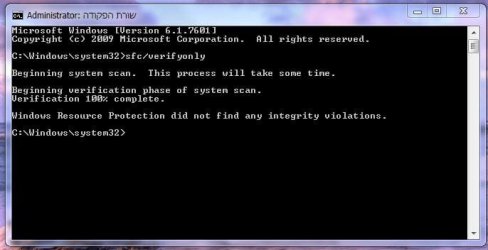
ok i just finish the scan... it seem like it don't find anything :\

however i can't restore my system without keep getting this error... so something is not right...

also i can't find this SR.INF file to begin with : |... it no where to be found in the c:/windows/INF folder


oh and i have OEM disk... it seem like it have the full installtion of win7 ultimate though... i format my OS with it 3 times allready and only when i change pc i will be need to call MS to tell them that i use 1 pc with that disk and that it... why OEM not going to work then? : o i seem to have the Sources folder and install.wim file in it ....
 

Attachments

  • 76t7.JPG
    76t7.JPG
    32.7 KB · Views: 109

My Computer

Computer type
PC/Desktop
Computer Manufacturer/Model Number
Self built custom
OS
Windows 7 SP1 Ultimate x64 bit
CPU
Intel I7 3770
Motherboard
Asus maximus v gene BIOS Version 1903
Memory
G.Skill Ares Quad Channel Low Profile 16 GB (4x4GB) DDR3
Graphics Card(s)
Asus GTX980 Ti 6GB STRIX-GTX980TI-DC3OC-6GD5-GAMING DirectCU
Monitor(s) Displays
AOC 24G2U/BK + DELL U2410 A010
Screen Resolution
1920x1080
Hard Drives
Samsung SSD 860 EVO 1TB


TOSHIBA MK1002TSKB 1TB 24/7, 7200 RPM, 64MB, SATA II


TOSHIBA MK1002TSKB 1TB 24/7, 7200 RPM, 64MB, SATA II
PSU
AcBel R88 1100W
Case
Corsair Carbide Series 500R White Mid-Tower Case
Cooling
ZALMAN CPU COOLER CNPS9900A LED + 2 more fans in the case
Keyboard
SteelSeries APEX 7
Mouse
SteelSeries Sensei 310
Egoz,

If it's a retail "OEM" copy of Windows 7 that your purchased say online or at a retail store, then you will only be able to install and activate it on the exact same computer that you first activated on and never on any other computer. That's why a OEM copy is cheaper than a full retail copy since the OEM is limited to the one computer for life. :(

Good news is that there's nothing wrong with your system files. Bad news is that system restore is still not working for you.

At this point, you might consider trying a repair install to avoid a clean install if you really want to try and fix system restore. Be sure to backup anything that you do not want to lose to be extra safe though.
 

My Computer

Computer type
PC/Desktop
Computer Manufacturer/Model Number
Self built custom
OS
64-bit Windows 11 Pro for Workstations
CPU
Intel i7-8700K OC'd to 5 GHz
Motherboard
ASUS ROG Maximus XI Formula Z390
Memory
64 GB (4x16GB) G.SKILL TridentZ RGB DDR4 3600 MHz
Graphics Card(s)
ASUS ROG-STRIX-GTX1080TI-O11G-GAMING
Sound Card
Integrated
Monitor(s) Displays
2 x Samsung Odyssey G7 27"
Screen Resolution
2560x1440
Hard Drives
1TB Samsung 990 PRO M.2,
4TB Samsung 990 PRO PRO M.2,
TerraMaster F8 SSD Plus NAS
PSU
Seasonic Prime Titanium 850W
Case
Thermaltake Core P3
Cooling
Corsair Hydro H115i
Keyboard
Logitech wireless K800
Mouse
Logitech MX Master 4
Internet Speed
2 Gb/s Download and 100 Mb/s Upload
Antivirus
Malwarebyte Anti-Malware Premium
Browser
Google Chrome
Other Info
Logitech Z625 speaker system,
Logitech BRIO 4K Pro webcam,
HP Color LaserJet Pro MFP M477fdn,
APC SMART-UPS RT 1000 XL - SURT1000XLI,
Galaxy S23 Plus phone
Egoz,

If it's a retail "OEM" copy of Windows 7 that your purchased say online or at a retail store, then you will only be able to install and activate it on the exact same computer that you first activated on and never on any other computer. That's why a OEM copy is cheaper than a full retail copy since the OEM is limited to the one computer for life. :(

Good news is that there's nothing wrong with your system files. Bad news is that system restore is still not working for you.

At this point, you might consider trying a repair install to avoid a clean install if you really want to try and fix system restore. Be sure to backup anything that you do not want to lose to be extra safe though.


ahh but some people allready used OEM on other pc = o they said that all they done was 1. delete the OS from the old pc.
2. call to MS and tell them they use the OS on one pc.
3. MS check if there is more then one activation codes
4. they saw there only one code that being used and let them use the OEM on other pc...

i also heard that the OEM put some "code" or stuff on the core so if i plan to do a big change to my hardware i will need to put the code again....

but lets go back to the subject, can't i just take the good SR.INF file from my disk and replace it with the corrupted one ? : o there is also a change that the files is not corrupted and some progrem that was update (like anti virus) block it or something... can you plz look again at the error code that i post earlier? it may give u some hint as to what causeing the problem
 

My Computer

Computer type
PC/Desktop
Computer Manufacturer/Model Number
Self built custom
OS
Windows 7 SP1 Ultimate x64 bit
CPU
Intel I7 3770
Motherboard
Asus maximus v gene BIOS Version 1903
Memory
G.Skill Ares Quad Channel Low Profile 16 GB (4x4GB) DDR3
Graphics Card(s)
Asus GTX980 Ti 6GB STRIX-GTX980TI-DC3OC-6GD5-GAMING DirectCU
Monitor(s) Displays
AOC 24G2U/BK + DELL U2410 A010
Screen Resolution
1920x1080
Hard Drives
Samsung SSD 860 EVO 1TB


TOSHIBA MK1002TSKB 1TB 24/7, 7200 RPM, 64MB, SATA II


TOSHIBA MK1002TSKB 1TB 24/7, 7200 RPM, 64MB, SATA II
PSU
AcBel R88 1100W
Case
Corsair Carbide Series 500R White Mid-Tower Case
Cooling
ZALMAN CPU COOLER CNPS9900A LED + 2 more fans in the case
Keyboard
SteelSeries APEX 7
Mouse
SteelSeries Sensei 310
For a normal retail copy, that would work, but not for a OEM copy.

The sfc scan didn't find any corrupted system files on your computer, so there's no need to try and replace any. :)
 

My Computer

Computer type
PC/Desktop
Computer Manufacturer/Model Number
Self built custom
OS
64-bit Windows 11 Pro for Workstations
CPU
Intel i7-8700K OC'd to 5 GHz
Motherboard
ASUS ROG Maximus XI Formula Z390
Memory
64 GB (4x16GB) G.SKILL TridentZ RGB DDR4 3600 MHz
Graphics Card(s)
ASUS ROG-STRIX-GTX1080TI-O11G-GAMING
Sound Card
Integrated
Monitor(s) Displays
2 x Samsung Odyssey G7 27"
Screen Resolution
2560x1440
Hard Drives
1TB Samsung 990 PRO M.2,
4TB Samsung 990 PRO PRO M.2,
TerraMaster F8 SSD Plus NAS
PSU
Seasonic Prime Titanium 850W
Case
Thermaltake Core P3
Cooling
Corsair Hydro H115i
Keyboard
Logitech wireless K800
Mouse
Logitech MX Master 4
Internet Speed
2 Gb/s Download and 100 Mb/s Upload
Antivirus
Malwarebyte Anti-Malware Premium
Browser
Google Chrome
Other Info
Logitech Z625 speaker system,
Logitech BRIO 4K Pro webcam,
HP Color LaserJet Pro MFP M477fdn,
APC SMART-UPS RT 1000 XL - SURT1000XLI,
Galaxy S23 Plus phone
For a normal retail copy, that would work, but not for a OEM copy.

The sfc scan didn't find any corrupted system files on your computer, so there's no need to try and replace any. :)


so the restore system is fine? :sarc:

something indeed going wrong if it still not working... what should i do *-* i don't want to do repair install.. the computer works just fine. .. just the restore not want to work xD


i don't even know what the cause for that... this error code not ring something ? :confused:
 

My Computer

Computer type
PC/Desktop
Computer Manufacturer/Model Number
Self built custom
OS
Windows 7 SP1 Ultimate x64 bit
CPU
Intel I7 3770
Motherboard
Asus maximus v gene BIOS Version 1903
Memory
G.Skill Ares Quad Channel Low Profile 16 GB (4x4GB) DDR3
Graphics Card(s)
Asus GTX980 Ti 6GB STRIX-GTX980TI-DC3OC-6GD5-GAMING DirectCU
Monitor(s) Displays
AOC 24G2U/BK + DELL U2410 A010
Screen Resolution
1920x1080
Hard Drives
Samsung SSD 860 EVO 1TB


TOSHIBA MK1002TSKB 1TB 24/7, 7200 RPM, 64MB, SATA II


TOSHIBA MK1002TSKB 1TB 24/7, 7200 RPM, 64MB, SATA II
PSU
AcBel R88 1100W
Case
Corsair Carbide Series 500R White Mid-Tower Case
Cooling
ZALMAN CPU COOLER CNPS9900A LED + 2 more fans in the case
Keyboard
SteelSeries APEX 7
Mouse
SteelSeries Sensei 310
No, I'm saying that SFC didn't find any corrupt system files on your computer. The cause for your system restore issue is still unknown at this point.

I'm not sure what else to suggest to try and repair this other than a repair install. :(
 

My Computer

Computer type
PC/Desktop
Computer Manufacturer/Model Number
Self built custom
OS
64-bit Windows 11 Pro for Workstations
CPU
Intel i7-8700K OC'd to 5 GHz
Motherboard
ASUS ROG Maximus XI Formula Z390
Memory
64 GB (4x16GB) G.SKILL TridentZ RGB DDR4 3600 MHz
Graphics Card(s)
ASUS ROG-STRIX-GTX1080TI-O11G-GAMING
Sound Card
Integrated
Monitor(s) Displays
2 x Samsung Odyssey G7 27"
Screen Resolution
2560x1440
Hard Drives
1TB Samsung 990 PRO M.2,
4TB Samsung 990 PRO PRO M.2,
TerraMaster F8 SSD Plus NAS
PSU
Seasonic Prime Titanium 850W
Case
Thermaltake Core P3
Cooling
Corsair Hydro H115i
Keyboard
Logitech wireless K800
Mouse
Logitech MX Master 4
Internet Speed
2 Gb/s Download and 100 Mb/s Upload
Antivirus
Malwarebyte Anti-Malware Premium
Browser
Google Chrome
Other Info
Logitech Z625 speaker system,
Logitech BRIO 4K Pro webcam,
HP Color LaserJet Pro MFP M477fdn,
APC SMART-UPS RT 1000 XL - SURT1000XLI,
Galaxy S23 Plus phone
Back
Top