Windows 7 taking 5-10 minutes to boot up.

toashishonly

New member
Local time
9:55 AM
Messages
3
Certainly Today my Computer started slowing up,it is taking 5-10 minutes to boot up.
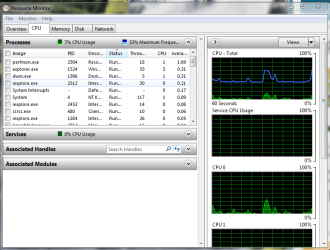
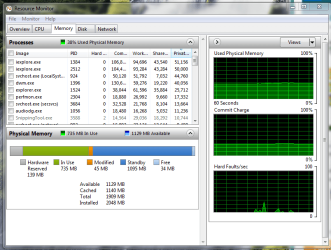
After Boot it is very slow,when I check ram usage it says 34% cpu usage 2-10% when windows media player is opened.I have used chkdsk twice and it don't detect any errors 2nd time system restore is not available sfc /scannow don't detects anything.It fails to start up in safe mode stuck at a place for more than 1 hr. Also it don't use more than 12 % ram even after opening many softwares.
Please Help because I don't want to format and reinstall windows.

My System Specs are:-
Win 7 ultimate*32 with win 8.1 pro*32
2 gb ram
500 gb hdd
core i3 3.06 ghz cpu
 
Last edited:

My Computer My Computer

At a glance

Windows 7 Ultimate *32,Windows 8.1 Pro*32Intel Core I3 3.06 ghz2 Gb
Computer type
PC/Desktop
OS
Windows 7 Ultimate *32,Windows 8.1 Pro*32
CPU
Intel Core I3 3.06 ghz
Motherboard
Intel Dh55pj
Memory
2 Gb
Sound Card
Realtek
Monitor(s) Displays
LG
Screen Resolution
1600*900
Hello toashishonly and welcome to Seven Forums.

Sometimes boot problems are related to malware (virus, spyware, etc.) If you haven't done so, run a full scna with your anti-virus of choice. Even if that scan comes back clean (no malware detected) I'd follow up with some additional free on-demand scanners like Malwarebytes, SuperAntispyware, ESET Online Scanner, etc.

You could also see if this Startup Repair tutorial helps:

http://www.sevenforums.com/tutorials/681-startup-repair.html

As to CPU usage, it's not uncommon for System Idle Process to be at 98% if the computer is turned on and you're not doing anything else with the computer. When you start another process the new process will usually use a smaller fraction and System Idle Process may drop down to 0%. This article goes into more detail.

The best protection to not have to reformat and reinstall everything is to make regular backups of all your important files and folders. I prefer doing a full system image which also backs up the entire operating system, all updates, etc. A lot of people recommend the free Macrium Reflect.
 

My Computer My Computer

At a glance

Win 7 Pro 64-bitIntel i5 2.4 Ghz8GB DDR3Intel HD 3000
Computer type
Laptop
Computer Manufacturer/Model Number
Sony Vaio VPCEB47GM Laptop
OS
Win 7 Pro 64-bit
CPU
Intel i5 2.4 Ghz
Memory
8GB DDR3
Graphics Card(s)
Intel HD 3000
Sound Card
IDT High Definition
Monitor(s) Displays
15.6 WGXA Anti-Glare LED
Screen Resolution
1280x800
Hard Drives
640Gb 7200rpm
Antivirus
MSE
Browser
Opera (primary) with IE9 backup
I have scanned with kaspersky lab antivirus and malwarebytes but it detects nothing and cpu usage don't exceeds even when I open various softs. when I open various softwarea at same time then my computer stucks but cpu usage remains fixed at about 10-12% .
 

My Computer My Computer

At a glance

Windows 7 Ultimate *32,Windows 8.1 Pro*32Intel Core I3 3.06 ghz2 Gb
Computer type
PC/Desktop
OS
Windows 7 Ultimate *32,Windows 8.1 Pro*32
CPU
Intel Core I3 3.06 ghz
Motherboard
Intel Dh55pj
Memory
2 Gb
Sound Card
Realtek
Monitor(s) Displays
LG
Screen Resolution
1600*900

My Computer My Computer

At a glance

Win 7 Pro 64-bitIntel i5 2.4 Ghz8GB DDR3Intel HD 3000
Computer type
Laptop
Computer Manufacturer/Model Number
Sony Vaio VPCEB47GM Laptop
OS
Win 7 Pro 64-bit
CPU
Intel i5 2.4 Ghz
Memory
8GB DDR3
Graphics Card(s)
Intel HD 3000
Sound Card
IDT High Definition
Monitor(s) Displays
15.6 WGXA Anti-Glare LED
Screen Resolution
1280x800
Hard Drives
640Gb 7200rpm
Antivirus
MSE
Browser
Opera (primary) with IE9 backup
Capture.PNG

Capture1.PNG
 

My Computer My Computer

At a glance

Windows 7 Ultimate *32,Windows 8.1 Pro*32Intel Core I3 3.06 ghz2 Gb
Computer type
PC/Desktop
OS
Windows 7 Ultimate *32,Windows 8.1 Pro*32
CPU
Intel Core I3 3.06 ghz
Motherboard
Intel Dh55pj
Memory
2 Gb
Sound Card
Realtek
Monitor(s) Displays
LG
Screen Resolution
1600*900
Well, things look normal to me. Couple more things you can try just for general cleanup and performance.

http://www.sevenforums.com/tutorials/818-disk-cleanup-open-use.html

http://www.sevenforums.com/tutorials/11733-disk-defragmenter-open-use.html

If still having issues, one of the Forum experts prepared this general troubleshooting guide. It has a lot of good suggestions and it's not something that a person can do in just a few minutes (or even a few hours.)

http://www.sevenforums.com/tutorials/220165-troubleshooting-steps-windows-7-a.html
 

My Computer My Computer

At a glance

Win 7 Pro 64-bitIntel i5 2.4 Ghz8GB DDR3Intel HD 3000
Computer type
Laptop
Computer Manufacturer/Model Number
Sony Vaio VPCEB47GM Laptop
OS
Win 7 Pro 64-bit
CPU
Intel i5 2.4 Ghz
Memory
8GB DDR3
Graphics Card(s)
Intel HD 3000
Sound Card
IDT High Definition
Monitor(s) Displays
15.6 WGXA Anti-Glare LED
Screen Resolution
1280x800
Hard Drives
640Gb 7200rpm
Antivirus
MSE
Browser
Opera (primary) with IE9 backup
Back
Top